Menu Options
PULSE menu bar presents options for the various features of the system.
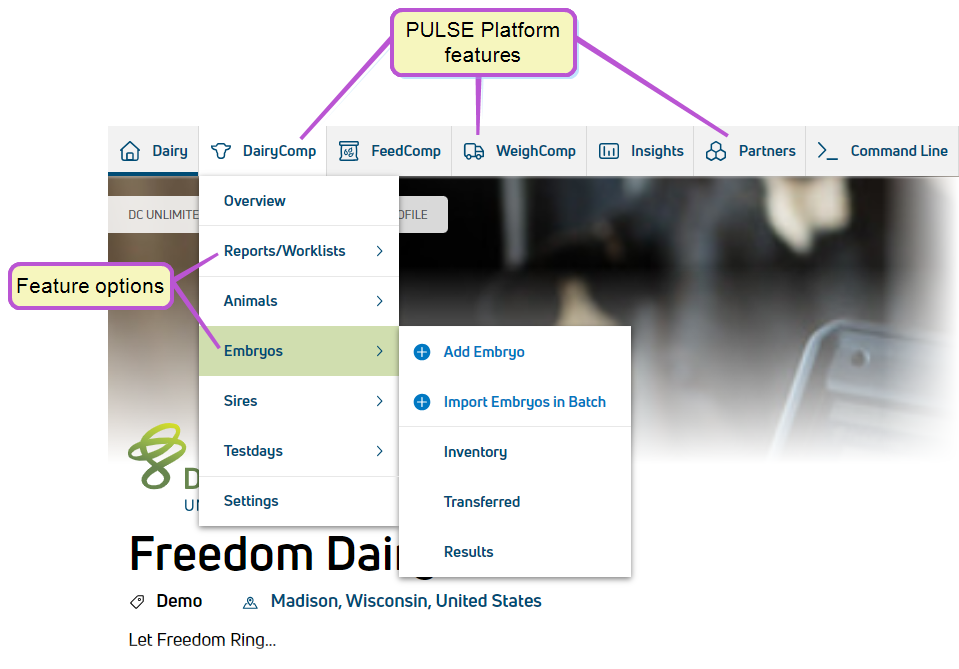
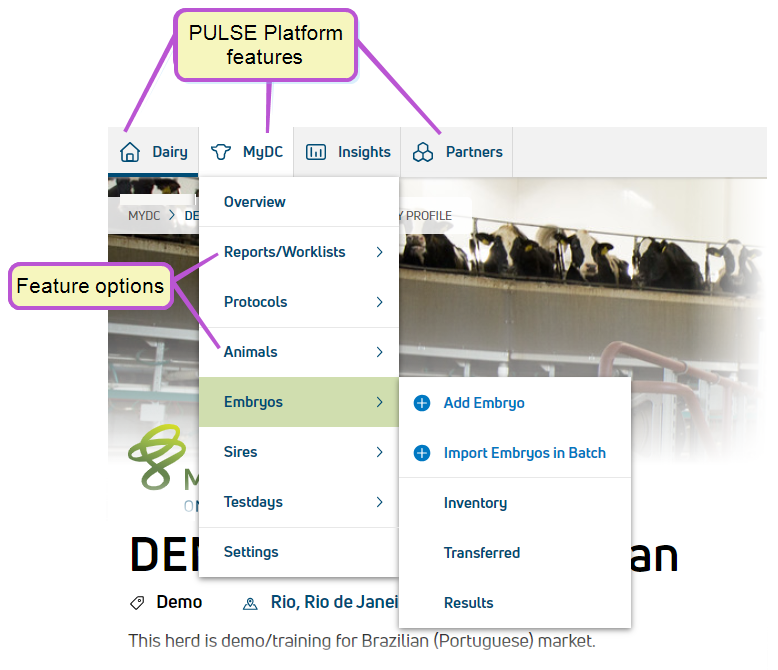
IMPORTANT: Not all menu bar items are available to all users. The items shown in PULSE are based on your subscription type.
Click the links below to learn more about the features available on the Dairy menuDairy menu:
- HomeHome
- DashboardDashboard
- Change LogChange Log
- Shared FilesShared Files
- PensPens
- User ManagementUser Management
- Add New UserAdd New User
- UsersUsers
- RolesRoles Integration StatusIntegration Status
- Process SchedulerProcess Scheduler
- SettingsSettings
The name of the DairyComp/MyDC button on the menu bar varies based on your PULSE subscription. The button name is "DairyComp" for DC Unlimited subscribers and "MyDC" for MyDC subscribers. See Know Your VAS PULSE Version Know Your VAS PULSE Version for more information.
Click the links below to learn more about the features available on the DairyComp/MyDC menuDairyComp/MyDC menu:
- Task ListsTask Lists
- Reports/WorklistsReports/Worklists
- Build Report/WorklistBuild Report/Worklist
- Open WorklistsOpen Worklists
- Dairy Reports/WorklistsDairy Reports/Worklists
- Template GalleryTemplate Gallery
- Report HistoryReport History
- Worklist HistoryWorklist History
- AnimalsAnimals
- Add AnimalAdd Animal
- Import Animals in BatchImport Animals in Batch
- Animal ListAnimal List
- ProtocolsProtocols
- New ProtocolNew Protocol
- Dairy ProtocolsDairy Protocols
- GalleryGallery
- EmbryosEmbryos
- Add EmbryoAdd Embryo
- Import Embryos in BatchImport Embryos in Batch
- InventoryInventory
- TransferredTransferred
- Add SireAdd Sire
- Sires ListSires List TestdaysTestdays
- Import TestdayImport Testday
- Current TestdayCurrent Testday
- Testdays ListTestdays List
- SettingsSettings
Click the links below to learn more about the features available on the FeedComp menu:
- PensPens
- IngredientsIngredients
- RecipesRecipes
- Add RecipeAdd Recipe
- RecipesRecipes
- PremixesPremixes
- FeedingsFeedings
- WeighbacksWeighbacks
- ReportsReports
- Feed HistoryFeed History
- Pen HistoryPen History
- Ingredient UsageIngredient Usage
- DM IntakeDM Intake
- Load ErrorLoad Error
- Drop ErrorDrop Error
- ProjectionsProjections
- Income Over Feed CostIncome Over Feed Cost
- InventoryInventory
- OverviewOverview
- TransactionsTransactions
- VendorsVendors
- SettingsSettings
Click the links below to learn more about the features available on the ParlorBoss menu:
- Efficiency Reports:
- Turns per Day ReportTurns per Day Report
- Shift Start and End ReportShift Start and End Report
- Pen Time ReportPen Time Report
- Parlor Speed ReportParlor Speed Report
- Empty Stalls per Day ReportEmpty Stalls per Day Report
- Pen Time ReportPen Time Report
- Identification Reports:
- Tasks Scanned/Expected ReportTasks Scanned/Expected Report
- Cows Scanned/Expected ReportCows Scanned/Expected Report
- Wrong Pen Animals ReportWrong Pen Animals Report
- Cows without ID Scans ReportCows without ID Scans Report
Click the links below to learn more about the features available on the FeedWatch menuFeedWatch menu:
- Task ListsTask Lists
- Bunk ScoringBunk Scoring
- Location DM% AdjustmentsLocation DM% Adjustments
- Inventory & ProjectionsInventory & Projections
- IngredientsIngredients
- RecipesRecipes
Click the links below to learn more about the features available on the WeighComp menuWeighComp menu:
- Transaction ManagementTransaction Management
- Harvest ManagementHarvest Management
- SettingSettings
- ProductProduct
- LocationsLocations
- VendorVendor
- FieldsFields
Click the links below to learn more about the features available on the Insights menu
- Animal Inventory TrendsAnimal Inventory Trends
- HealthVALHealthVAL
- Reproduction InsightsReproduction Insights
- RumINSIGHTRumINSIGHT
- HerdSightsHerdSights
Click the links below to learn more about the features available on the Partners menuPartners menu:
- Integrations GalleryIntegrations Gallery
The contents below require access to the on-premise version of DairyComp 305 and are only available to DC Unlimited subscribers.
Click herehere to learn more about the different versions of PULSE.
The Command Line brings the power of DairyComp into PULSE, allowing you to generate many of the same reports you're able to view in DairyComp. PULSE Command Line currently supports the LIST (SHOW)LIST (SHOW), SUMSUM, COUNT,COUNT, and ENTERENTER commands. You can find this feature on the main menu bar, or by selecting F9 from your keyboard.
See Command Line menuCommand Line menu to learn more!