Settings
The Settings page allows you to view and edit PULSE settings and configuration options. For DC Unlimited subscribers, the changes you make here are synchronized with on-premise DairyComp. You can find this feature under the DairyComp/MyDC MenuDairyComp/MyDC Menu.
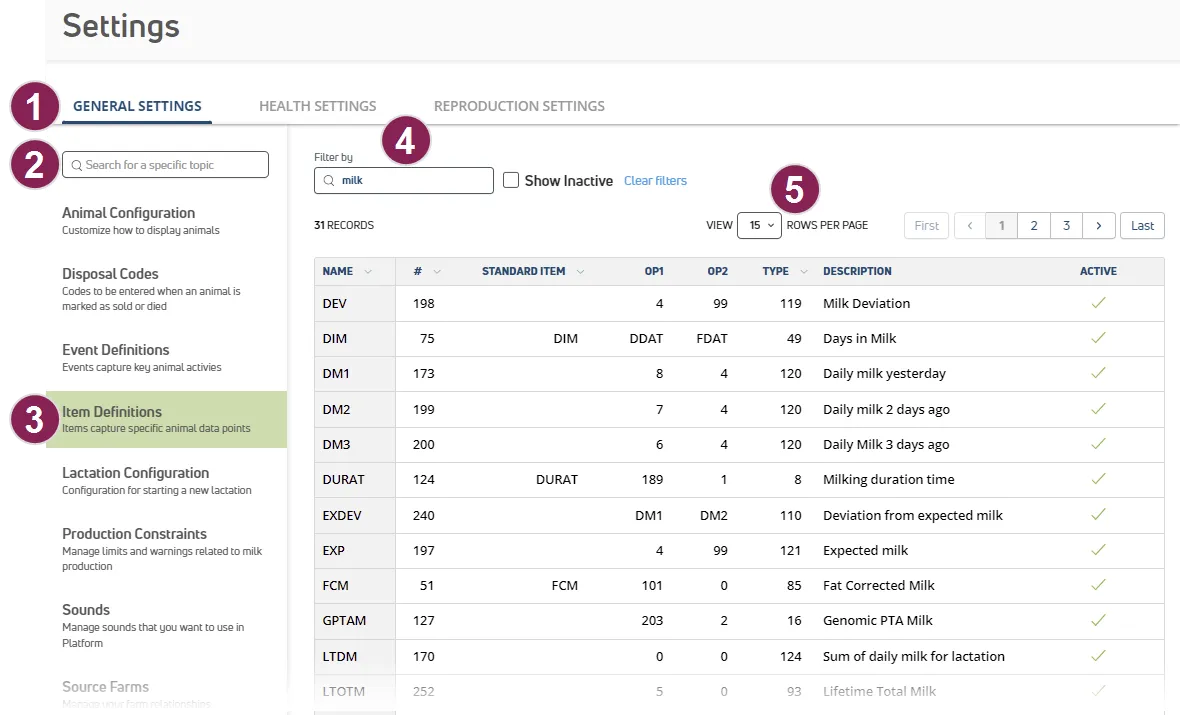
Follow the guidelines below when working with the Settings page:
View Settings Categories: Click the tabs at the top of the page to view General Settings, Health Settings, and Reproduction Settings.
Search for Settings: Use the Search field at the top left to find a specific Settings page.
Select an Option: Settings for the option selected are displayed on the right side of the page.
Filter the List: Some settings include additional search features at the top of the page.
- View Rows Per Page: Select an option to change how many records are displayed on the page, and click the navigation options to jump to a specific page.
TIP: Permissions to edit settings depend on your subscription and role.
See the topics below to learn more.