Know Your VAS PULSE Version
PULSE — the world's most trusted dairy herd management solution — is available in two versions: DC Unlimited and MyDC. Though both versions include the ability to access your data from any current device with a web browser, there are some differences you should know to make the most of your PULSE.
DairyComp (DC) Unlimited includes on-premise DairyComp, PULSE, and the DC on Mobile app. With DC Unlimited, all herd data remains synchronized between on-premise DairyComp rand PULSE. You can review all DairyComp data in PULSE, as well as make changes and generate reports in PULSE and the DC on Mobile app, while also using the mobile app for cow-side tasks. With DC Unlimited, you also have access to our full list of partner-product integrations, dashboard widgets, and additional reporting options at no additional cost.
MyDC includes PULSE and the DC on Mobile app. Data entry and retrieval are performed entirely through PULSE using a web browser or the mobile app. MyDC offers a powerful solution at a lower per-animal cost and can be integrated with VAS WeighComp and FeedWatch software. You also have a suite of structured reports and partner-product integrations available through PULSE.
How do I know which PULSE version I'm using?
Check the top of your Platform page to see if your dairy has DC Unlimited or MyDC.
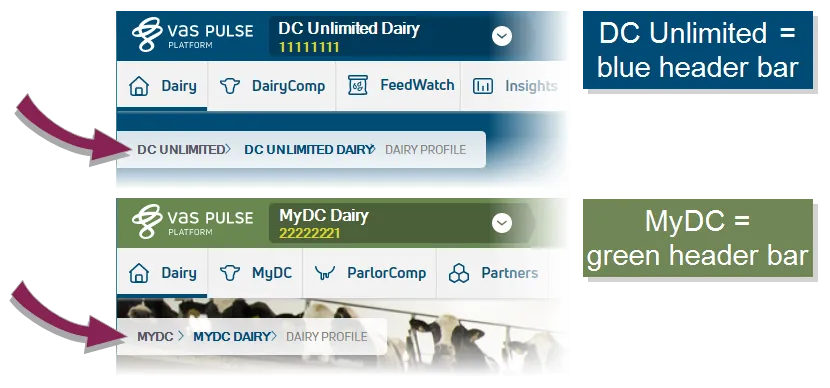
You can also identify your PULSE version in the following ways:
- The breadcrumb path at the top left of each page shows "DC UNLIMITED" for DC Unlimited subscribers and "MYDC" for MyDC subscribers.
- The Home (Dairy Profile)Home (Dairy Profile) page shows "DairyComp Unlimited" for DC Unlimited subscribers and "MyDC on PULSE" for MyDC subscribers.
- The name of the DairyComp/MyDC button on the menu bar is "DairyComp" for DC Unlimited subscribers and "MyDC" for MyDC subscribers.
- Some pages, such as Change LogChange Log and Dairy DashboardsDairy Dashboards, show "DairyComp" for DC Unlimited subscribers and "MyDC" for MyDC subscribers in page, tab, or subtab names.