Command Line
IMPORTANT: This feature is not available in all markets and regions.
This feature/option is available only for DC Unlimited subscribers. MyDC subscribers will not see it in PULSE.
Click herehere to learn more about the different versions of PULSE.
The Command Line brings the power of DairyComp into PULSE, allowing you to generate many of the same reports you're able to view in DairyComp. PULSE Command Line currently supports the LIST (SHOW)LIST (SHOW), SUMSUM, COUNT,COUNT, and ENTERENTER commands. You can find this feature on the main menu barmain menu bar, or by selecting F9 from your keyboard.

A typical command consists of the 5 parts defined below.
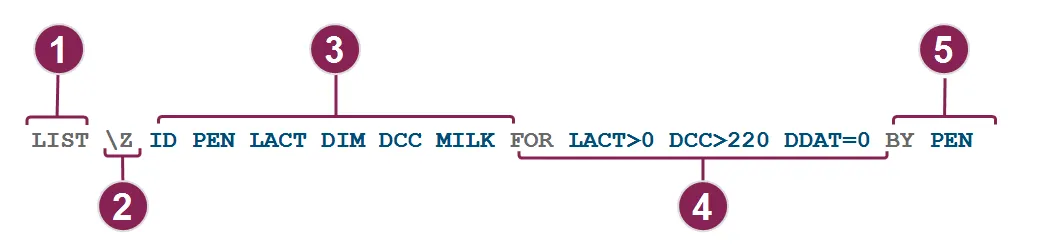
The command word controls the type of report you run. The following commands are supported in PULSE:
- LIST or SHOW: Generates a listing of animals with certain items and conditions. In PULSE command line, LIST and SHOW are interchangeable commands. In DairyComp, the LIST command may be used to print the report, while SHOW displays the report on the screen. See LIST (SHOW) CommandLIST (SHOW) Command for helpful sample commands!
- SUM: Generates averages for specific items or animals within certain groups and presents the details in a table or graph. See SUM CommandSUM Command for helpful sample commands!
- COUNT: Calculates the total number of animals that match certain items and conditions. See COUNT CommandCOUNT Command for helpful sample commands!
- ENTER: An ENTER command changes stored item values for multiple animals at once if the animals match certain conditions. PULSE then generates a report listing all the updated item values. See ENTER CommandENTER Command for more information.
In PULSE command line, any switches must immediately follow the command word. The following switches are currently supported in the specified command(s):
Switch | Definition | Command(s) | Example |
|---|---|---|---|
\B | Includes results for both live and dead animals. Without the switch, command results include live animals only. | COUNTLIST (SHOW)SUM | LIST \B ID LACT DIM RPRO ARDAT FOR FDAT>-7 BY LACTCapture live and dead animal data for recently freshened animals by lactation. |
\D | Limits results to dead cows only. | COUNTLIST (SHOW)SUM | COUNT \D FOR LACT=1 ARDAT>-90Capture total number of dead animals in their first lactation in the last 90 days. |
\S | Sets the standard deviation calculation to use sample values. Without the switch, PULSE calculates population standard deviation. | SUM | SUM \S MILK PCTF PCTS LGSCC BY lact FOR LACT>0Analyze sample standard deviation data for milk composition and quality by lactation. |
\Z | Includes zero values in averages and standard deviation calculations. Without the switch, average, standard deviation, mode, and median calculations include non-zero values only. | SUM | SUM \Z TKET BY LCTGP FOR FDAT>-365Analyze the number of times ketosis was diagnosed by lactation group for all animals that calved in the last year. |
Follow these guidelines for items in your command:
- The ID item is included in LIST reports by default, so including it is optional.
- Insert a space between items.
In the command example above, the items are ID, PEN, LACT, DIM, DCC, and MILK:
LIST \Z ID PEN LACT DIM DCC MILK`` FOR LACT>0 DCC>220 DDAT=0 BY PEN
This tells the report to include columns for the animal ID, pen number (PEN), lactation number (LACT), days in milk (DIM), days carried calf (DCC), and milking weights (MILK).
Here are a few examples of items you can use:
Item | Description |
|---|---|
ID | The animal's ID number. |
PEN | The animal's current PEN number. |
LACT | The animal's current lactation number. |
DIM | The animal's current days in milk. |
MILK | Pounds of milk the animal last produced. |
RPRO | The animal's current reproductive code. |
DCC | How many days the animal has carried its calf. |
DSLH | How many days since the animal's last heat. |
TIP: To see all available items for your dairy, go to your Item DefinitionsItem Definitions.
When you want to define one or more conditions, insert the word FOR and follow it with conditions to customize (i.e., filter) your report results, such as FOR PEN=4.
IMPORTANT: LIST (SHOW) commands require that the FOR keyword is typed before the BY or DOWNBY keyword. SUM commands require that the FOR keyword is typed after the BY or DOWNBY keyword.
In the command example above, the condition includes the word FOR, followed by 3 different conditions to customize the report results — one for lactation number (LACT), one for days carried calf (DCC), and one for dry date (DDAT):
- LIST \Z ID PEN LACT DIM DCC MILK FOR LACT>0 DCC>220 DDAT=0 BY PEN Adding these conditions to your command will narrow your report down to the following results:
- LACT>0 tells the report to include only animals with a lactation number of 1 or higher.
- DCC>220 tells the report to include only animals who have carried their calf for more than 220 days.
- DDAT=0 tells the report to include only animals that are currently milking (i.e., a fresh date exists, but DDAT=0 means no dry date exists).
A SUM command requires that the FOR condition is typed after the sort word DOWNBY:
- SUM DOWNBY AGE FOR LACT=0 This tells the report to only include heifers, or animals that have not yet had a lactation cycle (LACT=0).
When entering a condition, you can choose from the following operators:
Operator | Definition for numeric and date values | Definition for string values |
|---|---|---|
= | equal to | equal to |
<> | not equal to | not equal to |
> | greater than | contains |
>= | greater than or equal to | - |
< | less than | does not contain |
<= | less than or equal to | - |
The sort options are simple. You can use either BY or DOWNBY:
- Use BY to sort lowest to highest.
- Use DOWNBY to sort highest to lowest.
IMPORTANT: LIST (SHOW) commands require that the FOR keyword is typed before the BY or DOWNBY keyword. SUM commands require that the FOR keyword is typed after the BY or DOWNBY keyword.
The LIST command example above includes the sort word BY, followed by the column that will be sorted (PEN):
- LIST \Z ID PEN LACT DIM DCC MILK FOR LACT>0 DCC>220 DDAT=0 BY PEN This tells the report to sort the list by the PEN column. It puts the lowest pen number at the top and the highest pen number at the bottom. If you used DOWNBY PEN instead, it would sort the highest pen number at the top and the lowest pen number at the bottom.
A SUM command requires that the sort word DOWNBY is typed before the FOR condition:
- SUM DOWNBY AGE FOR LACT=0 This tells the report to sort the list by the AGE column. It puts the highest age group at the top and the lowest age at the bottom. If you used BY AGE instead, it would sort the youngest group at the top and the oldest group at the bottom.
Expand the sections below to learn more:
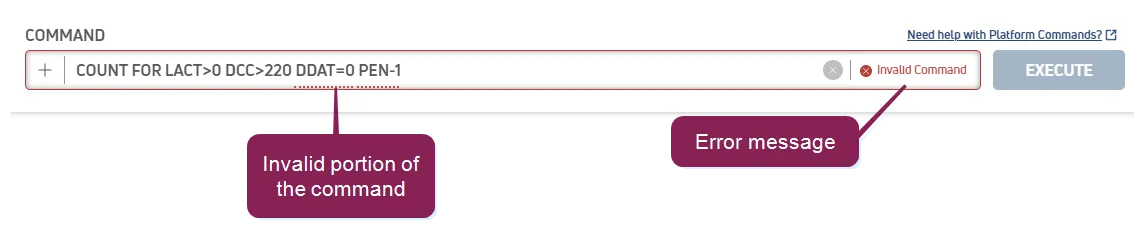
If you enter an incorrect command, or one that doesn't follow the expected syntax, the Platform provides a descriptive error message and highlights the area of the command that is in error.
The Reports/Worklists Results page displays the results of your executed command.
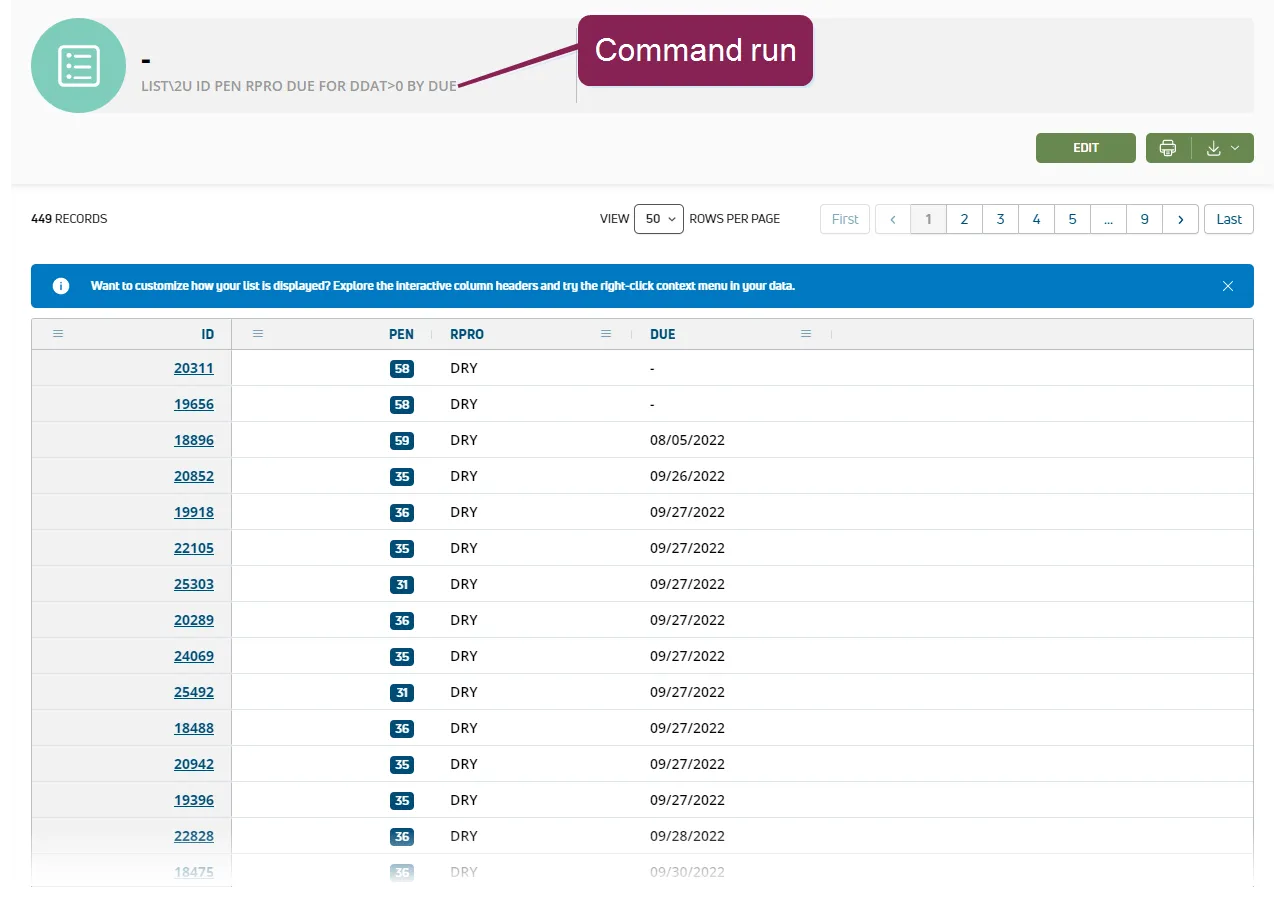
You can choose to Print or Export your results. See Reports/Worklists Results to learn more!
PULSE saves recent commands run to the Report History page.
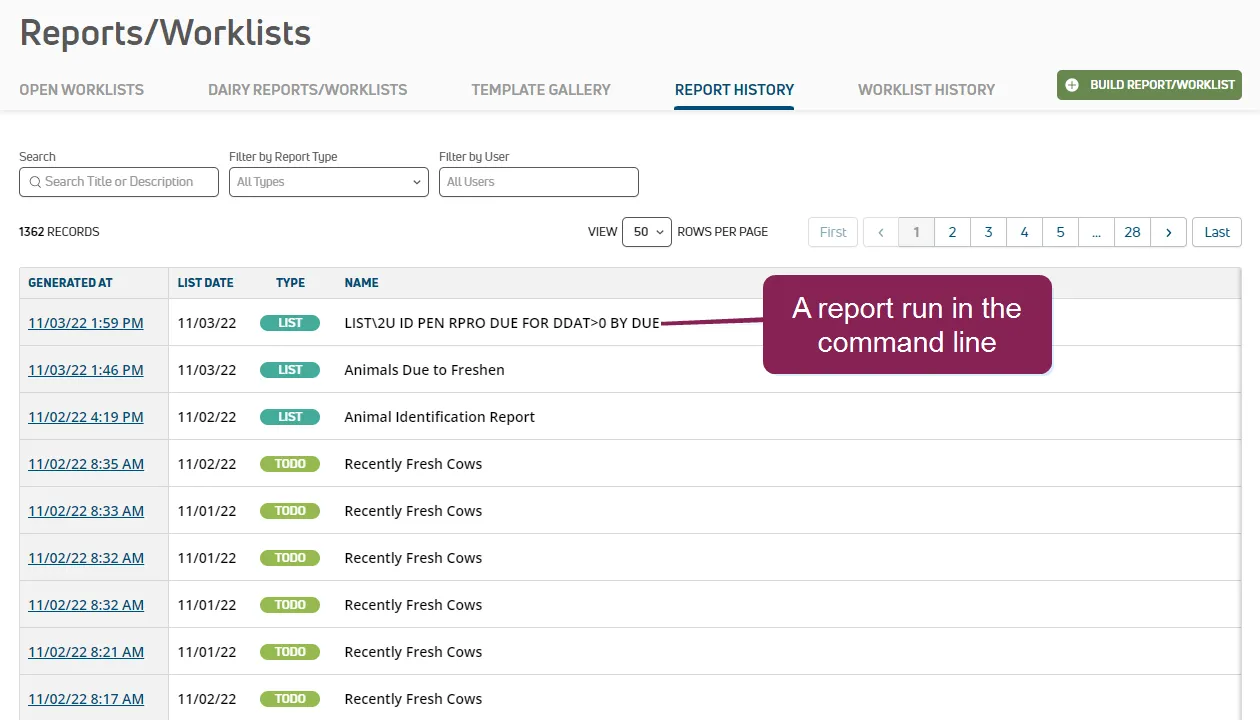
See Report HistoryReport History to learn more!
Click the Edit button on the Dairy Reports/Worklists page to add your command to your Dairy Reports.
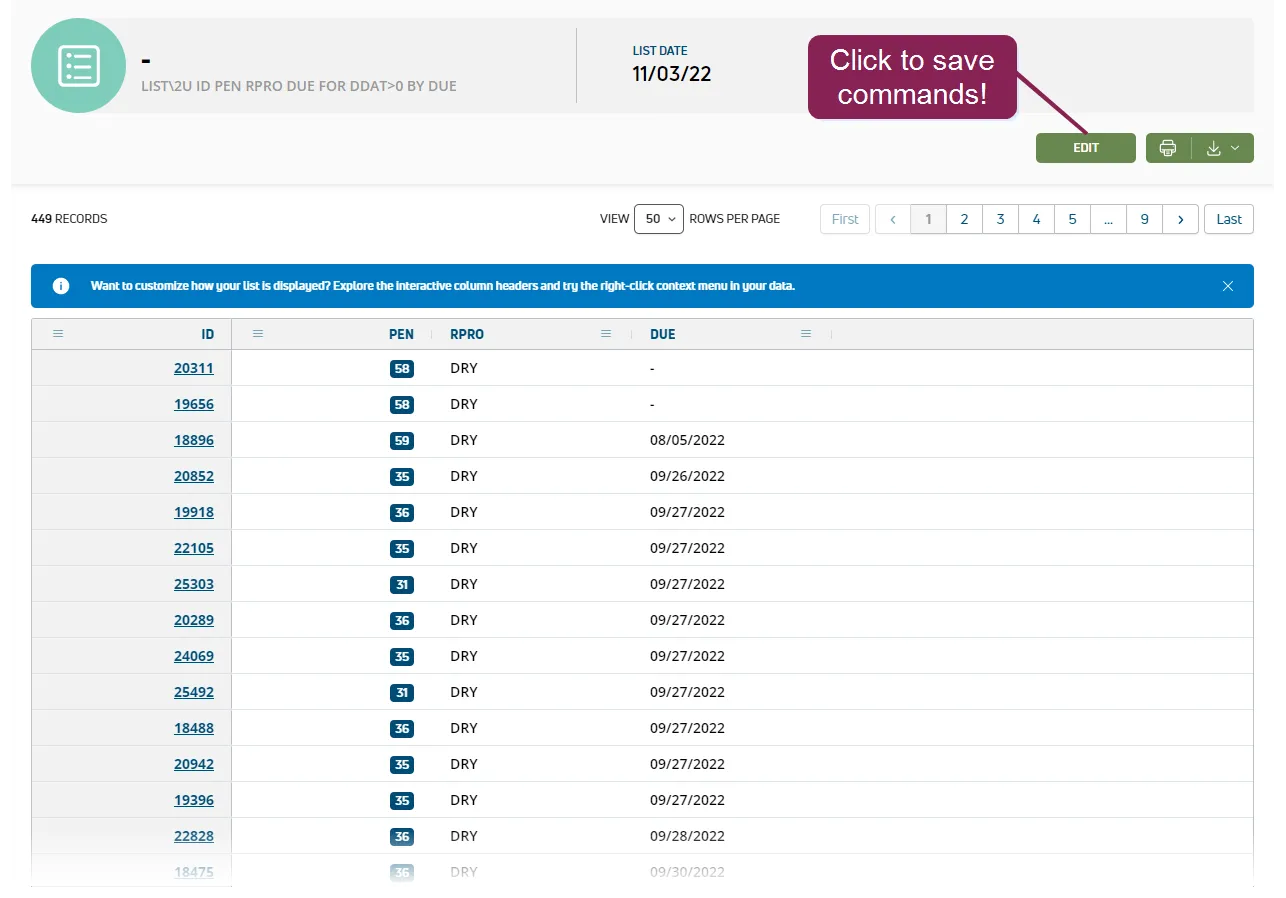
See Dairy Reports/WorklistsDairy Reports/Worklists to learn more!
The following cautions are especially important if you are familiar with DairyComp's command line feature:
PULSE uses existing DairyComp 305 standard item numbers, as well as an expanded set of pre-defined standard items (2000+). See DairyComp Standard ItemsDairyComp Standard Items for more information.
PULSE command line supports COUNT, ENTER, LIST, and SUM.
PULSE interprets the order of month and day based on your User ProfileUser Profile Date format setting.
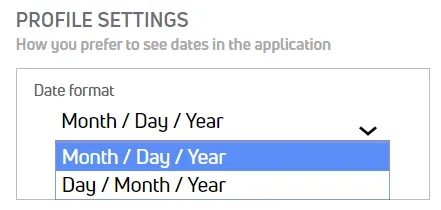
The year may be two or four digits, and month and day may be one or two digits. Use a forward slash (/) or period (.) to separate year, month, and day. Dates may be specified in any of the following formats:
- yyyy/mm/dd or yyyy.mm.dd
- mm/dd/yy or mm.dd.yy
- mm/dd/yyyy or mm.dd.yyyy
- dd/mm/yy or dd.mm.yy
- mm/dd or dd/mm (assumes the current year) | * yyyy/m/d or yyyy.m.d
- m/d/yy or m.d.yy
- m/d/yyyy or m.d.yyyy
- d/m/yy or d.m.yy
- m/d or d/m (assumes the current year) |
For instance, September 17, 2019, can be formatted as:
- 2019/09/17, 9.17.19, 9/17/19, or 9/17 if your date format is set to Month/Day/Year
- 2019/17/09, 17.9.19, 17/9/19, or 17/9 if your date format is set to Day/Month/Year
Double quotes (") are required to identify a string in the command line. For instance, CODA="TEST".
Sort and condition keywords (BY, DOWNBY, FOR) must follow a prescribed order in LIST (SHOW) and SUM commands.
IMPORTANT: LIST (SHOW) commands require that the FOR keyword is typed before the BY or DOWNBY keyword. SUM commands require that the FOR keyword is typed after the BY or DOWNBY keyword.
In PULSE command line, any switches must immediately follow the command word. The following switches are currently supported in the specified command(s):
Switch | Definition | Command(s) | Example |
|---|---|---|---|
\B | Includes results for both live and dead animals. Without the switch, command results include live animals only. | COUNTLIST (SHOW)SUM | LIST \B ID LACT DIM RPRO ARDAT FOR FDAT>-7 BY LACTCapture live and dead animal data for recently freshened animals by lactation. |
\D | Limits results to dead cows only. | COUNTLIST (SHOW)SUM | COUNT \D FOR LACT=1 ARDAT>-90Capture total number of dead animals in their first lactation in the last 90 days. |
\S | Sets the standard deviation calculation to use sample values. Without the switch, PULSE calculates population standard deviation. | SUM | SUM \S MILK PCTF PCTS LGSCC BY lact FOR LACT>0Analyze sample standard deviation data for milk composition and quality by lactation. |
\Z | Includes zero values in averages and standard deviation calculations. Without the switch, average, standard deviation, mode, and median calculations include non-zero values only. | SUM | SUM \Z TKET BY LCTGP FOR FDAT>-365Analyze the number of times ketosis was diagnosed by lactation group for all animals that calved in the last year. |