MyDC
MyDC includes PULSE and the DC on Mobile app. Data entry and retrieval are performed entirely through PULSE using a web browser or the mobile app. MyDC offers a powerful solution at a lower per-animal cost and can be integrated with VAS WeighComp and FeedWatch software. You also have a suite of structured reports and partner-product integrations available through PULSE.
To get started quickly with MyDC, follow the steps below.
- Begin by signing upsigning up for PULSE.
- Log inLog in.
After you log in, click the Get Started with MyDC button on the upper right side of the page to add your dairy.
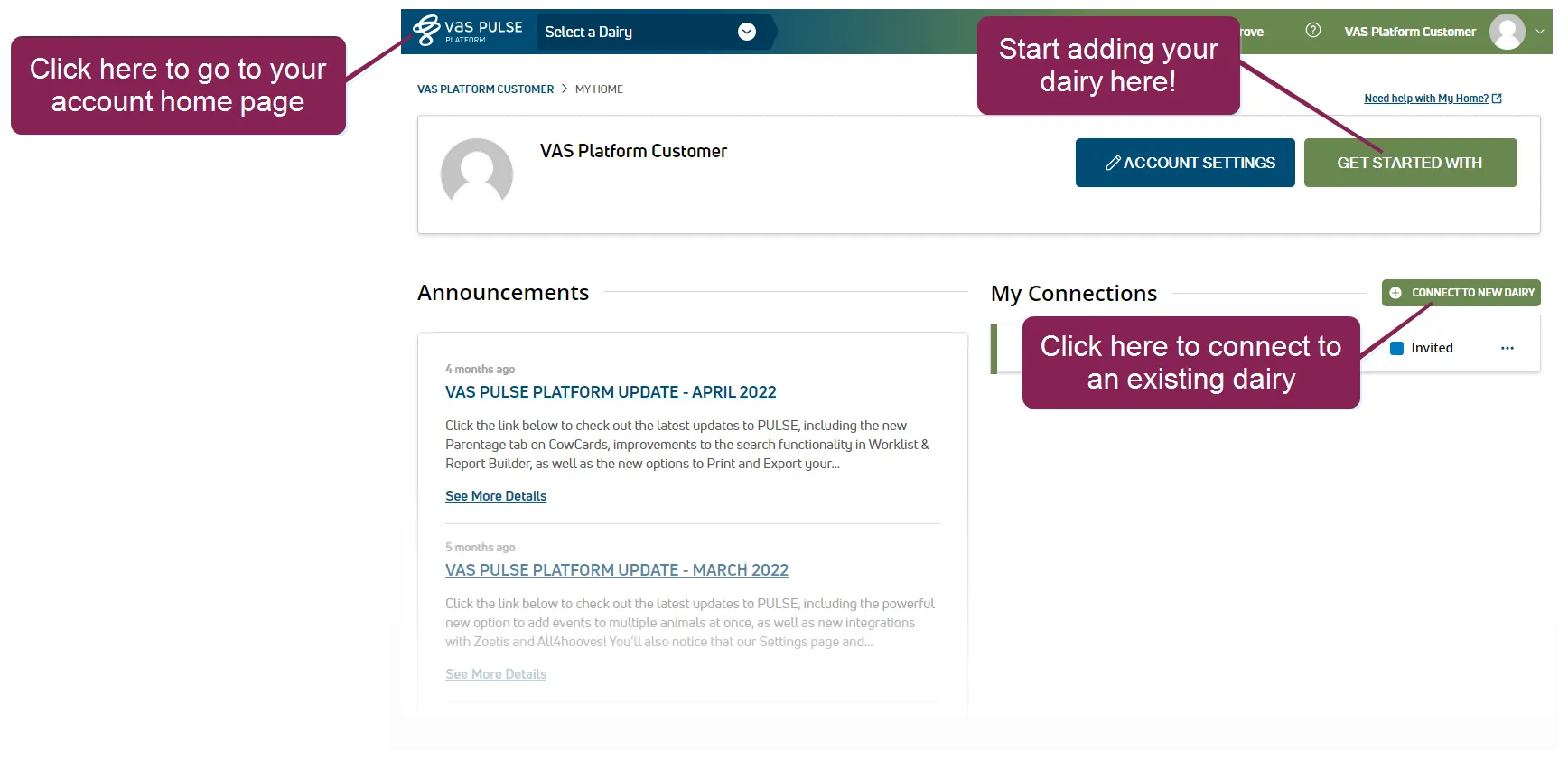
MyDC walks you through your dairy setup, provides options to import your animal data, and allows you to begin your MyDC subscription.
NOTE: If your dairy has already been added, click the Connect to a New Dairy button to request access. See Request Access to a DairyRequest Access to a Dairy to learn more!
- Did you know you can automate your data entry process? Here's how:
- If you're an AgSource customer, transfer your herd database and latest animal records automatically using an RAC during step 2 - Identify your Dairy. Find this code on the bottom right corner of your Herd Summary or contact your AgSource representative for help.
- Use an STF from your DRPC to import your herd database and latest animal records. If you have a testday approaching and prefer to hold off and import the latest file, you can complete the setup process first and then come back to MyDC to complete the upload. Be sure to select Yes in step 4 - Tell us about your Dairy's Data to indicate your plan to upload an STF.
- If your dairy has a herdcode, have it handy! You can find this 8-digit number in your DRPC communications or testday results. Contact your DRPC if you need help finding your herdcode.
- If your dairy is tax exempt, have your 9-digit exemption number or taxpayer ID ready. You will also need to upload a copy of your certificate, which can be a photo of the actual document. Use your phone to quickly snap a photo and upload it in step 5 - Tax exemptions!
- If you have a promotion code, have it ready and add it in step 6 - Estimate your cost.
- Have your credit card on hand to set up your subscription.
After the dairy setup process completes, you are ready to import your herd data or add your animals. Expand the sections below to learn more:
If your dairy uses AgSource for milk testing services and you entered your RAC in step 2 - Identify your Dairy of the setup wizard, PULSE will automatically import your herd and notify you by email when your dairy data is available.
If you selected Yes in step 4 - Tell us about your Dairy's Data to indicate your plan to upload an STF, go to the Quick Actions section of your dairy home page and click Upload to import your data.
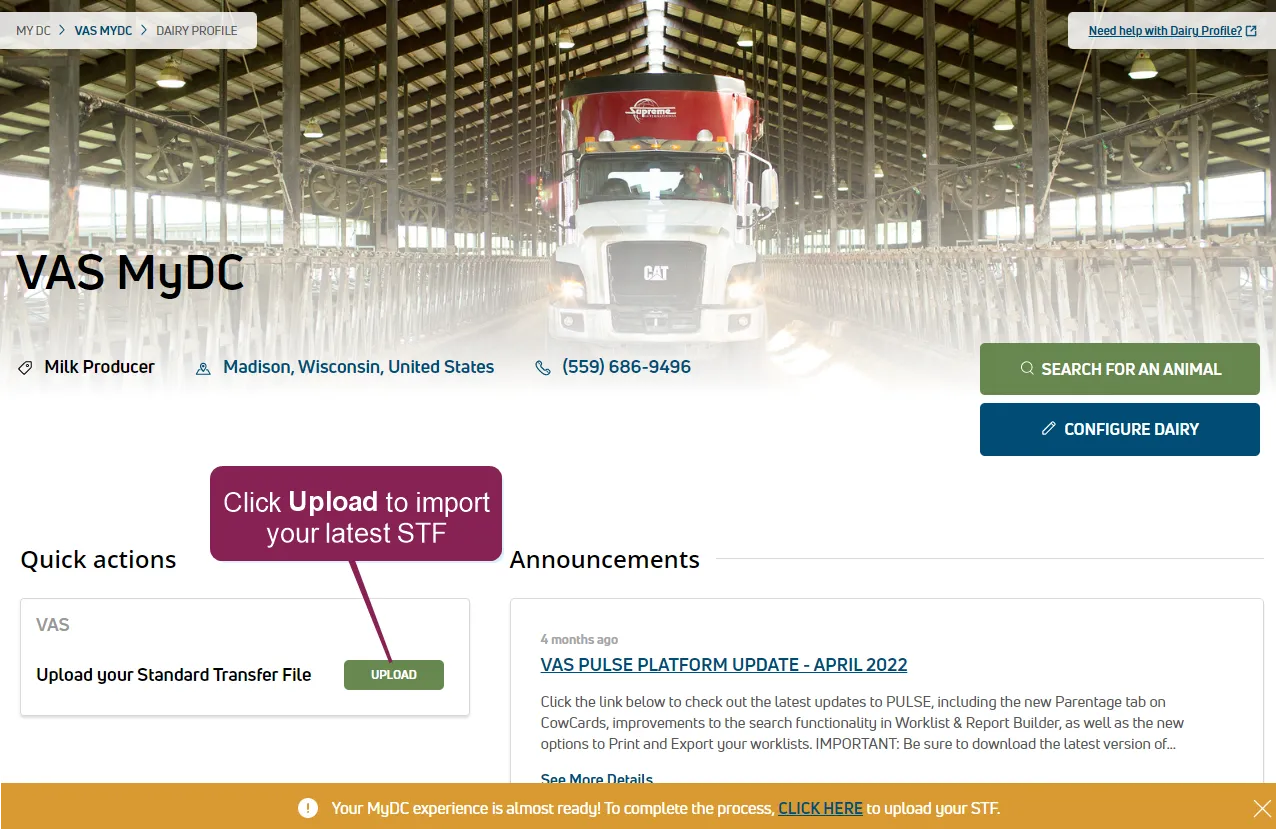
PULSE will import your herd data and then notify you by email when your dairy is available. This may take up to one business day depending on the size of your herd.
You can also add animals individually or use the Add Animals in Batch option to add multiple animals using a VAS template. See Add AnimalsAdd Animals to continue!
PULSE includes a SettingsSettings page where you can view and edit various options for your dairy. We suggest you check the following settings when you're getting started:
- Your dairy's Default BreedDefault Breed.
- Your Preferred IdentifierPreferred Identifier, such as ID or barn name.
- Default Event DefinitionsEvent Definitions and Item DefinitionsItem Definitions. You can edit the descriptions for events and items, or you can also deactivate events your dairy does not plan to track.
- Your Lactation ConfigurationLactation Configuration settings, which control prompted items for fresh cows and new calves.
The quickest way to look up an animal is to use the search at the top of any page.
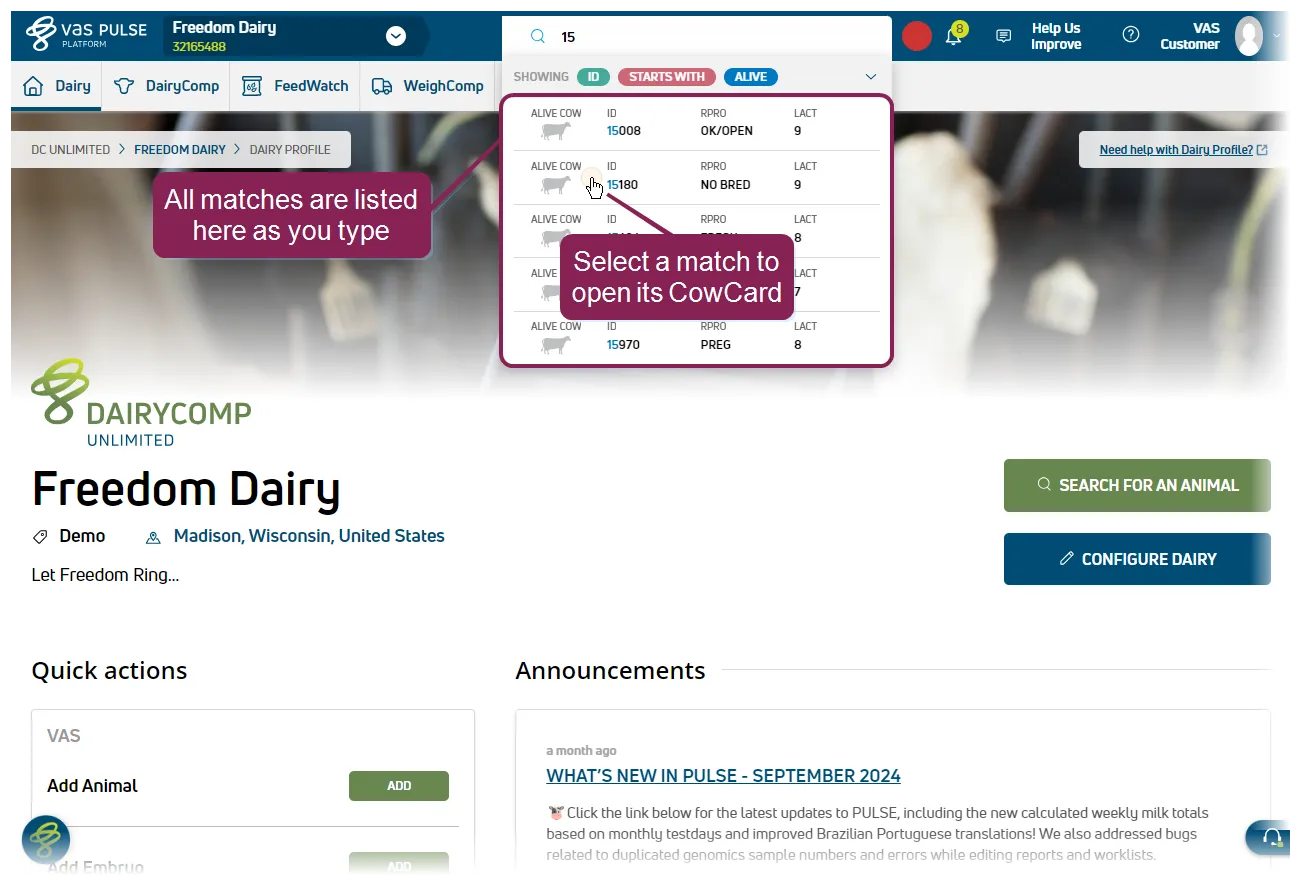
For instructions on how to view a list of all animals in your herd, as well as other ways to look up animals, see Find an AnimalFind an Animal.
Check out the topics below to start using PULSE to manage your herd!
See Invite a User to Your DairyInvite a User to Your Dairy to add new users to your dairy and Manage Dairy Users and RolesManage Dairy Users and Roles to learn more about managing your users.
You can also group dairy users into Teams, which allows you to set the types of tasks the users typically perform. For instance, you may have a Breeding team that handles all insemination activity. You can add users to the Breeding team and then set their associated events (BRED, ABORT, DNB, PREG) to include the team. See TeamsTeams and Event DefinitionsEvent Definitions to learn more!
A PULSE CowCard contains detailed status and event information about each animal in your herd, including reproduction status and days in milk, as well as any milk and meat withholds. Use CowCards to quickly access animal details.
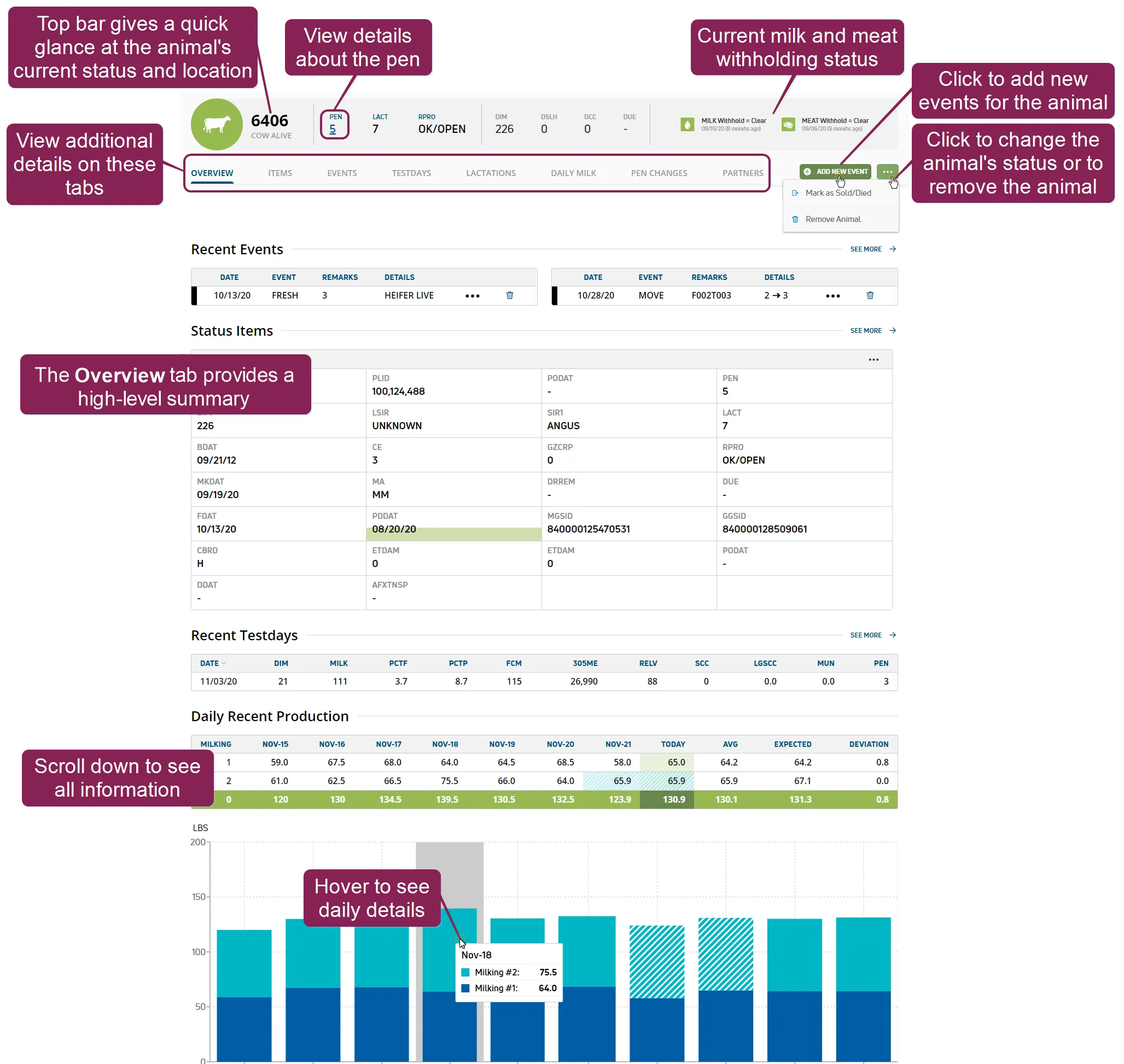
CowCards use the following common terms, which are known as "items" in PULSE:
- LACT: Lactation number
- RPRO: Reproductive code (or status)
- DIM: Days in milk in current lactation
- DSLH: Days since last heat
- DCC: Days carrying calf/pregnant
- DUE: Date due to freshen (if pregnant)
See View Animal Details on CowCardsView Animal Details on CowCards to learn more!
TIP: CowCards are your primary source for animal data, and you can set which details to include, in your preferred layout. See ItemsItems to learn more about setting PULSE to display your animal data. You can also use mobile CowCardsmobile CowCards and Manage Animals (v2)Manage Animals (v2) while out on the dairy!
Use the PULSE ProtocolsProtocols feature to define your dairy's standard animal treatments for health events. If your dairy uses an OvSynch protocol, tasks are automatically added to your daily Open TasksOpen Tasks worklist.
You can also define a Default Remark field for your protocols, which allows you to capture custom details for specific health events. See Protocols - RemarkProtocols - Remark to learn more!
Customize your filters for VetcodesVetcodes to control the animals PULSE flags for a vet check. After your vetcodes are set, you are ready to Create a Vet ListCreate a Vet List and process your list from web or mobile.
PULSE events capture key animal activities, including reproduction-related items (freshening, pregnancy, breeding), location information (movement between pens), and illness details (diagnoses, treatment) that are vital to managing your herd. You can add animal events from web or mobile.
- Events (web)Events (web)
- Events (mobile)Events (mobile)
- Events (mobile)Events (mobile)
For a full list of supported events, see Enter Events (v2)Enter Events (v2).
Customize and build reports and worklists using the Template GalleryTemplate Gallery and Report/Worklist BuilderReport/Worklist Builder. You can also use the scheduling options to set reports or worklists to generate automatically based on your dairy's specific needs.
Use the mobile app to process your mobile tasks and worklistsprocess your mobile tasks and worklists and Complete Tasks (v2)Complete Tasks (v2) while out on your dairy. Using an RFID scanner can make finding and treating animals even more efficient. See Work with RFID Scanners (v1)Work with RFID Scanners (v1) or RFID Scanners (v2)RFID Scanners (v2) to learn more!
View the Cow StatsCow Stats widget on your Dairy Dashboard.
For MyDC support, you can reach us by phone, email, text, or chat. Contact VAS Support for more details.
Share your feedback anytime! Click Help Us Improve and use the brief form to send your feedback to VAS.