Process Scheduler
Use the Process Scheduler calendar to view all your scheduled activities in one convenient location. The calendar provides a monthly view, and clicking on a specific day provides additional details in a side panel.
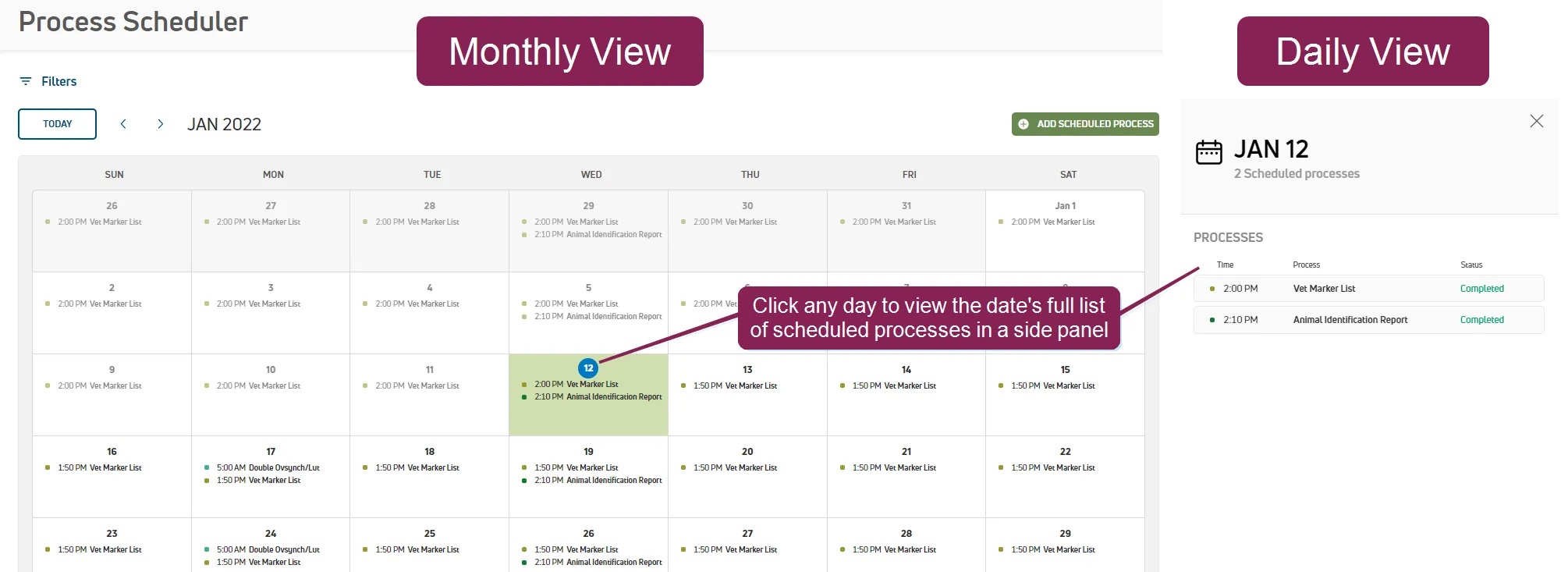
PULSE supports scheduling Worklists and Reports/Worklists to automatically generate on a daily, weekly, monthly, or even hourly basis. See Schedule WorklistsSchedule Worklists or Schedule ReportsSchedule Reports for instructions on adding those processes. After adding the processes to the schedule, you can view the activities on Process Scheduler.
Process Scheduler also allows you to create and manage email and text alerts for your dairy's protocol tasks. See Add and Manage Task Status AlertsAdd and Manage Task Status Alerts for more information on setting protocol task alerts.
NOTE: Protocol-related processes for OvSynch can be set to automatically run according to your defined enrollment setup. See Schedule Automatic EnrollmentSchedule Automatic Enrollment to learn more!
See the topics below to learn more: