View Scheduled Processes
On the Process Scheduler page, you can see all your scheduled processes in one easy-to-read calendar. In a few clicks, you can also see when each process is scheduled to start or how often the process is scheduled to run.
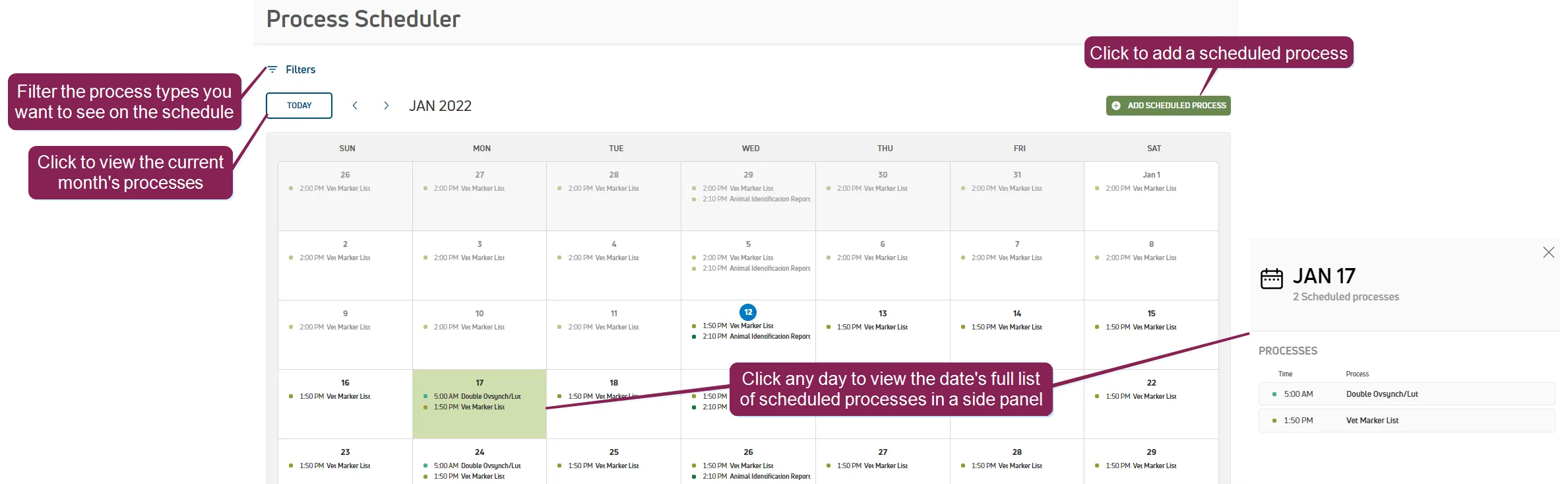
Follow the guidelines below when working with the Process Scheduler calendar:
- Use the filters on the upper left side of the calendar to select the processes you want to see on the schedule.
- Click the TODAY button on the upper left side of the calendar to see the current month's scheduled processes.
- Click the Add Scheduled Process button on the upper right side of the calendar to schedule a new process.
NOTE: Currently, users can only add a Protocol task status alert from the Process Scheduler page. See Add and Manage Task Status AlertsAdd and Manage Task Status Alerts to learn more about scheduling the alert messages.
Additionally, you can manage your system's processes directly on the Process Scheduler page. To learn more about scheduling and editing the processes shown on your Process Scheduler calendar, see Schedule or Edit a ProcessSchedule or Edit a Process.