Bunk Scoring
The Bunk Scoring page allows you to access feed bunk details for each pen, and includes a graphical representation of the dry matter per animal fed each day, the number of animals in the pen, and the target dry matter per animal, as well as whether feeding for the pen is active. You can find this feature under the Menu OptionsMenu Options.
Users with permissions to edit this page can adjust the number of animals fed, the target amount of feed, and whether feeding for the pen is active. If any adjustments are made, the  option activates so that you can save your changes.
You can then view the information that is illustrated in the example below.
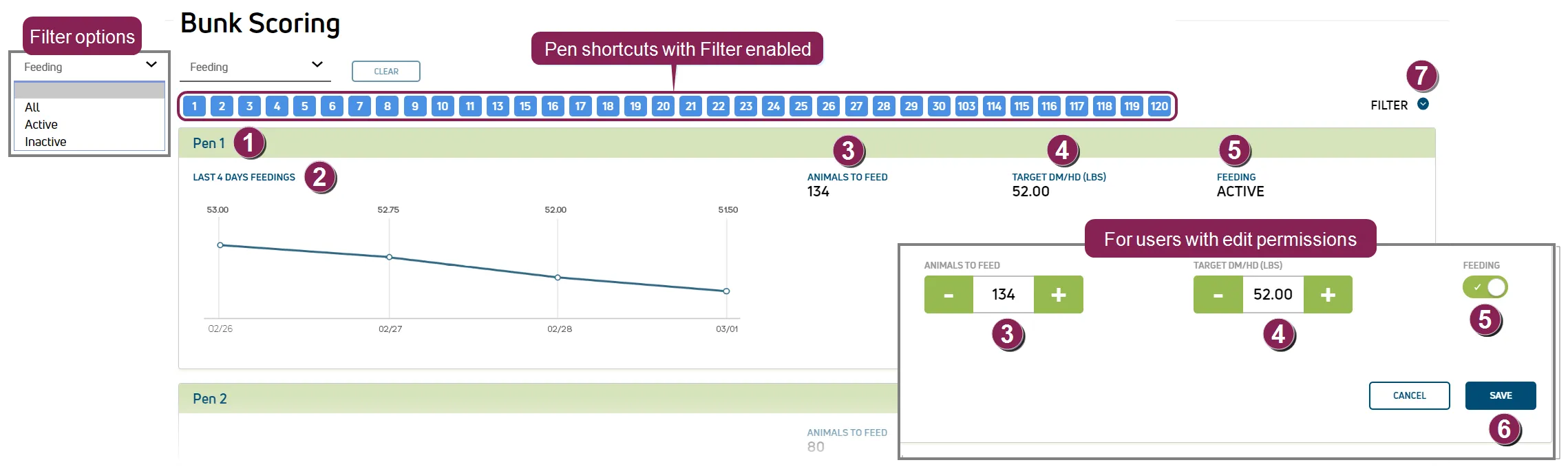
Pen: The Pen number.
Last # Days Feeding Graph: Shows how much dry matter (in weight) that is fed to each animal per day. Bunk scoring is available for up to 4 days.
Animals to Feed: The total number of animals in the pen. For users with permissions to edit this page, this data is displayed in an editable format:  .
.
Use the  and
and  buttons or ↓ and ↑ from the keyboard to adjust the total number of animals in the pen by 1.
Target DM/HD: The Target DM/HD column shows the amount of dry matter (in weight) each animal should receive each day. For users with permissions to edit this page, this data is displayed in an editable format:  . Use the and buttons or ↓ and ↑ from the keyboard to adjust the Target DM/HD dry matter (in weight) by 0.25.
Feeding: The current feeding status for the pen. Active feeding status indicates the pen is set for feeding. Inactive status indicates the pen is not set for feeding. For users with permissions to edit this page, you can use the toggle switch to change the feeding status for the pen.
 indicates Active feeding status.
 indicates Inactive feeding status.
Save: If any adjustments are made, the option becomes available. Select Save to capture your changes.
Activating or deactivating feeding for a pen also presents a confirmation message.
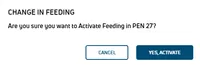 or
or 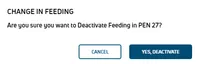
After changes are saved, a time stamp of the update displays.

NOTE: This time stamp is only visible during your current session on the Bunk Scoring page and no longer displays after you navigate away from this page.
Filter: Select Filter to view a drop‑down list that allows you to view All, Active, or Inactive pens, as well as shortcuts to specific pen numbers.