Add Embryos to Inventory or Transferred Embryos
PULSE allows you to add fresh or frozen embryos to inventory to streamline embryo transfer tasks while out on the farm and using the mobile app. Use the batch import feature to quickly add multiple embryos, such as those harvested from an embryo flush, or add individual embryos or multiple identical embryos as needed. You can also add transferred embryos directly to the Transferred EmbryosTransferred Embryos page using the same batch import process and file.
You can find this feature under the DairyComp/MyDCDairyComp/MyDC > EmbryosEmbryos menu. The options to add embryos are available from the menu or the Embryo Management tabs.
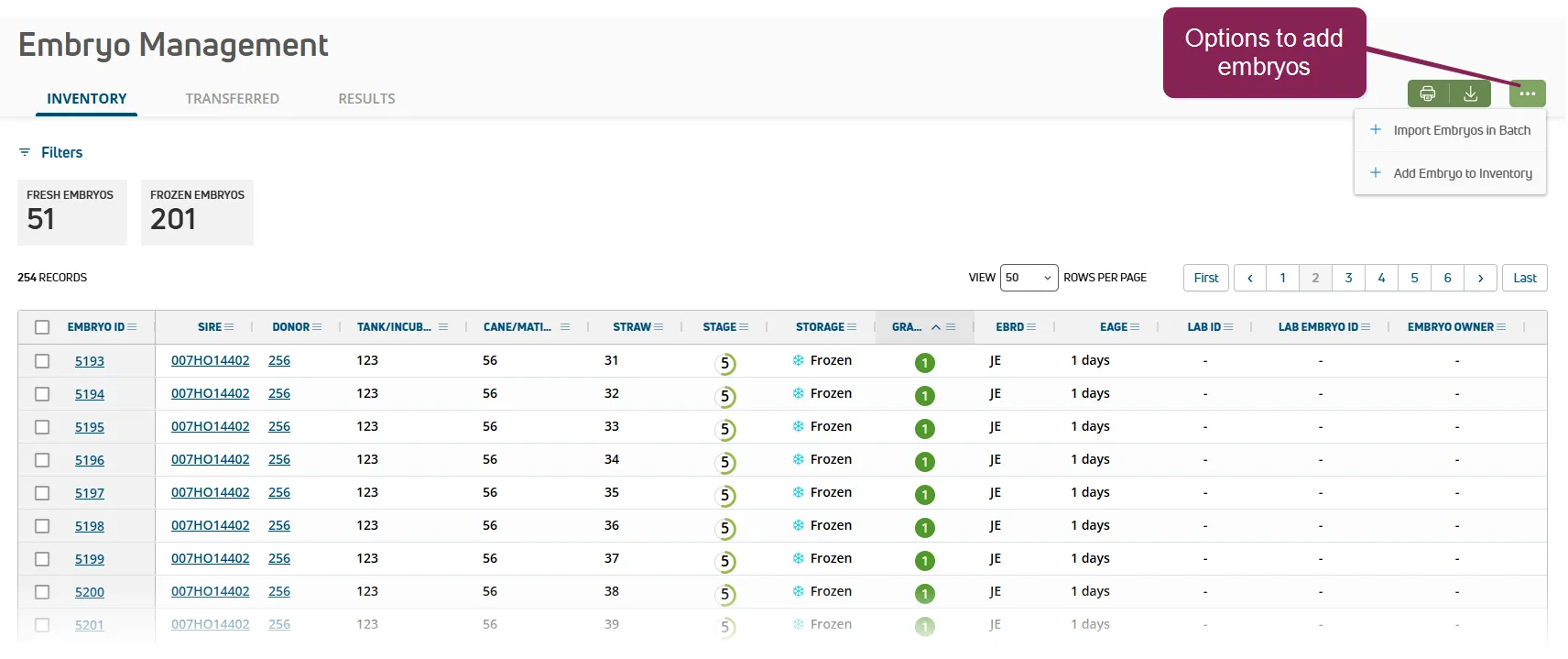
Prior to entering your embryos to inventory, be sure to have all required details. Verify that the lab report or other listing that accompanied the delivery of your embryos is handy and available for reference. Note that the following details are required to add embryos to inventory:
- Sire NAAB code or ISO ID
- Donor ID, Name, or ISO ID
- Fertilization Date
- Frozen Date (for frozen embryos)
In addition to the required items, other information that is useful when preparing to add embryos includes:
- Embryo breed
- Straw or Mating details
- Embryo counts
PULSE limits the transfer of embryos to those with the highest potential for success. Embryos must meet the following requirements to qualify for transfer:
- Embryo transfers are typically done with 4 to 8-day-old embryos. In PULSE, you can only enter data for embryos that are less than 12 days old (EAGE < 12). As noted in Enter Completed Transfers as Soon as Possible!Enter Completed Transfers as Soon as Possible!, you must be prompt with your data entry to capture embryo transfers in PULSE.
- Must be Grade 1 - 3:
- 1 Good
- 2 Fair
- 3 Poor
- Must be Stage 4 -9:
- 4 Morula
- 5 Early Blastocyst
- 6 Blastocyst
- 7 Expanded Blastocyst
- 8 Hatched Blastocyst
- 9 Expanded and Hatched Blastocyst
Expand the sections below to learn more:
Follow the steps below to continue:
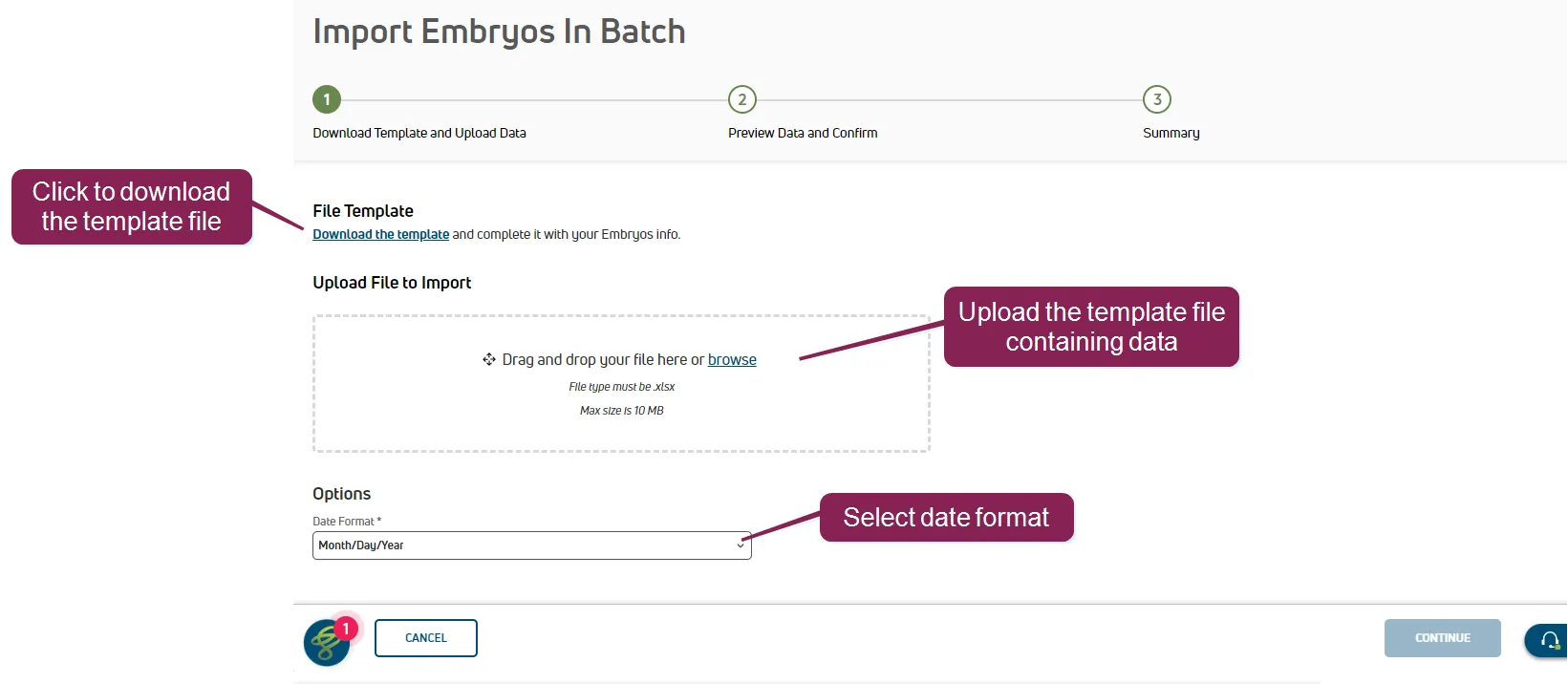
Select Import Embryos in Batch from the menu bar or the Options button  .
.
Click Download the template to save the template file.
Use the template to enter your embryo data, noting the required fields (bolded in the template):
- Sire
- Donor
- Embryo Breed
- Fertilization Date
- Recovery Type
- Straw Number Be sure to also add the following for frozen embryos:
- Frozen Date (required for frozen embryos)
- Freeze Method (required for frozen embryos)
IMPORTANT: If you are not adding data for optional fields, leave them empty. Make sure the file extension remains XLSX. If you change the extension, the file upload will fail, resulting in an "Invalid File Type" error: 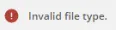 .
.
- Sire: The bull whose semen was used to fertilize the donor's egg to produce the embryo. If this column shows Pool, it means that an oocyte was fertilized by IVF from a pool containing the semen of multiple sires.
- Donor: TThe female who provided the embryo or oocyte (sometimes referred to as the donor dam).
- Embryo Breed: The embryo breed. Select from the standard list of NAAB breeds.
- Fertilization Date: Date the donor egg was fertilized using the sire semen.
- Recovery Type: The recovery type used:
- Flush is used for embryos
- IVF for in vitro fertilization (oocytes)
- Other for neither of the above
- Tank: The liquid nitrogen storage tank containing the cane with the embryo's straw.
- Incubator: The warming unit containing the embryo's straw or mating.
- Cane: The container holding the embryo's straw.
- Mating: A description of the embryo mating details, such as sire, donor, and fertilization date. May contain multiple embryos.
- Straw number: Number of the straw holding the embryo. Canes contain multiple straws and each straw holds a single embryo.
- Stage: The stage at which the embryo was harvested:
- 1 Unfertilized
- 2 Simple Celled
- 3 Early Morula
- 4 Morula
- 5 Early Blastocyst
- 6 Blastocyst
- 7 Expanded Blastocyst
- 8 Hatched Blastocyst
- 9 Expanded and Hatched Blastocyst
- Grade: The quality of the embryo:
- 1 Good
- 2 Fair
- 3 Poor
- 4 Dead (or Degenerating)
- Lab ID: Identifier for the lab from which the embryo was purchased.
- Lab Embryo ID: Identifier for the embryo from the lab. This value differs from the PULSE Embryo ID.
- Embryo Owner: Name or company that owns the embryo.
- Frozen Date: Date the embryo was frozen.
- Freeze Method: The method used to freeze the embryo:
- Direct Transfer (DT) is the process of using high levels of cryoprotectant to quickly cool an embryo to freezing. A common cryoprotectant used for this process is ethylene glycol.
- Slow is the process of using low levels of cryoprotectant and a programmable freezing machine to slowly lower the temperature of the embryo to freezing.
- Recipient: The animal that received the embryo transfer. Including the Recipient and Transfer details automatically adds a TRANSFER event to the recipient animal. See Import Transferred EmbryosImport Transferred Embryos for more information.
- Transferred Tech: The embryo technician who completed the transfer.
- Transferred Date: Date the embryo was transferred to the recipient.
- Breeding Code: The code associated with the breeding activity. Check your dairy's Breeding CodesBreeding Codes for more details on each code.
Drag and drop the completed template file into the upload box, or click browse to navigate to your file.
Select the Date Format.
Click Continue to preview and confirm the data.
Platform provides a summary and preview of the embryo data being imported. Hover over any error/warning icons to display the error message.
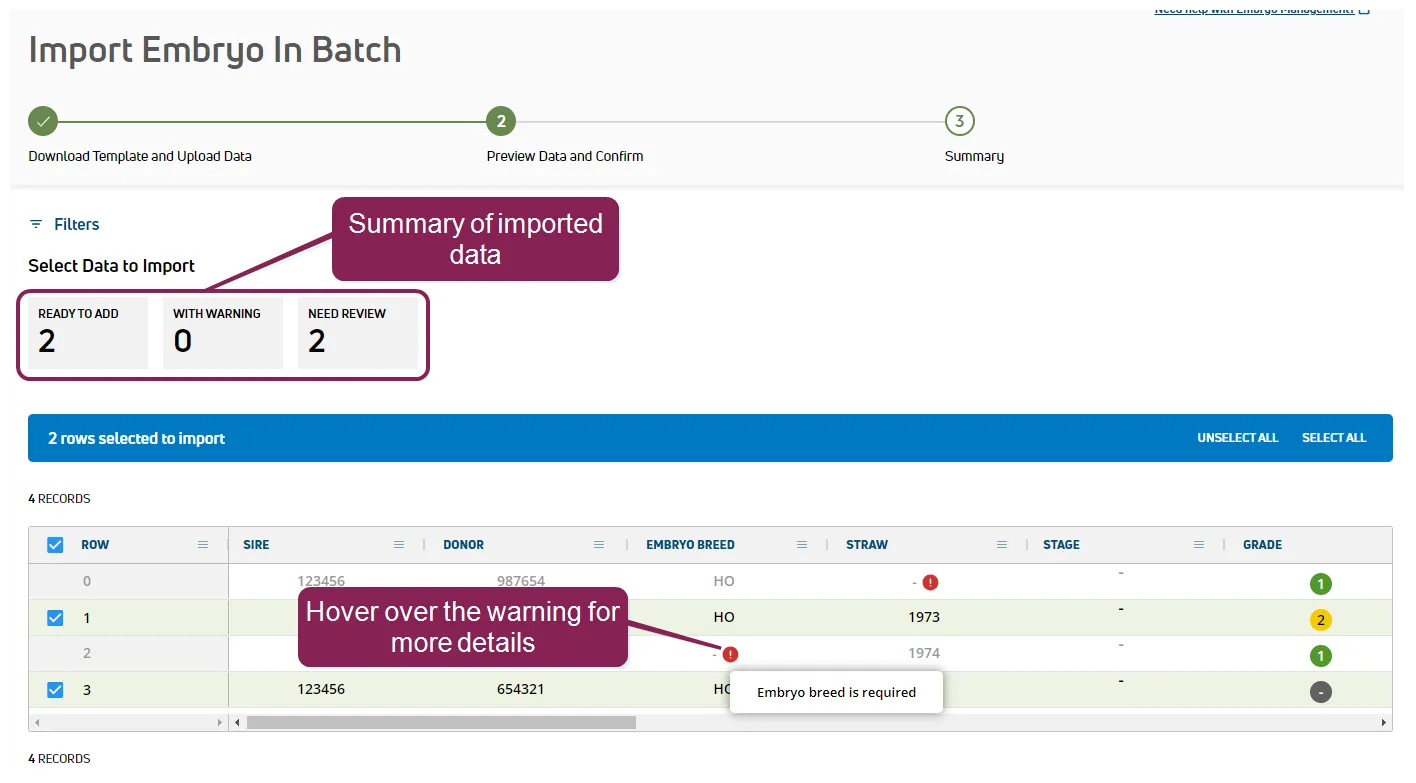
 Error: warns that a required detail is missing or if the data included is not within the expected range.
 Warning: indicates an issue with the data, such as a straw number that is already in use for a frozen embryo.
If necessary, return to your embryo batch file, resolve any errors, and upload the file again.
When ready, click Import to import your embryos.
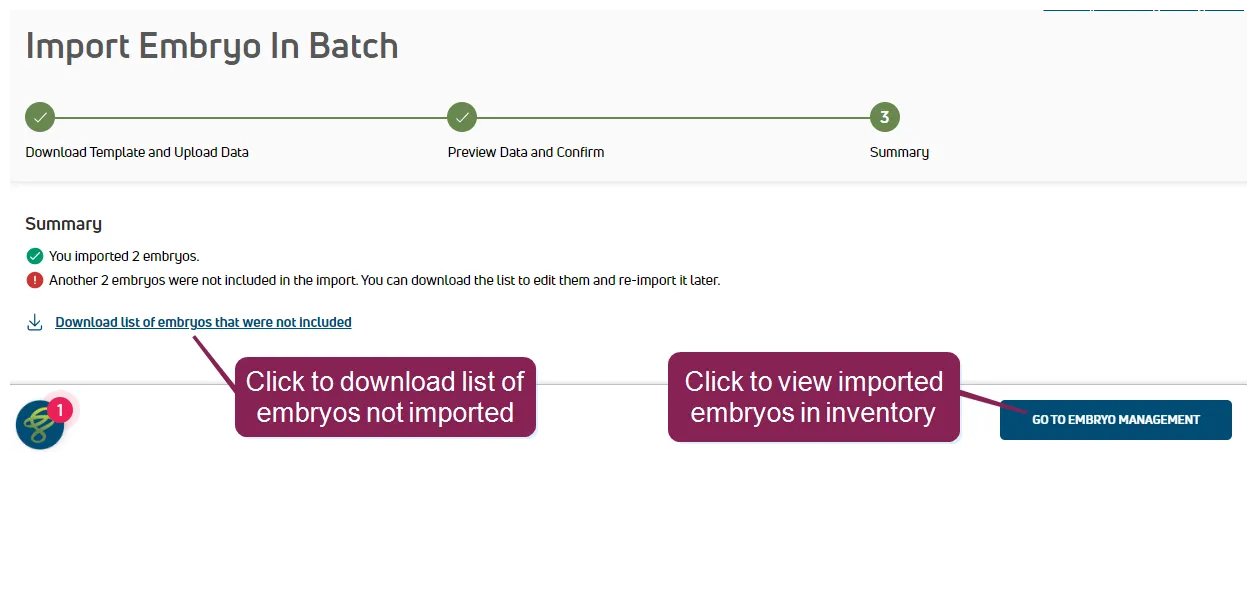
After your embryo data is imported, you can download a list of the embryos that were not included. You can use this list to identify and resolve any errors, and if necessary, upload the updated file.
In addition to importing embryos to inventory, you can use the same template file to import completed transfers. Follow the Import Embryos in BatchImport Embryos in Batch steps and be sure to include the required details in your template file:
- Recipient: The animal that received the embryo transfer.
- Transferred Date: Date the embryo was transferred to the recipient.
You can also include optional details if your dairy tracks them:
- Transferred Tech: The embryo technician who completed the transfer.
- Breeding Code: The code associated with the breeding activity. Check your dairy's Breeding CodesBreeding Codes for more details on each code.
After the import, the embryo is added directly to the Transferred EmbryosTransferred Embryos tab. PULSE also automatically adds a TRANSFER event to the recipient's CowCard for the Transferred Date you specified.
Select Add Embryo from the menu bar or the Options button .
Complete all required fields and any additional details for the embryo.
NOTE: To add multiple embryos with the same details, use the Number of Embryos/Straws field for fresh embryos and the From Straw/To Straw fields for frozen embryos. PULSE will calculate the number of frozen embryos you're adding based on the difference between the straw numbers.
- Sire: The bull whose semen was used to fertilize the donor's egg to produce the embryo. If this column shows Pool, it means that an oocyte was fertilized by IVF from a pool containing the semen of multiple sires.
- Donor: TThe female who provided the embryo or oocyte (sometimes referred to as the donor dam).
- Embryo Breed: The embryo breed. Select from the standard list of NAAB breeds.
- Fertilization Date: Date the donor egg was fertilized using the sire semen.
- Recovery Type: The recovery type used:
- Flush is used for embryos
- IVF for in vitro fertilization (oocytes)
- Other for neither of the above
- Tank: The liquid nitrogen storage tank containing the cane with the embryo's straw.
- Incubator: The warming unit containing the embryo's straw or mating.
- Cane: The container holding the embryo's straw.
- Mating: A description of the embryo mating details, such as sire, donor, and fertilization date. May contain multiple embryos.
- Straw number: Number of the straw holding the embryo. Canes contain multiple straws and each straw holds a single embryo.
- From Straw: The first straw number that contains this embryo.
- To Straw: The last straw number that contains this embryo. This allows PULSE to calculate the total number of embryos to be added. For instance, if you add embryos From Straw 6 To Straw 11, a total of 6 embryos are added.
NOTE: To add a single embryo, do not include From Straw and To Straw values.
- Stage: The stage at which the embryo was harvested:
- 1 Unfertilized
- 2 Simple Celled
- 3 Early Morula
- 4 Morula
- 5 Early Blastocyst
- 6 Blastocyst
- 7 Expanded Blastocyst
- 8 Hatched Blastocyst
- 9 Expanded and Hatched Blastocyst
- Grade: The quality of the embryo:
- 1 Good
- 2 Fair
- 3 Poor
- 4 Dead (or Degenerating)
- Lab ID: Identifier for the lab from which the embryo was purchased.
- Lab Embryo ID: Identifier for the embryo from the lab. This value differs from the PULSE Embryo ID.
- Embryo Owner: Name or company that owns the embryo.
- Frozen Date: Date the embryo was frozen.
- Freeze Method: The method used to freeze the embryo:
- Direct Transfer (DT) is the process of using high levels of cryoprotectant to quickly cool an embryo to freezing. A common cryoprotectant used for this process is ethylene glycol.
- Slow is the process of using low levels of cryoprotectant and a programmable freezing machine to slowly lower the temperature of the embryo to freezing.
Click Add.
If you made a mistake or need to change embryo details, see Edit or Delete EmbryosEdit or Delete Embryos.