Add TRANSFER Events
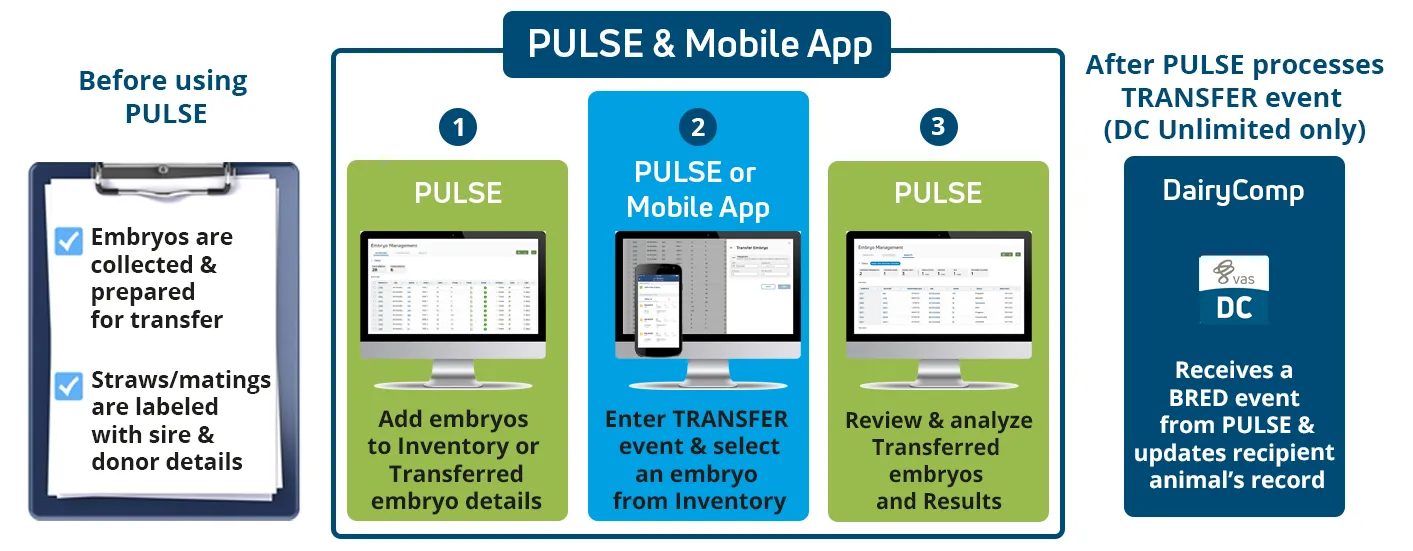
The TRANSFER event is a PULSE-only event added to recipient animals for embryo transfers. PULSE allows you to manage your embryo inventory and enter TRANSFER events in web or the mobile app.
Expand the sections below to learn more:
You can add a TRANSFER event from the mobile app or web in two different ways:
From web, select an embryo from the Inventory tab to open its side panel. Then use the Transfer Embryo shortcut to add a TRANSFER event.
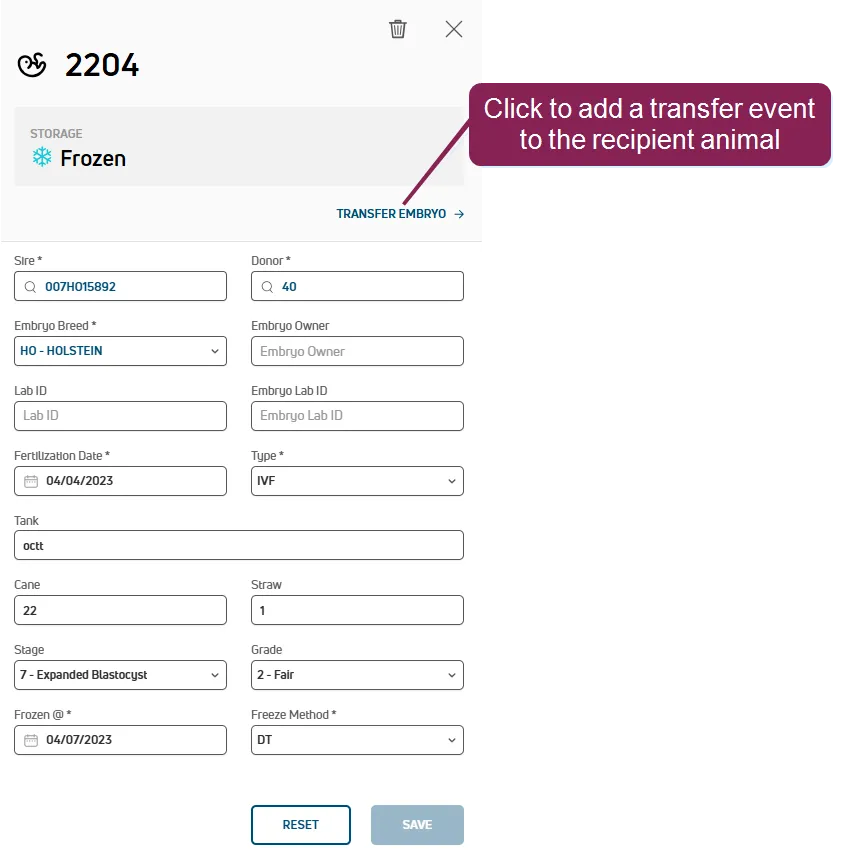
IMPORTANT: If the embryo does not meet the requirements for transfer, the option is not available from the side panel. See Embryo Requirements for TransferEmbryo Requirements for Transfer to learn more.
From the recipient animal's CowCard or the mobile app, add a TRANSFER event for the recipient animal. Add the required embryo details to save the event.
TIP: PULSE makes it easy to find or add your embryo in the side panel from web or in the mobile app! Search for an embryo, choose an embryo from inventory, or add a new embryo. When adding TRANSFER events from web, you can also filter or sort your embryos.
Expand the topics below to learn more about TRANSFER event details:
The female who provided the embryo or oocyte (sometimes referred to as the donor dam). When you search for a donor female, the app only locates matching females within your herd. The search retains your history so that you can easily select the same donor female(s) again. Once you choose the donor female, the Donor field displays its ID.
If you do not find this embryo's donor female in your search, you can enter it manually (see instructions below).
If the donor female you need to choose is not shown in the search results, you can enter its ID manually. Type the exact ID in the search bar, and you have the option to add it anyway. The app will display the exact ID you enter for the donor female.
TIP: In the mobile app, the selected identifier determines which keyboard layout is presented when entering the donor. If you need to enter letters and numbers, you may need to change the selected identifier to change the keyboard.
The breeding code for the selected recipient female. Tap this field to select from a list of available breeding codes.
If you have the required permissions, you can view or edit the Breeding CodesBreeding Codes in PULSE or the Breeding Code Table in DC305 for DC Unlimited dairies. These breeding codes are used mainly for extra information regarding the breeding, such as a standing heat, prostaglandin usage, embryo transfer, etc., with a specific veterinary application.
- Sire: The bull whose semen was used to fertilize the donor's egg to produce the embryo. If this column shows Pool, it means that an oocyte was fertilized by IVF from a pool containing the semen of multiple sires.
- Donor: TThe female who provided the embryo or oocyte (sometimes referred to as the donor dam).
- Embryo Breed: The embryo breed. Select from the standard list of NAAB breeds.
- Fertilization Date: Date the donor egg was fertilized using the sire semen.
- Recovery Type: The recovery type used:
- Flush is used for embryos
- IVF for in vitro fertilization (oocytes)
- Other for neither of the above
- Tank: The liquid nitrogen storage tank containing the cane with the embryo's straw.
- Incubator: The warming unit containing the embryo's straw or mating.
- Cane: The container holding the embryo's straw.
- Mating: A description of the embryo mating details, such as sire, donor, and fertilization date. May contain multiple embryos.
- Straw number: Number of the straw holding the embryo. Canes contain multiple straws and each straw holds a single embryo.
- Stage: The stage at which the embryo was harvested:
- 1 Unfertilized
- 2 Simple Celled
- 3 Early Morula
- 4 Morula
- 5 Early Blastocyst
- 6 Blastocyst
- 7 Expanded Blastocyst
- 8 Hatched Blastocyst
- 9 Expanded and Hatched Blastocyst
- Grade: The quality of the embryo:
- 1 Good
- 2 Fair
- 3 Poor
- 4 Dead (or Degenerating)
- Lab ID: Identifier for the lab from which the embryo was purchased.
- Lab Embryo ID: Identifier for the embryo from the lab. This value differs from the PULSE Embryo ID.
- Embryo Owner: Name or company that owns the embryo.
- Frozen Date: Date the embryo was frozen.
- Freeze Method: The method used to freeze the embryo:
- Direct Transfer (DT) is the process of using high levels of cryoprotectant to quickly cool an embryo to freezing. A common cryoprotectant used for this process is ethylene glycol.
- Slow is the process of using low levels of cryoprotectant and a programmable freezing machine to slowly lower the temperature of the embryo to freezing.
- Recipient: The animal that received the embryo transfer. Including the Recipient and Transfer details automatically adds a TRANSFER event to the recipient animal. See Import Transferred EmbryosImport Transferred Embryos for more information.
- Transferred Tech: The embryo technician who completed the transfer.
- Transferred Date: Date the embryo was transferred to the recipient.
- Breeding Code: The code associated with the breeding activity. Check your dairy's Breeding CodesBreeding Codes for more details on each code.
See Tips for Embryo Transfers in PULSETips for Embryo Transfers in PULSE for more help with the TRANSFER event. After your TRANSFER events are added, use the TransferredTransferred and ResultsResults tabs from web to review progress and track outcomes.
PULSE completes a variety of checks to keep your embryo transfer data as accurate as possible. The following sanity checks are done throughout the process:
- If an animal was BRED within 10 days, TRANSFER events cannot be added and PULSE flags the animal in an error message:
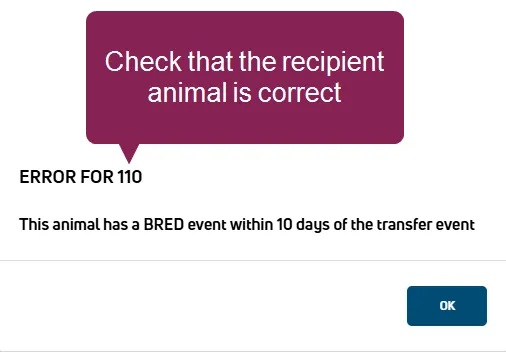
Be sure to check that the recipient animal is correct when you see the BRED error message.
- If an animal is pregnant, the TRANSFER event cannot be deleted. If you made an error, first delete the reproduction event (BRED, PREV, PREG, OPEN, ABORT, FRESH, SOLD, or DIED), and then delete the TRANSFER event.
- PULSE warns you if you attempt to add a second TRANSFER event to the same animal within 7 days.
- Transferred embryos default to an unsuccessful status if results are not added within 280 days.
When you add events from web or the mobile app, your updates are sent to PULSE and then on to DairyComp for DCU dairies (WiFi or data connection required).
When the Platform receives the completed TRANSFER event from the mobile app, it makes the following updates:
- Records an TRANSFER event and sets the EDAY to the date the event was completed or diagnosed.
- If an embryo from inventory was used for the transfer, moves the embryo from Embryo InventoryEmbryo Inventory to the Transferred EmbryosTransferred Embryos tab.
- Adds the event details for any new embryos to the Transferred EmbryosTransferred Embryos tab.
After the embryo transfer is completed and processed from either web or mobile, the embryo moves from Embryo InventoryEmbryo Inventory to the Transferred EmbryosTransferred Embryos tab. Then, when the recipient animal is checked and confirmed PREG, OPEN, ABORT, FRESH, SOLD, or DIED, the embryo moves to the Embryo ResultsEmbryo Results tab.
When DairyComp receives a completed TRANSFER event from PULSE, it processes the following changes:
- Records a BRED event and updates the RPRO status for all completed animals in the TRANSFER event.
- If the Embryo Age is defined in the TRANSFER event, then the BRED event is back-dated based on the Age entered. For example, if the embryo is 7 days old and today is 8/21/19, then PULSE TRANSFER event is recorded as 8/21/19, and DairyComp will receive a BRED event dated 8/14/19.

- If the Embryo Age is not defined in the TRANSFER event, then the date of the transfer is used for the BRED date.
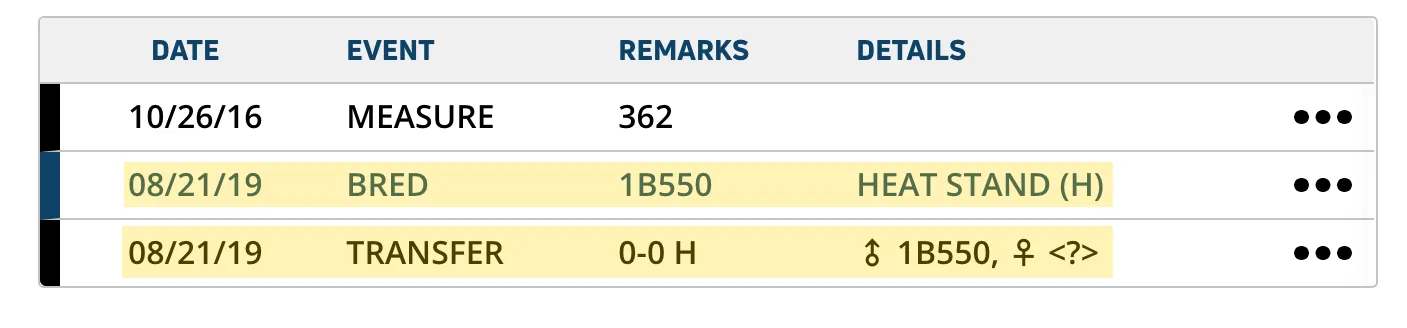
- Assigns the embryo an ID, which is auto-created from the data entered in PULSE TRANSFER event. This ID stays with the embryo for the entire duration of the pregnancy.
- Records the embryo's sire ID as the SIRC.
- Clears the recipient's ETDAM (donor female) value once the embryo is transferred to the recipient female.
- If DairyComp receives an embryo transfer event for a pregnant animal, it updates the animal's record to show a status of Vet Code 6 = ABT?.
- When DairyComp later receives a FRESH event for the recipient female, then the embryo transfer is marked as "successful."