Embryo Results
The Results tab in the Embryo Management page lists the outcomes of embryo transfers, including pregnant animals, live births, and other details.
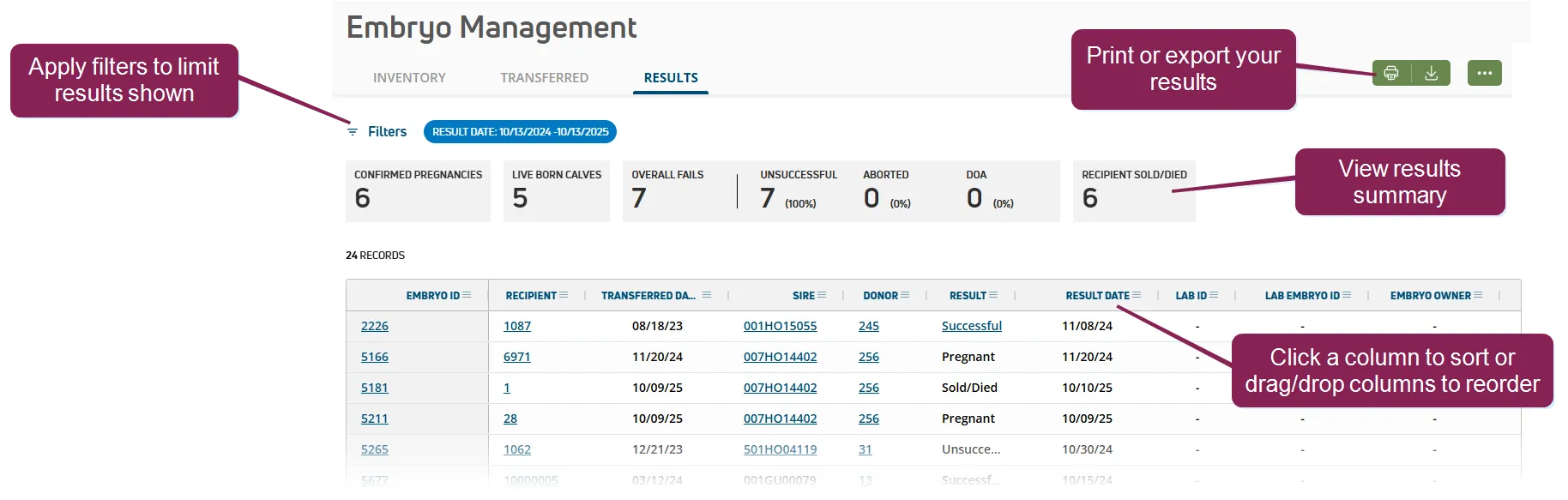
Filter transferred embryos: Use the filters to limit which results are shown. For instance, you may want to only view successful transfers or those performed by a specific tech. Check the Show discarded embryos box to include embryos that were discarded.
View a summary: A summary quickly shows the total number of confirmed pregnancies, live born calves, failures, including abortions and dead on arrival animals, as well as transfer recipients that have been sold or died. The summary adjusts as you apply filters to your view.
View transferred embryo details: Click the Embryo ID to view a side panel with additional details. Scroll to the right if necessary to view additional information on your results.
- Recipient: The animal that received the embryo transfer.
- Transferred Date: Date the embryo was transferred to the recipient.
- Sire: The bull whose semen was used to fertilize the donor's egg to produce the embryo. If this column shows Pool, it means that an oocyte was fertilized by IVF from a pool containing the semen of multiple sires.
- Donor: TThe female who provided the embryo or oocyte (sometimes referred to as the donor dam).
- Result: Embryo transfer outcome:
- Aborted: The transfer resulted in a pregnancy, but the fetus was aborted.
- Discarded: The embryo was not transferred to a recipient.
- DOA: The transfer resulted in a pregnancy and full-term birth, but the calf was born dead.
- Pregnant: The transfer resulted in a pregnancy.
- Successful: The transfer resulted in a pregnancy and live calf birth.
- Sold/Died: The recipient animal was sold or died before results were captured.
- Unsuccessful: The transfer did not result in a pregnancy. Result date: The date of the latest PREG, OPEN, ABORT, FRESH, SOLD, or DIED event.
- Transferred Tech: The embryo technician who completed the transfer.
- Breeding Code: The code associated with the breeding activity. Check your dairy's Breeding CodesBreeding Codes for more details on each code.
Sort transferred embryo results and customize your view: Click a column heading to sort by that column, or drag and drop the column to change the order of your view. You can also customize your view in other ways:
Interactive column headers allow you to arrange the data into a way that's most useful to you. Depending on the features available for each column, you can add new columns of data, rearrange and reorder them, and filter some columns. To access these features, click on the column menu in the column you want to change.
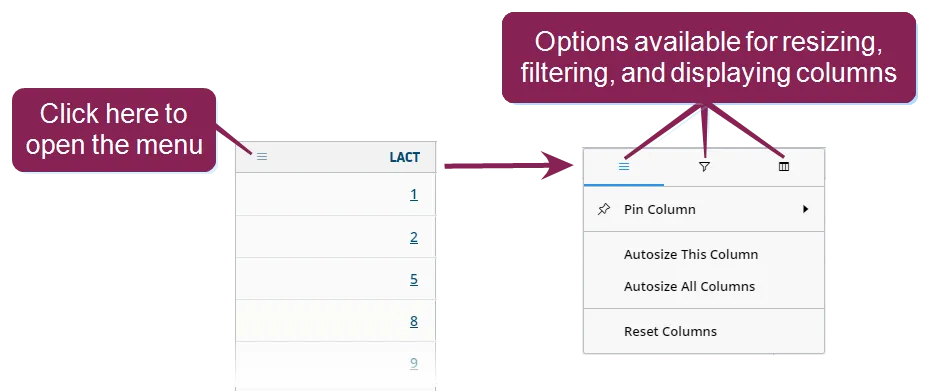
The top menu can contain three different options—one for resizing the column, one for filtering the data displayed in the column, and one for controlling which columns are displayed. Each menu contains various ways for manipulating what's shown on the page.
Expand the sections below to learn more:
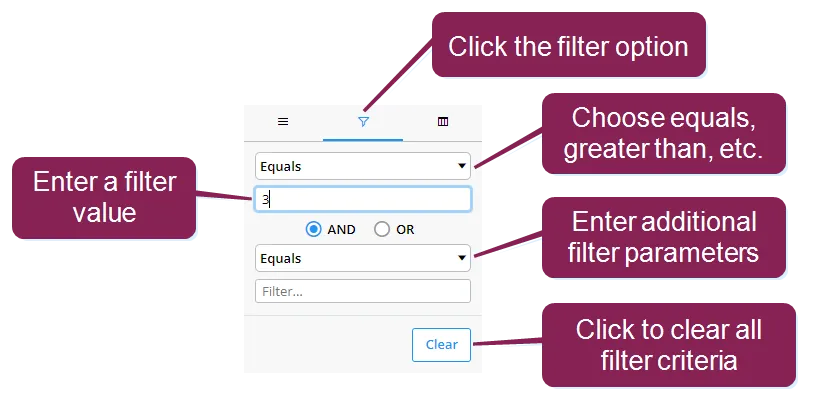
Some columns that contain numeric values can be filtered to show only certain data. For example, to filter the Lactation column so that only animals with a lactation value of 3 display, click the filter option, and then use the fields to create your filter.
You can reorder the way columns display by clicking in the header of the column you want to move and dragging it to its new location.
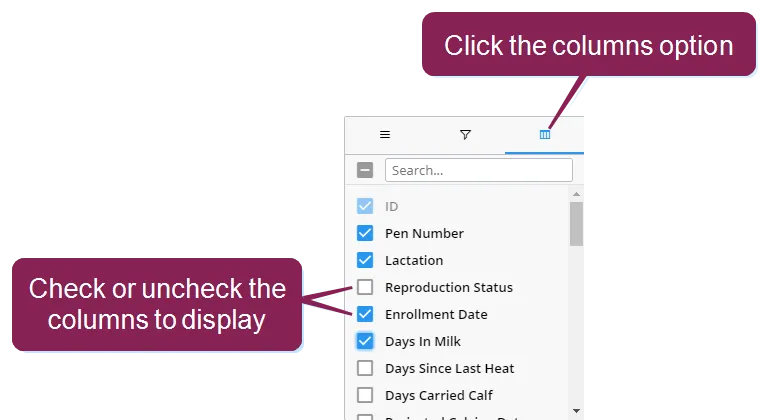
To add or remove columns from the page, click the columns option and then check or uncheck the boxes to select which columns to display.
You can also remove columns by clicking on the header of the column you want to remove, holding down the mouse key, and dragging the column up and out of the table.
Use the green buttons  on the top right of the page to print or export the list in one of two formats: PDF and CSV. The list will print/export with the current filters applied.