ENTER Command
Use the ENTER command to change stored item values for multiple animals at once. After you build and execute the ENTER command, PULSE generates a report that lists the updated item values.
In the command linecommand line, build your ENTER command using the following format:
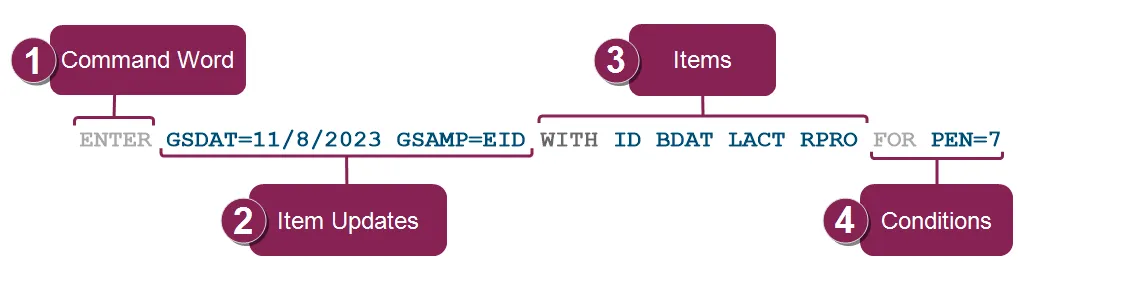
Command Word: Start by typing the command word, ENTER, to indicate that you want to change stored item values for multiple animals at once.
Item Updates: Enter the new values for the stored items you want to change.
In the command example, GSDAT=11/8/2023 and GSAMP=EID indicates that PULSE needs to update the genomic sample date (GSDAT) to the entered date and the genomic sample ID (GSAMP) to the animal's EID.
See the topics below to learn more:
- You can't use the ENTER command to change calculated item values and some stored item values. For example, you can’t change an animal's pen using the ENTER command. Instead, use a MOVE event to implement a pen change.
- You can update a stored item's new value to match another existing item's value. For example, you can change an animal's GSAMP value to its EID value by entering GSAMP=EID. Items: Type the items you want to include in your report. Items define the data you want to see in your report.
In the command example, the items are ID, BDAT, LACT, and RPRO, which tells PULSE to include columns for the animal ID, birthdate (BDAT), lactation number (LACT), and reproductive code (RPRO) in the report.
Conditions: Type the conditions to only update the animals that match the criteria.
In the command example, PEN=7 indicates that PULSE should only update item values for animals in pen 7.
Click Execute to implement the changes. PULSE then generates the Results ReportResults Report, which you can find on the Report HistoryReport History page.
You can also view the changes on your dairy's Change LogChange Log or an affected animal's Change LogChange Log in its CowCard.
See the following ENTER command examples, but note that some item names may not match your item names. Learn more about item names in Item DefinitionsItem Definitions:
ENTER CUT=1 WITH ID PEN LACT DSLH FOR VC=3
ENTER FLAG=1 WITH ID PEN TRMDT LACT DCC DIM FOR ID=123,456,678
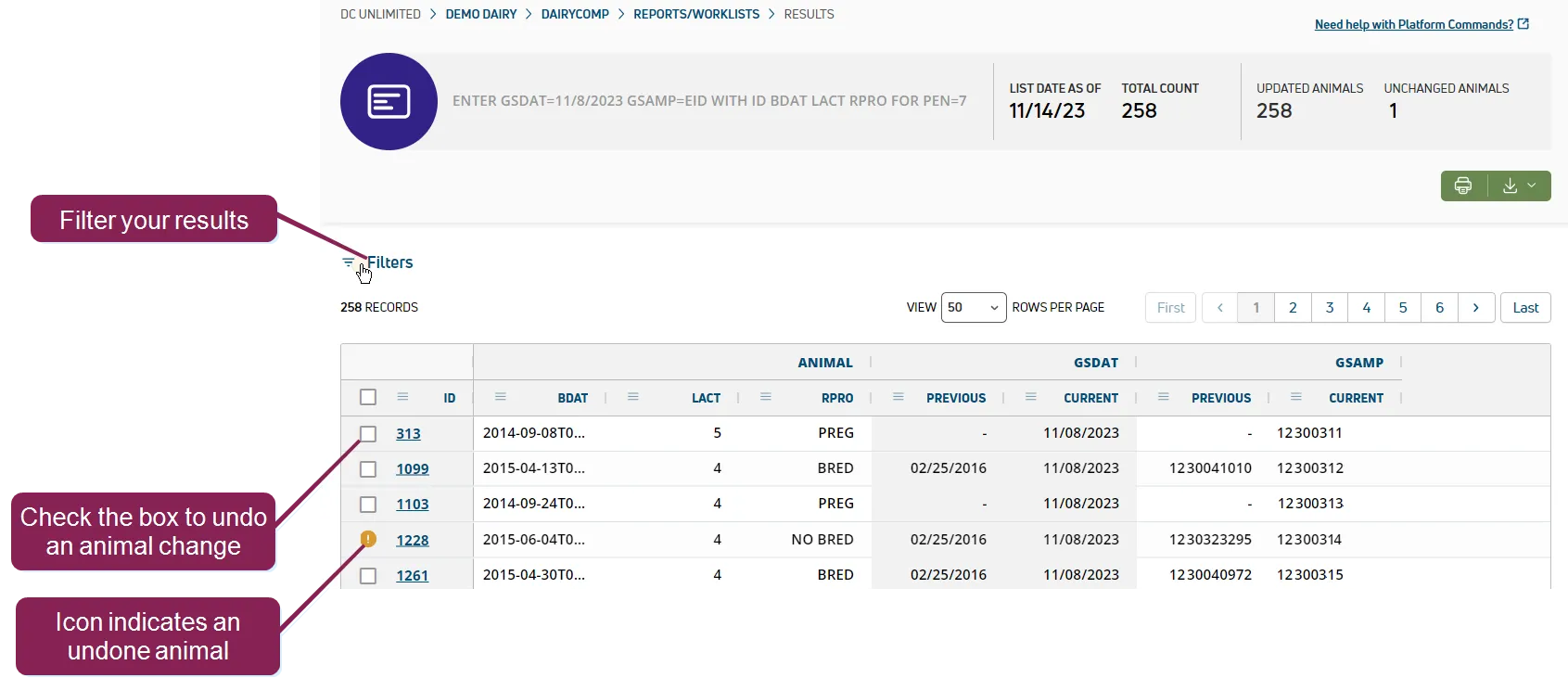
After you execute your ENTER command, PULSE generates a report that lists all updated animals and the previous and current stored item values.
See the topics below to learn more:
- UNDO changes for individual animals: When PULSE first generates the report, you can check the box next to any animal and click UNDO UPDATE in the upper right corner of the table to revert the change for the selected animal(s). You can only undo changes from the Results Report page. If you leave the Results Report page, you can go to the animal’s CowCard to edit the item.
- Filter your results: Click Filters in the upper left corner of the table to search for an animal by its ID or to filter the results by the following animal statuses:
- Unchanged: PULSE did not update the animal's stored item because the new value matched the previous value.
- Invalid: PULSE did not update the animal's stored item because the new value was invalid. For example, a value might be invalid because the stored item can't be set to a negative number or a certain date.
- Updated: PULSE successfully updated the animal's stored item.
- Undone: PULSE successfully updated the animal's stored item, but it was manually reverted back to the previous value.
- Check old and updated item values: The report shows the previous item value and the current item value. If there’s a “-” under the PREVIOUS column, the stored item had no value before the command was executed.
- Include more items in your report: Use WITH statements in the ENTER command to include additional details in the generated report. For example, you may want to include the animal ID, birth date (BDAT), lactation number (LACT), and reproductive code (RPRO) to use the report to its full potential.
- Command LineCommand Line
- View Report HistoryView Report History