Item Definitions
2 min
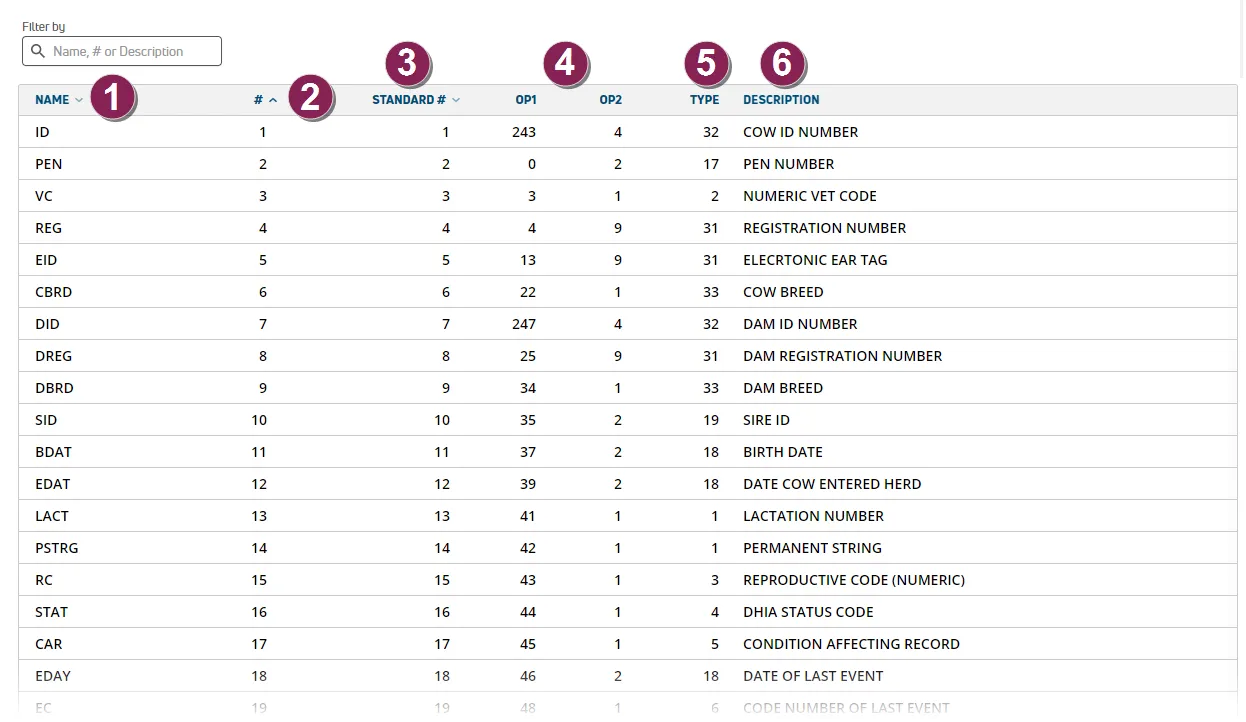
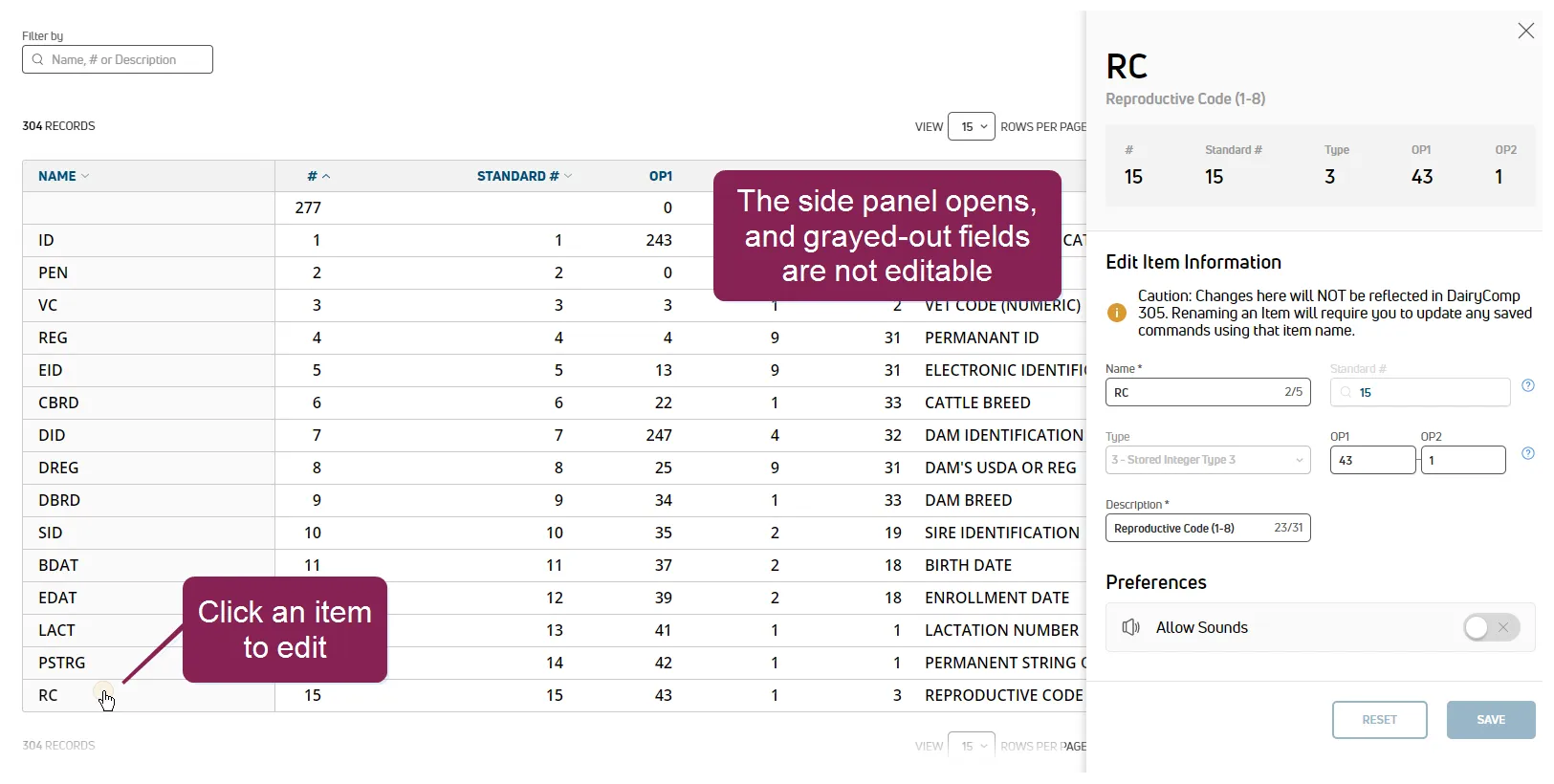
required permissions all users assigned to a role with herd read permissions can view this feature only users who are assigned a role with herd configuration permissions can edit data or customize settings the ability to edit and customize select fields may also depend on which version of pulse you are using (dc unlimited or ) see the topics below to learn more know your vas pulse version docid 5i7xv63wgmrxmsotyjaaa edit dairy user permissions docid\ gw6zx7tfc4ihsbrtozc v manage dairy roles docid 9yjukdzfab0kko1hw0mxj the item definitions page displays detailed information on all items configured for your dairy dairies include standard, predefined items commonly used throughout the industry dc unlimited dairies may also have custom or dairy specific items pulse items capture specific animal data points, including numbers, dates, animal status, and milk production details that are critical to managing your herd these data points are the foundational components of vas data analysis and daily management tools, including reports, worklists, and pulse widgets you can find this feature under the dairycomp/mydc menu docid\ ezfejzdkbcfov b69aupr > settings docid\ ezfejzdkbcfov b69aupr option on the general settings tab with the correct permissions, dc unlimited subscribers can view additional item details and edit their settings mydc subscribers can only edit item descriptions view item definitions see item details illustrated in the example below name pulse item name # pulse item number standard # if standard, the number for the item pulse uses existing dairycomp 305 standard item numbers, as well as an expanded set of pre defined standard items (2000+) see dairycomp standard items docid\ hcc6a5ztho8ukczhes9nn for more information op1/op2 item type configuration values operands op1 and op2 control the data points provided for the item type item type common types include stored items (dates, numbers, strings) and calculated items (ages, dates, expected or estimated values) description pulse item description edit item definitions users with permissions to edit this page can make adjustments to item information follow the steps below to continue click a row to open the side panel and edit an item's details fields available for editing are visible in the panel and fields that are grayed out cannot be changed important use caution when renaming items because it can interfere with your saved commands docid 773 9mqbjtwjyi14dvda1 if you rename an item here, you must update it in your saved commands as well editing guidelines item names are limited to 5 characters, including spaces standard # ranges 1 89 default items (cannot be modified) 90 1023 custom items 1024 1999 on the fly items 2000+ platform items types include stored items (dates, numbers, strings) and calculated items (ages, due dates, expected or estimated values) item types are not editable in pulse op1/op2 are operands, and are configuration values that control the data provided for the item op1 and op2 cannot be modified for item types 1 48 descriptions are limited to 31 characters, including spaces the allow sounds option enables audible cues from the sounds docid\ aioi9n8ooxhtrjbqixt1q page to be played in the mobile app when tapping or scanning animals in a complete your edits and click save when done pulse processes and saves your updates pulse also sends your changes to dairycomp for dc unlimited dairies related topics dairycomp standard items docid\ hcc6a5ztho8ukczhes9nn