Event Definitions
All users assigned to a role with Herd Read permissions can view this feature. Only users who are assigned a role with Herd Configuration permissions can edit data or customize settings.
The ability to edit and customize select fields may also depend on which version of PULSE you are using (DC Unlimited or MyDC). See the topics below to learn more:
- Know Your VAS PULSE VersionKnow Your VAS PULSE Version
- Edit Dairy User PermissionsEdit Dairy User Permissions
- Manage Dairy RolesManage Dairy Roles
The Event Definitions page allows you to view detailed information on all configured events, including any custom or dairy-specific events. Events capture key animal activities that are vital to managing your herd, such as reproduction items (freshening, pregnancy, breeding), location information (movement between pens), and illness details (diagnoses, treatment). Events are critical in supporting VAS data analysis and daily management tools, including reports, worklists, and dashboard widgets. You can find this feature under the DairyComp/MyDC menuDairyComp/MyDC menu > SettingsSettings option on the General Settings tab.
With the correct permissions, DC Unlimited subscribers can edit the details of events. MyDC subscribers can edit the descriptions and display colors of events.
IMPORTANT: Once an event definition is created, it cannot be deleted. You can, however, mark unused event definitions as inactive.
Click on an event definition to display its details in the side panel.
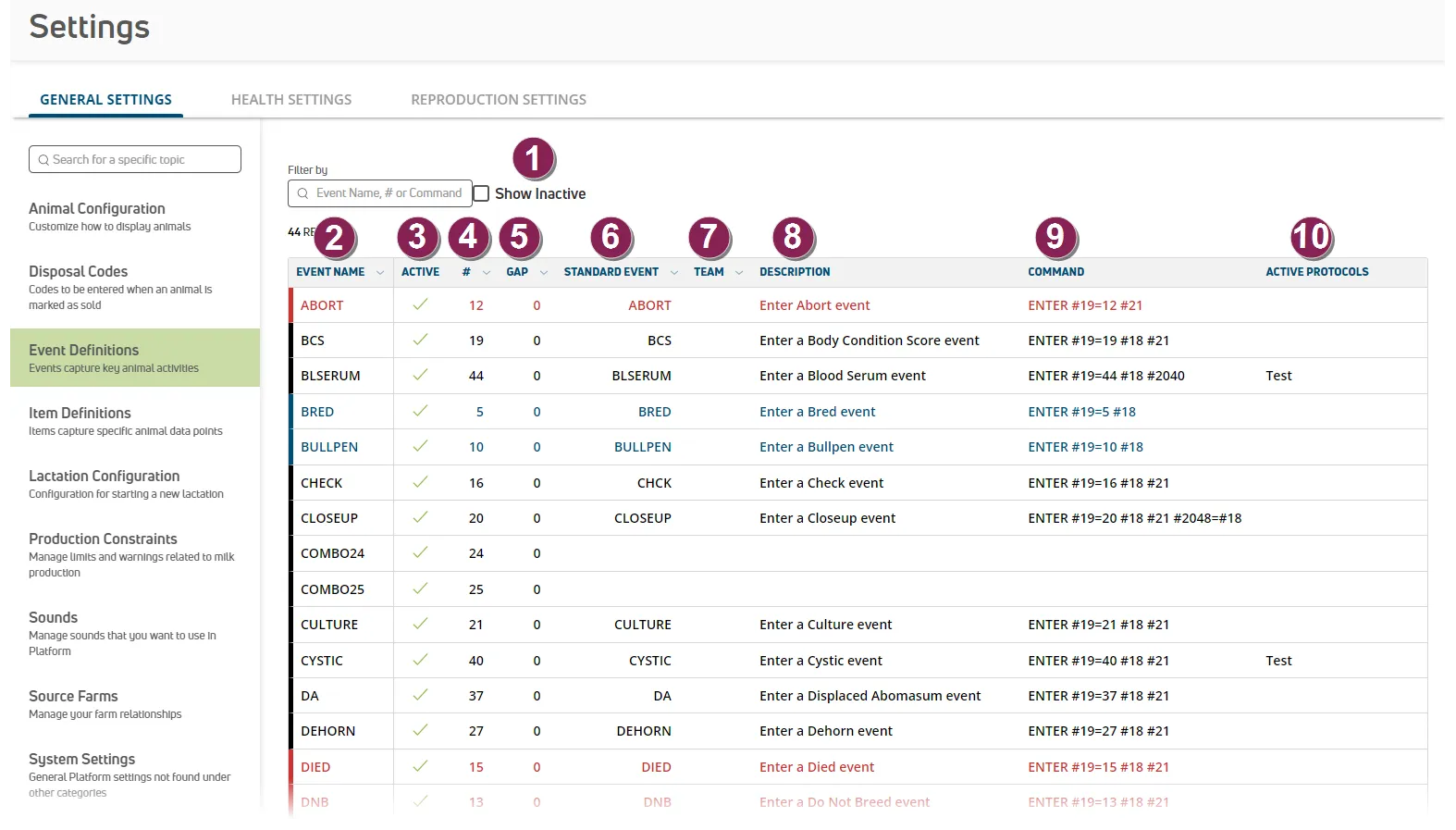
- Show Inactive: Check the Show Inactive box at the top of the page to view all available event definitions in the list. Once text is typed, click the Clear Filter(s) option to the right of the field to clear the text typed..
- Event Name: The event name.
- Active: Indicates whether the event definition is currently active or inactive.
- #: The event number.
- Gap: The number of days to translate multiple occurrences of the same event into a single event. For example, if the Gap for MAST is set to 28, then all MAST events for a 28-day period are considered a single mastitis diagnosis.
- Standard Event: The event type.
- Team: If applicable, the dairy team responsible for the event entry and management.
- Description: Text that describes the event definition. This field can contain up to 39 characters.
- Command: DC305 command that generates the event.
- Active Protocols: Any protocols that are currently active for the event.
Most of the details for an event can be edited, such as event name, description, and whether the event is active.
Click on an event definition to display its details in the side panel.
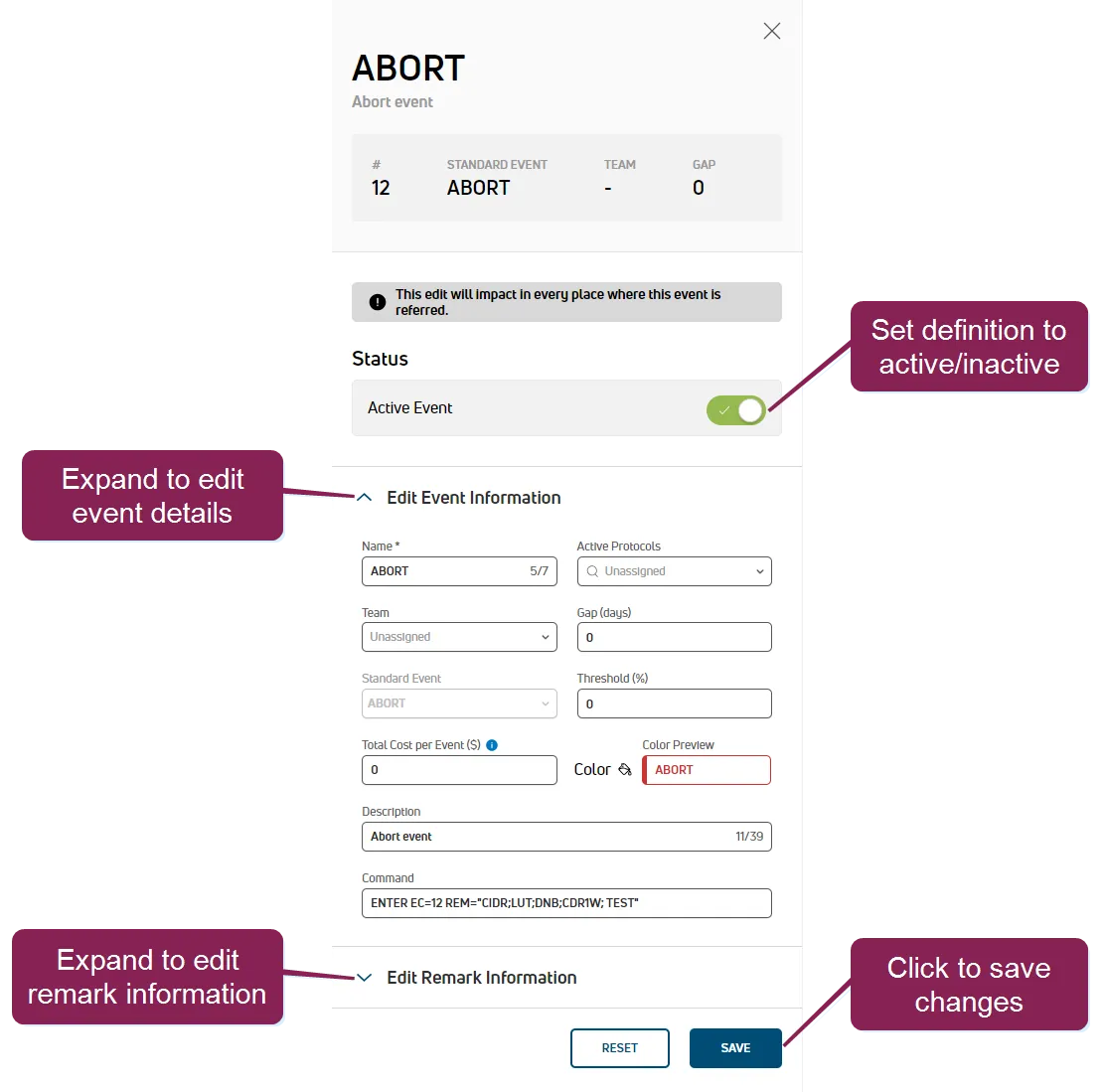
Expand the Edit Event Information section and click in any of the editable fields to change their values.
Most of the fields under Edit Event Information are the same as those described in Event DefinitionsEvent Definitions. Editable fields that are unique to the side panel include the following:
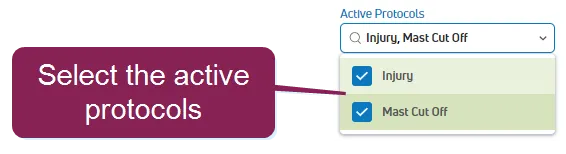
- Active Protocols: Click to choose the treatment protocols that are active for the event definition. See Events with ProtocolsEvents with Protocols for more information.
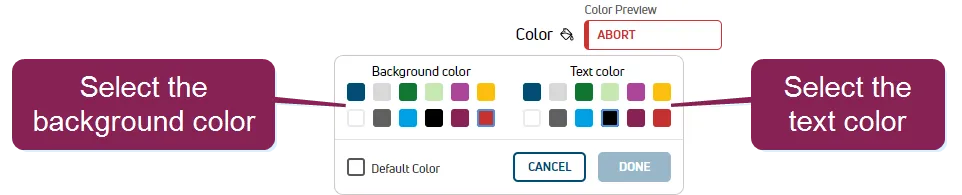
Color: Click to control the background and text colors for the event definition in the list.
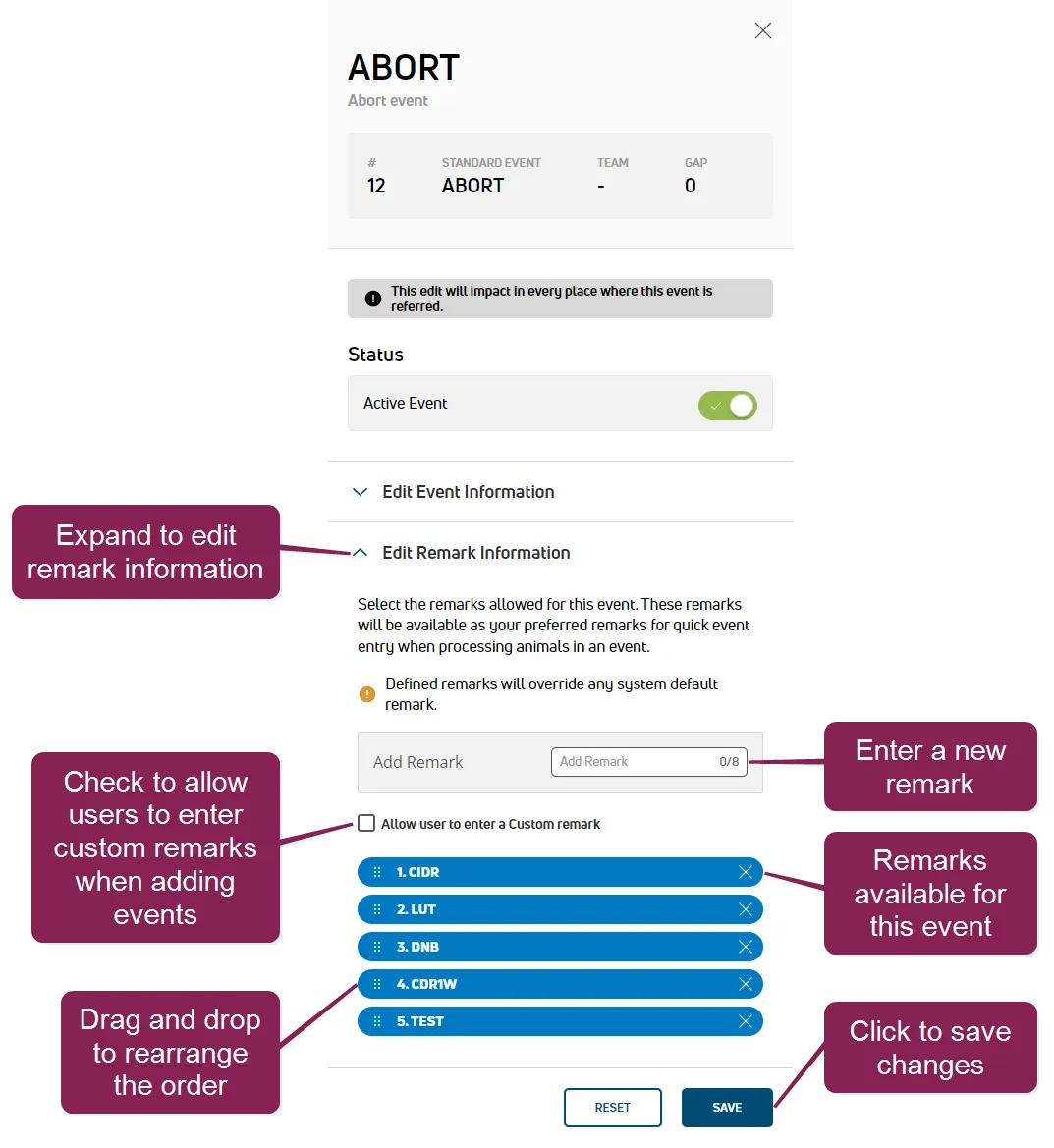
Expand the Edit Remark Information section to define a pick list of remarks or allow custom remarks for the event.
IMPORTANT: This feature is not supported in the original version of the VAS Platform (v1) mobile app. It is supported in PULSE and the DC on Mobile (v2) mobile app. See Mobile AppsMobile Apps and Known Issues and Workarounds (v1)Known Issues and Workarounds (v1) for more information.
Create a Remark Pick List: Use the Add Remark field to build a pick list of commonly used remarks for the event:
- Type the remark and press Enter to save it as a pick list item.
- Each new remark is displayed as a blue list item below the field.
- You can drag and drop each remark to rearrange the pick list order.
- Click the X on the right side of a remark to delete it.
Allow a Custom Remark: This box is displayed after you add at least one remark:
- Check the Allow user to enter a Custom remark box to allow technicians to enter a remark of their choosing when adding the event for an animal (instead of forcing selection from the remarks pick list).
- This allows technicians to leave the remark blank as well.
Follow the guidelines below when adding event remarks for events:
- The event remarks entered for the event are stored in REM item #21 and are based on the DairyComp command language.
- If a remark entered already exists, the system displays an error message.
- All remarks entered are available in a pick list when adding the event. See Enter EventsEnter Events to learn more about adding events in the mobile apps, and see Add EventsAdd Events and View Animal DetailsView Animal Details to learn more about adding events in PULSE.
- When remarks are entered for an event that automatically generates a remark (for example, a MOVE event definition, etc.), the remark takes precedence over the automated remark.
- When adding an event with a protocol (for example, a MAST event, etc.), the protocol's REM overrides the event remark.
- The total number of characters that can be entered for a remark is displayed on the right side of the Add Remark field. Your current Cowfile version determines how many characters and remarks can be added to the overall event definition for your dairy.
Cowfile V8 allows 127 total characters for the overall event definition, and Cowfile V9 or greater allows 1024 total characters.
The system calculates in total how many characters have already been added to the overall event definition and then limits the remarks accordingly. The limit is for the total remark definitions between the pick list and custom remark field (if one is allowed).
Each individual remark has a character limit, which is displayed at the end of the Add Remark field. Each remark you add to your pick list uses characters from the total limit.
For example, let's say the system determines that you have Cowfile V8 with a total limit of 127 characters, and you've added 7 pick list remarks that are 16 characters long. At this point, you have used 112 of your total 127 characters. You now have 15 characters left. You can enter one more pick list remark that contains up to 15 characters, or you can enter several shorter remarks, as long as the remaining items do not exceed 15 total characters (for example, you could create three 5-character remarks, or five 3-character remarks, or fifteen 1-character remarks, etc.).
Remember that custom remark characters count toward this limit, so if you want your users to be able to enter their own custom remark, be sure not to use all the characters up with your pick list items.
When the total number of characters allowed in remarks for your Cowfile version has been reached, a message is displayed that directs you to contact supportcontact support to update your Cowfile version and the Add Remark field is disabled for the event.
If you wish to revert back to the event definition's original values, click Reset.
Once you're done editing the information, click Save.
PULSE displays a message at the bottom of the page indicating that your changes have been saved.
Some events support additional optional data. For instance, the FRESH event includes Height, Weight, and BCS value as optional details. Click the toggle to enable additional details for the event.
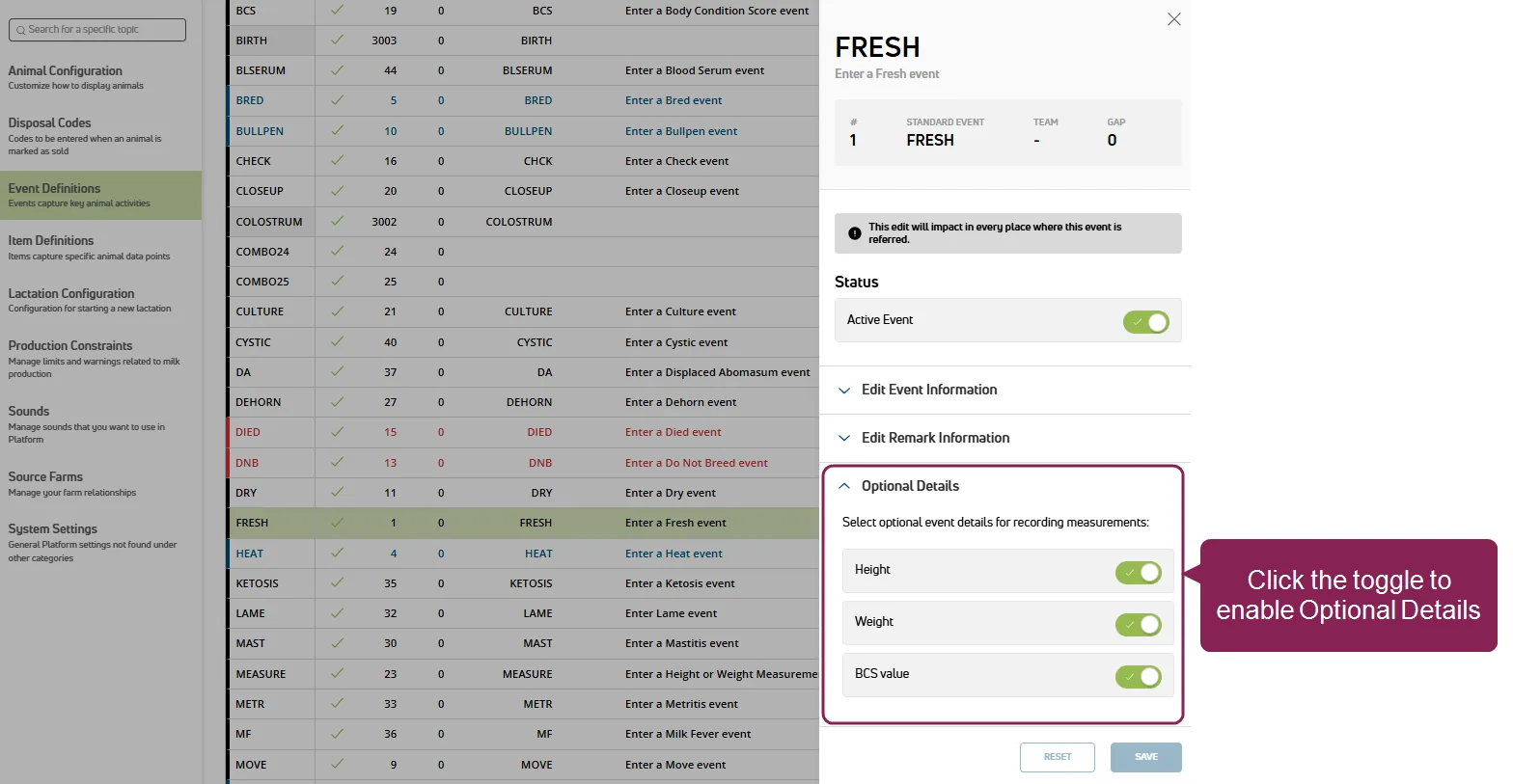
See Event DefinitionsEvent Definitions to learn more about events with optional details.