What's New in FeedComp?
Check out the latest features and improvements in FeedComp.
⚠️ IMPORTANT: Update all devices to the latest version to maintain a reliable connection and avoid sync issues. Using different versions of the app at your farm can cause app loading delays during feeding. VAS recommends setting all feeding devices to auto-update. See FeedComp App Auto-Update to learn more.
REMINDER FOR FEEDERS: Be sure to keep the FeedComp app running whenever you are out feeding. Do not close the app or lock your device until active feedings are completed.
See FeedComp Tech Specs and System Requirements to confirm your devices meet all requirements.
FeedComp Release v1.4.4083 - September 2026
This release focuses on improving device connectivity and giving you more flexibility when managing overnight loads.
Enhancements
- Detailed feeding history: The Feed History reportFeed History report now includes more details to help you troubleshoot feeding issues. You can now see the actual time delay between steps, and any ingredients or pens that were skipped are now highlighted for better visibility.
- Flexible overnight load options: If an overnight load is started by mistake or plans change, you can now abort the load or choose Start dropping to deliver the feed right away. This prevents mixer equipment from being locked up unnecessarily.
- Automatic scale reconnection: The app now automatically resumes searching for your Bluetooth scale whenever you bring FeedComp back to the foreground, ensuring your scales reconnect without needing to restart the app.
Bug Fixes
-
MOBILE ONLYOvernight load unlocking: Resolved an issue where scheduled feedings could become locked or greyed out after being paused, allowing you to select and resume overnight loads as expected.
-
MOBILE ONLYScale connection stability: Fixed intermittent connection drops during extended idle periods and resolved issues where scale details failed to persist after reconnecting.
FeedComp Release v1.4.4005 - September 2026
This release focuses on bug fixes and stability to give you a more consistent experience. These updates fix data syncing errors to help you keep reliable feeding records.
Bug Fixes
The following improvements apply to the mobile app:
- Improved data syncing: Updated the sync process so one bad record no longer stops all your data from uploading.
- Smoother app experience: Removed a brief loading sound that played between ingredients and fixed a screen flickering issue on the Android home screen.
FeedComp Release v1.4.3976 - August 2026
This release focuses on improving reporting accuracy, authentication stability, and visibility into the feeding process.
Enhancements
The following improvements apply to FeedComp on PULSE:
- Detailed feed history: The Feed History report now provides more visibility into how loads were completed. You can see if a feeder manually advanced, ignored, or aborted specific ingredients or drops.
- Improved drop tracking: The Feeding History report now displays three values for drops: Expected (original schedule), Adjusted (recalculated based on actual ingredient loading), and Actual (what was delivered). These values provide a clearer picture of how loading errors impact pen delivery.
- Accurate alternate recipe reporting: When an alternate recipe is active, the original recipe's usage now correctly shows as zero, and its associated pens are greyed out. The alternate recipe page also inherits and displays the feedings from the recipe it replaces.
- Load error report metric: The system now displays an Error % on the Load Error Report in PULSE.
- Refined ingredient projections: Ingredient usage and projections now exclude scheduled premixes until they are actually fed. This change keeps the Ingredients page aligned with the Projections report for more reliable inventory planning.
Bug Fixes
-
MOBILE ONLYAuthentication stability: Resolved an issue where feeding devices could get stuck on a loading spinner or fail to log in due to expired tokens. The app now proactively refreshes tokens to prevent session interruptions.
- Time zone accuracy: Fixed a reporting discrepancy where feeding data times did not match the dairy's local time zone for farms in Mexico.
- IOFC report accuracy: Fixed a bug in the Income Over Feed Cost (IOFC) report where incorrect pen counts and missing premix costs caused inaccurate daily feed cost calculations.
FeedComp Release v1.4.3911 - August 2026
This release includes new features for specific beta sites. For non-beta locations, your current FeedComp experience remains unchanged.
FeedComp Release v1.4.3759 - July 2026
This release focuses on improving application stability and reliability, particularly for offline workflows and scale synchronization.
Enhancements
- Automatic device log uploads for all users: All users, including non-feeders, now have their app logs automatically sent to VAS during the nightly reset. This helps our support team fix any technical issues you run into much faster.
- Updated help links: All Help buttons in the app now point to our new, improved Online Help Center.
- Report filter settings don't change: Report filters now work correctly. The filters stay in place when you switch between reports, making it faster and easier to compare report data.
Bug Fixes
- Faster scale reconnection: Improved how the app communicates with Scale-Tec POINT scales. If you drive out of range, the app will now find and reconnect to your scale much faster once you’re back in range.
- Persistent login sessions: Fixed an issue that was causing the app to log users out too often. You should now stay logged in even after closing the app or syncing data, so you can get to work without re-entering your password every time.
- Report access: Resolved an issue where reports could not be opened because an inaccurate error message blocked access.
- Zone integration memory: The app now remembers your previously used zone integrations when you switch between dairies. You won't have to "re-activate" your device as often when logging back in.
- Accurate first-ingredient loading: Fixed a bug where leftover weight on the scale could cause the app to skip the first ingredient. The app now correctly zeros out the scale at the start of every new mix.
- Ingredient editing crash: Fixed a crash that happened when removing a location while editing an ingredient.
- Batch feeding navigation: Fixed the scrolling on the batch feeding screen so you can easily see and select pens at the bottom of long lists.
- Improved audio stability: Fixed issues where the loading alarm would keep buzzing even after you skipped or finished an ingredient.
FeedComp Release v1.4.3688 - June 2026
This release focuses on improving application stability and reliability, particularly for offline workflows and scale synchronization.
Bug Fixes
- Offline stability for Android devices: Resolved a critical issue where the application would crash on Android devices when starting a batch premix load in offline mode.
- Restored offline weighback functionality: Feeders can now perform weighback loads without an active internet connection.
- Improved audio stability: Addressed a stability issue where missing volume settings could cause the application to crash during a load.
FeedComp Release v1.4.3660 - June 2026
Enhancements
- Improved Topcon auto-advance: For a smoother feeding process without manual intervention, the app now includes improved auto-advance behavior. If the scale doesn't signal that you've reached the correct weight, the app automatically moves to the next ingredient after 3 seconds. This supports a more efficient feeding process even if there are minor communication delays with the scale.
Bug Fixes
- Feed history missing mixer: We fixed an issue where the mixer name was occasionally missing from load and drop histories in PULSE.
Enhancements
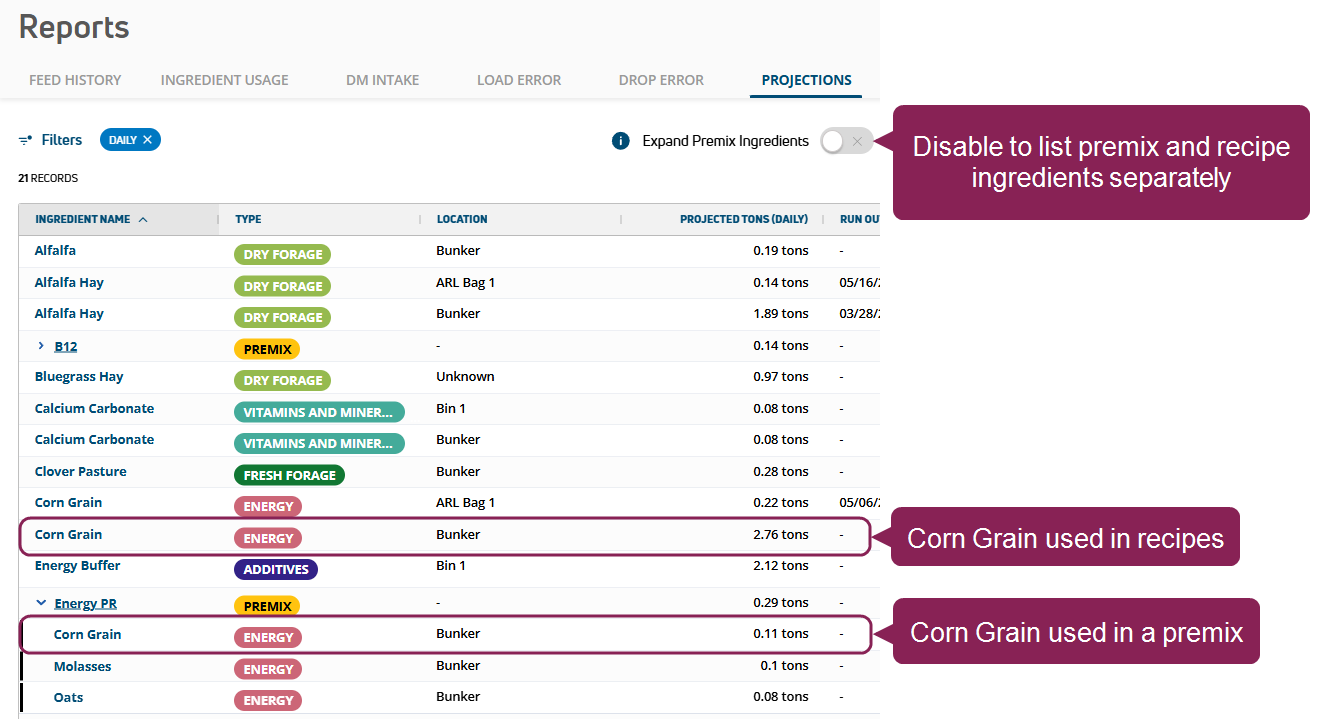
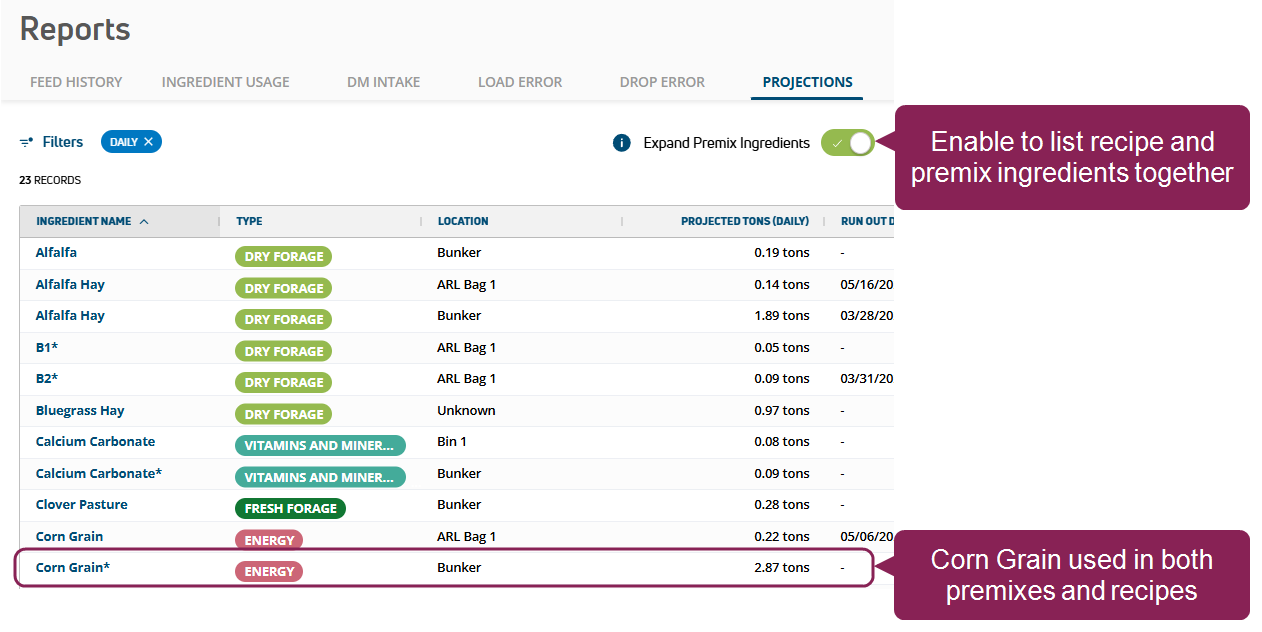
Improved premix reporting: In this release, we made it easier to identify and distinguish premixes (and their ingredients) from recipes in the following reports:
- In the Projections Report, use the new Expand Premix Ingredients toggle to control how premix ingredients are shown in projections to prevent double counting.
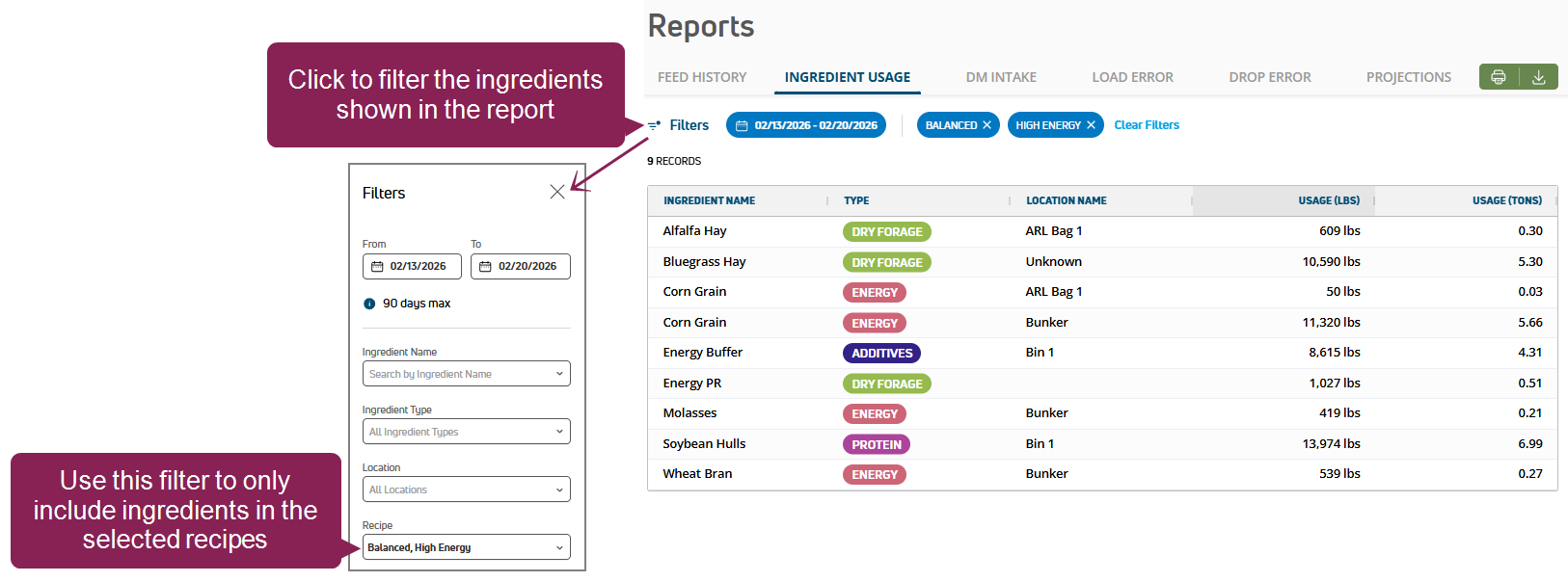
- The Ingredient Usage Report now lists whether ingredients are used in premixes or in regular feedings, so you can fully understand your actual ingredient costs and better forecast your herd's feeding needs.

View Earlier Releases - 2025.