Configure FeedComp Settings on PULSE
The Settings page allows you to view and edit FeedComp on PULSE settings and configuration options in PULSE. You can find this feature under the FeedComp Menu.
NOTE: These settings are required for FeedComp to function correctly, but they are typically configured by VAS Support or a VAR during onboarding, based on the Feed Data Sheet—not during day‑of installation. They are presented here for reference in case users need to review, add, or modify any of the settings described in this section.
TIP: Permissions to edit settings depend on your subscription and role.
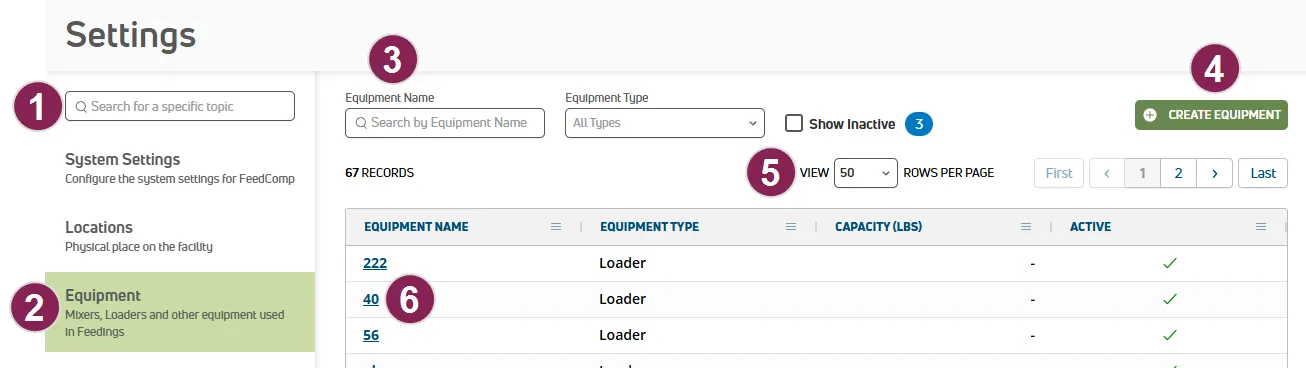
Follow the guidelines below when working with the FeedComp Settings page:
Search for Settings: Use the Search field at the top left to find a specific Settings page.
Select an Option: Settings for the option selected are displayed on the right side of the page. Choose from the following settings options:
Filter the List: Some settings include additional search features at the top of the page.
Add New Items: Some settings allow creation of new items at the top right of the page.
View Rows Per Page: Select an option to change how many records are displayed on the page, and click the navigation options to jump to a specific page.
View More Details: Click a name to open the side panel and view additional details.