Earlier Releases - 2025
FeedComp Release v1.4.3089 - December 2025
Enhancements
ENHANCEMENT Topcon Digi-Star scale integration improvements: The app’s user interface now matches the Topcon Digi-Star scale indicator. We also made several improvements to ensure that the integration is easier to set up and use. See Configure a Topcon Digi-Star scaleConfigure a Topcon Digi-Star scale for instructions on how to properly configure and connect the scale to the FeedComp App.
FeedComp Release v1.4.3069 - December 2025
Bug Fixes
- App stability improvements: We strengthened FeedComp's performance behind the scenes. Always keep FeedComp open during feedings for the best experience.
- View full pen details: Pen details are now fully visible across all devices. Previously, some details were cut off on some devices.
- Multilingual translation updates: Throughout the app, we refined some phrasing and improved some translations to ensure the best feeding experience in any supported language.
- Metric conversion fixes: Reports now correctly display units in kilograms. We are also introducing an update that rounds metric values and removes unnecessary decimal values. This enhancement will be fully available in an upcoming release.
- Error message fix: Inaccurate error messages no longer pop up when you create a new ingredient or recipe.
FeedComp Release v1.4.3069 - December 2025
Bug Fixes
- App stability improvements: We strengthened FeedComp's performance behind the scenes. Always keep FeedComp open during feedings for the best experience.
- View full pen details: Pen details are now fully visible across all devices. Previously, some details were cut off on some devices.
- Multilingual translation updates: Throughout the app, we refined some phrasing and improved some translations to ensure the best feeding experience in any supported language.
- Metric conversion fixes: Reports now correctly display units in kilograms. We are also introducing an update that rounds metric values and removes unnecessary decimal values. This enhancement will be fully available in an upcoming release.
- Error message fix: Inaccurate error messages no longer pop up when you create a new ingredient or recipe.
FeedComp Release v1.4.3027 - November 2025
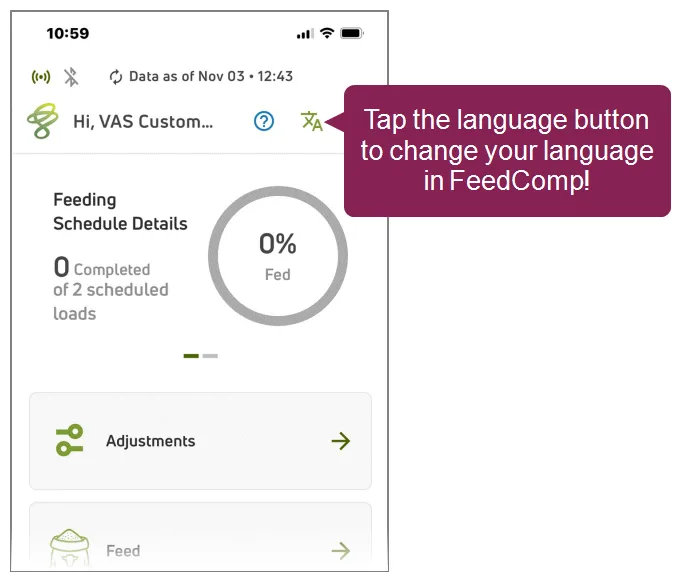
NEW FEATURE You can now use the FeedComp mobile app in your preferred language: This update adds multilingual support across the app interface, making it easier to navigate and interact with FeedComp in different languages. To change your language, tap the language icon  at the top right of any main screen or go to Account SettingsAccount Settings.
Supported Languages: English, Spanish, French, Italian, German, Polish, Russian, Chinese, Japanese, and Portuguese
Bug Fixes
App stability improvements: We’ve made several behind-the-scenes improvements to increase overall app stability. This update also resolves refresh and crash issues in both online and offline modes.
Report fixes: Navigation buttons in reports are now correctly disabled when no additional data is available.
Metric unit conversion corrections: Metric unit conversions are now calculated more accurately throughout the app.
FeedComp Release v1.4.2996 - October 2025
Bug Fixes
- Login and PIN Code stability improvements: You can now log in and enter your PIN code without errors or interruptions.
- Button UI corrections: Several button-related issues in the user interface were fixed. For example, the On Hold button now functions as expected during the feeding process.
- Error handling improvements: We’ve fine-tuned how error messages display so they show up correctly every time.
- Overnight Load refinements: We improved the overall functionality of Overnight Loads. Now ingredients and split feedings are listed correctly and the recipe's ingredient order is accurately followed.
FeedComp Release v1.4.2950 - October 2025
Enhancements & Bug Fixes
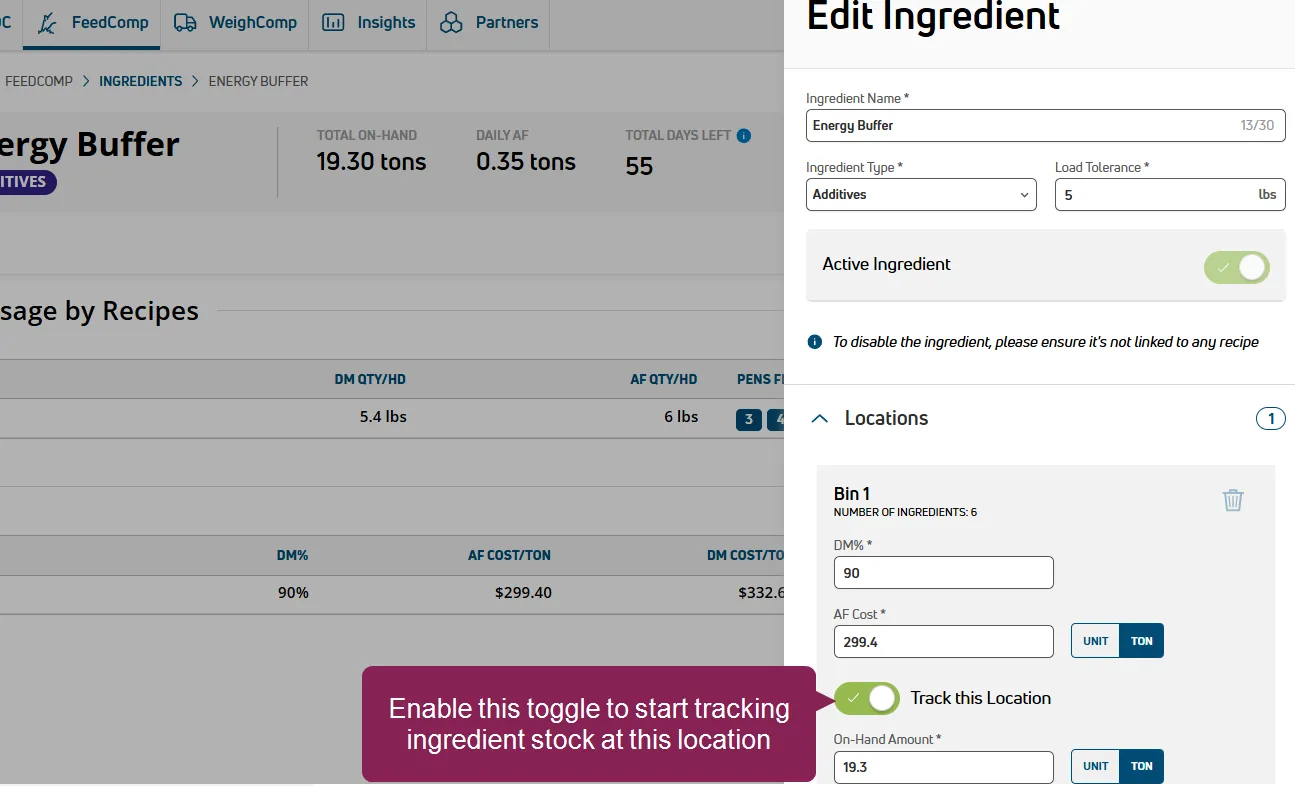
NEW FEATURE Track your inventory in PULSE! You can now monitor your inventory transactions at tracked ingredient locations. Whenever an ingredient is delivered, picked up, or adjusted in a tracked location, FeedComp updates your inventory to ensure your stock is always accurate and up-to-date. You can enable ingredient tracking when you add or edit an ingredient: click the Track this Location toggle to track the ingredient in a chosen location. See Track Ingredients at a LocationTrack Ingredients at a Location to learn more!
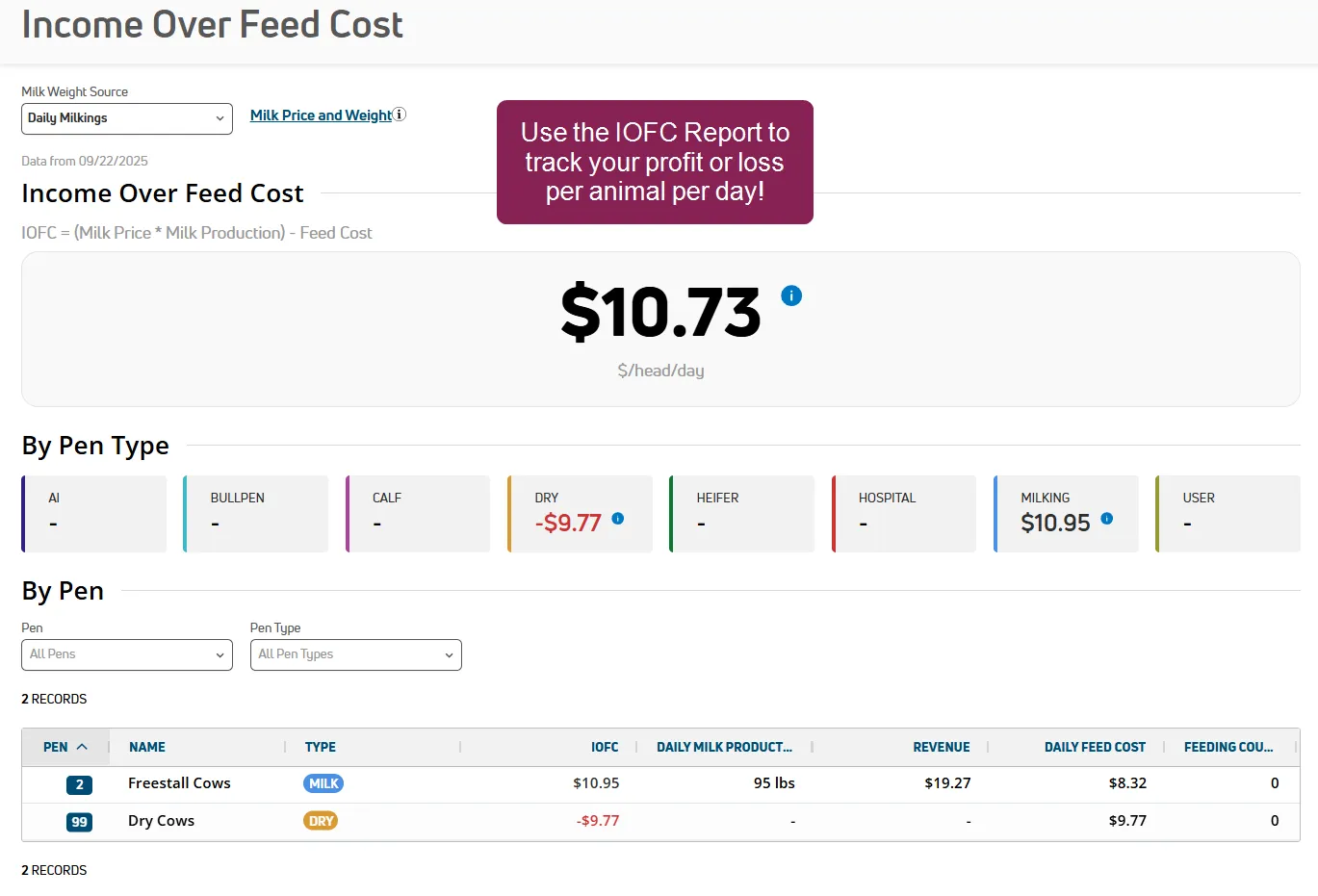
NEW FEATURE The Income Over Feed Cost Report tracks your profit or loss per animal per day. Use the Income Over Feed Cost report to see profit or loss per animal per day ($/head/day). This helps you spot costly pens, confirm ration changes with your nutritionist, and adjust milk price assumptions. See Income Over Feed Cost ReportIncome Over Feed Cost Report to learn more!
- Ingredient usage history fix: FeedComp now correctly tracks the usage history for premix ingredients.
- Completed loads update: FeedComp now marks loads as Complete after loading is done. Before you manually set a feeding to Complete, make sure you sync your data. Some feedings may appear Incomplete until the data is fully synced.
Updated Help Topic: Split Feeding Rules and Guidelines
We added some new guidelines to help guide you through different and complex split feeding scenarios. See the new FeedComp Rules for Handling Splits section in Adjust Feedings (mobile)Adjust Feedings (mobile) or Feedings (web)Feedings (web) to learn more!
FeedComp Release v1.4.2851 - September 2025
Enhancements & Bug Fixes
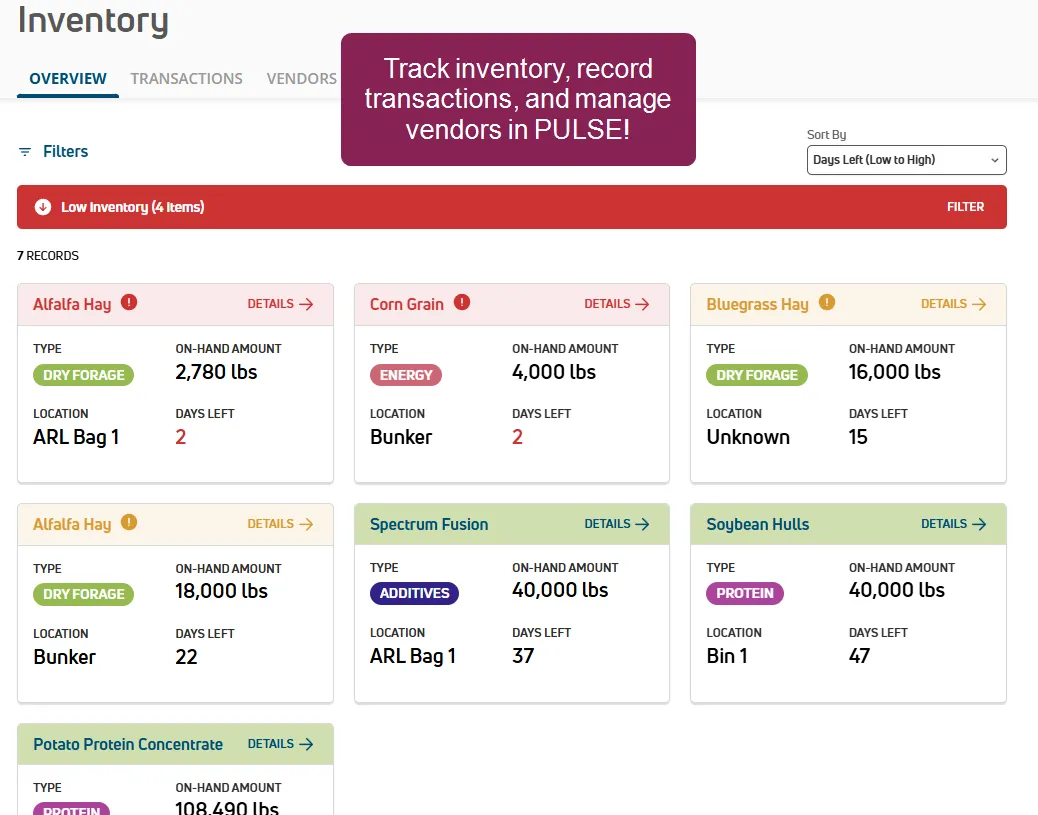
ENHANCEMENT Track and manage your Inventory in PULSE! Keep your feed operations running smoothly using FeedComp's inventory management tools that are already available in the mobile app! Now, you can monitor ingredient stock, costs, and usage in real time, track ingredients from delivery to pickup, record all inventory transactions, and manage your vendors in PULSE. See InventoryInventory to learn more.
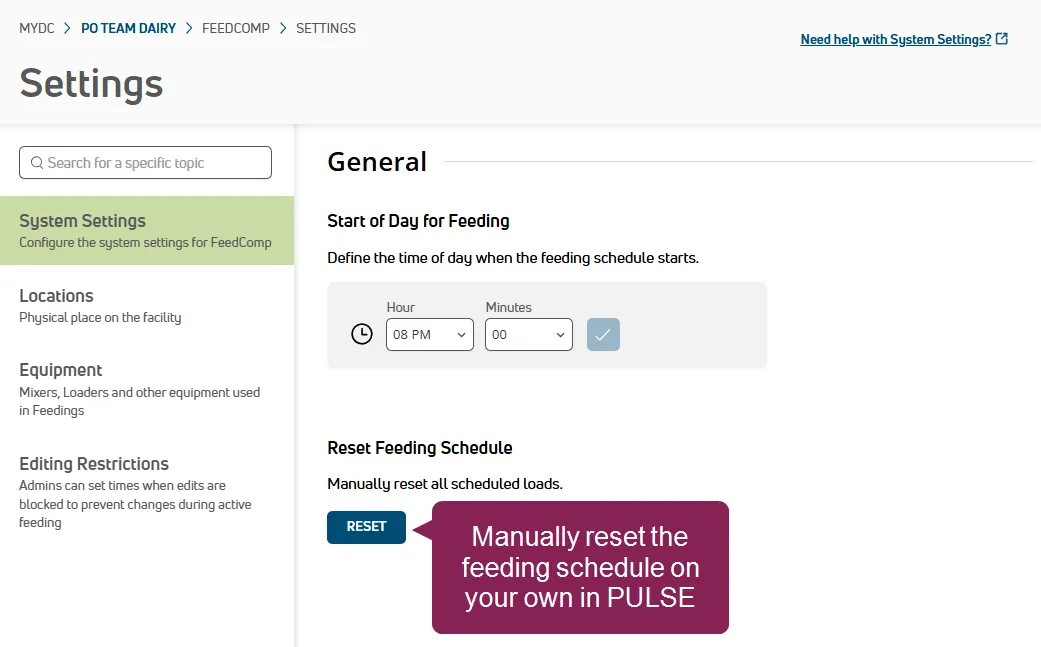
NEW FEATURE WEB ONLY Reset your Feeding Schedule in PULSE! After you have completed the day's feedings, you can now manually reset the schedule without having to contact Support. For example, if you need to complete an after-hours feeding before the next day, you can reset your feeding schedule and complete the feeding on your own. To learn more about resetting the feeding schedule, see Reset Feeding ScheduleReset Feeding Schedule.
NEW FEATURE Target DM/HD syncs across feedings and pens. When you update Target DM/HD in a pen, the change is automatically synced to a pen and vice versa. You no longer have to manually change DM/HD in both pens and feedings, which saves time and ensures that your data is always up-to-date.
- Ingredient load order improvement: FeedComp now maintains your ingredient sequence when you edit a recipe.
- Hold button usability: We updated the pause and play buttons to make them more clear and easier to use.
- Cost Unit display: Cost Unit displays now update correctly after switching locations and entering DM%.
- Multi-database loading support: Loads are now shown only for the selected dairy database, ensuring accurate totals on the main screen.
- Pen drop order improvement: When you drop a mix to multiple pens, FeedComp now maintains your pen order.
- Feeding record accuracy: Feeding history records, feed reports, and the feeding schedule now display only the most accurate and up-to-date information for improved clarity and reliability.
FeedComp Release v1.4.2798 - August 2025
Enhancements & Bug Fixes
NEW FEATURE Manage Split Feedings! FeedComp now automatically splits feedings when a recipe load exceeds the mixer capacity. FeedComp can split feedings when adding/editing feedings or when changing pen/feeding counts, and you can save or cancel the changes before feeding starts. FeedComp divides the load into equal parts, recalculates ingredients, and updates pen counts for you. By removing the need for feeders to calculate splits manually, this feature reduces errors, improves efficiency, and helps protect equipment from overload.
To learn more about managing split feedings in the mobile app or in PULSE, see Split Feedings (mobile)Split Feedings (mobile) and Split Feedings (web)Split Feedings (web).
- Duplicate record fix: The Load and Drop History reports no longer include duplicate records.
- Edit Feeding fix: FeedComp no longer displays an error message when you edit a feeding in specific situations. Sometimes, an error message was displayed if you tried to edit a feeding after creating it or if you edited a feeding, then changed the recipe to a premix.
- Offline sync update: FeedComp now correctly saves feeding history information during the offline sync process.
- Weighback report fix: The report for Weighback Filler Load feedings now shows the correct values for weighback ingredients.
- Time and Date format update: The app's Time and Date format now matches the format you choose in PULSE.
FeedComp Release v1.4.2734 - July 2025
Enhancements
NEW FEATURE Manage Weighbacks in PULSE! Weighbacks are now available in FeedComp on PULSE, in addition to the FeedComp App. Feed left over from a prior feeding is called a "weighback" in FeedComp. Weighbacks may also be called "refusals" or "cleanups." FeedComp allows you to capture weighbacks so that the leftover feed can be fed to animals in other pens or locations, included as a filler load in a recipe, or sold off farm.
See WeighbacksWeighbacks (web) to learn more about managing weighbacks in PULSE and WeighbacksWeighbacks (mobile) to learn more about managing weighbacks on the mobile app.
FeedComp Release v1.4.2734 - July 2025
Enhancements & Bug Fixes
-
MOBILE ONLYEquipment use fix: You can now use your equipment for overnight feedings and non-overnight feedings without seeing an error message that the equipment is already in use.
- Configure Scale-Tec POINT scales to ensure data syncs correctly: To ensure that your Scale-Tec POINT scale collects and shares data with the FeedComp App, you need to configure the scale when you first connect it. See ScalesScales to learn more.
FeedComp Release v1.4.2703 - July 2025
Bug Fixes
MOBILE ONLY First ingredient value fix: FeedComp now shows the correct values when you load your first ingredient.
FeedComp Release v1.4.2675 - July 2025
Enhancements & Bug Fixes
NEW FEATURE MOBILE ONLY Overnight Loads are now available on the FeedComp App! You can now mix loads overnight! Overnight loads optimize morning feeding routines by allowing feeding technicians to mix a feed recipe the night before, pause the feeding and store the mix in the equipment overnight, and resume the feeding the next morning. See Mix Overnight LoadsMix Overnight Loads to learn more.
NEW FEATURE WEB ONLY More reporting is available in FeedComp on PULSE! You can now view and analyze your Feed and Pen Feed History in FeedComp on PULSE! The reports organize the data that you collect in the FeedComp App and FeedComp on PULSE to provide insights that help you make better, informed decisions about your feeding practices! Click the links to learn more about each report: Feed History ReportFeed History Report and Pen Feed History ReportsPen Feed History Reports.
- Weighback calculation fix: The Weighbacks pick up screen now displays the correct ingredient amounts.
- Error message fix: FeedComp now displays an error message if you enter an invalid value on a metric farm.
- Alternate Recipe messaging updates: The FeedComp App now displays a message indicating that an alternate recipe has been successfully activated or deactivated, or to confirm that you want to activate a recipe.
- Autofill ingredient names fix: FeedComp now saves ingredient names that have been selected from the autofill library.
- Weighbacks feeding fix: FeedComp now correctly displays feedings in offline mode for Weighbacks with filler loads.
- Ignore button fix: The Ignore button is now visible for all feeding drops.
- Filler Load calculation fix: FeedComp now calculates Filler Loads' Feed DM Total for multiple pens correctly.
FeedComp Release v1.4.2573 - June 2025
Enhancements & Bug Fixes
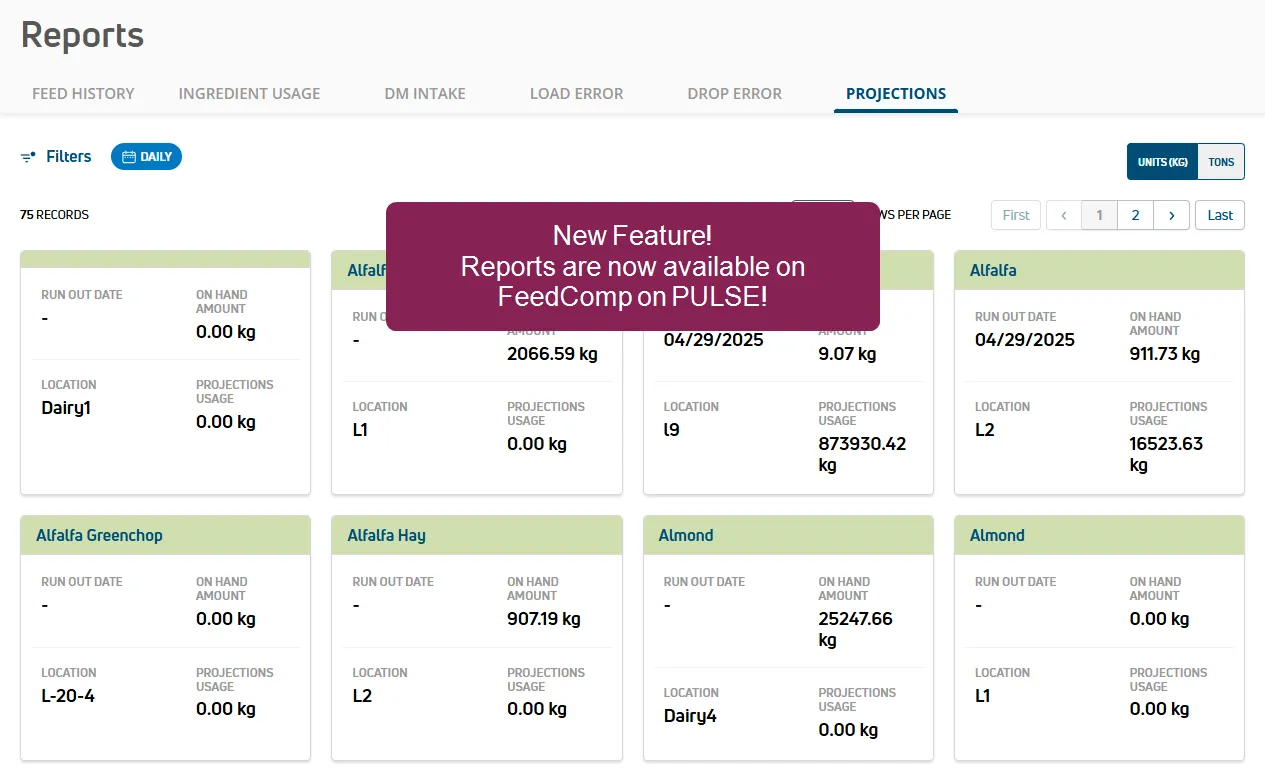
WEB ONLY Reporting is now available in FeedComp on PULSE! You can now view and analyze your feed data in FeedComp on PULSE reports! The reports organize the data that you collect in the FeedComp App and FeedComp on PULSE to provide insights that help you make better, informed decisions about your feeding practices! Click the links to learn more about each report: Ingredient Usage ReportIngredient Usage Report, DM Intake ReportDM Intake Report, Load Error ReportLoad Error Report, Drop Error ReportDrop Error Report, and Projections ReportProjections Report.
- Adjust Heifer pen type: To sync properly with DC305, the app now correctly assigns pen type 7 to Heifer pens and reserves pen type 6 for user-defined pen types. All farms currently feeding heifer pens should update to the new version of the app as soon as possible. The former version is not compatible with this change.
- Authentication bug fixes: You can now log in without encountering authentication errors.
- Projections report update: The Projections report now correctly displays On Hand Amount values for all records.
- Filler load calculation fix: Filler load values are now accurately calculated and displayed when creating a feeding.
- Pen number limit update: FeedComp now correctly enforces the allowed range of pen numbers when entering feed data.
- Self-referencing premix update: Premixes are now prevented from being reused as ingredients, ensuring valid recipe configurations.
- Feed mix reset fix: Feed mix records now update and reset properly when processing a feeding.
- Last Pen Drop Amount update: The Last Pen Drop Amount now matches consistently in the Report Card and Feed History report.
- Measurement conversion fix: The Ingredient Usage report now accurately converts values from Imperial units to Metric units.
- Ingredient location fix: Ingredient location values are now saved and displayed consistently in FeedComp.
- Feed Mix Name update: FeedComp now saves updated Mix Names while using the app in online mode.
- Feed Date addition: FeedComp now automatically records the Feed Date for all Feed History records.
- Start Weight and End Weight entry fix: Decimal values are now supported when entering Start Weight and End Weight for new transactions.
FeedComp Release v1.4.2543 - May 2025
Enhancements & Bug Fixes
- You can now assign Alternate Recipes! FeedComp now supports Alternate Recipes in the mobile app and in PULSE. If your dairy runs out of an ingredient, your feeding technician can select an alternate recipe to keep your herd fed until the ingredient is restocked. An alternate recipe can be used to add weighback ingredients to a feed mix and help you reduce waste. See Assign Alternate RecipesAssign Alternate Recipes to learn more.
- FeedComp on PULSE now prevents duplicate equipment names: If you create a duplicate equipment name, the app now shows an error message and prevents you from saving a duplicate.
- Fixed load and drop error calculation in reports: Previously, if you advanced multiple ingredients or drops, the FeedComp App may have incorrectly calculated the load error calculation and the drop error calculation. This issue has been resolved.
- The FeedComp App Schedule Mix cards now show Mix Total and Pen Count labels and values: Previously, the Schedule Mix cards did not correctly include the Mix Total or Pen Count information.
- Fixed the user interface for deactivating pens: We improved the app's messaging and usability when you deactivate a pen.
- The FeedComp App now correctly processes ingredient order changes if weighbacks are included: Previously, the FeedComp App would not save ingredient order changes in some instances, like if the recipe included a weighback.
- The Bluetooth connection status is now accurate on the Weighbacks screen: Previously, if you closed and reopened the FeedComp App, then navigated to the Weighbacks screen, the app showed that the Bluetooth connection was active. However, the app showed that the Save and start loading button was disabled. Now, the app correctly shows you when Bluetooth is not connected.
- The FeedComp App now displays Feeding History correctly if you have empty pens: Previously, the FeedComp App would not generate the Feeding History report if the dairy had more than two empty pens.
- The FeedComp App now shows weighbacks with filler loads in offline mode: When you enable offline mode and view Weighbacks, the app now shows filler loads correctly.
- Corrected the font appearance in various places: Fixed font size and font text color across FeedComp on PULSE.
FeedComp Release v1.4.2513 - May 2025
Enhancements & Bug Fixes
WEB ONLYManage FeedComp in PULSE: You can now manage some of your FeedComp settings directly in PULSE! Click the links below to learn more about managing the FeedComp SettingsSettings pages for your system settings, locations, and equipment:
- See System SettingsSystem Settings to learn more about the system settings you can manage.
- See LocationsLocations to learn how to create or edit a location, view ingredients at each location, and more!
- See EquipmentEquipment to learn more about adding or editing equipment.
-
MOBILE ONLYAdd audio alerts for your drops in the FeedComp App: The FeedComp App now includes an option to play a warning sound when your equipment is almost done loading or dropping feed. This audio cue helps the operator accurately finish the drop without needing to check the screen, which improves efficiency and focus during feeding! See Enable SoundsEnable Sounds to learn more!
- Fixed a measurement issue: We fixed an issue where user profile and dairy settings were not set to the same measurement system before ingredients were added.
- The FeedComp App now correctly shows AF and DM/HD: We resolved an issue where pen screens did not list the correct values for AF Amount or DM/HD in the FeedComp App.
- Feed mix pens are now visible in the FeedComp App: We fixed an issue where Feed Mix pens were not shown correctly in the FeedComp App.
- Recipe changes completed in Feeding Mode are now shown correctly in PULSE: Previously, recipes created in Feeding Mode in the FeedComp App were not shown correctly in FeedComp on PULSE. The issue has been resolved.
FeedComp Release v1.4.2342 - March 2025
Enhancements & Bug Fixes
- Set a weight acknowledgment threshold when setting up your mixing equipment! This ensures that ingredients are recorded correctly when their amounts are too small to be recognized by the scale while mixing. To set the threshold, see Create New EquipmentCreate New Equipment and Edit EquipmentEdit Equipment.
- Skip or ignore a pen while feeding! When you tap Skip
 , the ingredient or pen is temporarily skipped and moved to the end of the order so you can return to it later. When you tap Ignore
  , the ingredient or pen is skipped and removed from the order entirely. See Mix Scheduled FeedingsMix Scheduled Feedings for more information.
- View all upcoming feedings, ingredient loads, and pen drops at any time—even if today’s feedings are complete. See View Upcoming FeedingsView Upcoming Feedings to learn more!
- FeedComp can now play helpful sounds when while adding ingredients to the mixer or dropping loads at pens. See Enable SoundsEnable Sounds to learn more!
- We have made numerous improvements to the app’s display. The app now uses bigger, easier-to-read text, displays improved icons and buttons, and better supports multiple screen sizes.
- FeedComp now allows you to capture weighbacks so that the leftover feed can be fed to animals in other pens or locations, included as a filler load in a recipe, or sold off farm. See WeighbacksWeighbacks to get started!
- You can now view the unit of measurement used in FeedComp. Open your User AccountUser Account, then tap
 Settings to check whether your account uses the Imperial System or Metric System. You can update your measurement preference directly in Platform. See View Measurement SettingView Measurement Setting to learn more.