FeedComp App Auto-Update
3 min
Follow the steps below to enable automatic updates on supported mobile devices so the FeedComp app updates automatically without manual intervention.
🗒️NOTE: Steps and setting options may vary slightly depending on your device and operating system version.
⚠️ IMPORTANT: Enable auto-updates for the FeedComp app to stay current. However, set your device's operating system (OS) updates to install only during non-feeding hours (overnight). An OS update that triggers during feeding can force-close the app and interrupt your load.
Android Devices
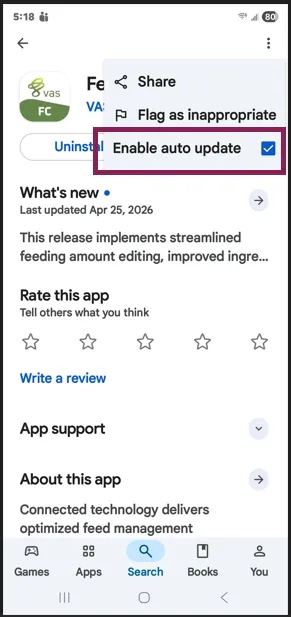
- Open the Google Play Store.
- Search for FeedComp.
- Tap the FeedComp app icon.
- Tap the three‑dot menu in the top-right corner.
- Select Enable auto update.
iOS (iPhone/iPad) Devices
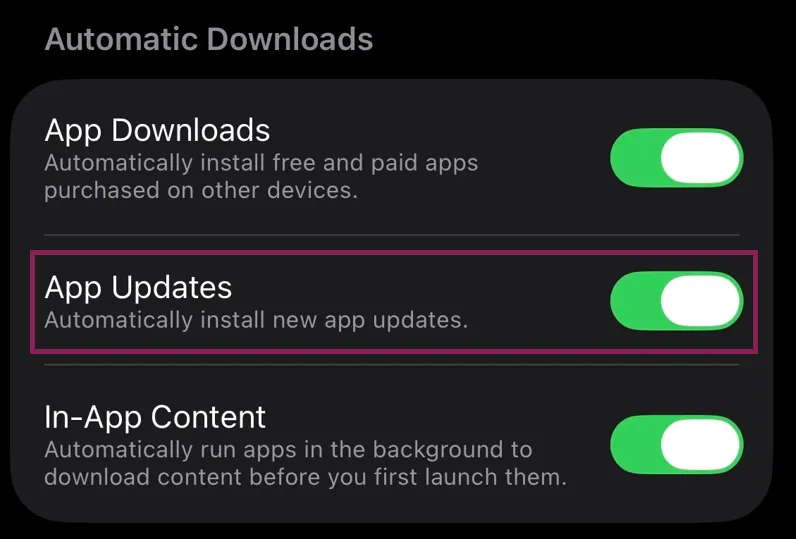
- Open the Settings app.
- Scroll down and tap App Store.
- Under Automatic Downloads, turn App Updates ON (green).
IMPORTANT: On iOS devices, you cannot enable auto‑updates for a single app. When App Updates are turned on, all installed apps update automatically.