View and Search Ingredients
The Ingredients page gives you a quick overview of your feed components. In PULSE, you can choose to view your ingredients as a list of cards or in a detailed table. If you are using the mobile app, ingredients always appear as cards for easy viewing on the go.
Select any ingredient to see its full details, including which recipes use it and exactly how much inventory you have at each location.
Search and Filter Ingredients
Use the search and filter options at the top of the screen to quickly find specific ingredients or narrow the list.
From PULSE on the Web
To refine the ingredient list:
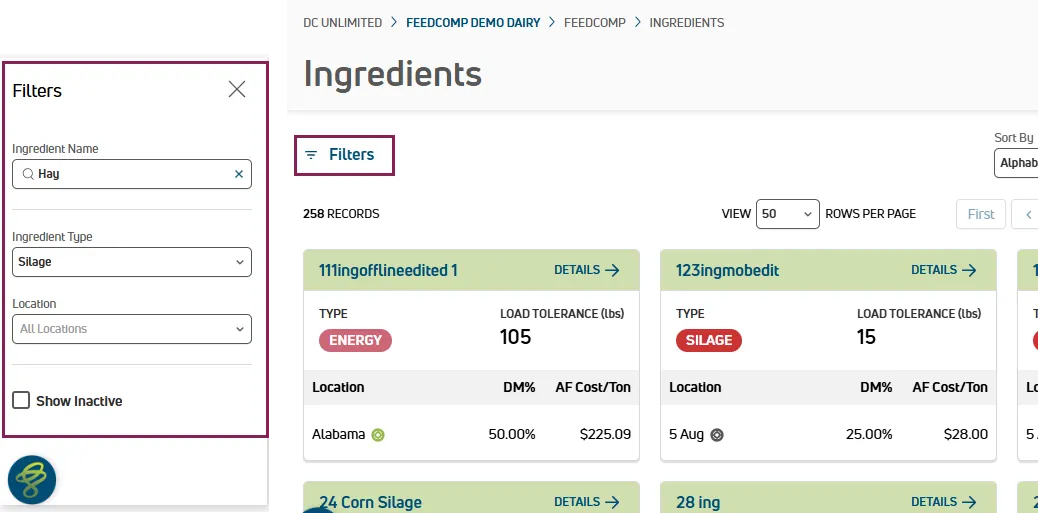
- Select Filters at the top left of the page to open the filter panel.
- In the Ingredient Name field, type all or part of a name to search.
- Use Ingredient Type to limit results to one or more types. You can scroll through the list or type to search within it.
- Use Location to show ingredients from specific locations. You can also type to search for a location.
By default, only active ingredients are shown. To include inactive ones, select Show Inactive.
To remove all applied filters and return to the full list, select Clear Filters.
From the Mobile App
Use the search and filter options at the top of the screen to narrow the list.
By default, only active ingredients are shown. To include inactive ones, tap the Inactive filter.
Sorting Ingredients (PULSE on the Web)
The PULSE interface provides two views for the ingredients list — Table and Cards — each with its own way of organizing ingredients.
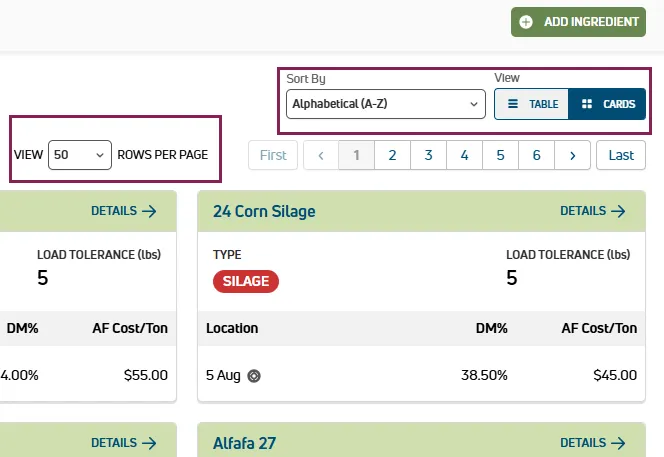
- Table view: Select a column header to sort the list by that column.
- Cards view: Select an option in Sort By at the top right of the page to change the sort order.
Use the toggle to switch between views.
Viewing Ingredient Information
Ingredient information is displayed at two levels: a summary view and a details view. The summary gives you a quick snapshot, and the details view provides the full picture including inventory status and recipe usage.
From PULSE on the Web
The following summary information is shown for ingredients in PULSE on the web:
- Ingredient Name
- Type: Shown as a color-coded label.
- Load Tolerance: The weight threshold that triggers auto-advance during loading.
- Location: The storage location where the ingredient is kept.
- DM%: The dry matter percentage. If stored in multiple locations, a value is shown for each.
- AF Cost/Ton: The as-fed cost per ton. If stored in multiple locations, a value is shown for each.
Select the Details link on any card or list row to open the full details view, which includes:
- Current On-Hand AF: The amount currently available on hand, as-fed, in tons.
- Daily AF: The daily as-fed usage in tons.
- Days Left: The estimated number of days before the on-hand amount is depleted.
- AF Projections: Estimated as-fed usage for the next 30, 60, and 90 days.
- Ingredient Usage by Recipes: A list of recipes using the ingredient, including DM weight per head, AF weight per head, pens fed, and daily AF usage.
- Locations: All locations where the ingredient is stored, including DM%, AF cost per ton, DM cost per ton, on-hand amount, and days left.
From the Mobile App
Ingredients are displayed as cards showing a brief summary. Tap a card to open the full details view, which includes all the information listed above. Tap Locations or Recipes to switch between viewing the ingredient by location or by recipe usage.
Important Considerations
Keep the following points in mind when viewing ingredients.
- For field definitions for DM%, AF Cost, and other terms, see Ingredients.
- Units (lbs or kg) are based on your account settings. See Edit Your User Account to change them.
- To make changes to an ingredient from the details view, see Edit an Ingredient.
To learn more, see the links below:
- Create an Ingredient: Add a new ingredient and assign it to a location.
- Edit an Ingredient: Update fields such as DM%, cost, load tolerance, type, and time delay.
- Deactivate or Reactivate an Ingredient: Deactivate or reactivate ingredients.
- Manage Ingredient Locations: Assign, remove, or transfer ingredients across locations, and enable tracking.