Edit an Ingredient
You can update your ingredient settings at any time to keep your feeding data accurate. When you change details like the name, cost, or dry matter percentage (DM%), FeedComp updates that information everywhere the ingredient is used. These changes take effect immediately, ensuring your recipes and costs stay up to date without any extra steps.
For field definitions and terminology, see Ingredients.
⚠️ IMPORTANT: The load tolerance setting controls when the app auto-updates during loading. See Load Tolerance for important cautions before changing this setting.
Edit an Ingredient using PULSE on the Web
Follow the steps below to edit an ingredient in PULSE.
- Navigate to the Ingredients page.
- Select the name of the ingredient in the table list or the Details link on the ingredient's card. The ingredient details page opens.
- Select Edit Ingredient at the top right of the page. The Edit Ingredient side panel opens.
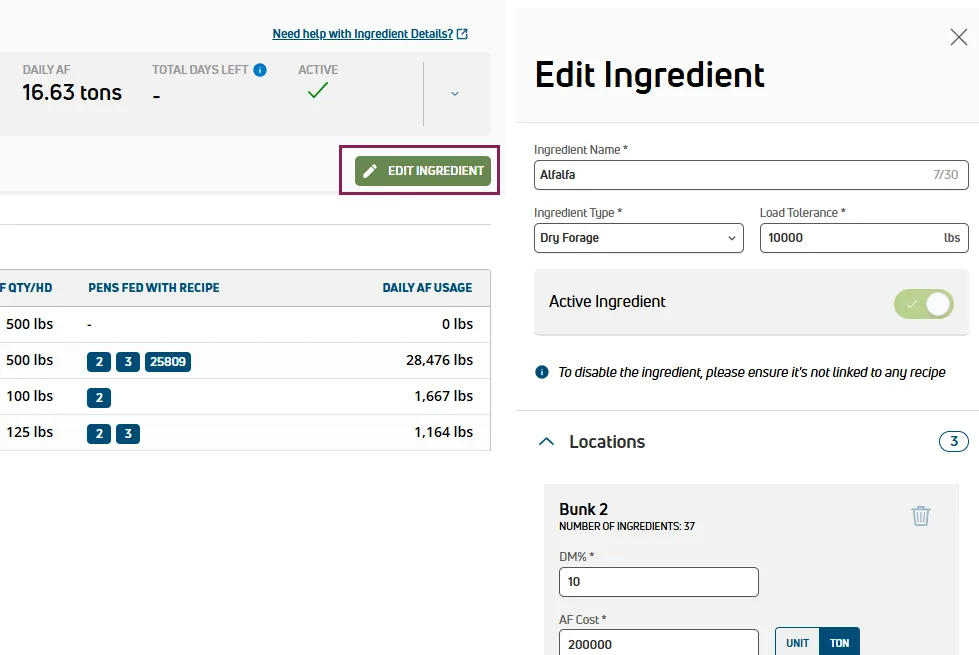
- Update the fields as needed.
- Select Save.
💡TIP: Don't see the ingredient? Select Filters at the top left of the page and check the Show Inactive box to view all available ingredients.
Edit an Ingredient using the Mobile App
Follow the steps below to edit an ingredient in the mobile app.
- Select Ingredients under Adjustments, then tap the ingredient you want to update.
- Tap Edit Ingredient at the bottom of the screen.
- Update the fields as needed.
- Tap Save at the bottom of the screen.
Important Considerations
Keep the following points in mind when editing ingredients:
- To deactivate or reactivate an ingredient, see Deactivate or Reactivate an Ingredient.
- To assign, remove, or transfer an ingredient to a different location, see Manage Ingredient Locations.
- Units (lbs or kg) are based on your account settings. See Edit Your User Account to change them.
To learn more, see the links below:
- Create an Ingredient: Add a new ingredient and assign it to a location.
- View and Search Ingredients: Find, sort, filter, and view ingredient cards and details.
- Deactivate or Reactivate an Ingredient: Deactivate or reactivate ingredients.
- Manage Ingredient Locations: Assign, remove, or transfer ingredients across locations, and enable tracking.