Deactivate or Reactivate an Ingredient
3 min
You can deactivate an ingredient you no longer need or reactivate one you want to use again. Active ingredients are available for use in recipes and premixes and appear in the default ingredients list. Inactive ingredients are hidden from the default list and cannot be assigned to new recipes or premixes.
🗒️ NOTE: An ingredient that is currently used in a recipe or premix cannot be deactivated. Remove the ingredient from the recipe or premix first, then deactivate it. On the mobile app, if the ingredient is assigned to a location, it is removed from that location when deactivated.
From PULSE on the Web
- Navigate to the Ingredients page.
- If reactivating, select Filters at the top left of the page and check the Show Inactive box to display inactive ingredients.
- Select the name of the ingredient in the table list or the Details link on the ingredient's card. The ingredient details page opens.
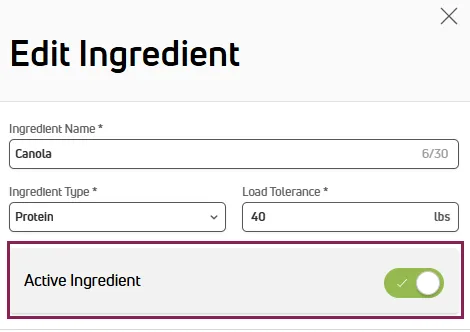
- Select Edit Ingredient at the top right of the page. The Edit Ingredient side panel opens.
- Select the Active Ingredient toggle to deactivate or reactivate the ingredient.
- Select Save.
From the Mobile App
- To deactivate: Tap the ingredient, tap Edit Ingredient at the bottom of the screen, then tap Deactivate at the top right of the screen.
- To reactivate: Tap the Inactive filter at the top of the screen, tap the ingredient, then tap Reactivate at the bottom of the screen.
Important Considerations
Keep the following points in mind when deactivating/activating ingredients:
- Inactive ingredients are hidden by default. Use the Show Inactive filter (PULSE) or the Inactive filter (mobile) to find them.
- To permanently remove an ingredient from a location rather than deactivating it, see Manage Ingredient Locations.
To learn more, see the links below:
- Create an Ingredient: Add a new ingredient and assign it to a location.
- View and Search Ingredients: Find, sort, filter, and view ingredient cards and details.
- Edit an Ingredient: Update fields such as DM%, cost, load tolerance, type, and time delay.
- Manage Ingredient Locations: Assign, remove, or transfer ingredients across locations, and enable tracking.