View Transaction Details
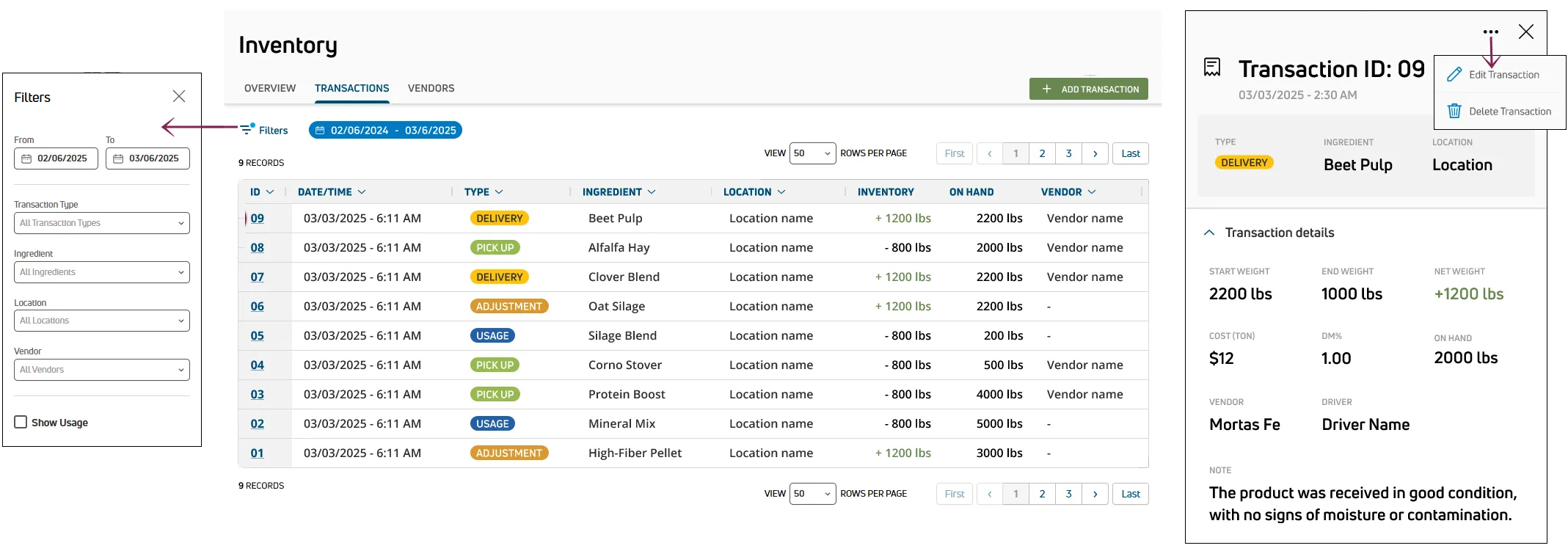
The Transactions tab on the Inventory page provides a complete history of all inventory changes, including deliveries, pickups, adjustments, and usage. You can search, filter, and sort the list, and open any transaction to view its full details. For definitions of each transaction type, see Transaction Types to learn more.
🗒️ NOTE: Transaction details are only available on PULSE. In the mobile app, you can view a summary of recent activity in the Past 7 Days Overview on the ingredient details screen.
Searching and Filtering Transactions
Select Filters at the top left of the Transactions tab to open the Filters side panel. The following filter options are available:
- From / To: Limit the list to a specific date range.
- Transaction Type: Select one or more types. You can also type directly in the field to search.
- Ingredient: Select one or more ingredients. You can also type directly in the field to search.
- Location: Select one or more locations. You can also type directly in the field to search.
- Vendor: Select one or more vendors. You can also type directly in the field to search.
- Show Usage: Check this box to include usage transactions in the list. Usage transactions are hidden by default.
- Select Clear Filters to reset all applied filters.
Select an option in Sort By at the top right of the page to change the sort order. Select an option in View Rows Per Page to change how many records are displayed, and use the navigation controls to jump to a specific page.
Viewing a Transaction
Select a transaction ID in the table to open the Transaction Details side panel. The top of the panel displays:
- Transaction ID: The unique identifier for the transaction.
- Date/Time: The date and time the transaction was created.
- Type: The transaction type, color-coded for quick identification.
- Ingredient: The ingredient associated with the transaction.
- Location: The location where the transaction took place.
The remaining details vary by transaction type.
Delivery and Pickup Transactions:
- Start Weight: The weight of the truck before the delivery or pickup.
- End Weight: The weight of the truck after the delivery or pickup.
- Net Weight: The difference between Start Weight and End Weight.
- DM Cost: The as-fed cost for the ingredient.
- DM%: The dry matter percentage.
- On Hand: The current amount available after the transaction.
- Vendor: The vendor associated with the transaction.
- Driver: The driver associated with the transaction.
- Cost: The total cost of the delivery or pickup.
- Note: Any additional notes.
Adjustment Transactions:
- Adjustment On Hand: The amount added to or removed from inventory.
- DM Cost: The current as-fed cost and the cost prior to the adjustment.
- DM%: The current dry matter percentage and the percentage prior to the adjustment.
- On Hand: The current amount available after the adjustment.
- User: The user who performed the adjustment.
- Note: Any additional notes.
Usage Transactions:
- Usage Amount: The ingredient amount used for the feeding.
- DM Cost: The as-fed cost for the ingredient.
- DM%: The dry matter percentage.
- On Hand: The current amount available after the usage.
- Feeding: The name of the feeding.
- Feeder: The feeding technician who loaded the ingredient.
- Cost: The total cost of the ingredient used.
Important Considerations
Keep the following points in mind when viewing transactions.
- Amounts are displayed in pounds or kilograms based on your User Account settings.
- Usage transactions are only visible when the Show Usage filter is checked.
- To create a new transaction, see Create a Transaction.
- To edit or delete a transaction, see Edit or Delete a Transaction.