Edit or Delete a Transaction
3 min
You can edit a transaction to correct details like weights, costs, or dates, or delete a transaction that was created in error. Both actions are available from the Transactions tab on the Inventory page.
⚠️ IMPORTANT: The following transactions cannot be edited or deleted:
- WeighComp-approved transactions
- Transactions created from WeighComp
- FeedComp transactions older than 6 months
- System transactions (created automatically when tracking is turned off)
See WeighComp Transaction Management for more information.
Edit a Transaction
- Navigate to the Transactions tab on the Inventory page.
- Select a transaction ID in the table. The Transaction Details side panel opens.
- Select the Options button (⋯) at the top right of the side panel and select Edit Transaction. The Edit Transaction side panel opens.
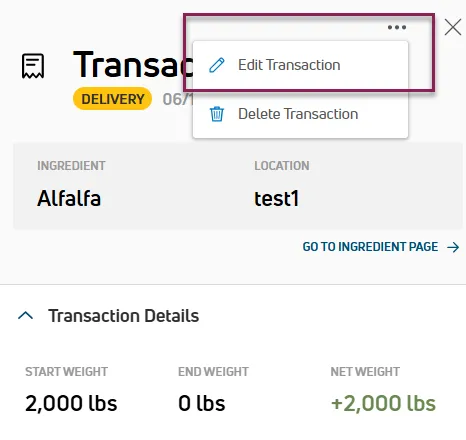
- Update the information as needed.
- Select Save. FeedComp automatically recalculates inventory from this transaction forward and updates the ingredient's current on-hand amount.
Delete a Transaction
- Navigate to the Transactions tab on the Inventory page.
- Select a transaction ID in the table. The Transaction Details side panel opens.
- Select the Options button (⋯) at the top right of the side panel and select Delete Transaction. A confirmation message displays.
- Select Delete.
Important Considerations
Keep the following points in mind when editing or deleting transactions.
- FeedComp automatically recalculates inventory levels when a transaction is edited or deleted.
- To view transaction details before making changes, see View Transaction Details.
- To create a new transaction, see Create a Transaction.