Add Events
Only users who are assigned to a Role with Herd Write permissions can use this feature. If your account only has Herd Read permissions, you will not be able to use this feature. See Edit Dairy User PermissionsEdit Dairy User Permissions and Manage Dairy RolesManage Dairy Roles for more information.
From the animal's CowCard, click the Add New Event button.
In the side panel, select an event from the New Event drop-down list.
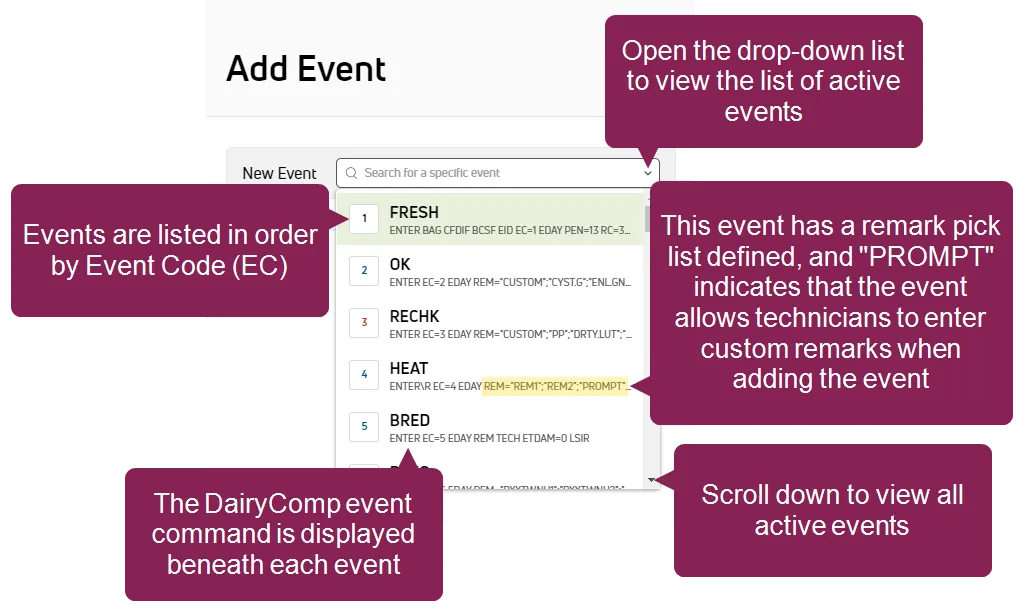
- Events are listed in order by Event Code (EC).
- Scroll down the list to view all events.
- The DairyComp event command is displayed below each event.
- Events that allow custom remarks display "PROMPT" in the event command. See event detailsevent details for more information.
Enter the details for the event in the applicable fields.
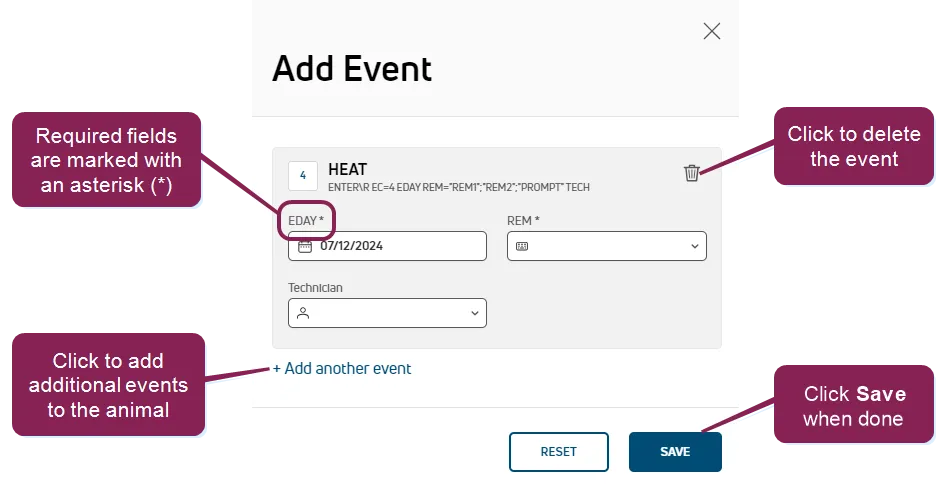
The details required in this step depend upon the type of event you're adding. The example above adds a HEAT event. For more information about the details required for each type of event, see Event Entry (v1)Event Entry (v1) and Event DefinitionsEvent Definitions.
- All required fields are marked with the * (asterisk) symbol.
- If the event requires a remark, you can select it from the remark pick list. If the event allows a custom remark, you can type it into the REM field instead of using the pick list. The custom field allows you to leave the remark blank as well. See Edit Event DefinitionsEdit Event Definitions for more information. When you enter a custom remark in the REM field, the pick list opens and an +Add option is available. Click the +Add option to select your custom remark and add it to the REM field.
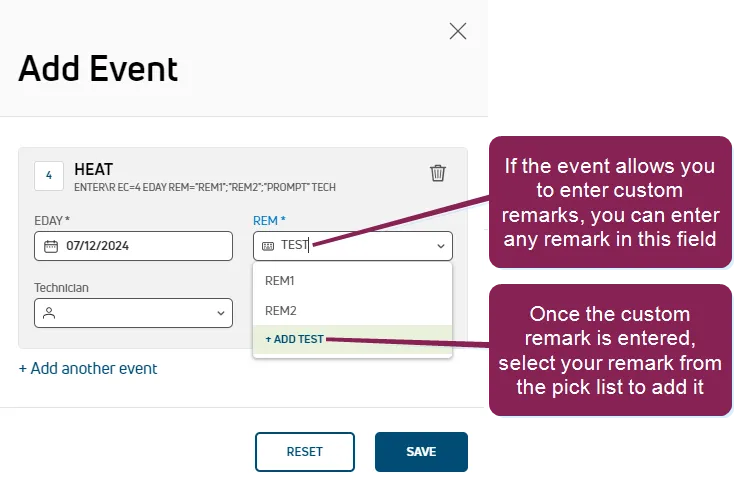
- To add additional events to the animal, click Add another event.
- To remove an event, click the delete icon
 .
.
IMPORTANT: Depending on the type of event you're adding, you may receive system prompts that warn you about an animal's status. See Warning Messages when Adding Animals to EventsWarning Messages when Adding Animals to Events to learn more.
Define protocols for the event (if applicable).
Certain events allow you to select a treatment protocol, such as drugs to be administered or treatments to be applied to the animal's hooves or udders. If you are entering an event that includes protocols, you will see the Protocols field as an option for the event.
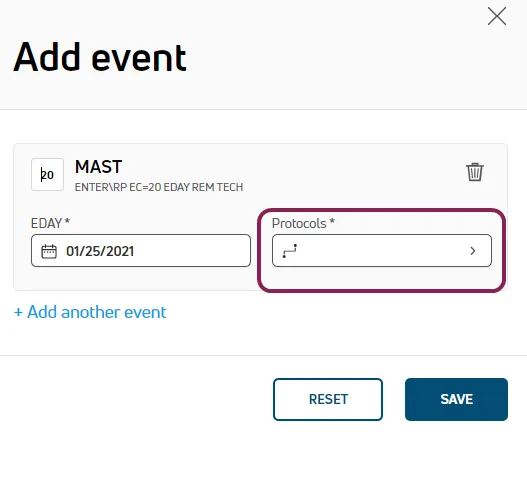
The treatment protocols for each eligible event are pre-configured so that they are available when you add the event to an animal. See ProtocolsProtocols to learn more.
Click the Protocols field to view the available protocols for the event.
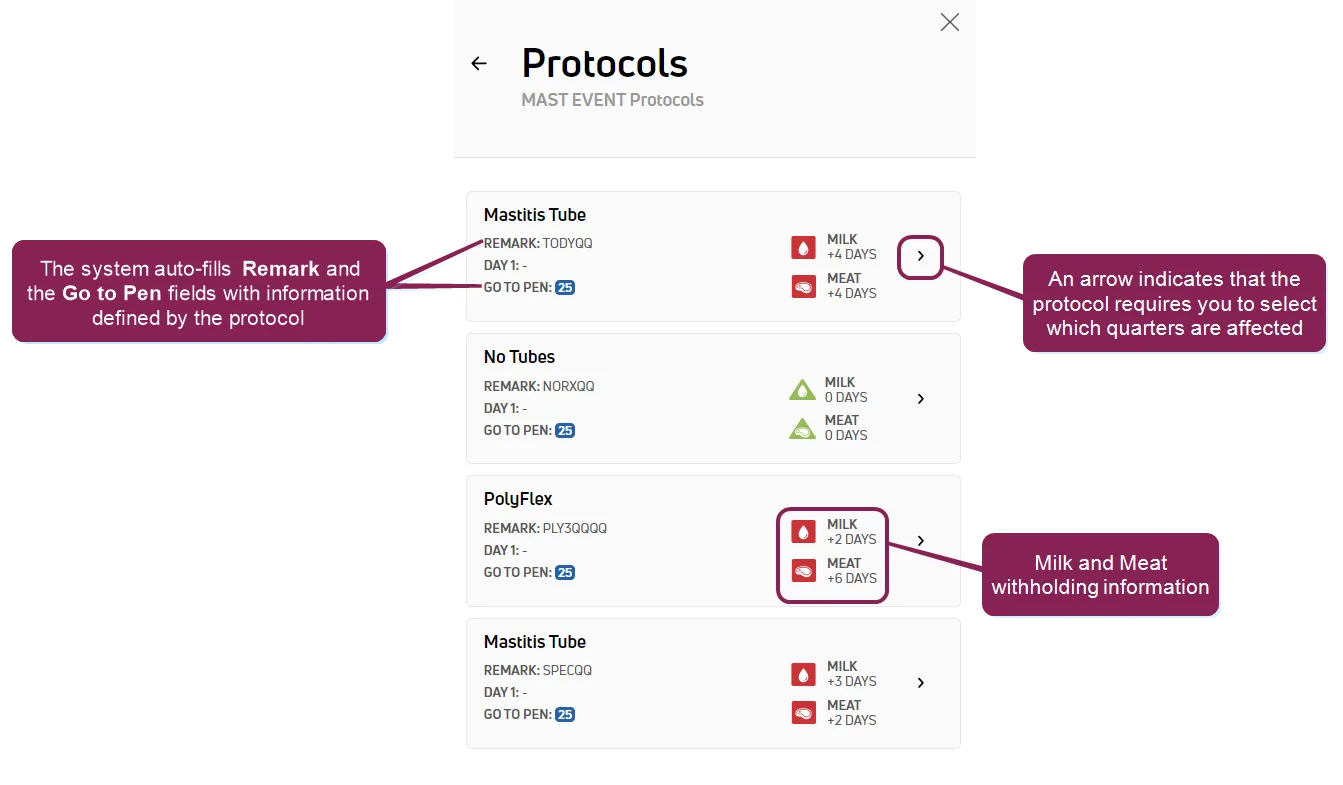
For each protocol, the system displays the corresponding Milk and Meat withholdings. Additionally, the system auto-fills the Remark field and the animal's pen (Go To Pen) based on the selected protocol. You may select only one protocol per event.
NOTE: If the event includes a default remark or pick list, the protocol's REM overrides it.
If you select a protocol that requires you to choose which hoof or quarter of the udder is affected, the system opens a page where you can select the quarter(s).
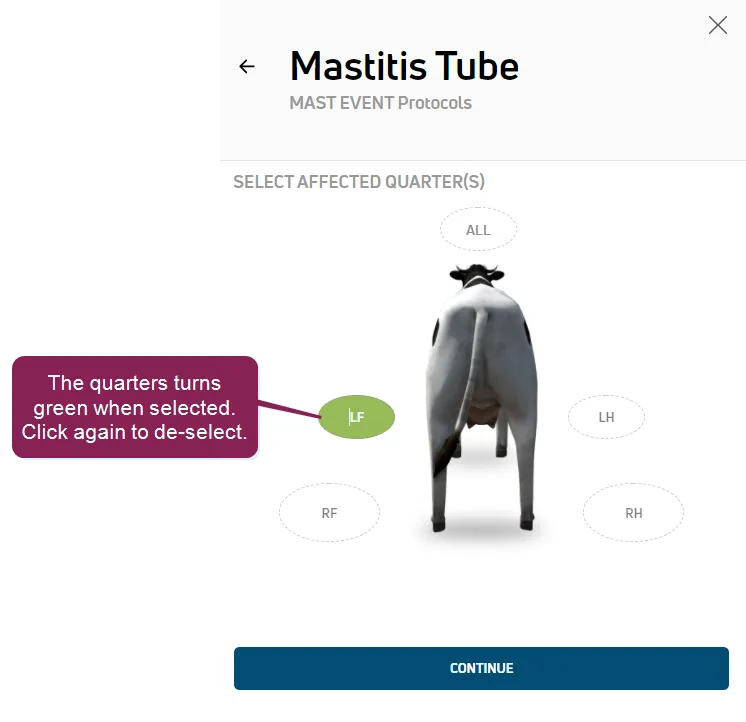
The labels you see may be different from those listed below, but the typical ones are:
- ALL - Selects all quarters/quadrants
- LF - Left Front hoof or teat
- RF - Right Front hoof or teat
- LH - Left Hind hoof or teat
- RH - Right Hind hoof or teat
NOTE: The labels for quarters/quadrants can be customized in PULSE Animal ConfigurationAnimal Configuration settings or in DC305 for DC Unlimited dairies.
See Events with ProtocolsEvents with Protocols to learn more.
When you are done selecting the affected quarters, click Continue to return to the Add Event window. From here, you can choose additional events for the animal, and then click Save.
IMPORTANT: The mobile app section of this document includes additional information about using protocols with events. See Events with ProtocolsEvents with Protocols to learn more.
Click Add another event to add additional events to the animal (optional).
Once you have entered the events and details, click Save.
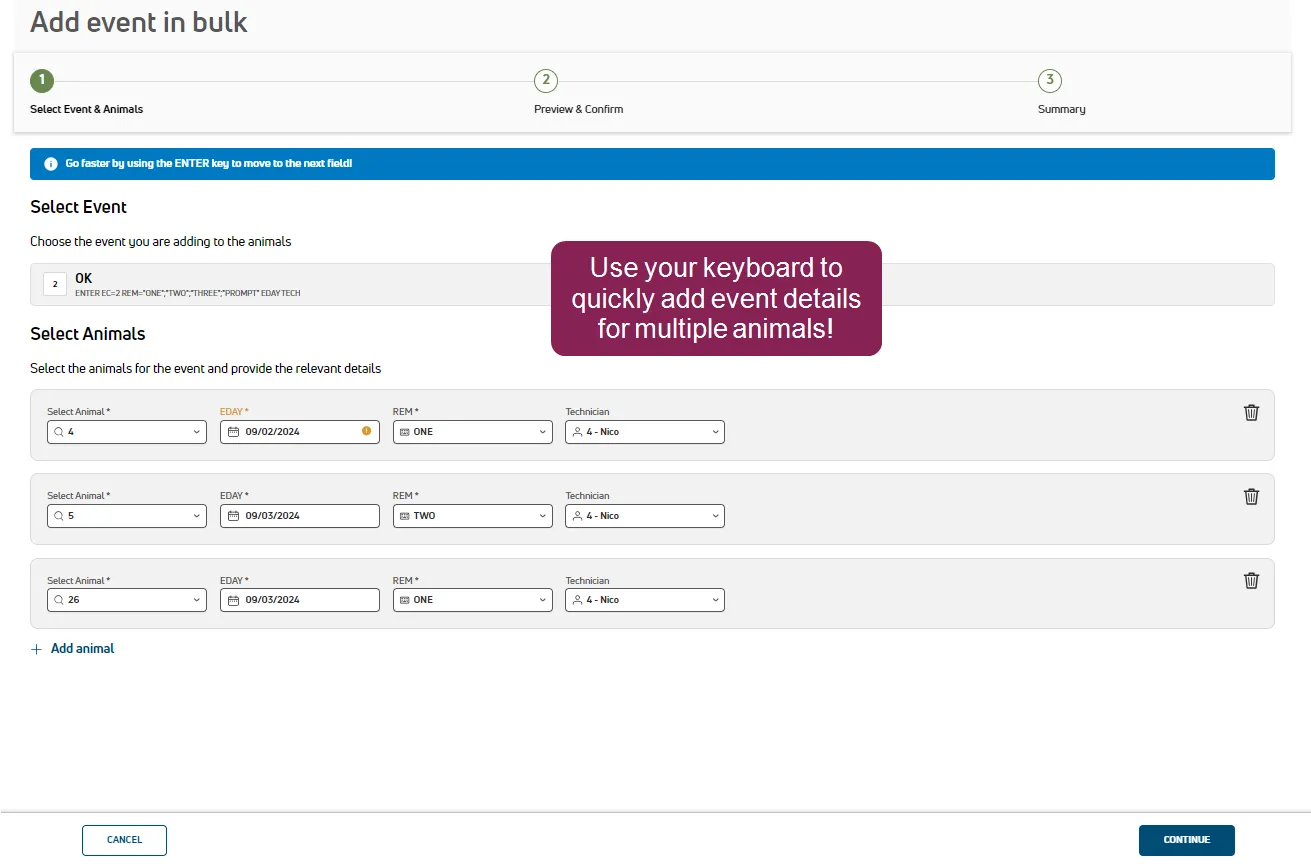
Use the Add Event in Bulk option to quickly add an event to multiple animals and adjust details on the fly! The page is designed for keyboard-only activity to speed up your data entry tasks and limit the number of mouse clicks needed.
- For FRESH events, use Items to be Prompted for Fresh Cows in Lactation ConfigurationLactation Configuration to control which items are available for entry.
- DC Unlimited dairies can adjust the event command to reorder the data entry fields. Go to Event DefinitionsEvent Definitions and adjust the order of items in the Command field as needed.
Follow the guidelines below when adding an event in bulk:
- Use ENTER to choose options and move between fields.
- Start typing or use the arrow keys to scroll through available options. This works for date selection, quarter selection, technician, etc.
- You can enter events for today or another day, and the system warns you when adding an event to a day other than today.
- All events have the same sanity checks as they do when adding a single event.
- If you accidentally navigate away from the entry page with data that hasn’t been processed, you can continue filling out the details the next time you select the Add Event in Bulk option. The pending entries remain available during your current web session only.
- Depending on the event, details from the previous animal will copy to the next animal you’re adding to speed up entry. Exceptions:
- FRESH: Number of calves is not auto populated.
- Events with Protocols: Protocols are not auto populated.
- To remove an animal from the event, click the delete icon .
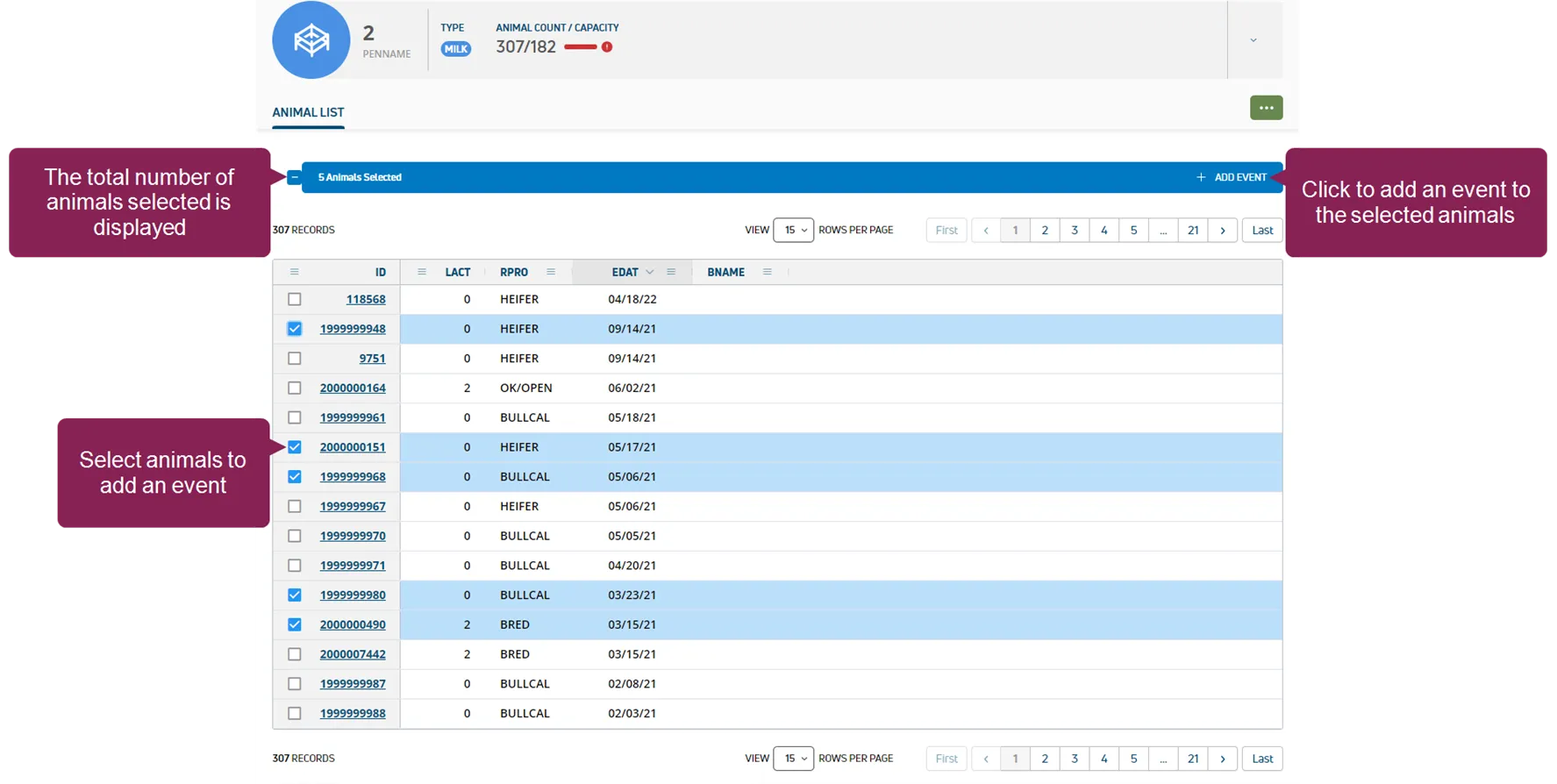
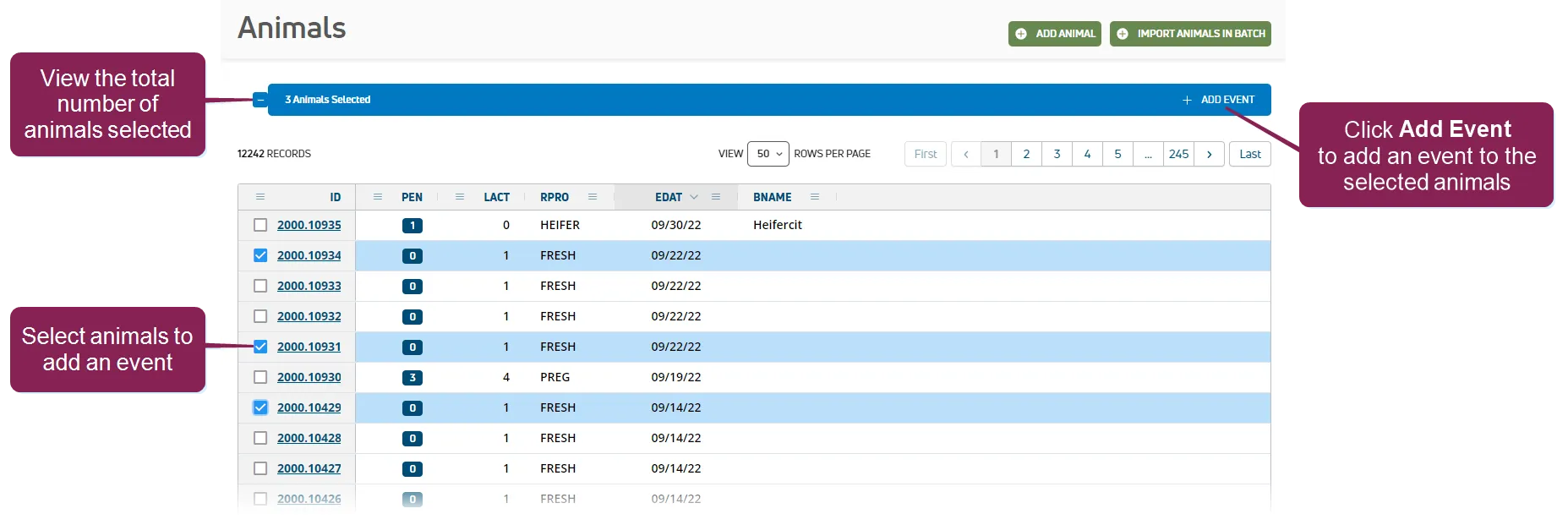
Go to the Animals ListAnimals List or the Pens ListPens List and select the animals that need the event. Then click Add Event in the upper right corner.
What happens when you save an event?
Saved events display on the CowCard immediately if you have MyDC. If you have DC Unlimited, saved events display after the system synchronizes with the on-premise DairyComp.