Protocols
IMPORTANT: For DairyComp Unlimited customers, your on-premise DairyComp 305 must be running DC305 version 21.6.0 or later to use Add ProtocolsAdd Protocols or Edit ProtocolsEdit Protocols.
All users assigned to a role with Herd Read permissions can view this feature.Only users who are assigned a role with Herd Configuration permissions can edit data or customize settings.
See the topics below to learn more:
- Know Your VAS PULSE VersionKnow Your VAS PULSE Version
- Edit Dairy User PermissionsEdit Dairy User Permissions
- Manage Dairy RolesManage Dairy Roles
This feature/option is available only for DC Unlimited subscribers. MyDC subscribers will not see it in PULSE.
Click herehere to learn more about the different versions of PULSE.
The PULSE Protocols page lists all drug and treatment protocols that are configured for your dairy. You can view or edit your existing protocols, or add new protocols. Protocols allow dairies to take a more structured approach when recording and treating disease. You can find this feature under the DairyComp/MyDC menuDairyComp/MyDC menu > SettingsSettings option on the Health Settings tab.
The DairyComp protocol table keeps track of protocol details, including the disease, the treatment, pen number, etc. This information is received by and displayed in the Protocols page defined below.
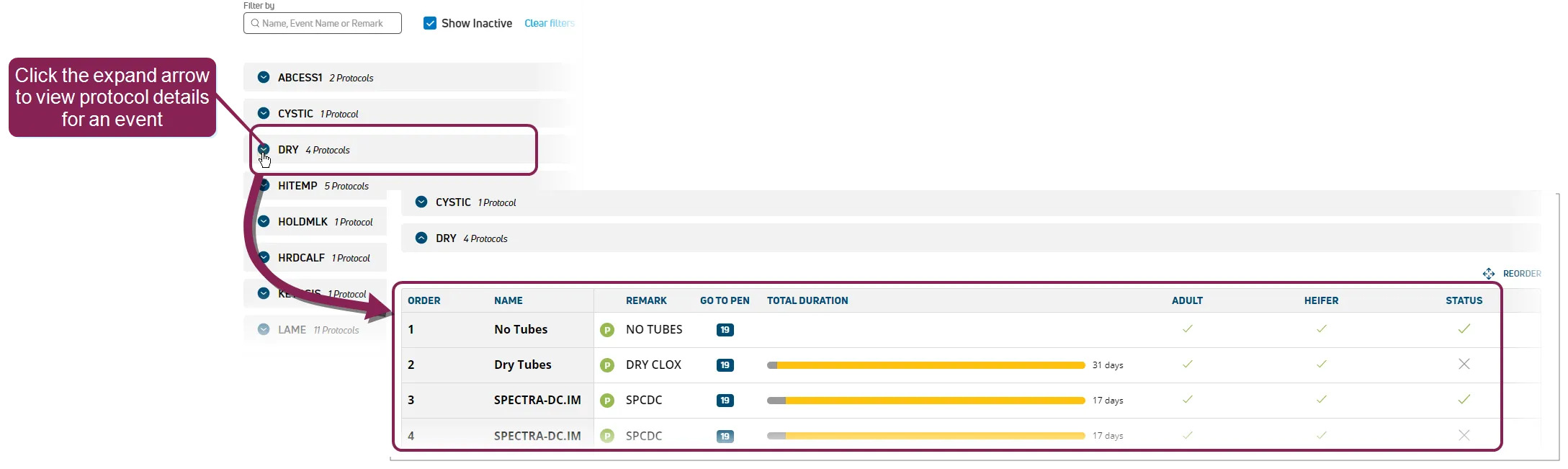
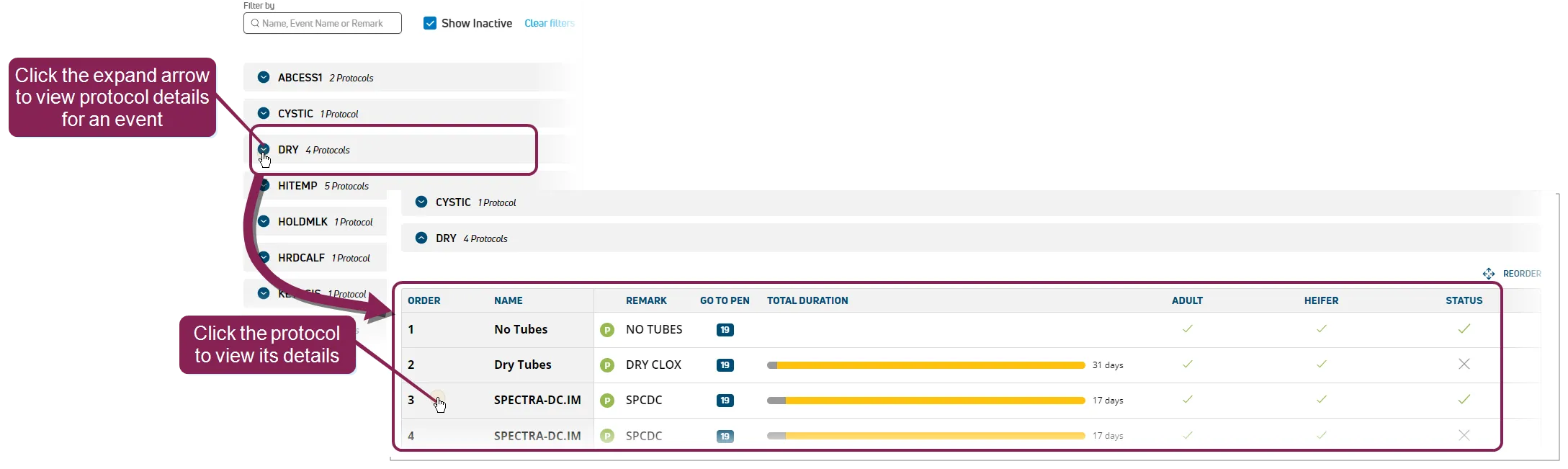
On the Protocols page, you can view a list of all the events in your dairy. Expand an event to view the protocols associated with the event, as well as a few protocol details like protocol name, the duration of an protocol, and whether the protocol can be used for adults or heifers.
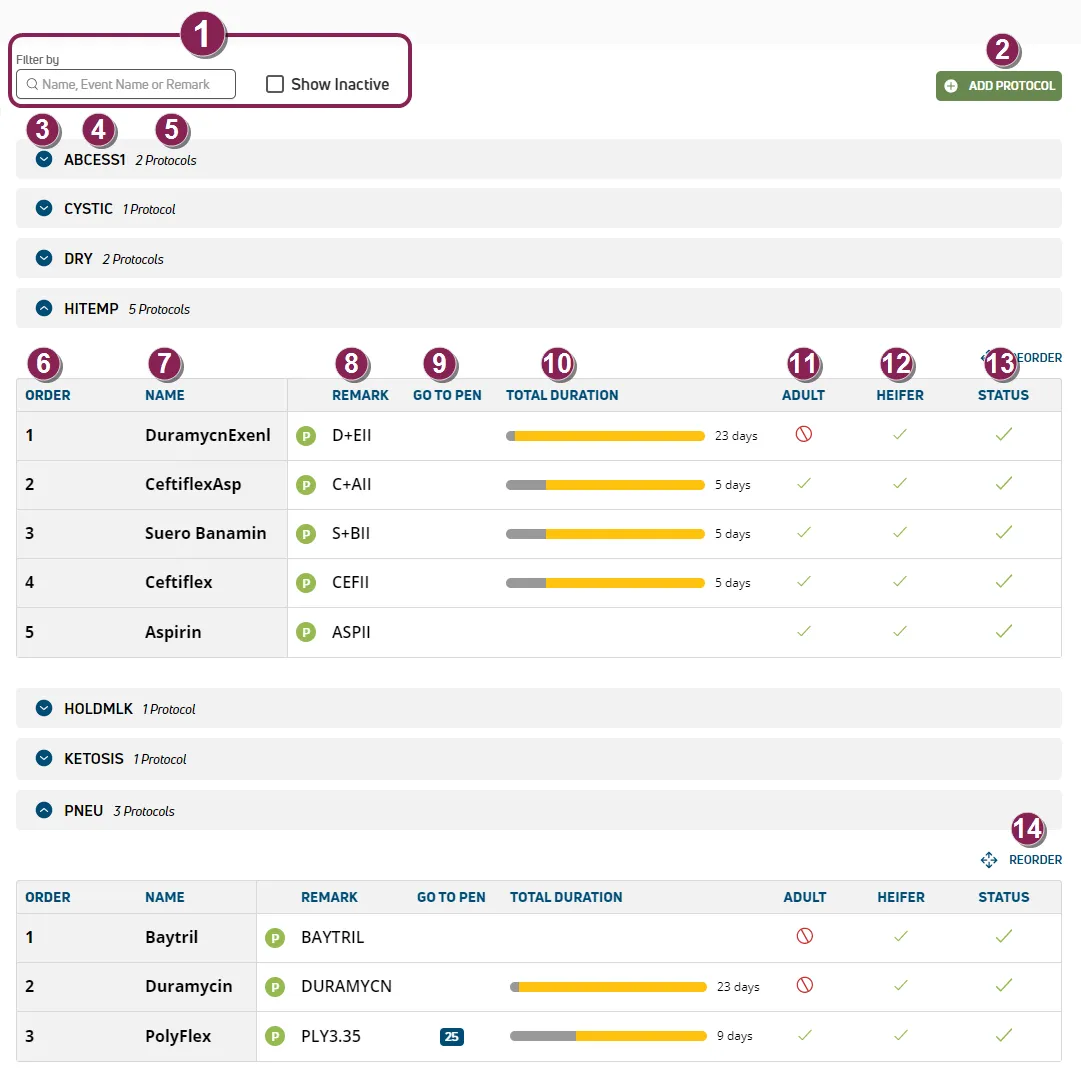
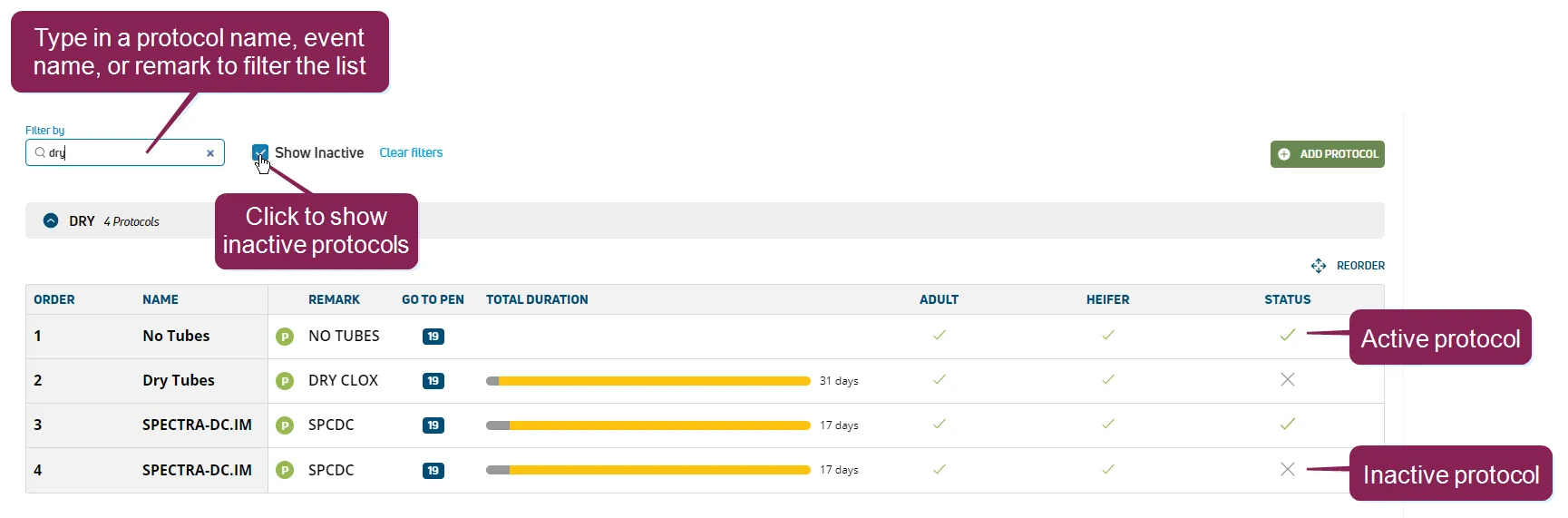
- Filters: You can filter your list of protocols by typing in a protocol name, event name, or remark and include inactive protocols by checking the Show Inactive box. If you include inactive protocols, icons indicate whether a protocol is active
 or inactive
  .
.
- Add Protocol: Click the Add Protocol button to add a protocol to an event. See Add ProtocolsAdd Protocols to learn more.
- Expand: Click the expand button
 next to an event name to see the event's list of protocols. The list also shows details like the drug or treatment that should be administered or how long it should be administered.
- Event: The event that will be entered for an animal when the protocol is activated.
- Number of Protocols: The number of protocols listed under an event.
- Order: The protocol order number. DairyComp allows this number to be defined for each protocol to help sort the view when there are multiple protocols for an event.
- Name: The protocol name. This name is defined on‑premise to assist with data entry.
- Remark: This column displays the default remark for the protocol. If a small P in a green circle
 is displayed in this column, it means that the system is configured to prompt the user to enter a remark for this protocol.
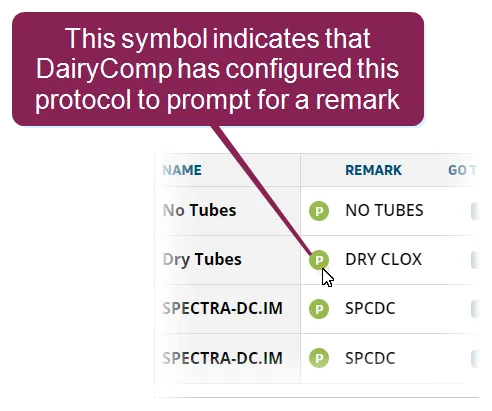
If the remark contains QQ in it, this means that the user must identify which quarters (front right, front left, hind right, and/or hind left) are affected. QQ can be used with events such as LAME, where the user would input the hoof or hooves affected, or events such as MAST, where the user would input the teats that are affected.
- Go To Pen: The pen to which animals on the protocol should be moved. If the pen number displays a - (dash), it means that the animal's pen number will not be changed. A pen number of H indicates that multiple hospital pens are used; in this case, the user is prompted to define the specific hospital pen number during data entry.
- Total Duration: Expected number of days an animal will be on the protocol. It is usually based on the LTDAT.
- Adult: Defines whether this protocol can or cannot be used on adult animals:
= This protocol is okay to use on adult animals.
 = Do not use this protocol on adult animals.
- Heifer: Defines whether this protocol can or cannot be used on heifers:
= This protocol is okay to use on heifers.
= Do not use this protocol on heifers.
- Status: Indicates whether the protocol is currently active or inactive for your dairy.
- Reorder: Click Reorder, then click and drag the protocols up or down to edit the protocol order. Click Save to implement your changes. See OrderOrder to learn more about protocol order.
You can add a new protocol and configure the new protocol's details directly from the Protocols page.
Click the Add Protocol button to open the Add Protocol side panel. All required fields are marked with the * (asterisk) symbol. Unmarked fields are not required, but adding more information will ensure that the protocol is consistently completed correctly.
Before you can save the new protocol, you must complete the required fields and add at least one Task.
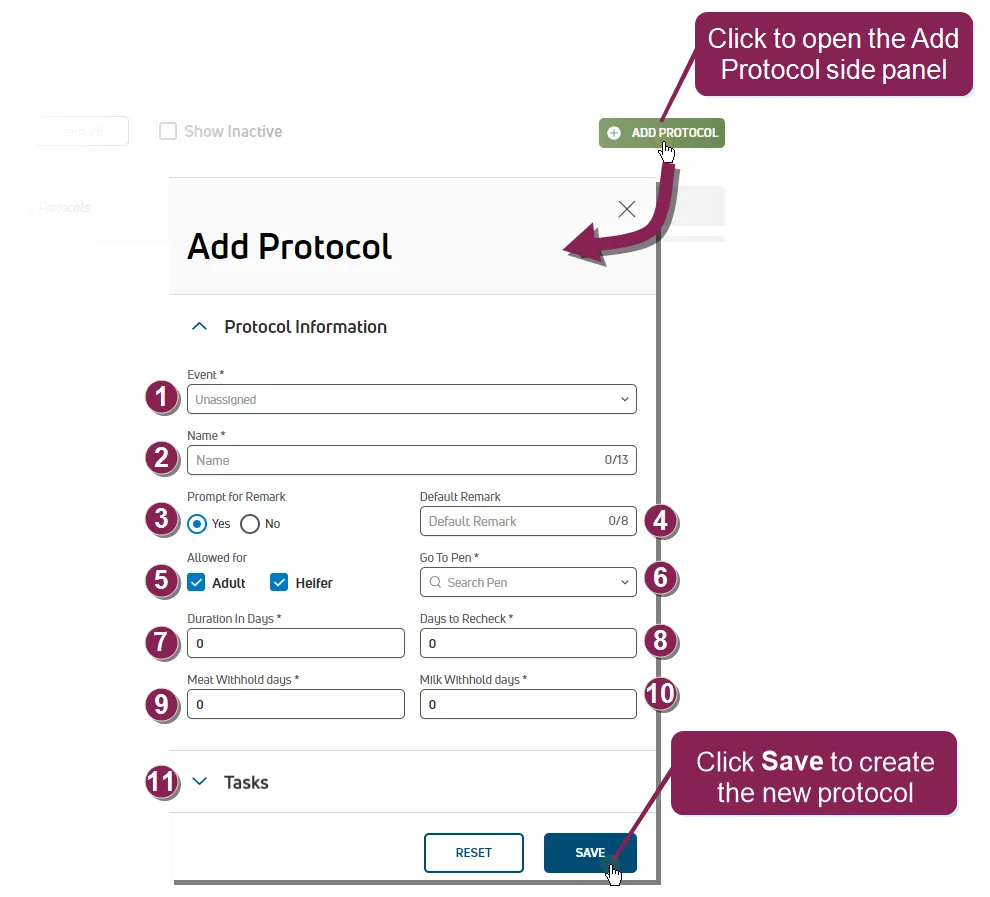
- Event: The event that will be entered for an animal when the protocol is activated.
- Name: The protocol name. This name is defined on‑premise to assist with data entry.
- Prompt for Remark: Defines whether DairyComp prompts the user to enter a remark for this protocol.
- Default Remark: The default remark that populates any time a user adds a remark for this protocol.
- Adult and Heifer: Defines whether this protocol can or cannot be used on heifers or adult animals.
- Go To Pen: The pen to which animals on the protocol should be moved.
- Duration in Days: Number of days the protocol is given in a row.
- Days to Recheck: Number of days to schedule a vet recheck after the protocol treatment period ends.
- Meat Withhold: Number of meat withhold days after the last treatment. It is usually based on the BFDAT.
- Milk Withhold: Number of milk withhold days after last treatment. It is usually based on the MKDAT.
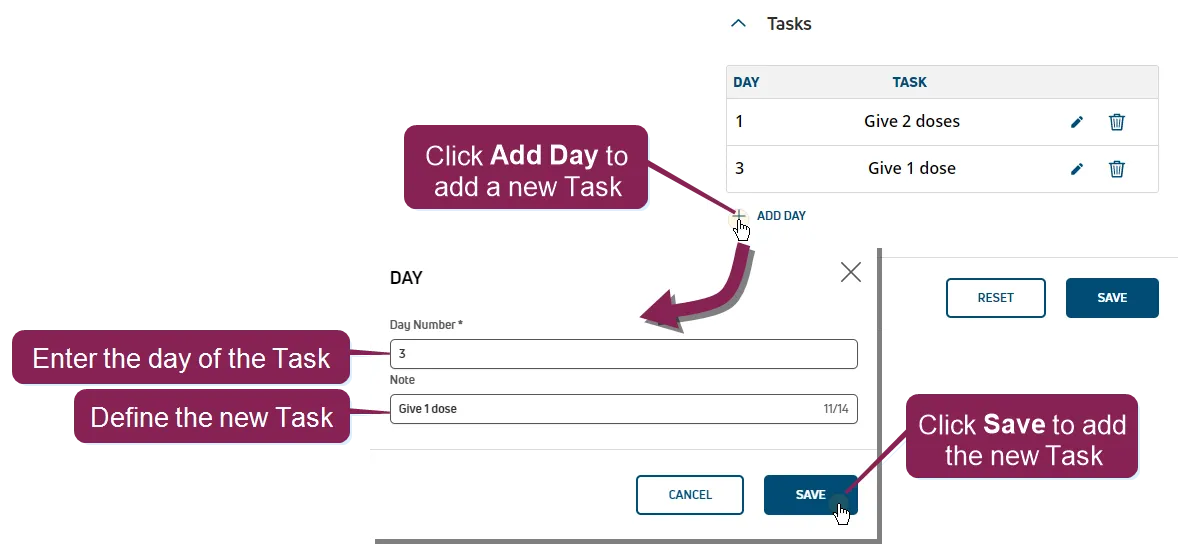
- Tasks: You must add at least one Task before you can save the protocol. A Task is an action that users must follow to complete the protocol. For example, a Task on Day 1 might instruct the user to "Give 2 doses," and a Task on Day 3 might instruct the user to "Give 1 dose." To add a Task, expand the Task drop-down section and click Add Day. In the pop-up window, enter the task that should be followed in the Note field, using 14 characters or less. In the Day field, enter the day that the task should be executed. Click Save to finish adding your Task.
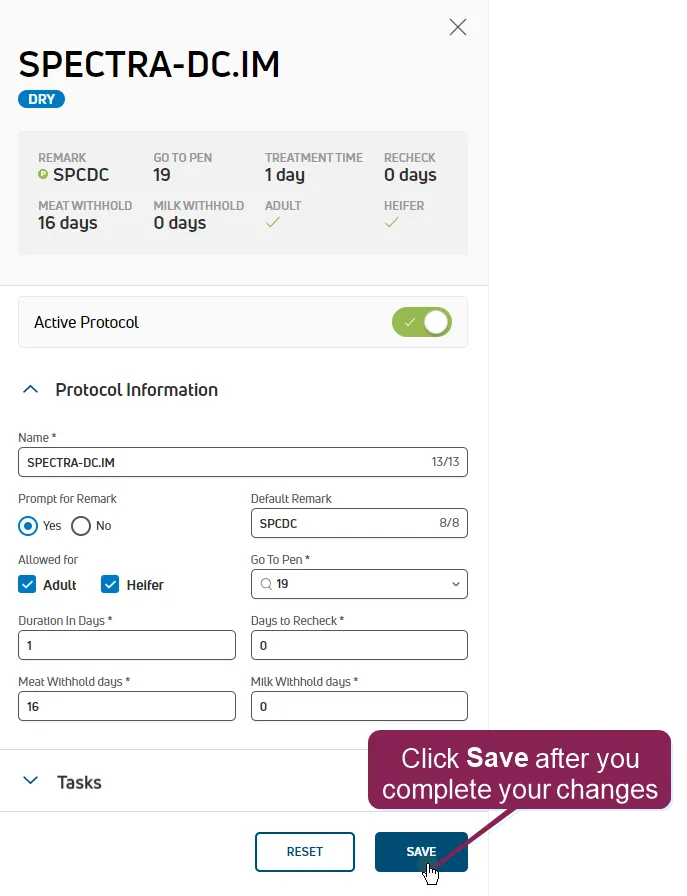
To edit protocol details, expand the event associated with the protocol to see all the event protocols. Click the protocol you want to edit to view its details in a side panel.
Modify the protocol details in the side panel, then click Save to apply the changes.