View Alert Groups
1 min
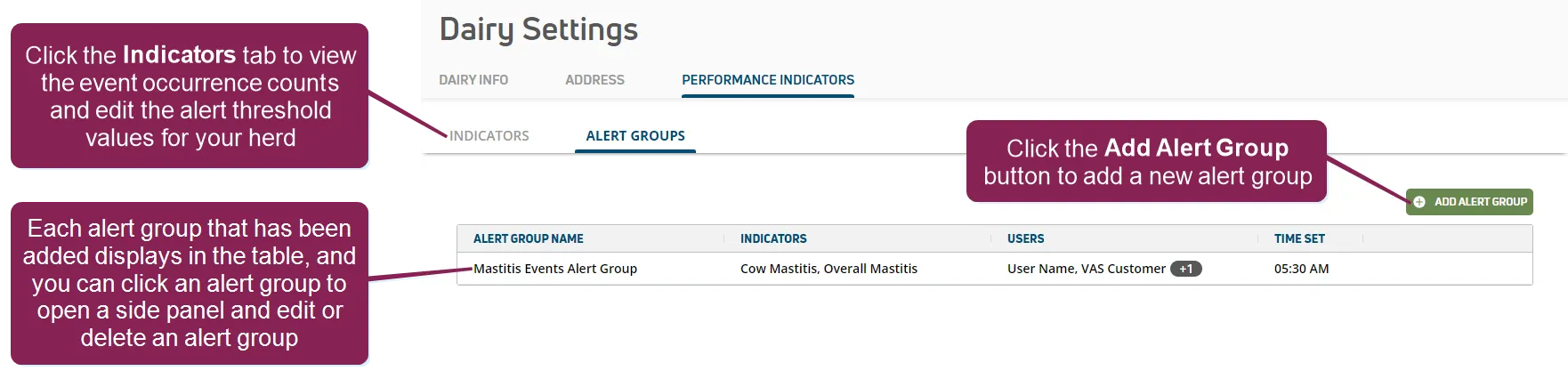
The Alert GroupsAlert Groups page lists all alert groups added to PULSE for your dairy.
See the topics below to learn more:
- Click the Indicators tab to view or adjust health and reproduction indicators for the animals in your herd. See Working with IndicatorsWorking with Indicators for more information.
- Click the Add Alert Group button to open a side panel and add a new alert group for your dairy. See Add Alert GroupsAdd Alert Groups for instructions.
- Alert Group Name: The name of the alert group.
- Indicators: The event indicators being tracked across your herd by the alert group.
- Users: The users being notified by the alert group.
- Time Set: The time of day when PULSE examines thresholds for your herd and notifies your dairy team.
- Click an alert group in the table to open a side panel and edit or delete an existing alert group for your herd. See Edit Alert GroupsEdit Alert Groups and Delete Alert GroupsDelete Alert Groups for instructions.