What's New in Pocket CowCard?
Check out the new features, enhancements, and bug fixes in the latest Pocket CowCard for Android.
Please note that your Pocket CowCard device must be charged to at least 20% before you can download the latest version of Pocket CowCard. Depending on your Android OS version, expand the instructions below to download the latest version of Pocket CowCard onto your device:
You must manually download the latest version of Pocket CowCard onto your device if you have Android 12 (or higher). Follow the steps below to continue:
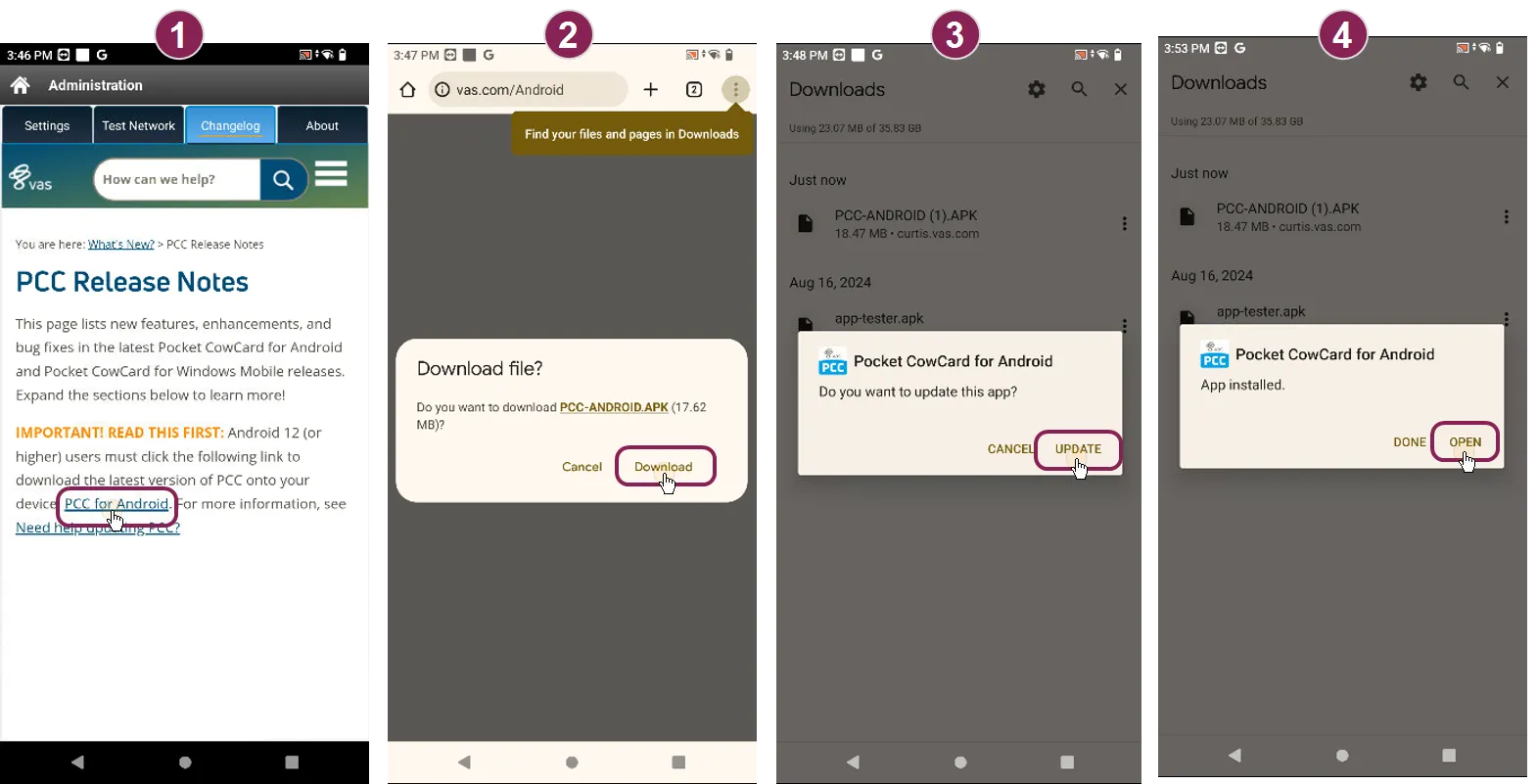
On your Pocket CowCard device, open the Changelog tab to view the release notes. Tap the Pocket CowCard for Android Download link.
Tap Download.
On your Downloads screen, tap the downloaded file (Pocket CowCard-ANDROID.APK), then tap Update.
When the download is complete, tap Open to run the latest version of Pocket CowCard.
The in-app updater automatically installs the latest version of Pocket CowCard onto your device. No action is needed.
Tap the Options button at the top right corner of the screen and then tap the About tab to check your current version.
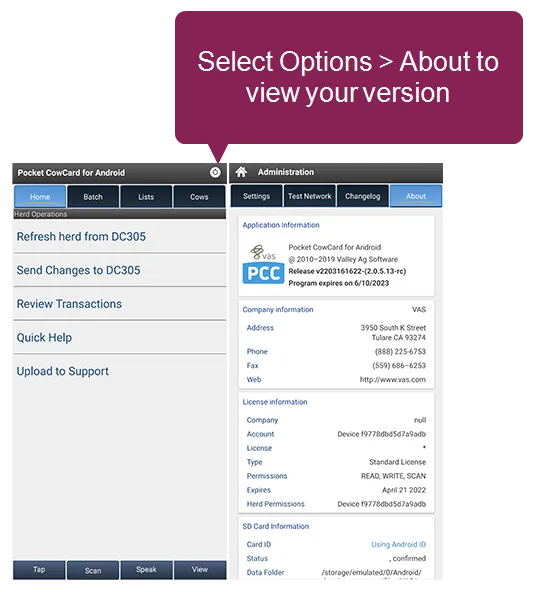
The version number translates to vYYMMDDhhmm (two-digit year, month, day, hour, minute).
⚠️ IMPORTANT: VAS no longer supports Pocket CowCard for Android 11 (or earlier) devices
- Android 10 or 11 devices: Do not install new versions of Pocket CowCard. These devices can continue using the August 2026 release until November 1, 2027. After that date, the release will expire and devices will no longer receive in-app notifications.
- Android 9 (or earlier) devices: VAS no longer supports Pocket CowCard for Android 9 (or earlier) devices.
For a full list of devices supported by VAS, click here. If you have any questions about your options or if you want to purchase a new compatible device, please contact your Pocket CowCard support representative.
Pocket CowCard Android - Version v2609231152-(2.0.39.11-rc)
Build Date: September 23, 2026 Release Date: September 28, 2026
- Updated Android system requirements: Pocket CowCard now requires devices to run Android 12 or later. Do not install this version on devices running Android 11 or earlier. Older devices can continue using the August 2026 release until November 1, 2027. After that date, the release will expire and devices will no longer receive in-app notifications. (1814)
- Enhanced memory diagnostics: The app now records specific memory states to help VAS Support troubleshoot issues more effectively during the delivery file process. (1868)
- Improved app quality through beta testing: A new Beta Update Channel has been created to support field testing and collect feedback on application issues and improvements. By validating changes with users before general release, we can make informed improvements that enhance quality, reliability, and the overall user experience over time. (1873)
- Simplified data backups: A new backup option allows users to create a complete backup of the Pocket CowCard VAS folder and transfer it to the DairyComp/AXIM folder in a single step. Based on field use and feedback, this feature may allow us to simplify portions of the app's main menu in the future. (1932)
- Expanded hospital audit trails: You can now view a complete history for hospital records if the required hospital settings are enabled. View actions performed through Item Edit directly from the CowCard when using the Hospital Grid Form. (1975)
- Improved Dark Mode visibility: Text color was updated in Dark Mode when using Expert Batch to improve readability. (1991)
- Improved language translations: Italian translations were updated throughout the application. For Spanish-speaking users, the button on the Breeding Grid were renamed from Enviar to Guardar to better reflect the save action. (2032, 2038)
- Improved application stability: Resolved several memory leaks and Firebase crashes to improve overall application performance. (1933, 1997, 1998, 1999, 2000, 1858, 1940, 1961, 1962, 1963, 1967)
- Fixed permissions crash: Fixed a crash that occurred when a user denied permission requests multiple times. (2007)
- Corrected list management: Fixed an issue where merged lists failed to unmerge after a refresh, which previously caused the application to crash. (2030)
- Resolved Hospital picklist errors: Resolved an issue that prevented transaction creation when Pen Validation was active. (2014)
- Updated Breeding Grid row limits: Fixed the Breeding Grid Row Count setting to allow more than 50 rows. (2015)
- Fixed Animal Movement Workflows: Fixed an issue that prevented moving animals from the DONE panel back to the TODO panel. (2022)
- 2026/09/28 - Samsung auto blocker may prevent updates: Some Samsung Galaxy devices include a security feature called Auto Blocker that can prevent Pocket CowCard updates. If the app update fails to install, go to device Settings > Security and privacy > Auto Blocker, toggle it Off, and retry installing or updating Pocket CowCard. VAS is looking for ways to improve this experience.
- 2026/08/21 - Recommended device maintenance: Remember to reboot your Android devices periodically, especially if they have been running continuously for 7 days or longer.
Regular reboots can help:
- Clear temporary memory usage and cached system resources
- Reset Bluetooth, NFC, and other hardware services
- Improve overall device responsiveness and stability
- Reduce the likelihood of communication issues with peripheral devices such as RFID and NFC readers
For best results, consider restarting devices weekly, or even daily, as part of normal operating procedures.
- 2026/02/03 - Include VC>0 in vet lists: When creating vet lists, make sure to include the condition VC>0. This ensures that only animals with valid vet check information are included in the list. If you want to use a single workflow during vet check, be sure to use the Merge option for your To Do lists. Merging keeps all tasks together in one place so you don’t have to switch between multiple lists.
- 2026/01/09 - Avoid taking screenshots of Pocket CowCard on your device: Pocket CowCard may freeze if you take screenshots while using Pocket CowCard.
- 2025/08/27 - Enable the navigation buttons for Android devices: Pocket CowCard devices that use Android 14 devices (or higher) no longer show the Back, Home, and Recents/Overview buttons by default. You can enable the navigation buttons on your Pocket CowCard device by opening Settings > Display > Navigation and selecting Buttons (or Button navigation).
- 2025/08/13 - Close and restart Pocket CowCard installer if it freezes during download: If you download the latest version of Pocket CowCard by using Pocket CowCard for Android Download (https://www.vas.com/Android), the installer window may freeze. Simply exit the installer and open the Pocket CowCard app if this happens.
- 2025/07/01 - Pocket CowCard only plays sounds for tasks with a WAV sound file: When a worklist has multiple task items, Pocket CowCard will not play any sounds if there are no WAV sound files for each individual task item. Make sure you have a WAV sound file for each task item you use if you want to hear a sound for the item. To learn more about adding a sound to a task item, contact VAS Support.
- 2025/04/09 - Deliver transactions before you switch herds: If you are refreshing more than one herd on your Pocket CowCard device, you must deliver transactions to DairyComp before you switch to another herd. If you do not deliver transactions before switching herds, Pocket CowCard might not send the transactions. Alternatively, you can use different devices for collecting data for different herds if you are unable to deliver transactions before switching herds. We are actively investigating this issue and discovered it has affected all Pocket CowCard versions since July 17, 2024.
- 2025/03/24 - Charge your phone before you update Pocket CowCard: Please note that your Pocket CowCard device must be charged to at least 20% before you can download the latest version of Pocket CowCard.
- 2026/09/25 – Previous live calf IDs displaying on new FRESH events: An issue where calf IDs from a prior FRESH event incorrectly appear on a new FRESH event when newborn calves are unidentified (Sold/DOA) is currently under investigation.
- 2026/09/25 – Erasing records from transaction file during ADD BATCH: An issue with the new database when erasing new records from the transaction file during ADD BATCH routines is currently under investigation.
- 2026/09/25 – Queued cows removed when sending to DairyComp: An issue where queued cows are removed when data is sent to DairyComp is currently under investigation.
- 2026/09/23 – RS420 NFC reader compatibility with A16 devices: A potential fix for an issue affecting RS420 NFC readers on Android 16 (A16) devices has been developed and is undergoing testing for an upcoming release.
- 2026/09/23 – Vet Check workflow edge cases: Potential fixes for two reported edge cases within the Vet Check workflow are currently being tested for an upcoming release.
- 2026/08/27 - Samsung A16 and Allflex RS420 compatibility: We completed an engineering review of a reported issue involving the Allflex RS420 NFC reader on certain Samsung A16 devices. During our investigation, an engineer identified reports of early Android and Bluetooth-related issues on some A16 devices. We recommend checking for and installing any operating system updates provided by the device manufacturer. If the issue persists after updating the device, contact VAS Support to obtain a special diagnostic version of the application that can collect additional logs for troubleshooting. We may also ask you to verify the firmware version of your RS420 NFC reader.
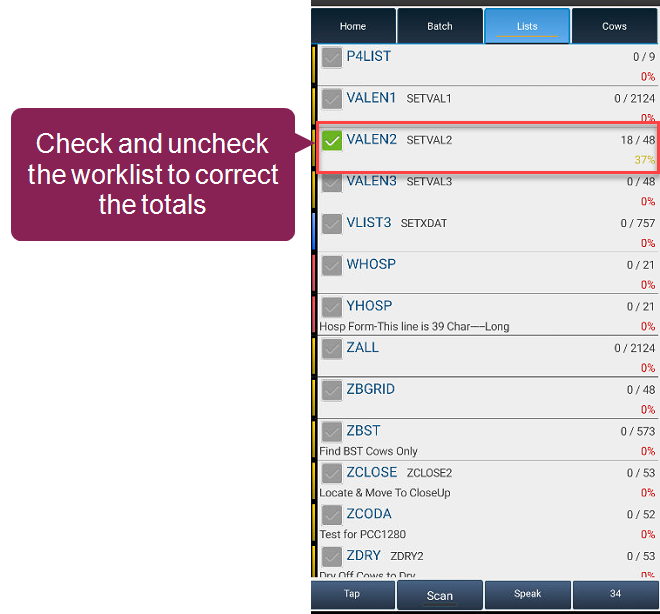
- 2025/05/01 - Fix Pocket CowCard worklist progress percentage bar: In some cases, Pocket CowCard tracks worklist progress correctly, but then it stops updating the progress percentage bar and does not correctly show the completed cows. If you encounter this error, force stop Pocket CowCard and reopen it to see the correct progress percentage.
- 2025/04/09 - Do not edit transaction log when using an Expert or Simple Batch filtered list: If you use a filtered list in Expert or Simple Batch, do not edit the transaction log. Instead, write down the correction and fix it directly in DairyComp or redo the transaction for the animal. We are actively investigating this issue and discovered it has affected has affected all Pocket CowCard versions since July 17, 2024.
- 2024/06/04 - Pocket CowCard may crash if you add a record using VETLIST, then delete it in the transaction log: We found a rare issue where Pocket CowCard may crash if you add a new record to VETLIST, delete the record from Transaction Log, and return to the vet list. We recommend that you don't delete the transaction from the Transaction Log. Instead, move the animal from the DONE tab back to the TODO tab. If you already deleted the transaction from the Transaction Log, send the updates to DairyComp and refresh your device to avoid a crash.
TIP: Click here for an archive of resolved or expired known issues.
🗒️ NOTE: We have identified several opportunities to further improve the speed and efficiency of hospital treatment workflows when animals are housed in the same pen and do not require mastitis-related treatments. Additional research and field evaluation are planned.
Interested in learning more? Contact [email protected] with the subject line "Hospital Treatments".
Pocket CowCard for Windows Mobile - Version 20200806 V2
🗒️ NOTE: VAS no longer maintains or supports this app.
Build Date: August 6, 2020 Release Date: August 10, 2020
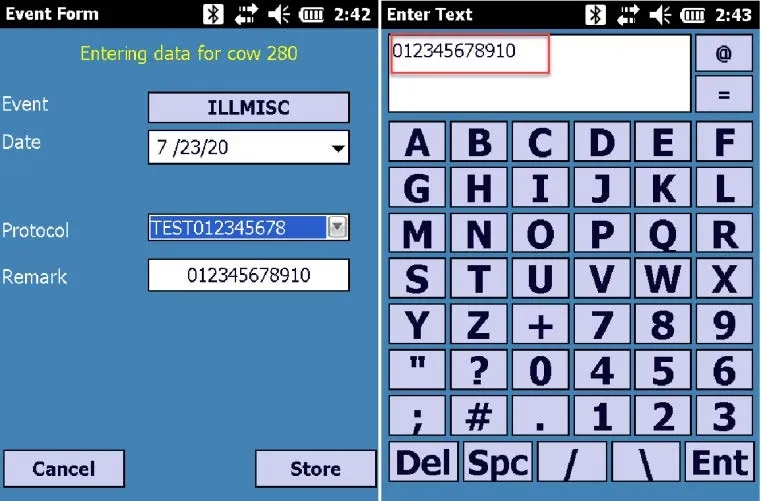
- Protocol Remark Field Update – Pocket CowCard-792: The Remark field now displays up to 12 characters: Before:
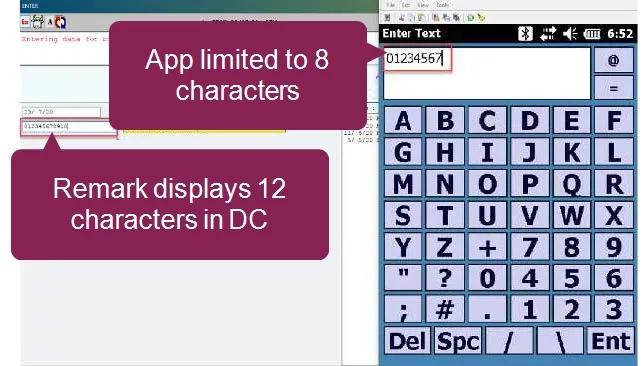
- After:
- Updated Notification – Pocket CowCard-834: The notification regarding the End User License Agreement/Privacy Policy/Terms and Conditions Agreement was updated in the app.