Resolved Known Issues
RESOLVED 2026/03/03 - Remove the refresh error message: Pocket CowCard may display a "No syncable transactions were found" error message when you try to refresh. This error may occur if you click on a list without picking an animal or activate a list and focus on PEN=0, then exit. This will be fixed in a future release.
To remove the message and refresh Pocket CowCard, follow the steps below:
- Click OK to exit the message.
- Tap Review Transactions on the Home screen.
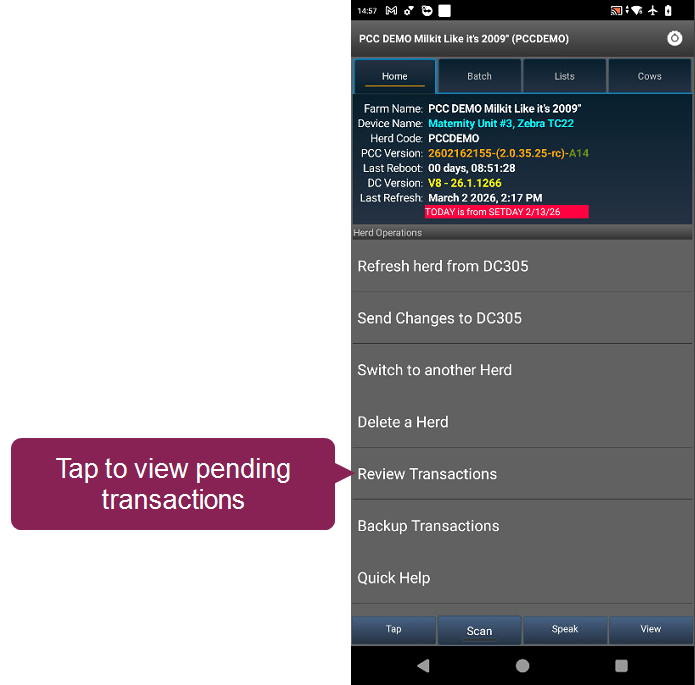
- Follow the guidelines when selecting transactions to erase:
- Check the box next to transactions that aren't related to ID entry or event entry.
- Do not check any boxes next to queued animal transactions. Check why they are not marked as Done in the hospital or vet list.
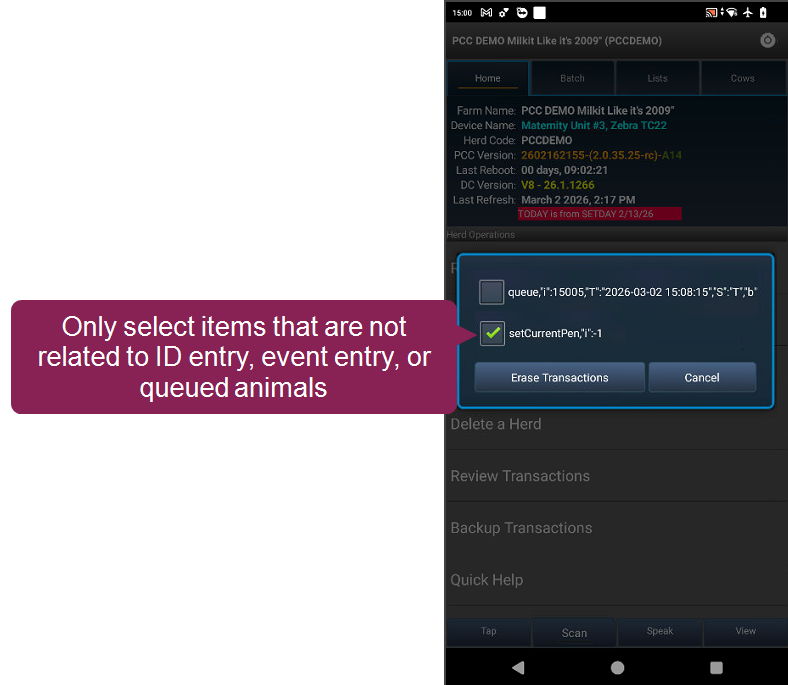
- Tap Erase Transactions, then tap Yes to confirm your choice.
Pocket CowCard should now refresh correctly.
RESOLVED 2025/09/18 - View full animal IDs in grid view workaround: If your animal IDs are getting cut off when you view them in grid view, change the font size on your Pocket CowCard device so you can view the full ID. Follow the steps below to update your device's font size:
🗒️ NOTE: Android settings may vary depending on the device. Contact Us if you need more help.
- Open Settings on your device.
- Go to Display.
- Tap Font size and style, then select the smallest option.
- Return to the Display screen.
- Tap Screen zoom or Display size, then select the smallest option.
- Close and reopen Pocket CowCard. When you switch to grid view, the full animal ID will now be visible.
RESOLVED 2025/06/18 - Send all records to DC305 before initiating Batch commands: We have successfully identified the root causes for Cow Not Found error messages and subsequent transaction failures. The issue arises when new animals are added through the CowCard tab or worklists. Subsequently, Expert or Simple Batch commands are utilized prior to a full data transmission. This sequence prevents the submission of further transactions. A solution is currently being prioritized for immediate implementation. As a temporary workaround, users should send all newly added records to DC305 before initiating any Batch workflows.
RESOLVED 2025/05/01 - Fix inaccurate TODO counts after a rare workflow: The TODO counts may be inaccurate if you activate a vet list using the following steps: open the Cows tab, click on an animal, navigate past Pen Validation, exit the CowCard, click the LISTS tab, and activate a vet list. If the TODO counts do not match, close and reopen the vet list to fix the TODO counts.
RESOLVED 2025/03/24 - Enter Breeding Codes on BRED events from the CowCard tab: If you enabled the setting to force Breeding Codes when you enter a BRED event from the CowCard tab, make sure you enter a Breeding Code when you enter the BRED event. If you do not enter a Breeding Code before accepting your BRED event updates, the app may crash. This does not affect Breeding Grid entries.
RESOLVED 2025/03/07 - Rare workflow results in lost data between Pocket CowCard and DairyComp if you switch herds: We found a situation where Pocket CowCard does not send data correctly to DairyComp if you switch herds without sending the herd's data to DairyComp first. If you refresh multiple herds on a Pocket CowCard device, send each herd's data to DairyComp before you switch herds. We are looking into how to resolve this rare issue.
EXPIRED 2025/01/27 - Pocket CowCard may not show the correct DONE count on the LISTS screen: In testing, VAS identified a bug where the LISTS view did not show the correct DONE count. If you experience this issue, check (long press) and uncheck (long press) the worklist to correct the totals:
VAS has not been able to recreate this issue, and we ask that you contact VAS Support if you encounter this bug.
RESOLVED 2025/01/21 - Pocket CowCard does not warn you if you enter an undefined pen: We found an issue where Pocket CowCard does not show a warning if you enter a pen that is not defined in DC305 during a MOVE event. Ensure that you do not have any undefined pens by running a summary by pen report in DC305. This will be fixed in the next Pocket CowCard release.
EXPIRED 2024/10/29 - Pocket CowCard needs more details from devices that fail to make transactions: We have a special debug version to collect more information for certain “edge cases” where transactions are either not getting created or partially getting created. Please reach out to your support specialist if you have a device that is experiencing this issue: VAS Support. "Edge cases" are situations where we cannot replicate the issue for various reasons. These cases might be device-related, OS-related, Cowfile-related, or related to a certain cadence used in the workflow. Videos of cadence workflow are helpful.
EXPIRED 2023/09/20 – Pen validation error in the new Item Entry feature: We found an issue that occurs if you use pen validation during new item entry on a CowCard on an Android device that uses OS version 8.1 or 9.0. If the system asks you about pen validation and you select the Don't ask me again option, the system will automatically send the new item to DairyComp 305. If you must perform pen validations during item entry, use the SIMPLE BATCH command to avoid this error.
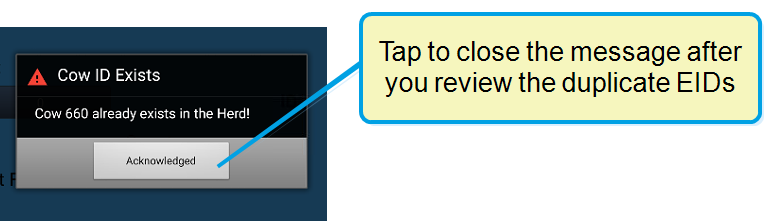
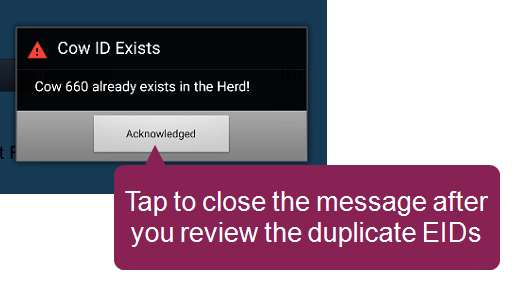
RESOLVED 2023/07/19 – Older versions of Pocket CowCard may crash when adding an existing animal to a herd: Previously, we noted that Pocket CowCard would crash if you used the ADD BATCH command to add an existing animal to a herd if the herd used source farm identifier items (SF and SFID). This issue only affected older Pocket CowCard versions.
Upgrade to the latest version of Pocket CowCard to get the fix: Manually Update the App on your Android Device. In the latest version of Pocket CowCard, the system notifies you that the existing animal already exists and does not process the command.
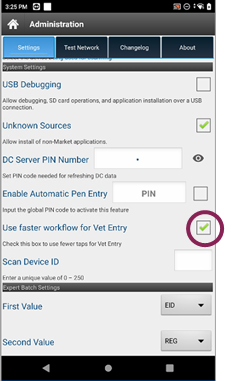
RESOLVED 2023/06/19 - Pocket CowCard may crash when entering a BRED event using the Enhanced VET FORM: Pocket CowCard may crash if you try to enter a BRED event by selecting Other Event, and then BRED. This only occurs if you have enabled Enhanced Vet Form by selecting the Use faster workflow for Vet Entry setting.
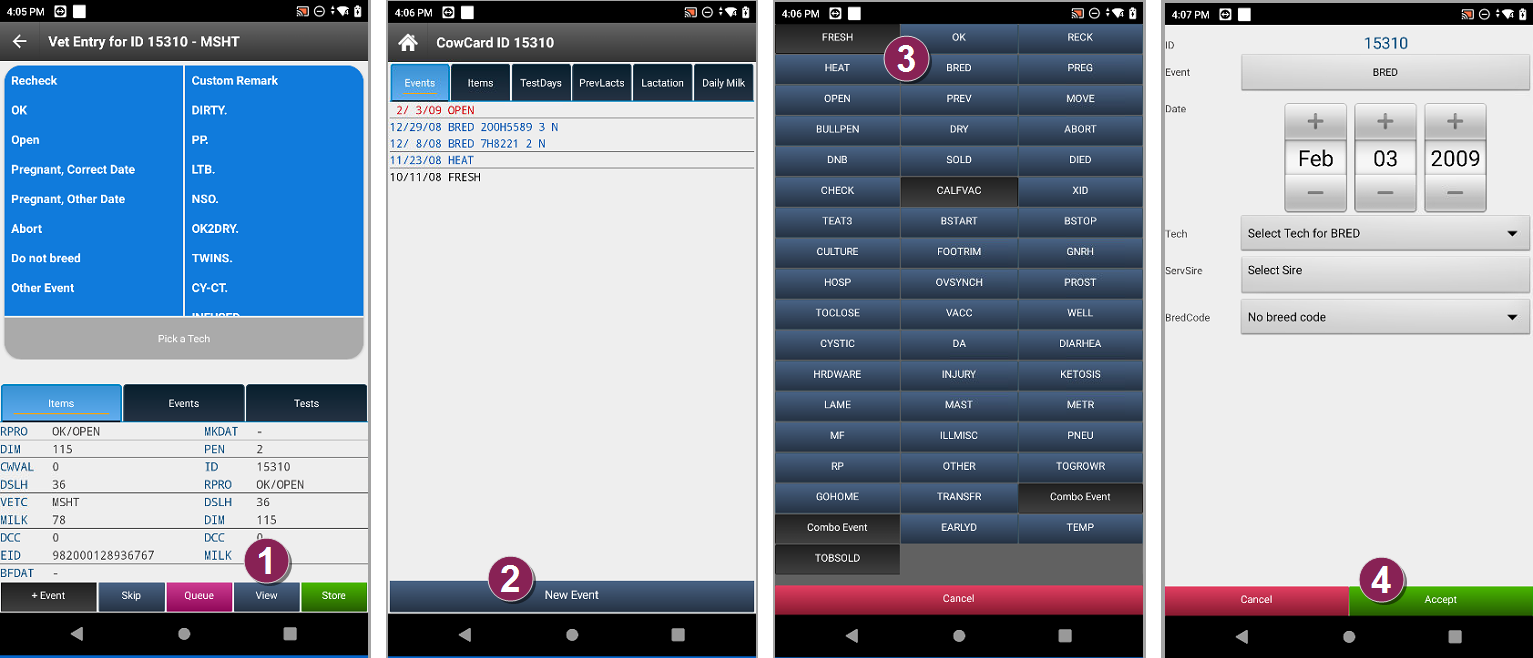
KNOWN ISSUE 2023/04/10 - Pocket CowCard unable to recognize 2 separate animals when using a Source Farm ID with ADDBATCH commands: When using this feature in DC305 to add two or more animals with the same visual ID (SFID) in the same session, the application is unable to recognize that there are 2 separate animals. We are working to add the necessary logic to this workflow in a future release. As a workaround, please type the complete identification (SF+SFID and any preceding zeros) in cases where 2 or more animals are added in the same collection session.
RESOLVED 2022/10/12 – Some Batch menu entries are not being collected: There have been a few cases where the system loses new entries created from the Batch menu on Pocket CowCardAndroid. The loss only occurs if you edit the Expert Batch command after you have already started entering data for a batch or if you do not refresh the device before you start entering data for a new batch. We are working diligently to resolve this issue. We have had no reports that ADD batch is affected. If you experience this issue, contact VAS Support before you refresh the device. There may be a chance that we can recover missing data before you refresh.
RESOLVED 2022/12/15 - When adding a new record by scanning from the CowCard or worklists, the record is sent to DairyComp as an ADD and is not being held on the DairyComp server: With this bug, new records are being sent to DC305 when scanning in CowCards and worklists. We are working on a fix that will hold the records back on the DairyComp server. Additionally, the fix will do the same with Expert Batch.
RESOLVED 2022/10/21 - After refreshing a new herd, an error message warns that the new herd has unposted data: The system displays an error message after you refresh a new herd to your existing Pocket CowCard app. Until we can resolve the issue in a future update, follow these steps if the system display the Unposted data error message.
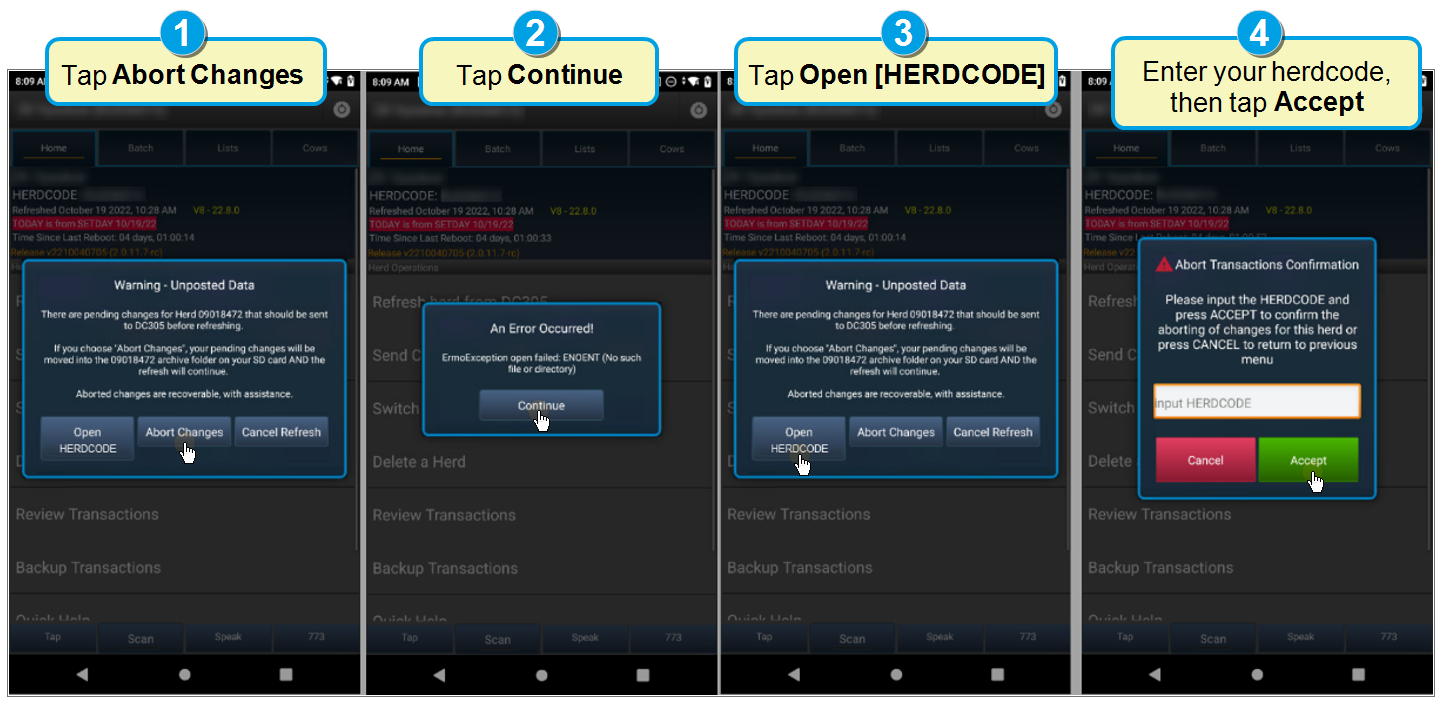
- Tap Open [HERDCODE]. Instead of [HERDCODE], the system displays your actual herdcode.
- Tap Continue.
- Tap Abort Changes.
- Enter the new herd's herdcode, then tap Accept.
After completing the steps, the system should no longer display the error message if you refresh the new herd again unless the app is deleted. If the workaround fails and the system displays the message again, contact VAS Support.
RESOLVED 2022/10/04 - Unsupported events shown in SERVER\3 settings: When we started supporting events higher than 63 for cowfile 9 users, we discovered a bug for all users. You may now see the option to select FRESH, CALFVAC, and COMBO events on Pocket CowCard, but Pocket CowCard does not support these events. Do not use these events on Pocket CowCard. This issue will be resolved in a future release.
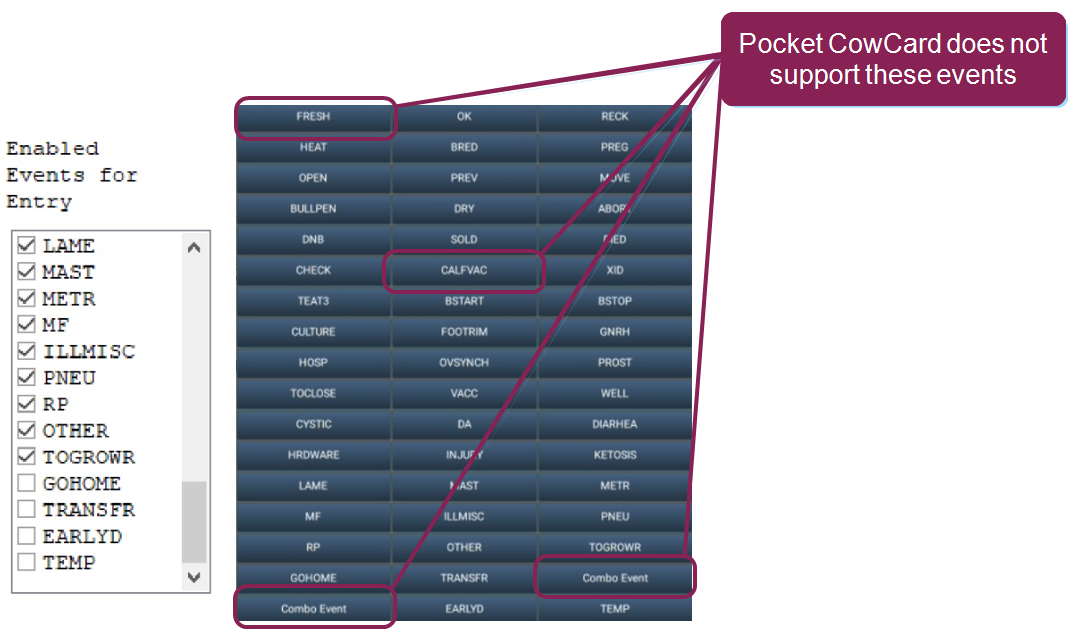
All other events are now supported. If you do not want to use certain events that are now supported, inform your staff that they should not use them.
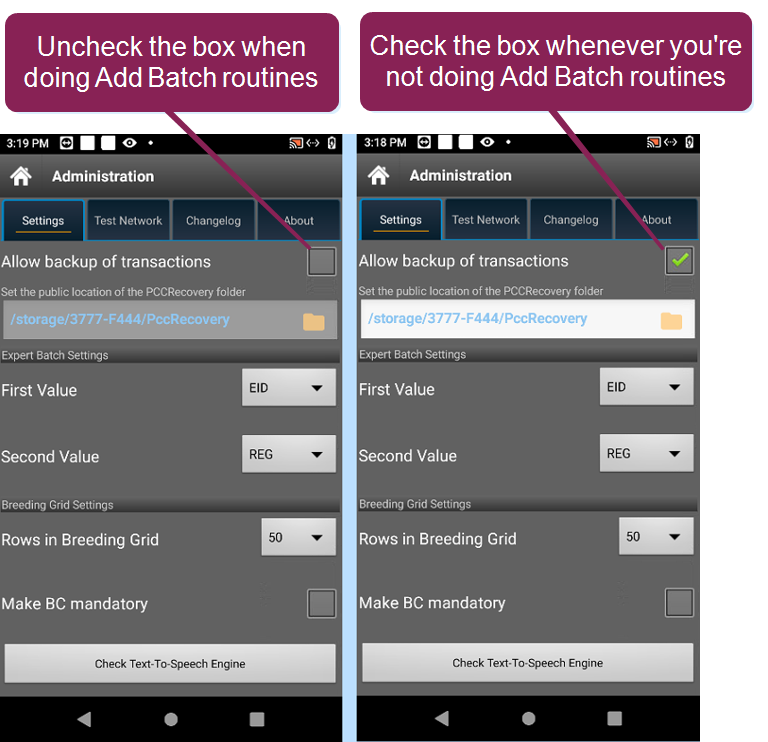
RESOLVED 2022/09/26 - Backups for ADD BATCH routines do not include EIDs: When you use an ADD BATCH routine with a scanner, the system will send a backup without EIDs for the new records if you allow transaction backups. Until we can resolve this issue, if you plan to use any ADD BATCH routines with a scanner, we recommend deselecting the Allow backups of transactions option in the Settings tab. If you do are not using an ADD BATCH routine with a scanner, check the box to enable transaction backups.
EXPIRED 2022/02/22 – Support for Android 6 OS and earlier ends on 8/15/2022: Pocket CowCard support for older Android OS versions has ended, so please upgrade or replace your device.
EXPIRED 2021/12/31 – Version 5 cowfiles are not supported in Pocket CowCard Android: Support for Version 5 cowfiles on Pocket CowCard Android ended in 2019. Any changes made after support ended are not compatible with older version cowfiles like 3, 5, and 7.
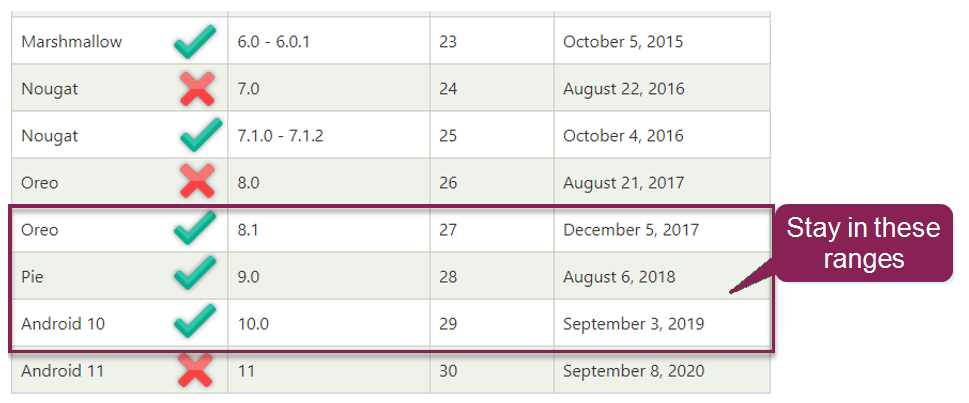
EXPIRED 2021/10/29 – Android 11 runs very slowly with the app installed on the SC card: There is a known issue that affects Pocket CowCard Android when using devices with Android 11 with an SD card and large worklists. Our current recommendation is to only use devices in the 8.1 to 10.0 versions of Android while working with large worklists. We are working on alternatives for handling the changes Google is making with apps that are installed on the SD card. Please refer to the chart below for which devices to use for Pocket CowCard Android. You can learn more about this on the Reddit forum.
EXPIRED 2021/06/08 – List completion percentages on some devices: There is a known bug that affects certain OS versions of devices on the list's completion percentage. Re-installing the app solves this issue in the intermediary. This issue will be watched to see if a pattern develops, as it is presently difficult to reproduce across all devices.
RESOLVED 2021/06/08 – PIN codes for Pocket CowCard Android are here; your device ID may change: Please consider using the PIN codes in DairyComp for controlling the devices that refresh from your DairyComp Server. Specifications from Google require that we move to using Android ID, which may cause your device ID to no longer be available. PRO SCAN and Pocket Breeder Android users will retain their license but need a PIN code to access a herd that has PIN codes activated. Windows Mobile users are not affected by this change. See this video for more details.
RESOLVED 2021/05/12 – IMPORTANT: Users must allow all permissions to use the Pocket CowCard app: Please allow all permissions on any releases dated after 2021/03/31. The app will guide you through the permission process upon installation.
RESOLVED 2020/12/23 – IMPORTANT: RFID scanning with outstanding prompts may cause crashes: VAS recommends responding to any screen prompts before proceeding to the next RFID scan. Continuing to scan animals with outstanding prompts causes known issues in the Vet Form, Hospital Form, and Breeding Grid. We are investigating these issues and will address them in a future release.
RESOLVED 2021/04/22 – IMPORTANT: Users must allow all permissions to use the Pocket CowCard app; Device ID may change: When installing the Pocket CowCard app, users MUST allow all permissions. The app will guide you through the permission process during installation. Also, many users will be informed that their device ID is no longer valid when using higher versions of Android devices. Users configured for Pocket CowCard Unlimited (i.e., those using goodwill certificates) should not be impacted. Please contact VAS Support to update your Pocket CowCard certificates if you are not using goodwill certificates or are a Pocket CowCard Pro user.
EXPIRED 2020/12/03 – Must use the COW tab when using multiple TODO lists: We have encountered issues when processing multiple worklists from outside of the COW tab, as the app only finds animals on the list that you currently have open. VAS recommends only working from the COW tab when processing multiple lists. Or, an even better solution is to redo your worklists into a single list. The option to process multiple lists concurrently is becoming increasingly complicated and is not sustainable on the Mobile Platform in the long run. This feature will be deprecated in favor of speed, dependability, and simplicity.
WORKAROUND 2020/11/17 – How to prevent an Android Device from auto-updating its OS: To prevent issues in the future, please turn off your device’s ability to auto update its OS, see basic example for 9.0 devices:
- Swipe down from the top edge of your screen to reveal the quick settings menu.
- Tap the cog (also called ‘gear’) icon, which is usually in the upper right corner.
- Tap “Software Update” from the list of options.
- Deselect “Download updates automatically”.
- Make sure all options are deselected.
RESOLVED 2020/08/04 – Android 10/11 no longer supports the display of (IMEI) DEVICE IDs: Customers who are affected will need to contact support in the event their device is not registered and are not using “Good Will” Pocket CowCard license certificates.
RESOLVED 2020/05/26 – DC305 license and application upgrade required: Future improvements for the Android version of Pocket CowCard and the VAS Platform will require that you upgrade your Version 5 DC305 licenses to Version 8. An application upgrade to the XE version of DC305 will also be required.
RESOLVED 2020/05/26 – Ending Pocket CowCard Android support for the DC305 Version 5 Cowfile/License: To streamline programming and improve the support experience with Pocket CowCard Android, we are announcing an “End of Life” in supporting data exchange with the DC305 Version 5 Cowfile/License.
IMPORTANT: Customers are encouraged to migrate to the Version 8 Cowfile/License by December 31st, 2020 to continue using Pocket CowCard Android in 2021. Please contact your Sales/Support Specialist for assistance in making the needed upgrade to Version 8.
RESOLVED 2020/05/19 – Update to Google's security regarding apps from unknown sources: This is the first release where a new Google security notification has popped up for Pocket CowCard APK. Users must click Install Anyway, or else Pocket CowCard will not install.
RESOLVED 2020/01/13 – CAUTION: Uninstalling the Pocket CowCard app will remove it and all associated data from your device: This means you will lose all your custom settings, herd folders, unposted transactions, and archived transactions on the device if you uninstall the Pocket CowCard app. If you must uninstall your app, please deliver any unposted transactions to DC305 first, and then consider renaming your app folder COM.VAS.Pocket CowCard. We are looking at ways to preserve some of the content, if possible, based on how Google’s Android handles the uninstall process.
EXPIRED 2020/01/13 – The server that handles the distribution of the Pocket CowCard Android app will be discontinued soon: We are planning to use the Google Play Store as the new method for distributing the Pocket CowCard Android app.
RESOLVED 2019/12/12 – Scanning new animals into the herd from a TODO list or AD-HOC event: Scanning of a new animal into the herd currently adds that animal to DC305 immediately. In a future Pocket CowCard Android release, we plan to match the current Windows Mobile functionality and instruct the DC305 Server to hold those new "add" transactions rather than immediately adding them to the system.
RESOLVED 2019/11/13 – Scan method overwrite: Scan method items may be changed inadvertently from their original values when tapping on animals from the QUEUE or DONE tabs in worklists. For instance, an R or V method may update to a T. This issue will be addressed in an upcoming release.
EXPIRED 2019/10/11 – DC305 license and application upgrade required: Future improvements for the Android version of Pocket CowCard and the VAS Platform will require that you upgrade your Version 5 DC305 licenses to Version 8. An application upgrade to the XE version of DC305 will also be required.
EXPIRED 2019/03/07 – Android Nougat 7.1.2, 8.1.0, and other newer versions cannot read 8-digit SD Card – Pocket CowCard-315: Google has removed the ability to read the 8-digit SD Card ID on newer versions of Android. The current method is to use the Device ID for the licensing of Pocket CowCard at the time of registration.