Pocket CowCard Update - 2020 - 2024
Pocket CowCard Android - Version v2410251041-(2.0.27.39-rc)
Build Date: October 25, 2024 Release Date: October 29, 2024
Pocket CowCard for Android version v2410251041-(2.0.27.39-rc) includes a variety of enhancements and bug fixes. Expand the sections below to learn more:
As we communicated previously, VAS no longer supports Pocket CowCard for Android 8.1 (or lower) devices. For a full list of devices supported by VAS, click here. If you have any questions about your options or if you want to purchase a new compatible device, please contact your Pocket CowCard support representative.
(Pocket CowCard-1355, Pocket CowCard-1361)
- Enter a FRESH Event on Pocket CowCard: The FRESH event is now available in Pocket CowCard! You can enter FRESH events for your animals directly on the animal's CowCard in Pocket CowCard. Simply go to the Events tab, tap New Event, and tap FRESH to enter event details and store the new event. See Create a FRESH Event in PCCCreate a FRESH Event in Pocket CowCard to learn more! (Several tickets)
- Created new ability to add new animals during some Expert Batch routines: Users can now add new animals during an Expert Batch routine using a certain workflow. If you use an ENTER\Z routine and ADD an animal that does not exist in your herd, the system adds the animal. Note that this feature does not support WITH statements for source farms. (Pocket CowCard-1420, Pocket CowCard-1447)
- Regression tested at 100% for test rail cases for Android 14: This Pocket CowCard version was fully tested with Android 14 using a MOTO G24 model and passed all testing. Please avoid using Android 15. (Pocket CowCard-1434, Pocket CowCard-1447)
- Fixed a missing feature in the Settings tab: We recovered the lost alternative vet check setting where users define which items are shown. (Pocket CowCard-1438, Pocket CowCard-1447)
- Resolved a crash issue when users use the in-app updater: We have fixed the in-app updater issue that affected devices running on Android 12 or higher. Use the instructions here to update your app to the latest version: Need help updating Pocket CowCard? Click here for installation instructions for Android devices!. For future versions, you won't have to manually update Pocket CowCard anymore, as long as you allow all permissions requested by the app to enable the in-app updater. (Pocket CowCard-1436, Pocket CowCard-1447)
Pocket CowCard Android - Version v2408271644-(2.0.26.376-rc)
Build Date: August 27, 2024 Release Date: August 28, 2024
Pocket CowCard for Android version v2408271644-(2.0.26.376-rc) includes a variety of enhancements and bug fixes. Expand the sections below to learn more:
As we communicated previously, VAS will no longer support Pocket CowCard for Android 8.1 (or lower) devices on August 31, 2024. For a full list of devices supported by VAS, click here. If you have any questions about your options or if you want to purchase a new compatible device, please contact your Pocket CowCard support representative.
(Pocket CowCard-1355, Pocket CowCard-1361)
- Turned off in-app update messaging and activation for Android 8.1 (or lower) devices: This is the final version for Android 8.1 (or lower) devices. The in-app updater will handle future updates. Future versions of Pocket CowCard will not work with devices running Android 8.1 and lower. (Pocket CowCard-1354, Pocket CowCard-1423)
- Updated VAS address on the About screen: We updated the VAS address on the About screen to the Visalia, California address. (Pocket CowCard-1363, Pocket CowCard-1423)
- Completed full regression test on A14 OS: We did 95% regression testing for the A14 OS version on this release. (Pocket CowCard-1369, Pocket CowCard-1423)
- Preparing FRESH event for field testing: In a future release, the FRESH event will be available to dairies that can test it in the field and provide feedback. If you are interested in testing the FRESH event and meet the listed requirements, contact your VAS support representative for more details:
- Testing is only available for the English version of Pocket CowCard.
- Your devices must be using Android 9 (or higher).
- You can only use items prompted for cows and calves, not source farm IDs. (Pocket CowCard-1196, Pocket CowCard-1408, Pocket CowCard-1425, Pocket CowCard-1423)
- Fixed an issue affecting the OnDone command: We resolved an issue where the OnDone command was applied to animals from active lists that did not have an OnDone command. This occurred if multiple lists were active and one of its active commands had an OnDone command. We recommend that you use a combination of OnDone and PostProcess commands when you apply content that needs sanity checking. (Pocket CowCard-1415, Pocket CowCard-1423)
- Resolved an issue that stalled transaction backups: We added an improvement so the backups are not stalled if devices are not fully connected to the network when Pocket CowCard tries to send transactions to DairyComp. (Pocket CowCard-1412, Pocket CowCard-1423)
- Fixed the insemination tech number display: We resolved an issue where the breeding technician's number was not visible on a CowCard. (Pocket CowCard-1397, Pocket CowCard-1423)
Pocket CowCard Android - Version v2407171622-(2.0.26.300-rc)
Build Date: July 17, 2024 Release Date: July 17, 2024
Pocket CowCard for Android version 2.0.26.300 includes a variety of enhancements and bug fixes.
As we communicated previously, VAS will no longer support Pocket CowCard for Android 8.1 devices on August 31, 2024. For a full list of devices supported by VAS, click here. If you have any questions about your options or if you want to purchase a new compatible device, please contact your Pocket CowCard support representative.
(Pocket CowCard-1355, Pocket CowCard-1361)
- Improved transaction handling: We have created a new method for collecting transactions, which prevents data loss caused by crashes or flow interruptions. We now store transactions in a database system, which is a more reliable method that helps to protect you from data loss. (Pocket CowCard-1265, Pocket CowCard-1361, Pocket CowCard-1373, Pocket CowCard-1374, Pocket CowCard-1376, Pocket CowCard-1382, Pocket CowCard-1383, Pocket CowCard-1384, Pocket CowCard-1385, Pocket CowCard-1388)
- Pocket CowCard now supports an ADD BATCH command for identifying animals: You can now use the ADD BATCH command ID=NUMBER++ on a scanner to identify an animal by its RFID, so you no longer have to manually enter Management ID ear tags. (Pocket CowCard-1306, Pocket CowCard-1361)
- Added ability to remove ADD records from the Transaction Log: If you find an error in the Transaction Log, you can now safely remove any ADD records by using the new edit feature in the Transaction Log. (Pocket CowCard-1331, Pocket CowCard-1361)
Fixed an issue affecting the in-app updater: This version resolves an issue where Pocket CowCard repeatedly advertised a new update, but would not install the update properly. (Pocket CowCard-1395)
Added a fix for a worklist crash: This version resolves an issue where Pocket CowCard crashed if you used the Undo feature to move an animal from DONE back to TODO on a worklist. (Pocket CowCard-1353, Pocket CowCard-1361)
Pocket CowCard Android - Version v2403211458-(2.0.25.9-rc)
Build Date: March 21, 2024 Release Date: April 1, 2024
Pocket CowCard for Android version 2.0.25.9 includes a variety of enhancements and bug fixes.
- DairyComp can now support any items defined by a Pocket CowCard event entry: If you download Pocket CowCard 2.0.25.9 and DC305 24.3DairyComp 24.3, DairyComp can now merge event entries from Pocket CowCard with the existing event commands to support any items defined for that event. This occurs even if the content doesn't include an entry prompt, picklist, or a chain of commands. For example, if your DRY event is EC=11 PEN=5, a DRY event from Pocket CowCard will now support the PEN=5 entry. (Pocket CowCard-1231, Pocket CowCard-1347)
- Implemented multiple improvements for non-English sounds: The Chinese, German, Russian, and Spanish language sounds are now embedded in Pocket CowCard, so you no longer have to manually place the CORE sounds in your AXIM/WAVS folder. We have also converted the files to WAV and increased the speed to improve the efficiency of your workflows. (Pocket CowCard-1315, Pocket CowCard-1347)
- Improved pen validation process for some Pocket CowCard commands sent to DairyComp: If you initiate an event entry, OnDone, or PostProcess command, Pocket CowCard now sends pen validation pen changes to DairyComp before it sends event entry data. This updated process prevents instances where an animal is assigned to the wrong pen because the pen validation process interferes with a MOVE event. (Pocket CowCard-1298, Pocket CowCard-1347)
- Prevented some sounds from playing if certain items are included in a worklist: We now prevent some Text-to-Speech sounds or custom sound files from playing if the worklist includes one of the following items:
- Item Type #21: REM
- Item Type #84: RPRO
- Item Type #85: EVT
- Item Type #19: Sire NAAB/Names (Pocket CowCard-1299, Pocket CowCard-1347)
Added a fix for a certain Firebase crash: This version resolves an issue where Firebase would crash if the system did not properly initialize storage. (Pocket CowCard-1330, Pocket CowCard-1347)
Pocket CowCard Android - Version v2402151852-(2.0.24.05-rc)
Build Date: February 15, 2024 Release Date: February 26, 2024
Pocket CowCard for Android version 2.0.24.05 includes a variety of enhancements, bug fixes, and information related to known issues.
Refactored text-to-speech and custom sounds: We disabled some default English text-to-speech sounds to make Pocket CowCard more user-friendly for non-English users. Previously, when the app recognized a phrase in a worklist, the app would play an English text-to-speech sound if there was no custom sound assigned to the phrase. In the latest version of Pocket CowCard, the system will no longer play the English text-to-speech sounds listed below. Instead, the system will play the CORE sound (NEEDED) if there is no custom sound assigned to the phrase.
- ABT.WAV
- BST.WAV
- CHCK.WAV
- CONF.WAV
- CYST.WAV
- FRSH.WAV
- GBS.WAV
- GNRH.WAV
- HNPG.WAV
- LUT.WAV
- LUT1.WAV
- LUT2.WAV
- LUT3.WAV
- MSHT.WAV
- NOHT.WAV
- PREG.WAV
- PRGH.WAV
- RCON.WAV
- REPG.WAV
- XBRD.WAV
If you want to enable any disabled English text-to-speech sounds, expand the steps below to reinstall the text-to-speech sounds:
- Download the newest version of DairyComp 305 to get the text-to-speech sounds.
- From Windows Explorer, open your DairyComp > AXIM folder.
- Right-click the zip file (ORIGINAL_ENGLISH_CUSTOM_TTS_SOUNDS_PLACE_IN_WAVS_FOLDER.ZIP), then click Extract All to extract the files.
- Copy and paste the unzipped files you want into your DairyComp > AXIM > WAVS folder.
(Pocket CowCard-1327, Pocket CowCard-1325)
Added fixes for certain Firebase crashes: This version resolves issues where Firebase would crash if the system received a null response for a previous lactation or if the check feature was enabled on Zebra devices. (Pocket CowCard-1327, Pocket CowCard-1309, Pocket CowCard-1312)
Pocket CowCard Android - Version v2401151625-(2.0.23.13-rc)
Build Date: January 15, 2024 Release Date: January 23, 2024
Pocket CowCard for Android version 2.0.23.13 includes a variety of enhancements, bug fixes, and information related to known issues.
- Improved speed and decompression times for core sound files: The latest version of Pocket CowCard improves the playback speed of the core English sounds used in the app. In future updates, we may apply the same updates to sounds in other languages. (Pocket CowCard-1318, Pocket CowCard-1308)
- App now includes latest end-user license agreements: The app now contains the updated, combined end-user license agreements. (Pocket CowCard-1318, Pocket CowCard-1283)
- Fixed Add Batch routines for non-Source Farm herds: Previously, the system would duplicate Add Batch content or cause stuck transactions for some herds. The latest version of Pocket CowCard has now fixed the issue. (Pocket CowCard-1318, Pocket CowCard-1317)
- Added a fix for certain Firebase crashes: This version resolves an issue where Firebase would crash if you tried to set Pocket CowCard to night mode and the settings were not properly loaded. (Pocket CowCard-1318, Pocket CowCard-1283)
Pocket CowCard Android - Version v2312140949-(2.0.22.21-rc)
Build Date: December 14, 2023 Release Date: December 14, 2023
Pocket CowCard for Android version 2.0.22.21 includes a variety of enhancements, bug fixes, and information related to known issues.
- Removed false error messages from ABORT events: The system incorrectly generated a false error message on every ABORT event. Now, Pocket CowCard only displays the error messages under the correct conditions. (Pocket CowCard-1310)
- Added new way to display items in VETFORM worklists: In Administration > Settings, you can now enable the Display Items from Vet Worklists option to include more items in your VETFORM worklist. When you enter your command, simply add the items in your worklist command between the SERVER command and any FOR statements.
- For example, if you want the list to include the animal's ID, pen, vetcode (VETC), days in milk (DIM), days calf carried (DCC), andtimes bred (TBRD), enter the following command in the command line: SERVER ID PEN VETC DIM DCC TBRD FOR VC>0 \V However, we recommend that you do not include the following items at this time: Item Type #21 (REM), Item Type #60 (Age in Months), Item Type #84 (RPRO), and Item Type #85 (EVT). (Pocket CowCard-1304, Pocket CowCard-1206) Added new warning if you try to add an ABORT date earlier than the conception date: Pocket CowCard will no longer let you enter a Days Carried Calf or ABORT date that is set before the conception date and now displays a warning that you must acknowledge before you can pick a reproduction code. (Pocket CowCard-1304, Pocket CowCard-1290)
- Improved process for switching technicians: Previously, if you changed technicians, Pocket CowCard would prompt you to confirm the change. Now, if you have enabled the Use faster workflow for Vet Entry option and switch technicians, Pocket CowCard no longer requires confirmation. (Pocket CowCard-1304, Pocket CowCard-1293)
- Added new warning if you enter an ABORT date for an animal with CDAT>0 and VC=6 after a recent breeding: If you try to breed a PREG animal (CDAT>0) that has an ABORT vetcode (VC=6), the app now warns you if you pick an ABORT date that is dated after the most recent breeding. This message reminds you to abort the earlier pregnant breeding and to allow a new breeding for a future PREG check. (Pocket CowCard-1304, Pocket CowCard-1295)
- You can now configure shortcut buttons for hospital forms on Pocket CowCard Android: In Pocket CowCard Android, we added customizable shortcut options so you can quickly add events or expert batch commands when using hospital forms. Enable and configure this feature in your Pocket CowCard settings in DairyComp, then use the feature in Pocket CowCard:
NOTE: To use this feature, you must have DairyComp 305 version 23.11 or higher. See Update DC305 to the Latest ReleaseUpdate DairyComp to the Latest Release to learn how to download the latest version of DairyComp.
- In DairyComp, enter SERVER\3 to open the Server Configuration screen.
- In the Pocket CowCard Entry tab, navigate to the Select Event or Expert Batch for Quick Pick on Hospital Forms columns at the bottom left side of the screen.
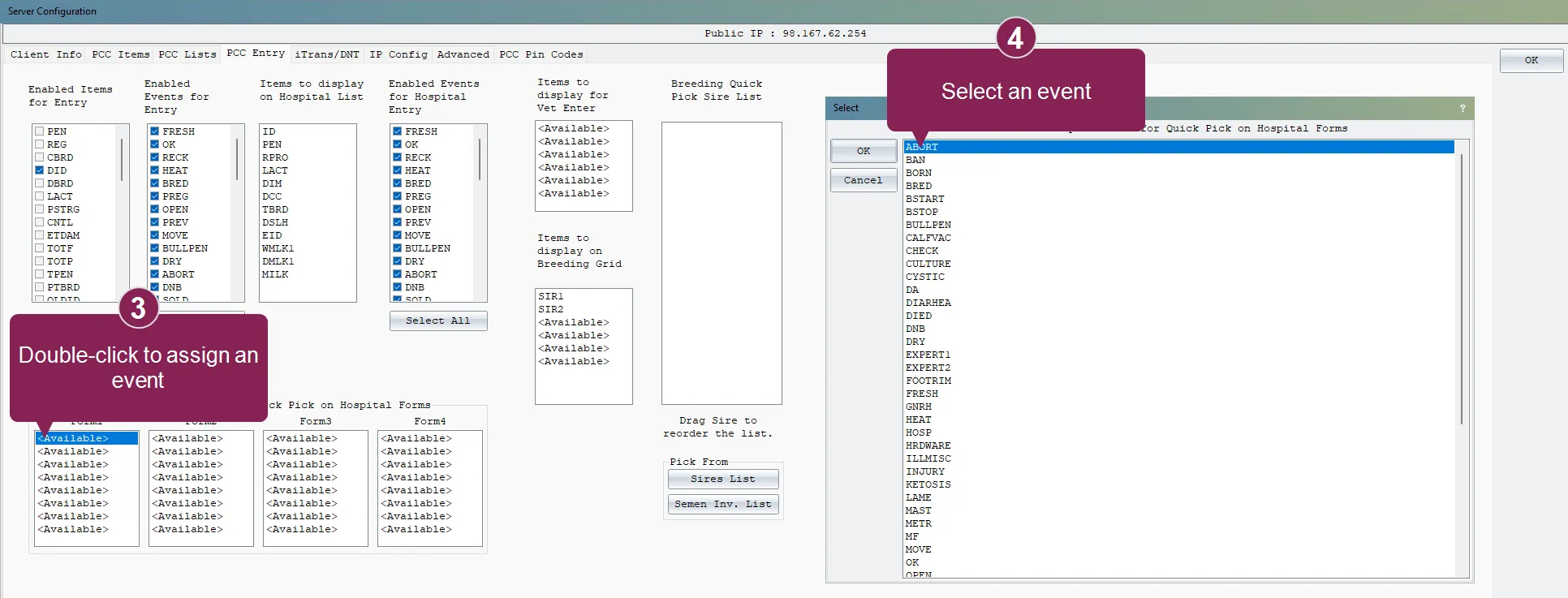
- Each column corresponds to a switch that you can use in your worklist command:
- Form1: \HM1
- Form2: \HM2
- Form3: \HM3
- Form4: \HM4 To assign an event or expert batch shortcut to the \HM1 switch, go to the Form1 column and double-click <Available> to open the Select screen.
- Select your most-used event and click OK.
- Repeat the steps for each shortcut you want to quick pick in hospital forms and select your shortcuts by most used to least used. You can add up to 8 shortcuts per switch.
- Create hospital worklists that implement the switches (\HM1 to \HM4) you just configured:
- ZLHOSP1: SERVER ID DIM PN NOTE FOR PEN=99\HM1
- ZLHOSP2: SERVER ID DIM PN NOTE FOR PEN=99\HM2
- ZLHOSP3: SERVER ID DIM PN NOTE FOR PEN=99\HM3
- ZLHOSP4: SERVER ID DIM PN NOTE FOR PEN=99\HM4
- In Pocket CowCard, open a hospital worklist to see your new shortcuts at the bottom of the screen. Swipe left to right to see all shortcuts:
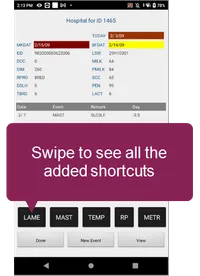
- (Pocket CowCard-1304, Pocket CowCard-1159)
Fixed an issue where grid view limited data to five characters: In the latest release, we increased the character limit for worklist data when you view the data in grid view. (Pocket CowCard-1304, Pocket CowCard-1266)
Pocket CowCard Android - Version v2311090712-(2.0.21.108-rc)
Build Date: November 9, 2023 Release Date: November 13, 2023
Pocket CowCard for Android version 2.0.21.108 includes a variety of enhancements, bug fixes, and information related to known issues.
As we communicated previously, VAS will no longer support Pocket CowCard for Android 7.x or Android 8.0 devices. Now, if you try to install Pocket CowCard on an unsupported device, you will receive an error message.
If you access Pocket CowCard on an Android 7.x or Android 8.0 device and downloaded the September 2023 version of Pocket CowCard, you must upgrade to a newer device by the end of 2024 to continue using Pocket CowCard.
For a full list of devices supported by VAS, click here. If you have any questions about your options or if you want to purchase a new compatible device, please contact your Pocket CowCard support representative.
(Pocket CowCard-1287, Pocket CowCard-1214, Pocket CowCard-1202, Pocket CowCard-1201)
- Use the new text-to-speech feature to hear the number of days for some vetcode constraints: In Pocket CowCard, you can now enable a text-to-speech (TTS) feature to hear the number of days for some vetcode constraints. For example, you can set up a vetcode (PREG) and enter its primary time constraint (Days Since Last Heat) in DairyComp. Then, in Pocket CowCard, you can tap on an animal with a PREG vetcode to hear the number of days that have passed since its last heat. Enable this feature in your Pocket CowCard settings in DairyComp, then use the feature in Pocket CowCard:
NOTE: To use this feature, you must have the DairyComp 305 version 23.6 or higher. See Update DC305 to the Latest ReleaseUpdate DairyComp to the Latest Release to learn how to download the latest version of DairyComp.
- In DairyComp, enter ALTER\5S to open the VetList Options window.
- Open the vet code you want to edit.
- In the vet code's Vet List Parameters window, check the Play Speech box and enter the primary time constraint in the Cnst 1 field to indicate when the system should play the sound. For example, you can enter DSLH>33 so Pocket CowCard plays a sound to let you know how many days have passed since an animal's last heat.
-
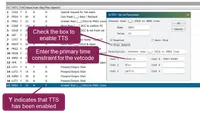
Save your changes. In the VetList Options window, the system displays a Y in the Play Speech column to indicate that the system will play a TTS sound for the vetcode.
Save your changes. In the VetList Options window, the system displays a Y in the Play Speech column to indicate that the system will play a TTS sound for the vetcode.
- In Pocket CowCard, go to the Administration > Settings tab and check the Use "Text to Speech DAYS" sounds with VET CODES box to enable TTS.
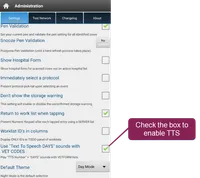
- This feature works best with time constraints that are measured in days. When you enable this feature, Pocket CowCard will say the primary time constraint value, then "days."
- Pocket CowCard will say "days" in the supported language you have selected.
(Pocket CowCard-1287, Pocket CowCard-1012)
- Improved the display for queued animal IDs: When you use dark mode and open the VETFORM entry screen, the font color for queued animals is now white instead of magenta. (Pocket CowCard-1287, Pocket CowCard-1282)
- Removed support for internal RFID reading devices: Pocket CowCard no longer supports internal RFID reading devices or Android devices using OS version 8.0 or lower. See IMPORTANT: Pocket CowCard no longer supports Android 9 devices for more information. (Pocket CowCard-1287, Pocket CowCard-1289)
- Added a warning that displays if you enter an ABORT date before the last PREG event: If you try to enter an abortion date that is earlier than the last PREG event entry, Pocket CowCard now displays a warning message. (Pocket CowCard-1287, Pocket CowCard-1271)
- Fixed the "IsNeeded" sound when the sound is not available: We fixed the core "IsNeeded" sound on worklists when a custom sound is not available. (Pocket CowCard-1297)
- Removed extra sounds that play during text-to-speech: We fixed an issue where the system would play extra sounds if you used text-to-speech (TTS) for items that consisted of a single letter or a period. We recommend that you do not include periods (.) when you create task sounds e.g. P.1, P.22, P.P, etc. (Pocket CowCard-1287, Pocket CowCard-1280)
- Tested and fixed numerous crash scenarios: In the latest release, we implemented additional code to help prevent the app from crashing when no herd is detected or during item entry when pen validation is active. (Pocket CowCard-1279, Pocket CowCard-1285)
Pocket CowCard Android - Version v2309190718-(2.0.21.30-rc)
Build Date: September 19, 2023 Release Date: September 26, 2023
Pocket CowCard for Android version 2.0.21.30 includes a variety of enhancements, bug fixes, and information related to known issues.
If you are accessing Pocket CowCard on an Android 7.x or Android 8.0 device, please update your Pocket CowCard app to the September 2023 version immediately to continue using Pocket CowCard on your device without interruption. The September 2023 release version is expected to be available until October 30, 2023.
As we communicated previously, VAS will no longer support Pocket CowCard for Android 7.x or Android 8.0 devices. As a temporary solution, update your app to the September release version using the in-app updater in Pocket CowCard. However, you must upgrade to a newer device by the end of 2024 to continue using Pocket CowCard.
For a full list of devices supported by VAS, click here. If you have any questions about your options or if you would like to purchase a new compatible device, please contact your Pocket CowCard support representative.
(Pocket CowCard-1268, Pocket CowCard-1214)
- Pocket CowCard now supports item entry in CowCards: The app now supports the ability to enter item values directly from the Items tab of an animal's CowCard. First enable item entry from your Pocket CowCard settings in DairyComp, then use the feature in Pocket CowCard:
- In DairyComp, enter SERVER\3 to open the Pocket CowCard Server Configuration window.
- Open the Pocket CowCard Entry tab:
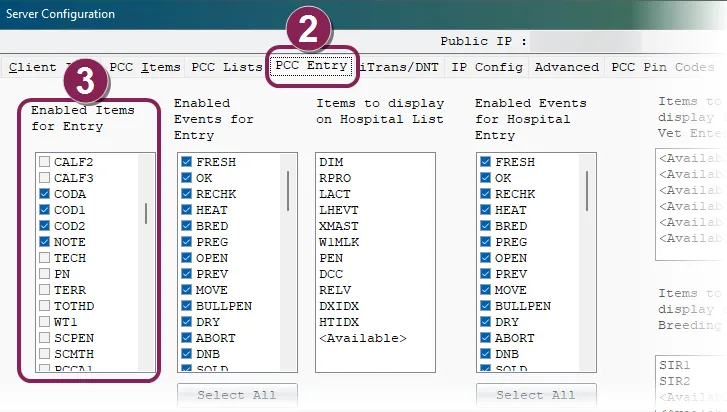
- In the Enabled Items for Entry column, check the boxes next to the items you want to enable.
- Click OK at the top right corner of the screen to save your changes.
- In Pocket CowCard, open an animal's CowCard and tap the Items tab:
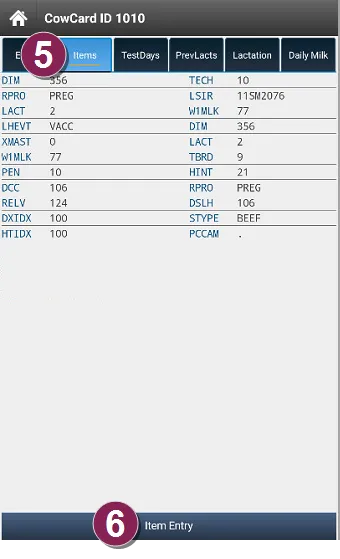
- Tap Item Entry at the bottom of the screen.
- In the Select Item window, choose the item you want to edit from the drop-down list:
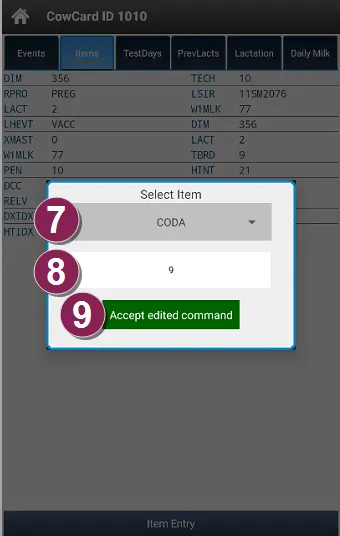
- In the blank box, enter the item value.
- Click Accept edited command to save your changes.
- (Pocket CowCard-1268, Pocket CowCard-1152) DRY events can no longer be applied to animals that aren't cows: The app now warns you if you try to apply a DRY event to youngstock animals. If you need to apply a treatment protocol from a DRY event to a youngstock animal, reach out to your support representative for an alternative treatment protocol option. (Pocket CowCard-1268, Pocket CowCard-1241)
- New Herd TODO page affected tablet user interface: When you open the herd TODO tab on a tablet, the upper section of the worklist controls now works correctly. (Pocket CowCard-1238, Pocket CowCard-1268)
- Fixed Out of Bounds error in worklists: We fixed an issue that would result in an Out of Bounds error in worklists. Previously, if an item in a worklist contained the single letter P, the system would confuse the worklist command with the text-to-speech sound used for pen moves (the GOTO item P sound). (Pocket CowCard-1268, Pocket CowCard-1274)
- Tested and fixed numerous crash scenarios: In the latest release, we have implemented additional code to help prevent the app from crashing during the following instances: checking List Activity, using the Mark Cow process, or when the Pocket CowCard service is not initialized and the app tries to launch a notification. (Pocket CowCard-1199, Pocket CowCard-1256, Pocket CowCard-1257, Pocket CowCard-1260, Pocket CowCard-1261, Pocket CowCard-1268)
Pocket CowCard Android - Version 2308160910-(2.0.20.25-rc)
Build Date: August 16, 2023 Release Date: August 29, 2023
Pocket CowCard for Android version 2.0.20.25 includes a variety of enhancements, bug fixes, and information related to known issues.
- VETFORM entry screen is now available in Day or Night Mode: You can now choose between two color themes for the VETFORM entry screen: Day Mode or Night Mode. In Pocket CowCard, change your color theme in Administration > Settings.
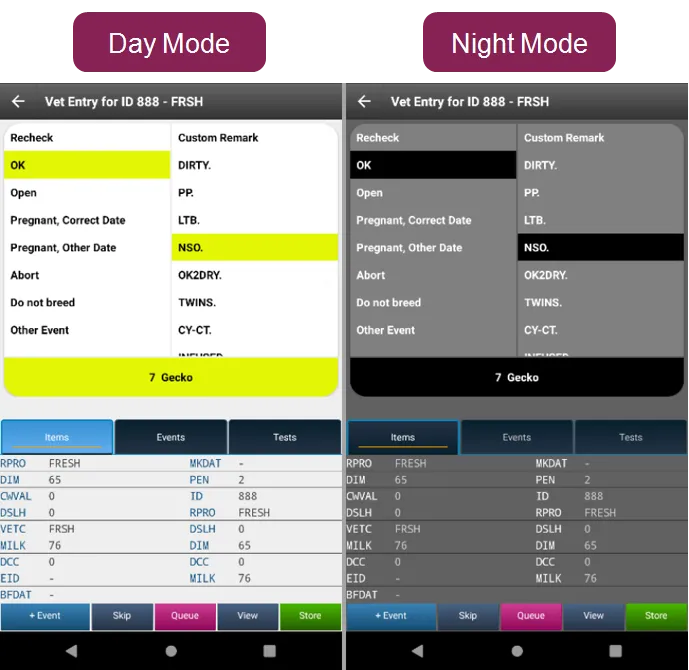
- (Pocket CowCard-1243, Pocket CowCard-1226) Added BRED events to the OTHER event selection screen in VETFORM: On the VETFORM event entry screen, you can select OTHER to see a list of an events to choose from. Now, the list of event includes the BRED event. (Pocket CowCard-1243, Pocket CowCard-1225)
- Added text-to-speech sounds for GOTO items: The latest version of Pocket CowCard now plays sounds for GOTO items with values between P1 to P9999. The system will say the number in the language you selected if the translation is supported. The system does not say "pen" in English, German ("grupp"), or Spanish ("corral"). You can also create your own sound files (WAV or MP3) to override the text-to-speech sounds. (Pocket CowCard-1243, Pocket CowCard-1218)
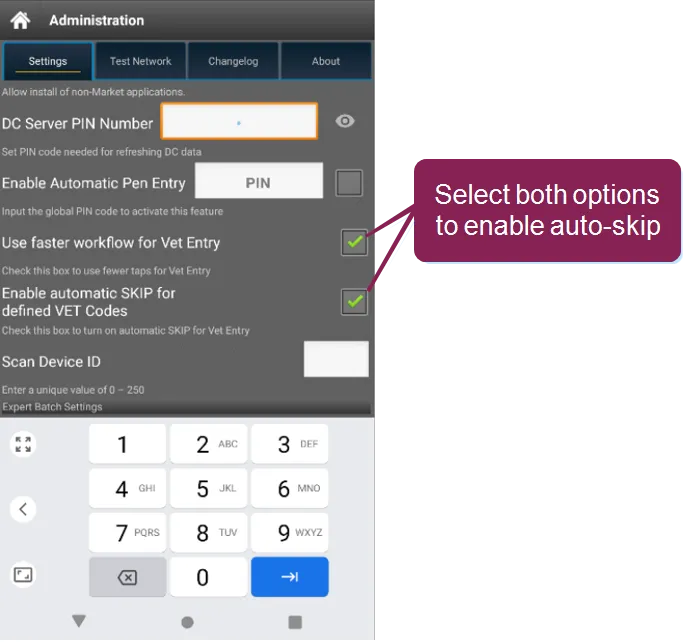
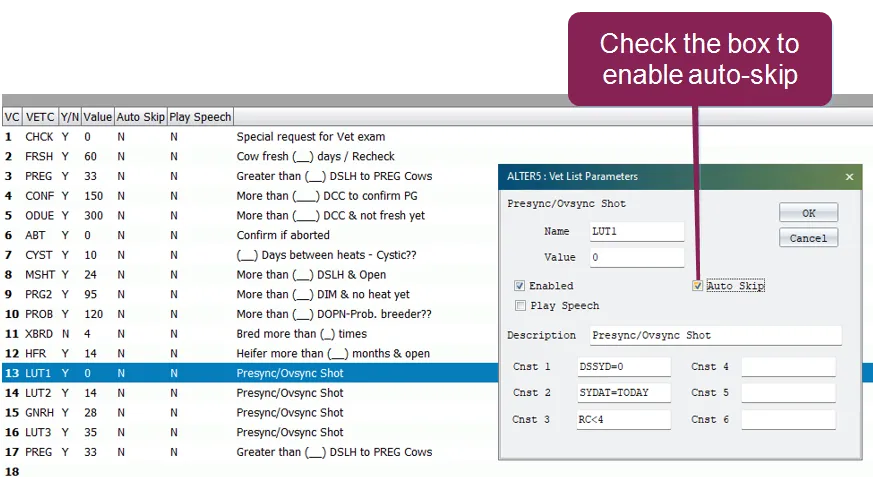
- Added the ability to auto-skip vet codes on a VETFORM worklist: We added the ability to automatically Skip (Mark as Done) selected vet codes on a VETFORM worklist. To use this feature, you need to edit the vet code in DairyComp 305 and edit your settings in Pocket CowCard.
- In Pocket CowCard, go to Administration > Settings and check the boxes for Use faster workflow for Vet EntryUse faster workflow for Vet Entry and Enable Automatic SKIP for defined VET Codes.
- In DairyComp, enter ALTER\5S to open the list of vet codes.
- Double-click the vet code that you want the system to automatically skip and mark as done.
- In the Vet List Parameters window, check the Auto Skip box.
- For more information, contact VAS Support. This feature can also be enhanced by using a OnDone or PostProcess command. (Pocket CowCard-1243, Pocket CowCard-0855)
Fixed the animal order shown in the Vet Queue: Pocket CowCard now lists animals by oldest ID to newest ID in the Vet Queue. Previously, the system incorrectly listed the newest IDs first. (Pocket CowCard-1243, Pocket CowCard-1255)
Pocket CowCard Android - Version 2307311846-(2.0.19.11-rc)
Build Date: July 31, 2023 Release Date: August 1, 2023
Pocket CowCard for Android version 2.0.19.11 includes a variety of enhancements, bug fixes, and information related to known issues.
- Added ability to view all animals in the To Do tab: In the To Do tab in worklists, you can now view all animals from all pens. Tap the All Pens button to view all To Do animals in the herd:
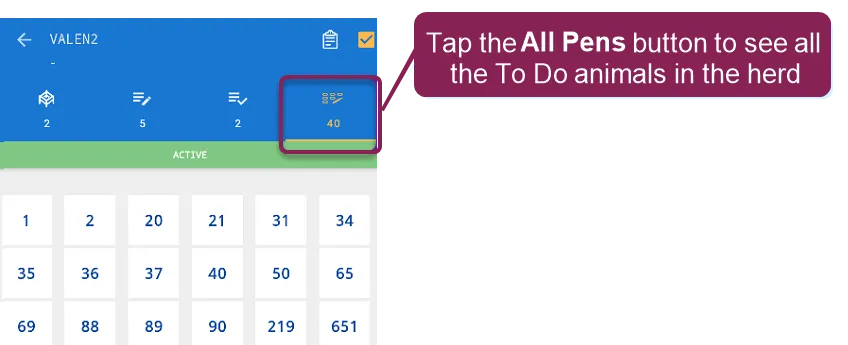
- This improvement makes it easier and quicker to complete tasks like pen validation. If an animal is in the wrong pen, you can still check the animal in the To Do tab. (Pocket CowCard-1232, Pocket CowCard-1154) Added ability to view all animals in the Done tab: In the Done tab in worklists, you can now view all animals from all pens. This improvement will make it easier and quicker to make changes for multiple animals in multiple pens at once. To view all the Done animals in the herd, tap the ALL button at the top right:

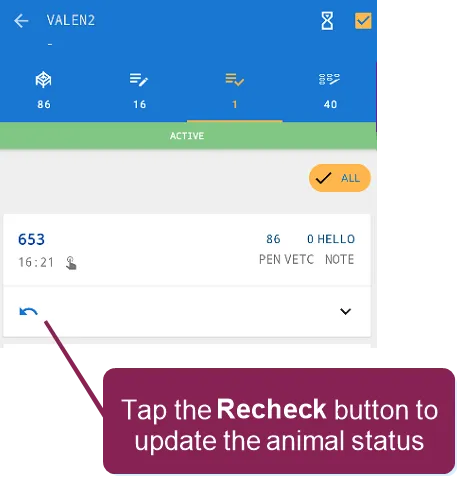
In this scenario, imagine that you need to complete a PREG check for 100 animals in the herd. Out of the 100 animals, 99 animals need to be marked as PREG and only one animal needs to be marked as OPEN. Follow the steps below to quickly complete the PREG check:
- In the To Do tab, mark all 100 animals as PREG.
- Go to the Done tab and find the one animal that requires a different status.
- Tap the animal's Recheck button and change the animal's status:
- (Pocket CowCard-1232, Pocket CowCard-1154) Added a warning message when duplicate EIDs are detected: If you refresh Pocket CowCard from DairyComp 305 and the system finds duplicate EIDs, Pocket CowCard will now notify you. Click Acknowledge and fix the duplicate EIDs in DairyComp:
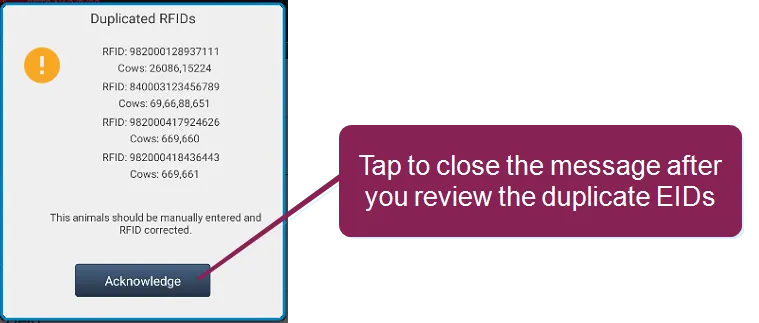
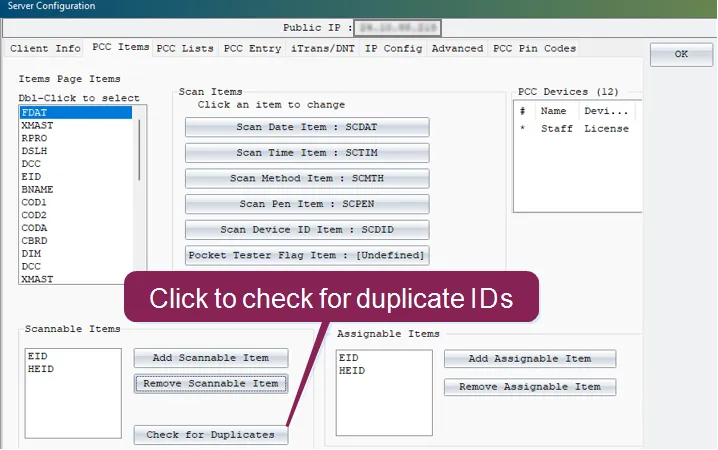
- In DairyComp, open the Server Configuration screen by entering SERVER/3 in the command line.
- At the bottom of the Server Configuration screen, click Check for Duplicates:
- Check the text file to see the list of duplicate EIDs:
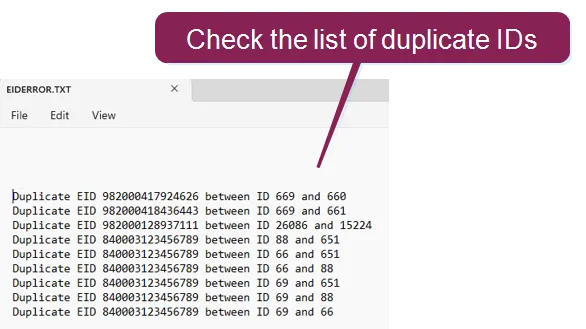
- (Pocket CowCard-1232, Pocket CowCard-0421)
- Fixed an issue where Pocket CowCard did not import Scan Date and Scan Time: When you use an ADD BATCH command with source farm identifiers, the system now imports Scan Date (SCDAT) and Scan Time (SCTIM) values correctly. (Pocket CowCard-1232, Pocket CowCard-1234)
- Resolved a crash issue caused by duplicate EIDs: Pocket CowCard no longer crashes if the system finds duplicate EIDs during an ADD BATCH command. (Pocket CowCard-1232, Pocket CowCard-1234)
Pocket CowCard Android - Version v2307060017-(2.0.18.63-rc)
Build Date: July 5, 2023 Release Date: July 7, 2023
Pocket CowCard for Android version 2.0.18.63 includes a variety of enhancements, bug fixes, and information related to known issues.
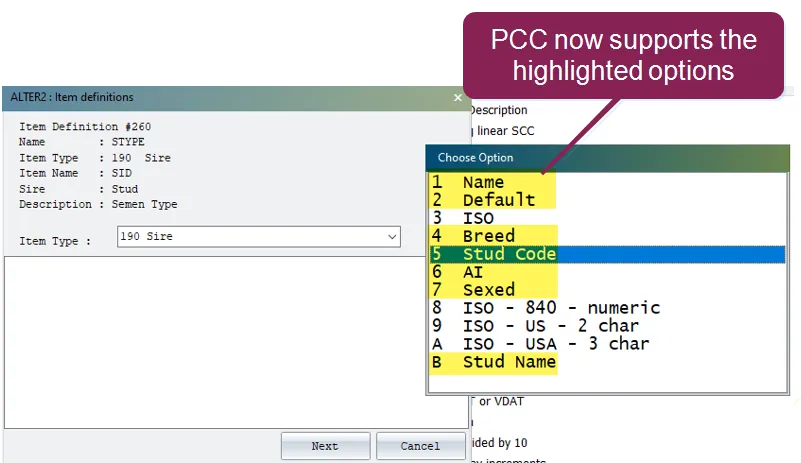
- Added support for Type 190 option 7: Pocket CowCard returns item type 190, option 7 if the semen is sorted as Sexed or Unsexed (conventional) and is a Beef type.
- (Pocket CowCard-1222, Pocket CowCard-1150) Added support for SFID.SF with ADD BATCH commands: Like Pocket CowCard for Windows Mobile, Pocket CowCard for Android now offers full support for the WITH statement in ADD BATCH for source farms based on the Pocket CowCard journal method. Pocket CowCard for Android no longer warns you if a duplicate source farm is entered. Like Pocket CowCard for Windows Mobile, the duplicate entry is discovered by DCSERVER after the entry. (Pocket CowCard-1222, Pocket CowCard-1189)
- Resolved an EXPERT BATCH crash: Expert Batch no longer crashes when adding a command to a blank Simple Batch command. (Pocket CowCard-1222, Pocket CowCard-1200)
- Resolved a duplicate number issue in the Vet Queue: The same animal is no longer displayed multiple times in the Vet Queue. (Pocket CowCard-1222, Pocket CowCard-1219)
- Resolved a Sort by Scan filter issue: Animals added and queued to the Vet List are now displayed at the top of the list. (Pocket CowCard-1222, Pocket CowCard-1221)
- Resolved a SIMPLE BATCH empty input box issue: An empty box no longer displays after tapping on the Simple Batch command when DairyComp has no items defined for input. To fix the issue, Pocket CowCard now requires item definitions in SERVER\3 before Simple Batch can be used. (Pocket CowCard-1222, Pocket CowCard-1220)
- Resolved a Pocket CowCard null exception error: We fixed a null pointer exception error that was discovered in the June 21, 2023 release. This error was fixed in the July 7, 2023 hotfix release (2.0.18.63). (Pocket CowCard-1222, Pocket CowCard-1227)
Pocket CowCard Android - Version v2305161700-(2.0.17.9-rc)
Build Date: May 16, 2023 Release Date: May 23, 2023
Pocket CowCard for Android version 2.0.17.9 includes a variety of enhancements and bug fixes.
- Added End of Support warning for Android 7 and 8 devices: After each refresh, users will be notified that devices that are running Android version 7 and 8.0 will no longer be supported after the August 2023 release.
- (Pocket CowCard-1208, Pocket CowCard-1202) Added the ability to use custom sounds: You can now use custom soundscustom sounds for the "No, not this animal" (buzz sound) and "Cha-ching" sound files when using ADD, SIMPLE, and EXPERT commands. Your sound files must be named NONOTTHISANIMAL.MP3 or .WAV and CHACHING.MP3 or .WAV (file name must be ALL CAPS). Save the .mp3 or .wav files to the X:\DairyComp\AXIM\WAV DairyComp folder.
- (Pocket CowCard-1208, Pocket CowCard-1184) Enhanced VET FORM entry capabilities: Like Pocket CowCard for Windows Mobile, Pocket CowCard for Android now offers a setting that allows you to quickly enter vet check results. See the information below to enable faster Vet Entryenable faster Vet Entry and enter Vet Check results: In the Pocket CowCard mobile app, open the Settings menu and check the Use faster workflow for Vet Entry box.
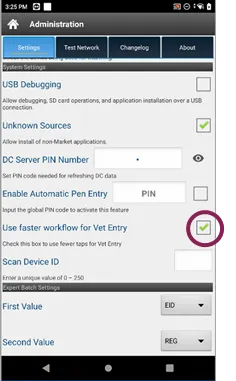
- You can then go to your Vet List, tap an animal, and then tap on Events.
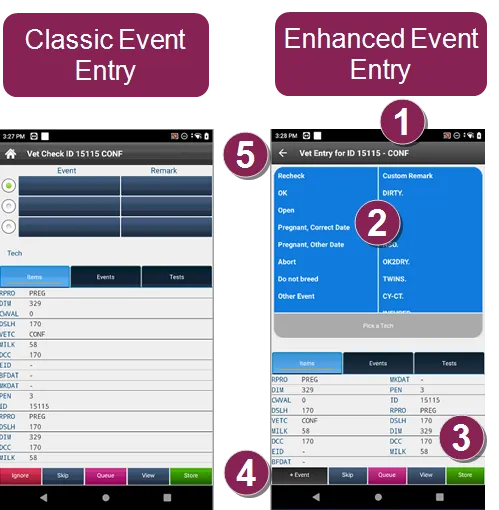
- Vet Check Reason: The reason for the vet check is displayed next to the Cow ID.
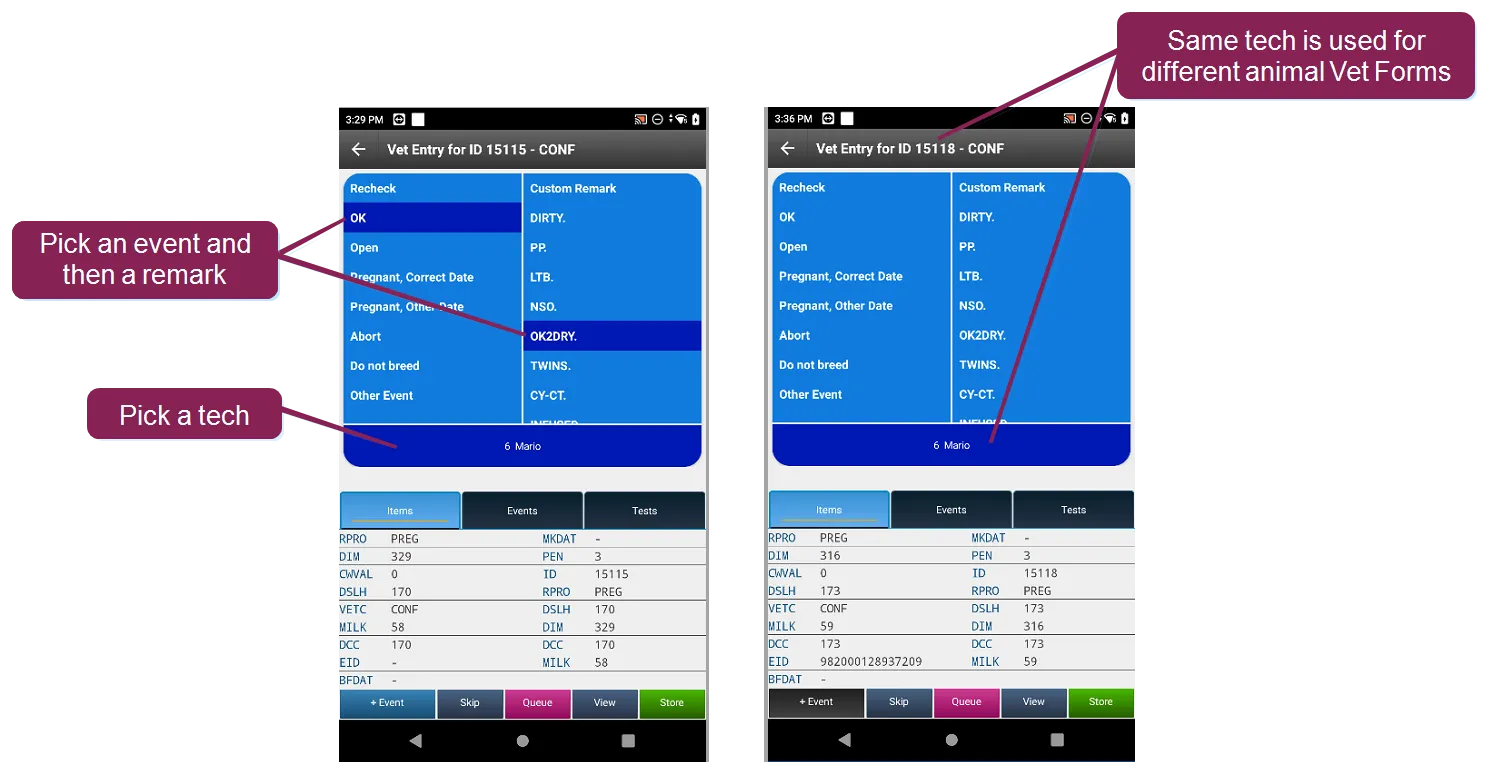
- Event and Remark: Tap to pick an event and then set a remark. An event must be selected before setting a remark or a tech.
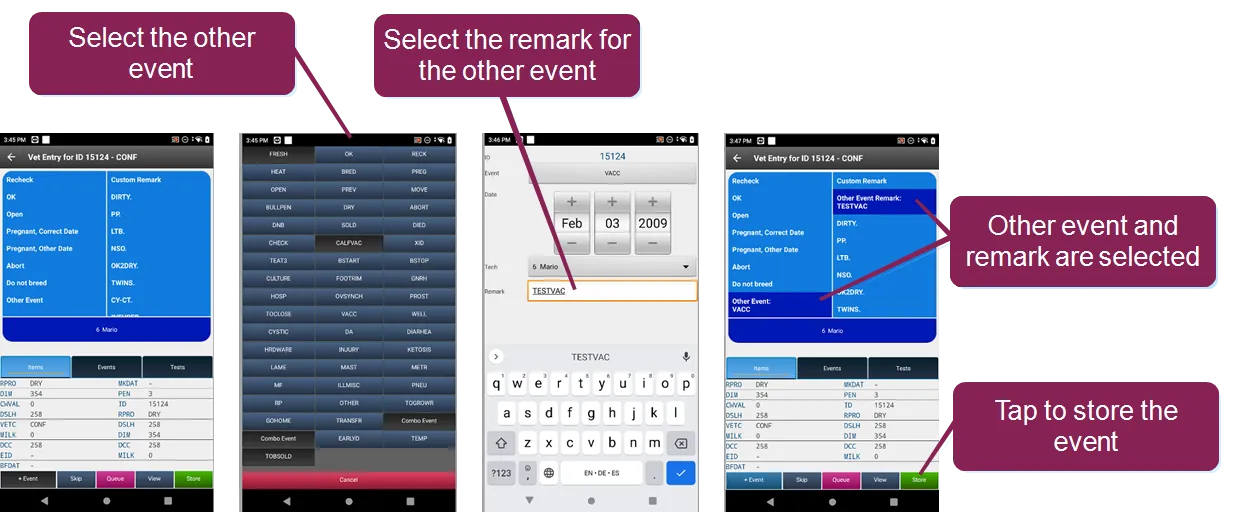
- Store: Tap to store the events and remarks.
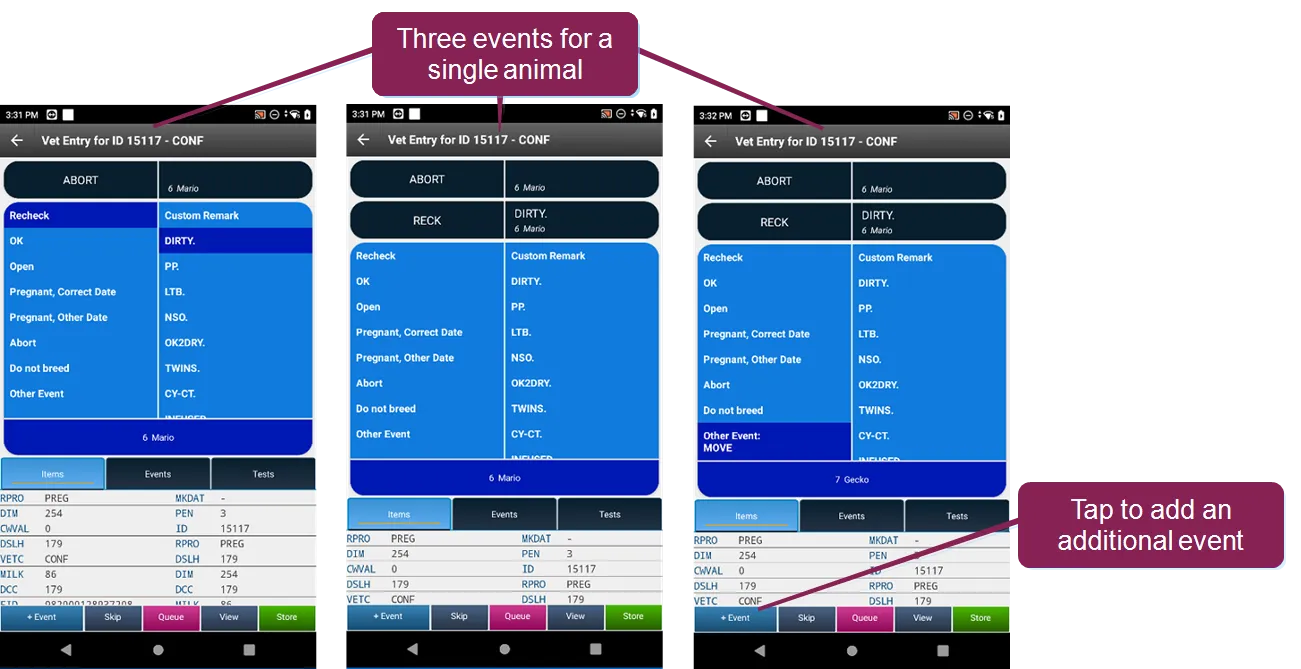
- +Event: Tap to add a second or third event to an existing entry.
- Ignore: Tap the Back button to ignore and cancel the entry. For faster input, Pocket CowCard stores the previous technician used. VAS recommends using the same Event Tech team for the most common Vet Form events.
- By default, you can add three events to single animal. Tap +Event to add additional events to the same animal.
- Pocket CowCard now supports all other events. Command abbreviation content is not available, but we do support protocols that move to a given pen.
- (Pocket CowCard-1208, Pocket CowCard-0624)
- Resolved a Pen Validation crash for Chinese localizations: We have fixed an issue from the March 22, 2023 release that caused Pen Validation to crash while running Pocket CowCard for Android in the Chinese language. (Pocket CowCard-1208, Pocket CowCard-1195)
- Resolved an issue when adding an animal to a Vet List: We fixed an issue where adding an animal to a vet list was not working properly when a new animal was added to the vet form list and then queued. (Pocket CowCard-1208, Pocket CowCard-1188)
- Resolved an issue with the Pocket CowCard splash screen: We updated the splash screen date in the About tab to make it clear that you are not running an older version. (Pocket CowCard-1208, Pocket CowCard-1210)
Pocket CowCard Android - Version v2304181825-(2.0.16.25-rc)
Build Date: April 18, 2023 Release Date: April 19, 2023
Pocket CowCard for Android version 2.0.16.25 includes one enhancement, various bug fixes, and information related to known issues.
Added the SIMPLE BATCH command feature: Like Pocket CowCard for Windows Mobile, you can now use the Simple Batch feature in Pocket CowCard for Android. Use the SERVER\3 command in DairyComp to select the items that can be input.
- In DairyComp, enter SERVER\3 in the command line to open the Server Configuration window, and then follow the steps below to select items for entry.
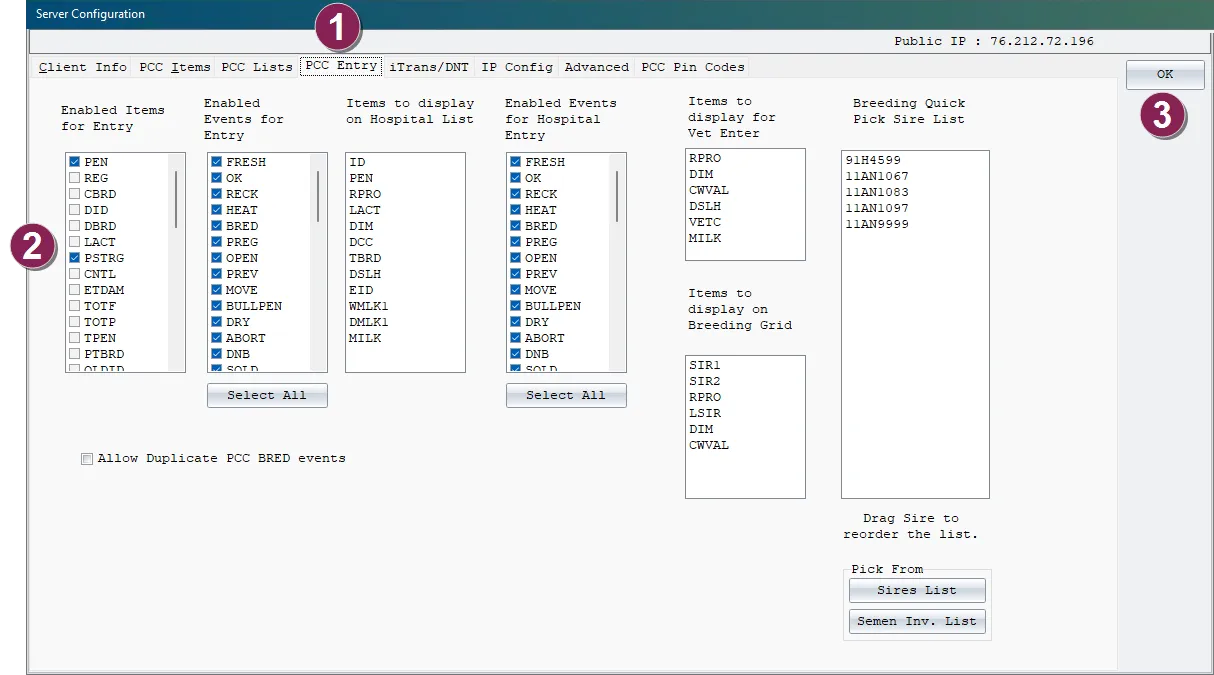
- Select the Pocket CowCard Entry tab.
- Select the items to enable for batch entry from Pocket CowCard.
- Click OK.
- In the Pocket CowCard mobile app, follow the steps below to select the items to enter in batch from Pocket CowCard.
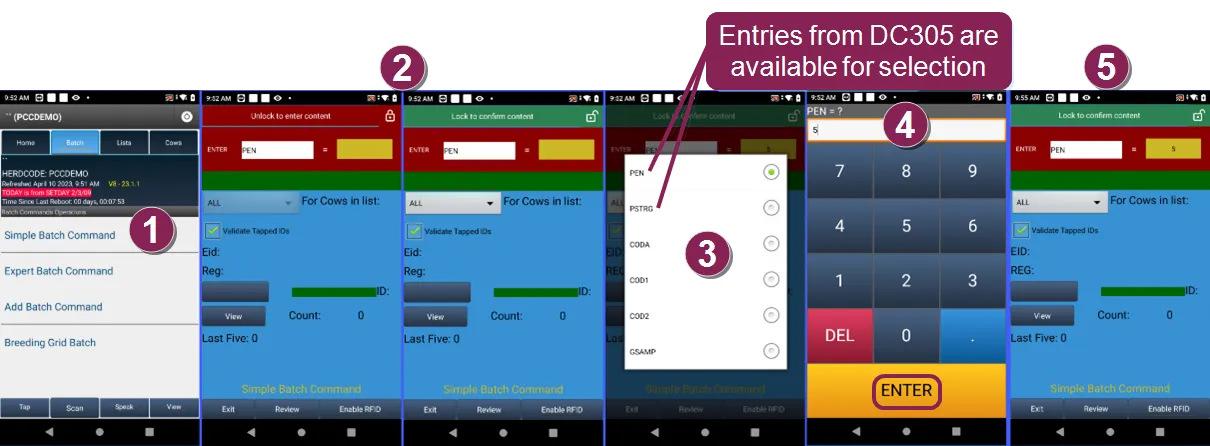
- On the Batch tab in the Pocket CowCard mobile app, select Simple Batch Command.
- Click the lock icon at the top right to unlock the content.
- Select the items to enable for batch entry.
- Enter the value for the batch item, which is the pen number in the example above, and tap ENTER.
- Tap the lock icon at the top right to confirm the content.
- (Pocket CowCard-1153, Pocket CowCard-1124)
- Resolved an issue when changing an RFID on an existing animal: We have fixed the ability to assign a new RFID change for SFID.SF identification on selected herds. With this fix, the system now accepts the Source Farm DOT.ID selection when you change the RFID on an existing animal. (Pocket CowCard-1153, Pocket CowCard-1190)
- New production versions now display the correct expiration dates: We applied two code fixes to ensure that your current version of Pocket CowCard displays the correct expiration dates as well as the final expiration of the Pocket CowCard application. With this fix, the system should no longer display expiration dates from older releases. (Pocket CowCard-1153, Pocket CowCard-1191, Pocket CowCard-1185)
- Resolved a problem with ADD\Z and ENTER\Z commands not showing in herds using DCLANG Spanish: We applied a code fix for displaying ADD BATCH commands in herds using the DCLANG.SPA (Spanish) file with the command verb named AGREGAR. This was not supported in the Pocket CowCard Android app, so we have requested that DairyComp support both English and localized translations for ADD\Z and ENTER\Z in a future release for Pocket CowCard payload creations. (Pocket CowCard-1153, Pocket CowCard-1186)
Pocket CowCard for Android - Version v2303221123-(2.0.15.16-rc)
Build Date: March 22, 2023 Release Date: March 22, 2023
Pocket CowCard for Android version 2.0.15.16 includes various enhancements, bug fixes, and information for a known issue related to Batch menu entries.
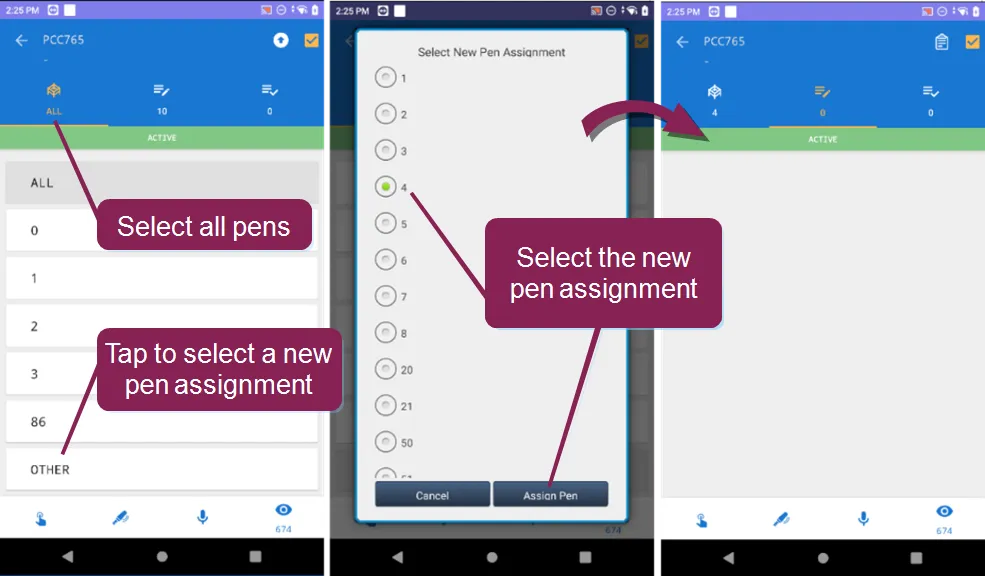
- Added the ability to select an unlisted pen on a worklist by choosing OTHER pen: You can now select a pen that isn't listed on the worklist. This feature helps you maintain an organized inventory count of any pen while finding animals you may need. With all pens selected, tap OTHER to select a new pen assignment. The example below displays Pen 4 with no animals.
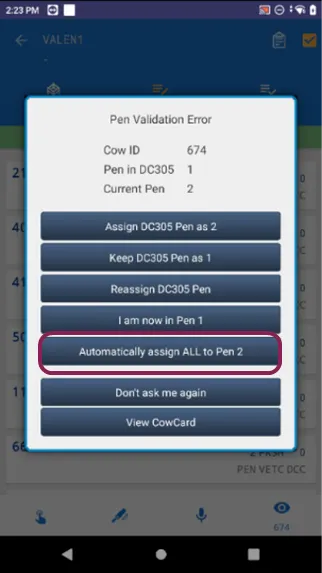
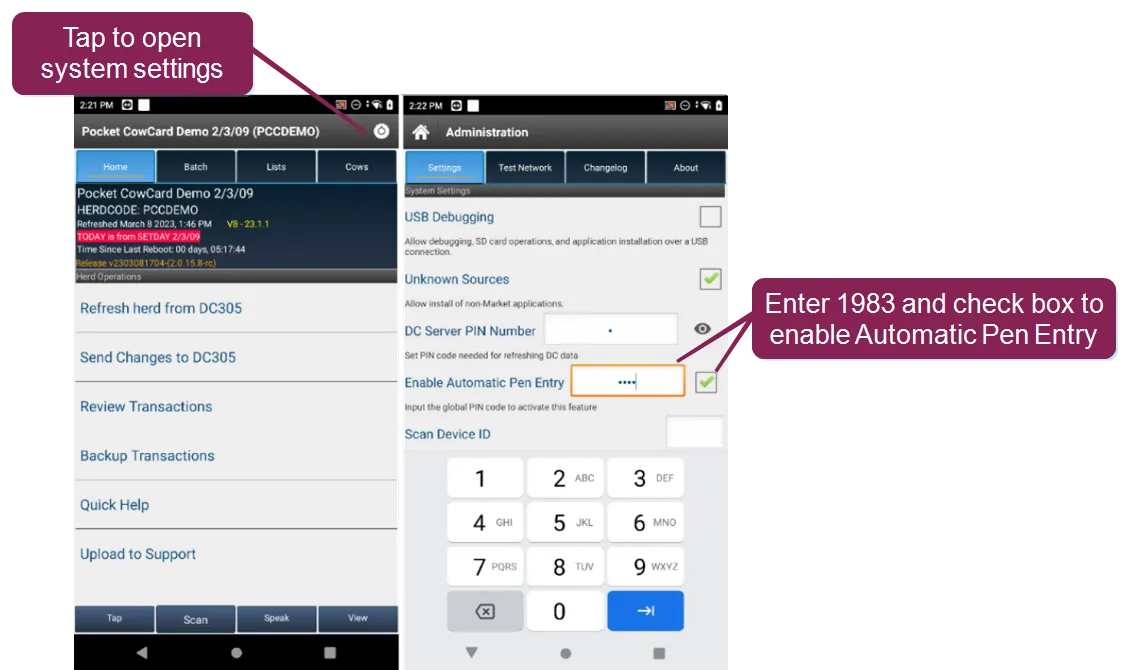
- (Pocket CowCard-0708, Pocket CowCard-1155) Automatic pen entry for worklists: The new Automatic Pen Entry feature makes it easier to move all animals from one pen to a new pen. When enabled, the system displays an option to automatically move all animals. A pin code must be entered to enable this feature. When the feature is not enabled, the system displays a confirmation message for each animal move.
- (Pocket CowCard-1141, Pocket CowCard-1155) Expand the topics below to learn more about using this feature:
To enable this feature, go to System Settings. In the Enable Automatic Pen Entry field, enter 1983 and check the box to activate this feature.
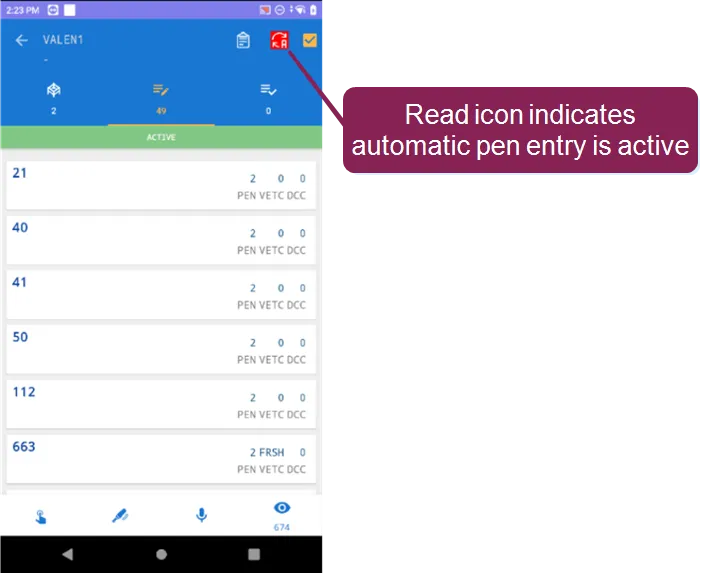
When the feature is enabled, a Read icon is displayed at the top right corner of the worklist.
- The system only displays the Automatic Pen Entry option in worklists. It is not available in any other features.
- After you use this feature for a pen, make sure you exit out of the pen and switch to a new pen before using the feature again.
- You will not see this feature if you select All Pens. This feature only works if you only select one pen.
- To reset the pen validation, simply exit the pen.
- Resolved an issue that occurred when using Expert Batch command: Previously, the system would prompt you to add new records to DairyComp when Cow IDs were manually entered during the Expert Batch process. We have fixed the issue.(Pocket CowCard-1149, Pocket CowCard-1155)
- Investigated and fixed a Firebase crash: We applied a code fix to prevent a Firebase crash that was occurring in Pocket CowCard. (Pocket CowCard-1143, Pocket CowCard-1155)
Pocket CowCard for Android - Version v2302101132-(2.0.14.6-rc)
Build Date: February 10, 2023 Release Date: February 22, 2023
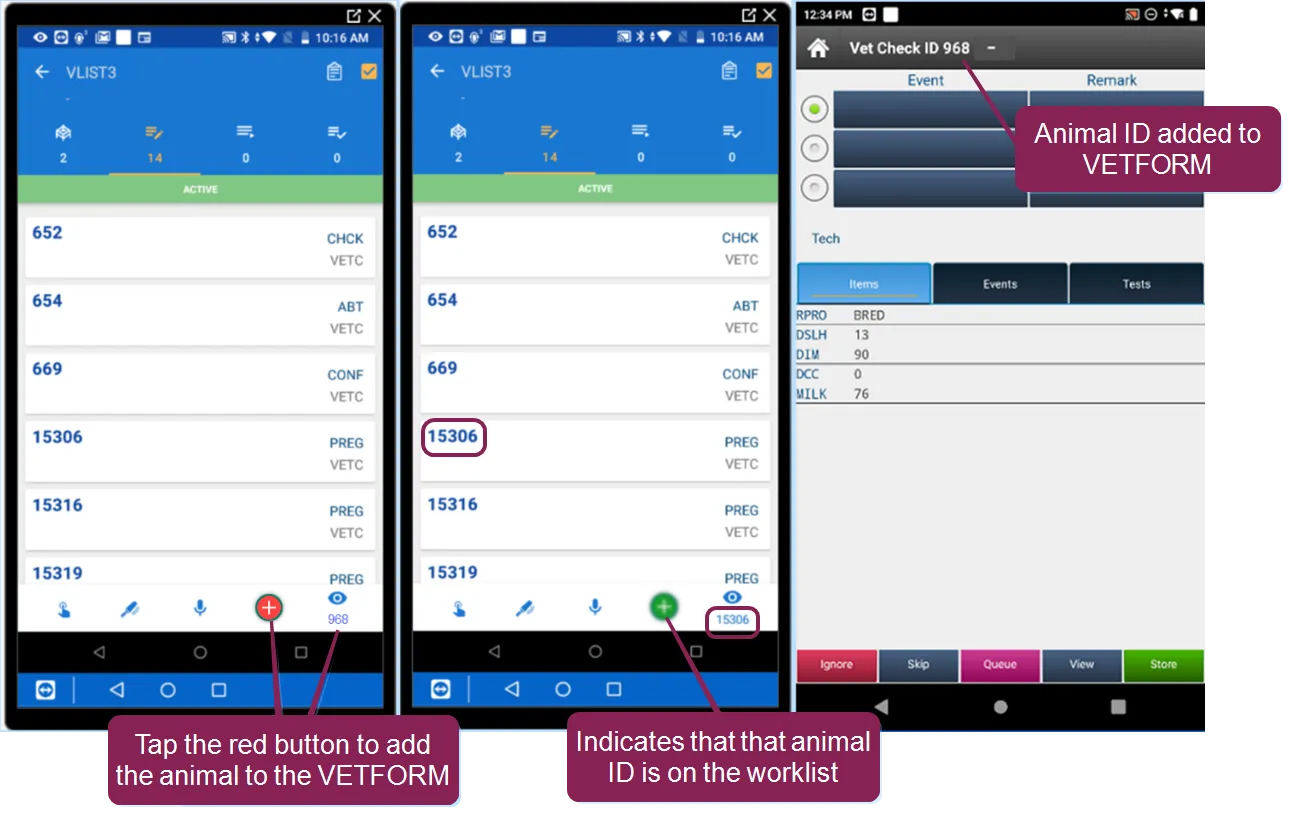
- Added the ability to add an animal to the VETFORM worklist: Similar to Pocket CowCard for Windows Mobile, you can now add an animal to the VETFORM worklist, then mark it as done in Pocket CowCard for Android. Tap the red + button to add the animal to the VETFORM. The green + button indicates that the animal ID shown under the eye icon is on the list.
- (Pocket CowCard-1140, Pocket CowCard-0198) Removed the term "Add" from new records created under the Expert Batch command: You can no longer use the EXPERT BATCH command to add new records. You must now use the ADD BATCH command to add new records automatically to DairyComp. The removal of the ADD verb allows you to enter information like birth weights and genomic sample barcodes after adding records to a FRESH event. Contact VAS Support for more information.
- (Pocket CowCard-1140, Pocket CowCard-1121) New QUADRANT picker for protocol events that define the affected quadrant: When entering an event where the protocol requires you to select the affected quadrant(s), such as the teat for MAST or the hoof for LAME, you can select the quadrant(s) in the new graphical image show below. Your selections on this image will then add the quadrant code(s) to the REM field for that event.
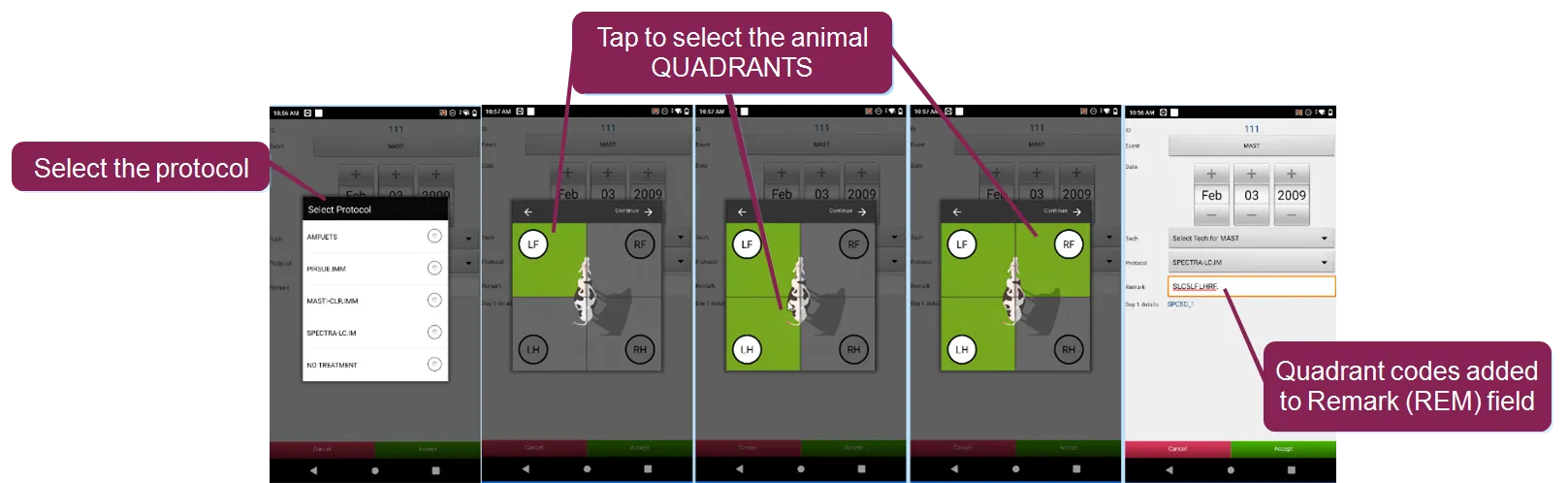
- The quadrant codes that are added to the REM field are determined by the abbreviations that are set for your Remark Prompts in DairyComp under the SETUP command found under the Codes tab (see below). The A4 abbreviation is for All Quadrants.
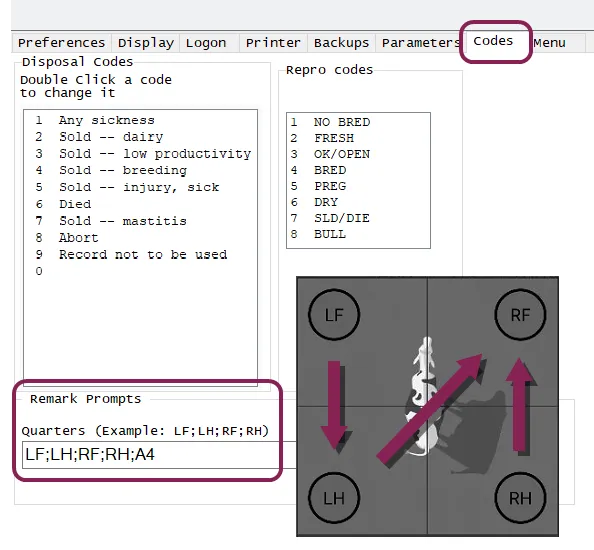
- Be aware that the length of the REM item in your cowfile may limit how many quadrants you can select. If the REM field is limited to 8 characters, you may not be able to select more than one or two quadrants. If your cowfile allows the REM item to include 16 characters, you should be able to multi-select quadrants. Tapping on the animal in the center of the image will select all quadrants, which inserts a REM of A4, which works for REM fields that are both 8 or 16 characters long. (Pocket CowCard-1140, Pocket CowCard-0435)
NOTE: The CULTURE event used with the AUTOMAST feature of DairyComp has not been modified.
- Fixed an issue where new records were being created when scanning from CowCard and worklists: We fixed a regression where DairyComp would automatically add new records when scanning from the CowCard tab and all worklists. These entries will now be held by the DairyComp server for review. (Pocket CowCard-1140, Pocket CowCard-1126)
- Investigated and fixed a Firebase crash: We applied a code fix to prevent a Firebase crash that was occurring in Pocket CowCard. (Pocket CowCard-1140, Pocket CowCard-1142)
- Corrected an unposted data system notification issue: The system was notifying users that there was unposted data for a new herd when there wasn't any data available to post. We have applied a code fix for this issue. (Pocket CowCard-1140, Pocket CowCard-1106)
- Corrected and issue where the list name was not displaying on the Cow tab screen: The list name was not displaying on the Cow tab screen when activating a list from inside of the selected list. We have applied a code fix for this issue. (Pocket CowCard-1140, Pocket CowCard-1104)
Pocket CowCard for Android - Version v2301101609-(2.0.13.5-rc)
Build Date: January 10, 2023 Release Date: January 17, 2023
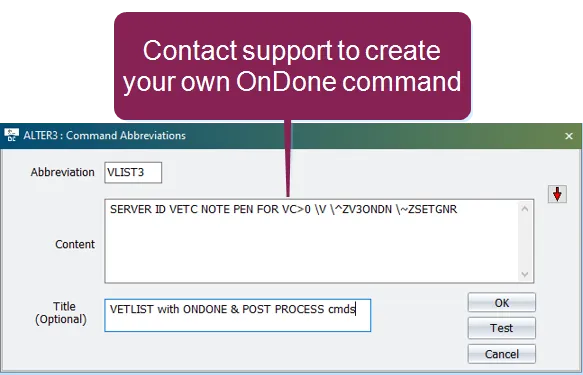
- Added the ability to run the OnDone and PostProcess commands with Vetlists: If you enter a command with an OnDone and PostProcess command, the system lets you automatically enter the same events and remarks for multiple animals. To enable this feature, contact VAS Support to create an OnDone and PostProcess command in DairyComp.
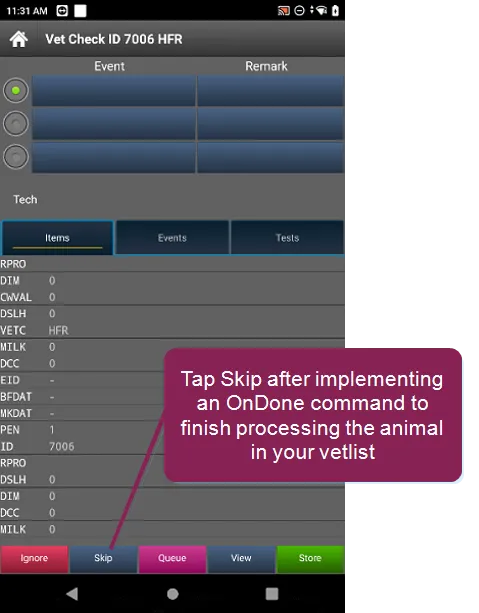
- After successfully setting up an OnDone and PostProcess command for an OvSynch task, simply open the vetlist on Pocket CowCard and tap the Skip button to process the animals.
- (Pocket CowCard-1110, Pocket CowCard-1105) Updated button labels on the screening tool of the Breeding Grid: We've changed the phrasing of the button labels to now display Don't Breed instead of Do Not Breed to avoid confusion with the terms used for RPRO, the reproductive code known as DNB (Do Not Breed) in DairyComp. (Pocket CowCard-1122, Pocket CowCard-1134)
- Enhanced the pen validation feature so it works every time a cow is scanned: A warning message now displays every time you scan or input an animal's number if the animal is in the wrong pen. Previously, Pocket CowCard would not repeat the wrong pen warning if an animal was already entered in the workflow. (Pocket CowCard-1073, Pocket CowCard-1134)
Pocket CowCard for Android - Version v2211171444-(2.0.12.17-rc)
Build Date: November 17, 2022 Release Date: November 21, 2022
- Fixed a SERVER\3 settings issue that affected Events: We fixed an issue where the system would allow Event entry for Events, even after you updated SERVER\3 settings to not allow Event entry for the Event. (Pocket CowCard-1110, Pocket CowCard-1105)
- Corrected an EID import issue on Android 11+ devices: Electronic IDs (EIDs) now load correctly when using Android 11+ devices. Previously, when Android 11+ devices were used to complete an ADD BATCH routine and a transaction backup folder was defined, EIDs did not import correctly. (Pocket CowCard-1110, Pocket CowCard-1103)
- Fixed an issue where using the ADD\Z command would sometimes result in EID loss: Previously, some ADD BATCH routines would fail and EIDs would be lost when using an ADD\Z command. This issue has been fixed. (Pocket CowCard-1110, Pocket CowCard-1105)
- Pocket CowCard now correctly displays daily and weekly milk totals: We resolved an issue where Pocket CowCard was not correctly showing daily milk totals (Item Type #121) and weekly milk totals Weekly Milk (WMLK1). The issue is now resolved for herds that milk twice a day (2X) or three times a day (3X). The app does not currently support herds that milk four times a day (4X). (Pocket CowCard-1110, Pocket CowCard- 1111, Pocket CowCard-1105)
Pocket CowCard for Android - Version v2210040705-(2.0.11.7-rc)
Build Date: October 4, 2022 Release Date: October 4, 2022
- Added ability to add events higher than 63 on V9 cowfiles: You can now pick events higher than 63 when using the new CowFile 9 database. (Pocket CowCard-1101, Pocket CowCard-1089)
- Optimized EXPERT BATCH sounds to play faster: In this release, we optimized the sounds to play faster like previous versions. The sounds included in the September 2022 release were slower than earlier versions. (Pocket CowCard-1101, Pocket CowCard-1099)
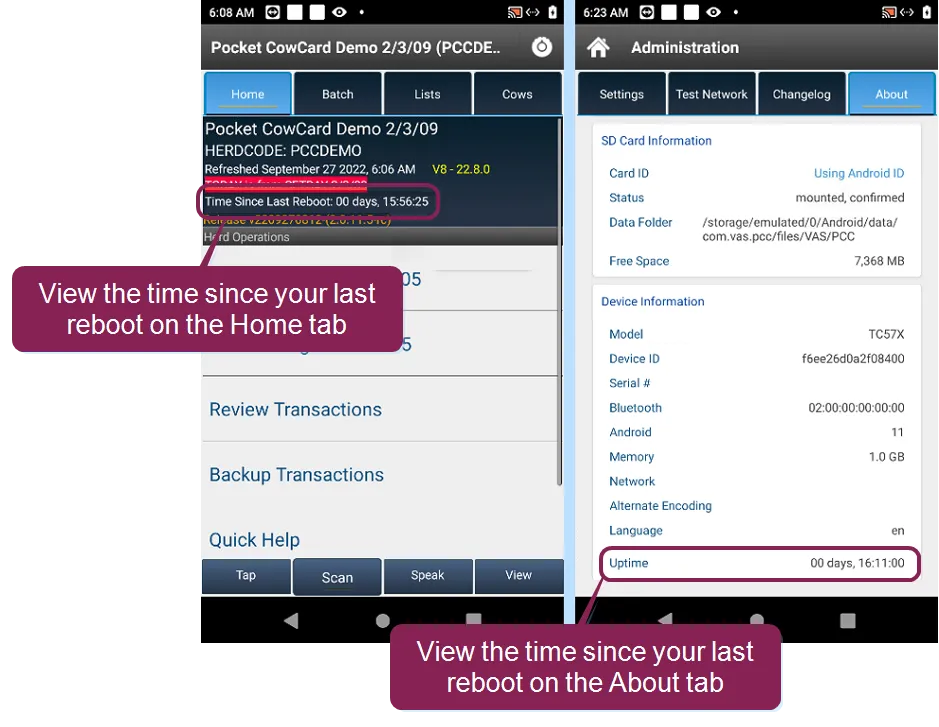
- Added Time Since Last Reboot to the home screen: The app now displays how long a device has been running since its last reboot on the Home screen and the About screen. We recommend that you reboot your device on a daily basis for the best performance.
- (Pocket CowCard-1101, Pocket CowCard-1094, Pocket CowCard-1088)
- Fixed an issue where Animals Not Needed did not buzz when the Cows tab was open: Previously, animals not needed would not buzz correctly if one or more lists was being used and if the Cows tab was opened on one of the lists. This issue has been resolved. (Pocket CowCard-1101, Pocket CowCard-1098)
- Fixed Pocket CowCard daily milk totals that didn't match DairyComp 305 daily milk totals: We corrected an issue where daily milk totals (Item Types #120 and #121) shown in Pocket CowCard were very different from the totals shown in DairyComp 305. We updated the rounding method, so now, the values shown in Pocket CowCard will be within 2-3 units from the values shown in DairyComp 305. (Pocket CowCard-1101, Pocket CowCard-1071, Pocket CowCard-970)
- Corrected an issue where the system recognized pending transactions that didn't exist: After all transactions were erased and the app was refreshed, the system would still behave as if there were pending transactions even though none were shown. This issue has been fixed. (Pocket CowCard-1101, Pocket CowCard-1096)
- Identified and fixed a potential Transaction Batch data loss scenario: We discovered a scenario where the transaction log would become unstable if there was a communication interruption when transactions were delivered over WiFi or Ethernet. We have fixed this and hope that it resolves intermittent data loss issues that occur from time to time. Please follow the best practices when delivering transactions and do not refresh between deliveries to ensure that no transactions are lost. See Known Issues for workaround instructions. (Pocket CowCard-1101, Pocket CowCard-1085)
Pocket CowCard for Android - Version v2209131733-(2.0.10.63-rc)
Build Date: September 13, 2022 Release Date: September 14, 2022
- Support has ended for Android 6.x (or lower) devices: Pocket CowCard no longer supports older Android OS versions (6.x or lower), so please upgrade or replace your device. (Pocket CowCard-1082, Pocket CowCard-1004)
- Phase 2 sound improvements (hospital lists and more): Pocket CowCard now includes improvements to phrases/sounds used in the English version of the app, as well as new sounds for the spoken phrases in Chinese, German, Russian, and Spanish. See Change the Language of Pocket CowCard Sounds to see the full list of sound improvements, which include sounds for hospital lists, and to learn how to implement the updates.
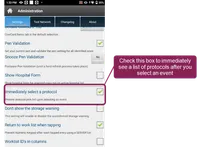
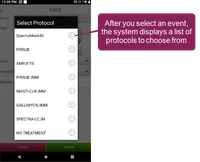
- (Pocket CowCard-1047, Pocket CowCard-1026) Added ability to immediately select protocols after you enter an event: After you select an event, Pocket CowCard can immediately display a list of protocols for you to choose from. To enable this feature, go to Administration > Settings and check the Immediately select a protocol box.
- ../../Resources/Images/whats-new/Pocket CowCard-aug22-protocols.png
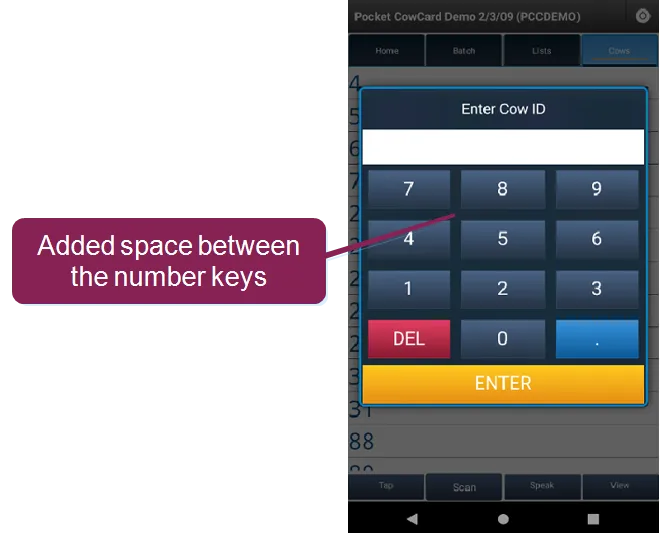
Improved numbered keypad screen: On the TAP entry screen, we added more space between the number keys to make it easier to use.
Improved numbered keypad screen: On the TAP entry screen, we added more space between the number keys to make it easier to use.
- Fixed display error when switching between Day Mode and Night Mode: Previously, the system did not display the refresh status bar correctly whenever you switched between Day Mode and Night Mode. The system now displays the refreshing screen correctly. (Pocket CowCard-1082, Pocket CowCard-1054)
- Resolved app crash issue that occurred when viewing a CowCard's Item tab: Previously, the app would crash when users opened a CowCard for an animal with no sire ID, then viewed the Item tab for Item Type #190. This issue has been resolved and the app no longer crashes. (Pocket CowCard-1082, Pocket CowCard-1084, Pocket CowCard-1077)
- Fixed filter error that occurred while using Expert Batch command: We fixed an issue where the Expert Batch command would process any animal even if the animal was on an active filtered list. The error only occurred when a transaction was deleted from the transaction log while you were still using the Expert Batch command. (Pocket CowCard-1082, Pocket CowCard-1072)
- Investigated and fixed various Firebase crash reports: Several crash reports were investigated and fixed. (Pocket CowCard-1082, Pocket CowCard-1064, Pocket CowCard-1075, Pocket CowCard-1080, Pocket CowCard-1081)
- Fixed instances where Expert Batch incorrectly configured ++ content: We fixed an issue where the order of ++ content affected certain combinations of data input. (Pocket CowCard-1082, Pocket CowCard-1086)
Pocket CowCard for Android - Version v2207131730-(2.0.9.29-rc)
Build Date: July 13, 2022 Release Date: July 18, 2022
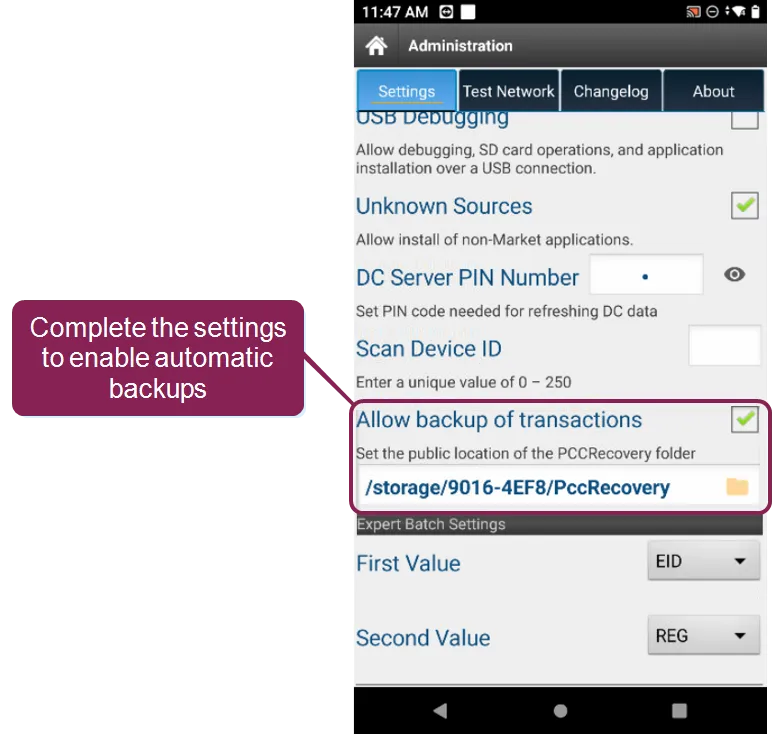
- Pocket CowCard can now create automatic backups every time you send transactions to DairyComp (Android 11+ devices): With this enhancement, Pocket CowCard creates automatic backups before the system sends the transactions to DairyComp! If you use an Android 11+ device, you can enable the Allow backup of transactions option in the Administration > Settings tab to start using this feature. (Pocket CowCard-1069, Pocket CowCard-1061)
- Implemented support for most Item Type #190 options: We have added support for Item Type #190, which displays various types of sire table names (Date Type 19 item). The following options are now supported: Name, Default, Breed, Stud Code, AI, Sexed, and Stud Name. (Pocket CowCard-1058, Pocket CowCard-1046)
- Recommended replacements for Item Type #128 and #129: We have determined that Item Type #128 and #129 require a disproportionate amount of mobile support. We recommend that you replace the item types if you use them for mobile processes:
- Item Type #128: Use Item Type #52 (305ME) instead.
- Item Type #129: Use Item Type #49 (RELV) instead. (Pocket CowCard-1069, Pocket CowCard-1051, Pocket CowCard-1053)
- Events with protocols now include Day 1 details: The system now shows Day 1 details and detail definitions for events. (Pocket CowCard-1069, Pocket CowCard-773)
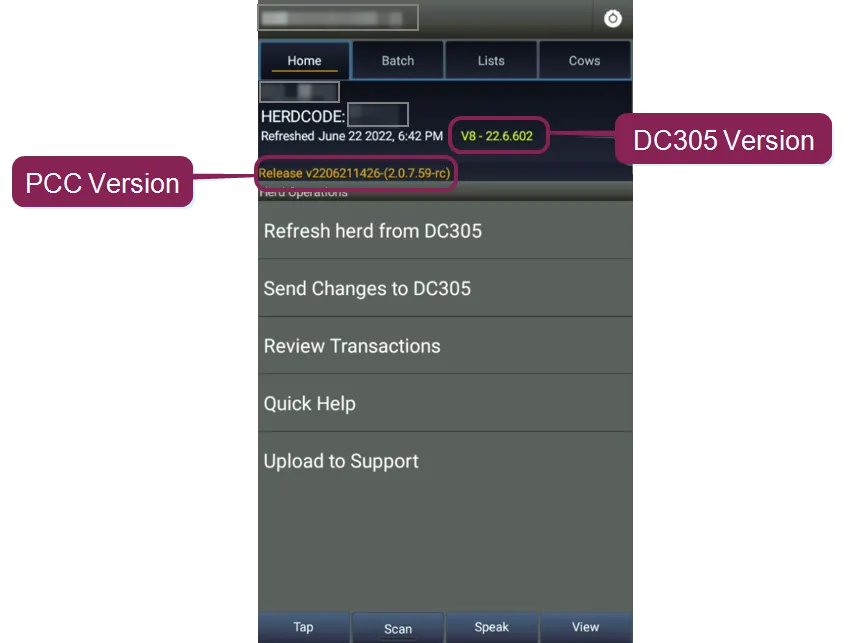
- Added the Pocket CowCard version number to the main home screen: When you view the main home screen, the system now clearly displays the Pocket CowCard version number (in orange text) below the DairyComp version number (in yellow text). (Pocket CowCard-1069, Pocket CowCard-1049)
- Updated the Erase Transactions screen to match the rest of app: To improve the consistency of Pocket CowCard's screens and make it easier to use, we updated the Erase Transactions YES/NO screen to match the other YES/NO screens in Pocket CowCard. (Pocket CowCard-1069, Pocket CowCard-625)
- Fixed an error that affected Item Type #91 and LACT=1: Fixed a divide by zero error for the ARELV item (Item Type #91) on the first lactation (LACT=1). (Pocket CowCard-1069, Pocket CowCard-467)
- System now counts events correctly even if an event occurs on the FDAT: We fixed an error where the system did not count events correctly if an event occurred on the FRESH date (FDAT). (Pocket CowCard-1069, Pocket CowCard-801)
- Resolved Add Batch and Expert Batch journal corruption: We have identified and prevented situations where the app would crash and cause journal corruption after ~200 ADD BATCH or ~1000 EXPERT BATCH transactions. (Pocket CowCard-1069, Pocket CowCard-1066)
Pocket CowCard for Android - Version v2206101547-(2.0.8.12-rc)
Build Date: June 10, 2022 Release Date: June 14, 2022
- Added support for multiple DairyComp item types: Pocket CowCard now supports the following item types (Pocket CowCard-1058):
- Item Type #132: Department of Transportation (DOT) ID values that can be used for source farm identification (Pocket CowCard-1056)
- Item Type #133: Animal gender, determined by the reproductive codes of both dead and alive records. Pocket CowCard Android stores some sold or dead (RC=7) animals in its payload. (Pocket CowCard-1046)
- Item Type #144: Tech number (Pocket CowCard-1045)
- Item Type #145: Tech name (Pocket CowCard-1050)
- Item Type #173: Protocol description (Pocket CowCard-687)
- Added support for API level 31 and 32 for Android: The Pocket CowCard app now supports Google API levels 31 and 32. (Pocket CowCard-1058, Pocket CowCard-1043)
Pocket CowCard for Android - Version v2205111638-(2.0.7.11-rc)
Build Date: May 11, 2022 Release Date: May 17, 2022
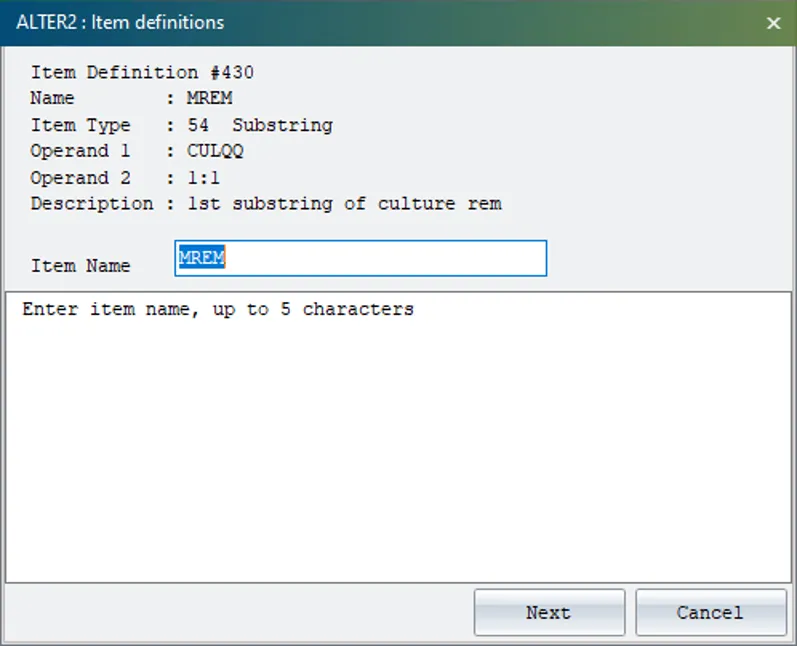
- Added support for item type #54: Pocket CowCard now supports DairyComp item type #54, substring, which is commonly used to capture event remarks.
- (Pocket CowCard-1047, Pocket CowCard-675)
- Beta Testing Pocket CowCard: We've made beta testing Pocket CowCard more convenient! After you're done testing the app, you can smoothly revert to a production release without having to remove the beta app. (Pocket CowCard-1047, Pocket CowCard-1033)
- Phase 1 sound improvements: Pocket CowCard now includes improvements to the four core phrases/sounds used in the English version of the app, as well as new sounds for the spoken phrases in Chinese, German, Russian, and Spanish. See Change the Language of Pocket CowCard Sounds to learn how to implement the sound improvements, including the new spoken phrases.
NOTE: If you don't like the new COWFOUND sound included in the updates, you can change it to a ping sound. See Change PCC SoundsChange Pocket CowCard Sounds to learn more.
- (Pocket CowCard-1047, Pocket CowCard-1026)
- Add Batch/Expert Batch: An issue that occurred when you used Add Batch followed by Expert Batch has been addressed. The last animal added no longer shows as a transaction. (Pocket CowCard-1047, Pocket CowCard-1024)
- Clear Row function in breeding grids: The Clear Row function now works as expected in breeding grids. (Pocket CowCard-1047, Pocket CowCard-1025)
- Outdated alert code: We removed older messaging code to prevent an alert that was triggered for some users. (Pocket CowCard-1047, Pocket CowCard-1044)
Pocket CowCard for Android - Version v2204111607-(2.0.6.20-rc)
Build Date: April 11, 2022 Release Date: April 12, 2022
- Improved Android 11+ performance: Pocket CowCard now installs to and runs from device storage on Android 11 or 12 devices. This greatly improves app performance and speed on Android 11+ devices, including faster worklists and RFID scanning. If you are running Android 11+, you will be prompted to allow Pocket CowCard to manage all files on your device. Be sure to update this system setting to Allow access when prompted.
- See Manually Update PCC on your Android DeviceManually Update Pocket CowCard on your Android Device to learn more about updating the app. (Pocket CowCard‑999, Pocket CowCard‑1029, Pocket CowCard-1030, Pocket CowCard-1034)
- New backup options on Android 11+ devices: Android 11+ devices are now equipped with backup options to make sure your transactions are saved in case your device fails or is damaged. To set your recovery options, go to Settings and scroll down to the Allow backup of transactions checkbox. Check the box and then tap Pocket CowCardRecovery location to set the folder.
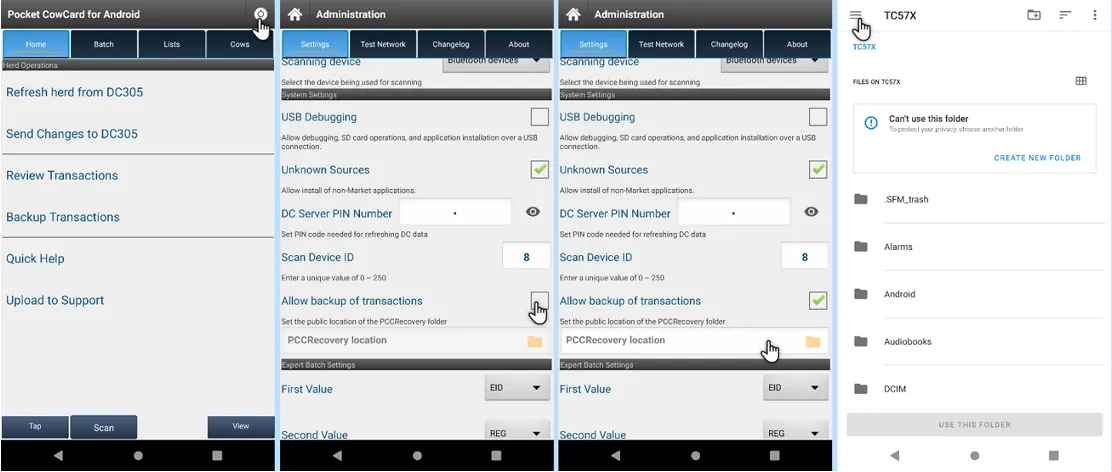
- See Backup PCC Transactions Backup Pocket CowCard Transactions to learn more! (Pocket CowCard‑999)
- One-time Sync Settings option on Android 1+ devices: Pocket CowCard supports a one-time sync of your settings from the SD card when you upgrade the app on your Android 11+ devices. After the one-time sync, the app retains your settings for future updates automatically. Tap the Sync Pocket CowCard settings option. Then tap the Copy Pocket CowCard settings button and Yes to confirm.
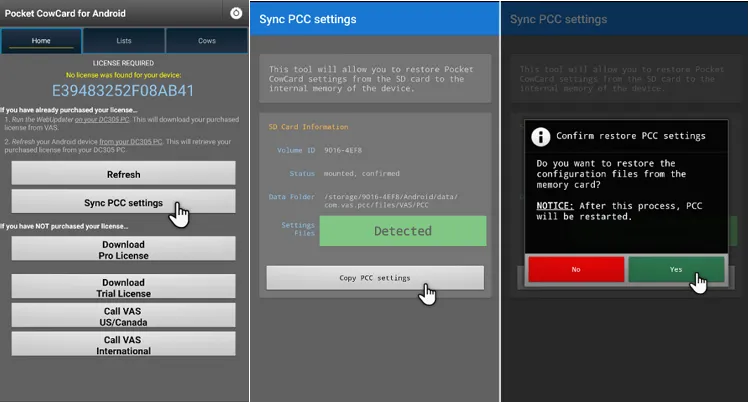
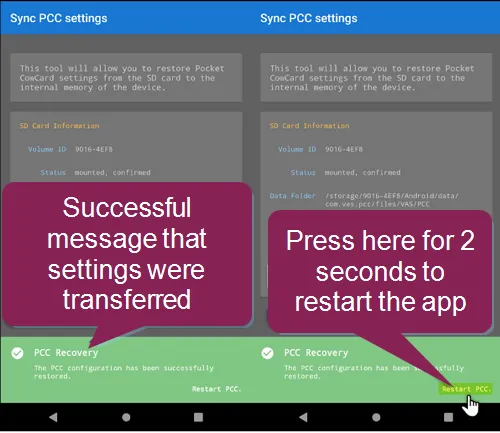
- A message displays to confirm the sync was successful. Press and hold the Restart Pocket CowCard option to restart the app.
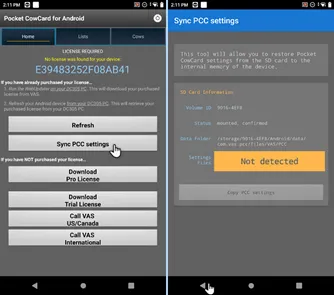
NOTE:
If you attempt to Sync the Pocket CowCard settings a second time, the app will notify you that settings files were
Not detected
. This is due to the fact that the files were already transferred from the SD card to device storage.
- (Pocket CowCard-1034)
- Reboot required after an update: A reboot is no longer required after an app update on most devices. We're continuing to investigate rare cases where a reboot may still be needed. (Pocket CowCard‑1034,Pocket CowCard-1040)
Pocket CowCard for Android - Version v2203161622-(2.0.5.13-rc)
Build Date: March 16, 2022 Release Date: March 22, 2022
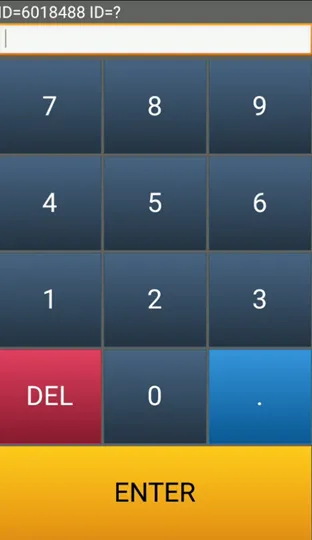
- Improved BATCH numeric keypad visibility – Pocket CowCard‑1032, Pocket CowCard‑1027: The numeric keypad used for BATCH entries is now easier to see and use in direct sunlight. The keypad background is dark and the numbers are white for greater contrast.
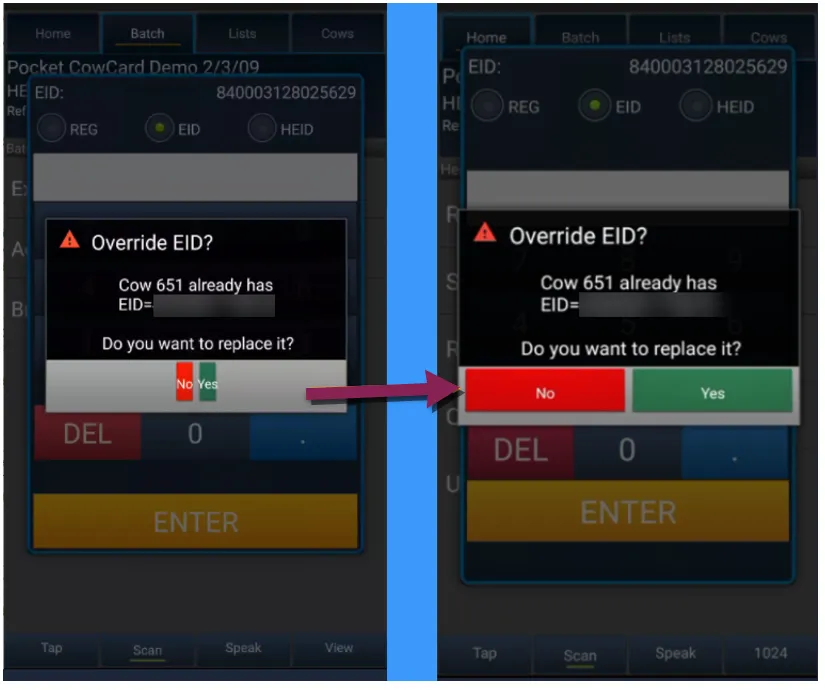
- Pop-up message Yes/No button size fix – Pocket CowCard‑1032, Pocket CowCard‑1023, Pocket CowCard‑1018: The Yes/No buttons on pop-up messages now adjust based on the device being used.
- Error on Scan button for internal RFID readers – Pocket CowCard‑1032, Pocket CowCard‑1021: Addressed issues and errors on devices with internal RFID readers, including the PAC-5000 and CopperNic C-One2.
Pocket CowCard for Android - Version v2202151900-(2.0.4.2-rc)
Build Date: February 15, 2022 Release Date: February 22, 2022
- Improved home screen navigation – Pocket CowCard‑1014, Pocket CowCard‑276: Navigating the home screen has been improved. A pop-up message now appears when clicking the back button in the action bar.
- Online release note link improved – Pocket CowCard‑1014, Pocket CowCard‑976: The tab to the Changelog has been changed so that now it links to the online release notes (since the Changelog has been deprecated on the Pocket CowCard HELPDESK server). You must be connected to the internet to view the online release notes.
- Users now being warned about support ending for Android 6 devices – Pocket CowCard‑1014, Pocket CowCard‑998: We have begun the process of notifying users through the In-App-Updater feature in Pocket CowCard that we will no longer be supporting Android 6 (API level 23 or lower) devices after 8/15/2022 for Pocket CowCard Android. Please upgrade or replace these devices going forward after August 15th, 2022. Contact your support specialist for more information.
- The "Prompt for remark Y/N" option in Alter\7 for protocols has been fixed – Pocket CowCard‑1014, Pocket CowCard‑995: The prompt was not working when set to "N" for both cows and heifers. This issue has been fixed so that the remark prompt no longer appears when the Alter\7 setting is set to "N" for cows or heifers.
- Fixed the following error mesage: Fatal Exception: java.lang.NumberFormatException For input string: "118." on KeyPadWidget.java line 183" – Pocket CowCard‑1014, Pocket CowCard‑996: Fixed a situation in which someone would tap in a period (.) after a number on the herd id keypad.
- Fixed sorting of the DONE Panel – Pocket CowCard‑1014, Pocket CowCard‑1017: The DONE Panel was sorting from oldest to newest scan time on worklists, instead of the correct method of sorting from newest to oldest time. This issue has been fixed.
- Smaller YES-NO prompt on Android 11 devices when using the Breeding Grid – Pocket CowCard‑1014, Pocket CowCard‑997: The small box size for this area of the app has been fixed.
- Fixed automatic numeric increment and creation of ADD Batch commands – Pocket CowCard‑1014, Pocket CowCard‑1002, Pocket CowCard‑1002: We fixed an incrementing issue for ITEM TYPES that are integer based in EXPERT BATCH commands and fixed an issue with ADD batch commands not making transactions.
- The In-App Updater reported some crash details – Pocket CowCard‑1014, Pocket CowCard‑1019, Pocket CowCard‑1020: Some issues reported in Firebase from the In-App Updater have been fixed.
Pocket CowCard for Android - Version v2201121734-(2.0.3.38-rc)
Build Date: January 12, 2022 Release Date: January 12, 2022
- The In-App Updater now ensures updates are not installed until unposted transactions are delivered – Pocket CowCard‑991, Pocket CowCard‑989: We have improved the In-App Updater process to check for unposted transactions before announcing any updates are available. Once you have delivered transactions, you will see a notification to apply an update (Picture 1). A message appears when you have no pending transactions to deliver (Picture 2): Picture 1
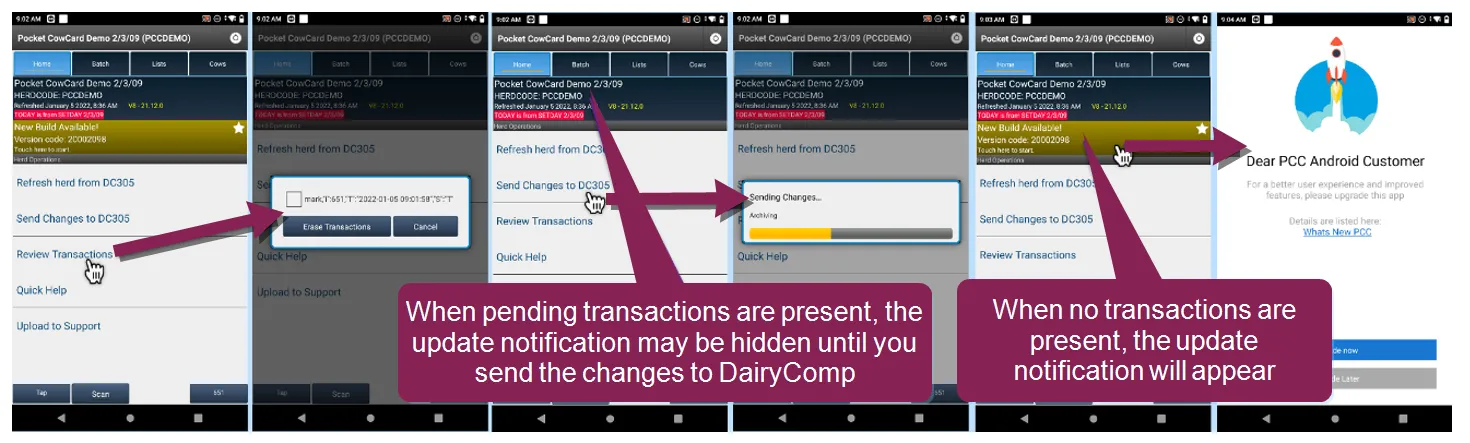
- Picture 2
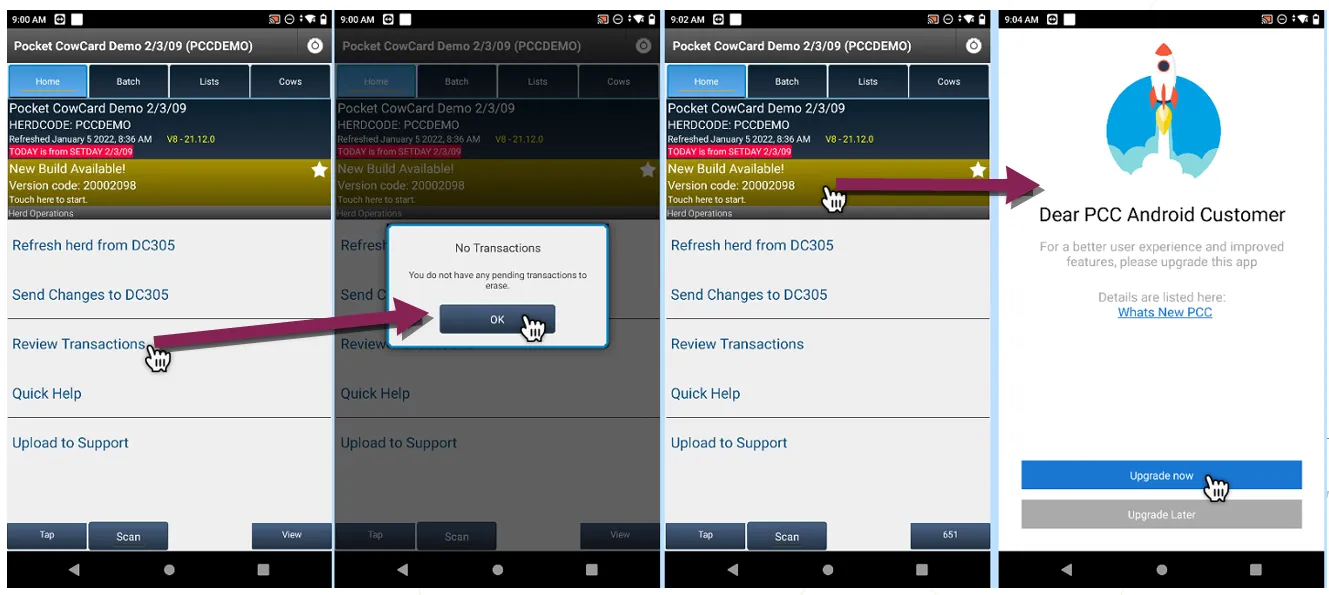
- Show SIRE ID, SHORT NAME, REG, and eventually semen sort when picking a sire for BRED event and Breeding Grid – Pocket CowCard‑991, Pocket CowCard‑307: We have improved the search functionality for selecting sires in the BRED event. When using the Quick Pick Sire selection, you will see four pieces of information (SIRE ID, SHORT NAME, ISO IDENTIFICATION, and SEMEN TYPE) for each service sire. When searching, the filter shows the sire information as it is typed; the beginning part of the sire data item is used for the search. You can search for SIRE ID, SHORTNAME, or ISO IDENTIFICATION. See examples below.
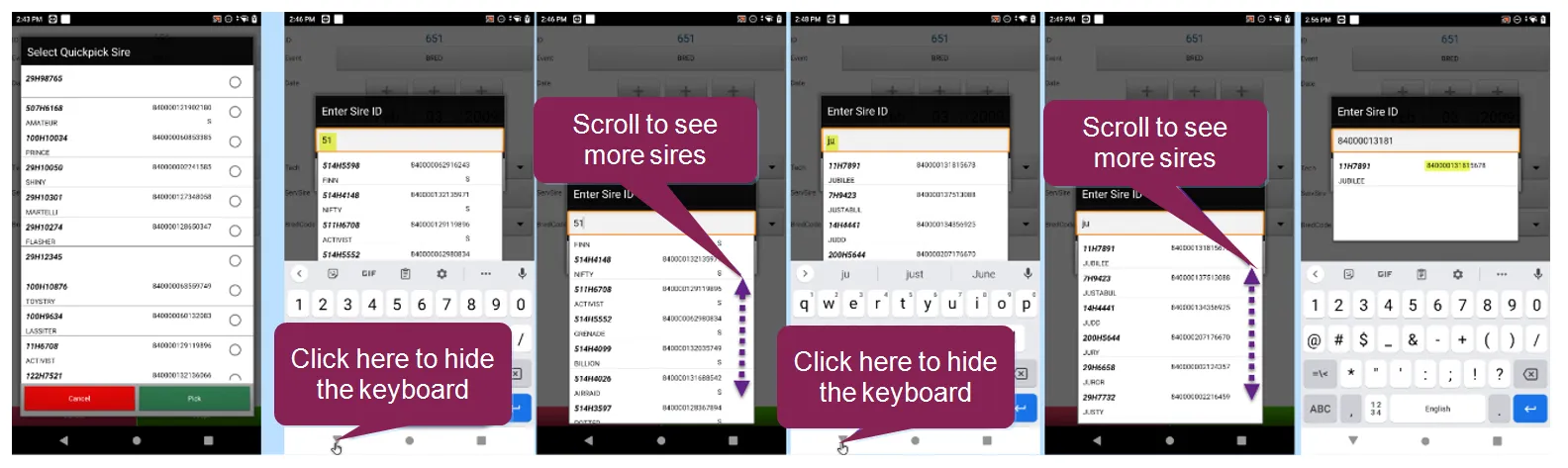
- ABORT entry on Pocket CowCard vetlist should show grey "Accept" button until RPRO Status is selected – Pocket CowCard‑991, Pocket CowCard‑986: This issue has been fixed so that you cannot accept an ABORT event until the RPRO STATUS is selected. Once the RPRO STATUS is selected the "Accept" button turns green.
- Wrong Pen unable to pick any pen, only those with animals from the worklist – Pocket CowCard‑991, Pocket CowCard‑971: The pen choice prompt has been fixed so that you can choose any pen defined in the ALTER\4 command in DairyComp (except for pen zero).
- Crash report for "MainActivity.java line 35" – Pocket CowCard‑991, Pocket CowCard‑983: We have fixed some crashes reported recently by Firebase.
- No warning for HOSPITAL events in the future – Pocket CowCard‑991, Pocket CowCard‑948: We have fixed the app so that it now warns when a PROTOCOL EVENT is dated after the SETDAY date used on a refresh. The app now plays the following sound: WARNING. TREATMENT DATE is in the future. Check your systems. Click here to hear what this message sounds like.
- Investigated two crash errors (line 308 and line 1620) – Pocket CowCard‑991, Pocket CowCard‑988: We have fixed some crashes reported recently by Firebase.
- Changed color or Accept/Cancel button font on ABORT event – Pocket CowCard‑991, Pocket CowCard‑658: The font color on the ABORT event has been changed to match the rest of the events.
- Item names for SIR1, SIR2, SIR3, as well as the phrase "Last Sire use the name of item #25" were missing when picking up the breeding sire – Pocket CowCard‑991, Pocket CowCard‑690: We have fixed the labels for some of the sire items on the BRED EVENT FORM.
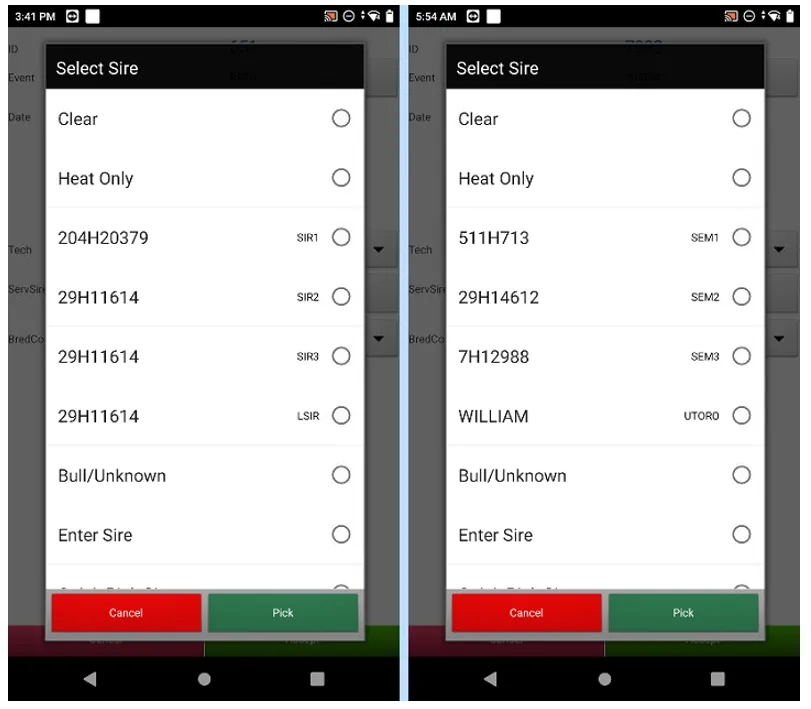
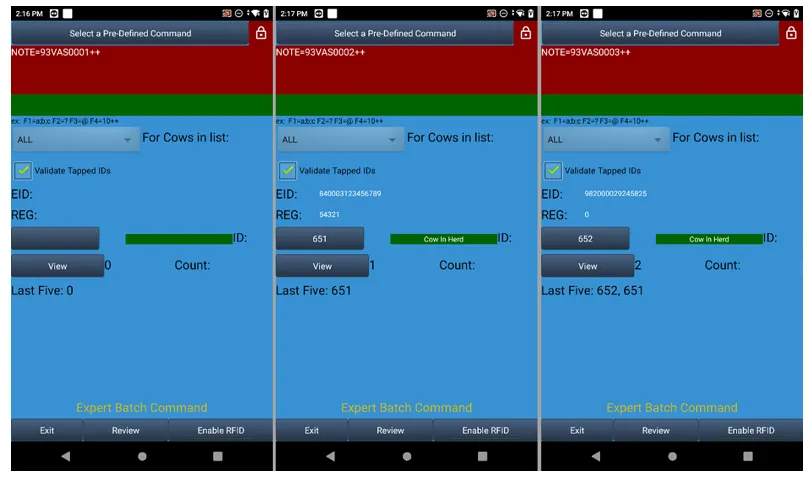
- Expert Batch Command form for automatic increment of a value was broken in certain syntaxes – Pocket CowCard‑991, Pocket CowCard‑993: We fixed the auto increment issue for items like USDA inputs. Example: 93VAS0001++
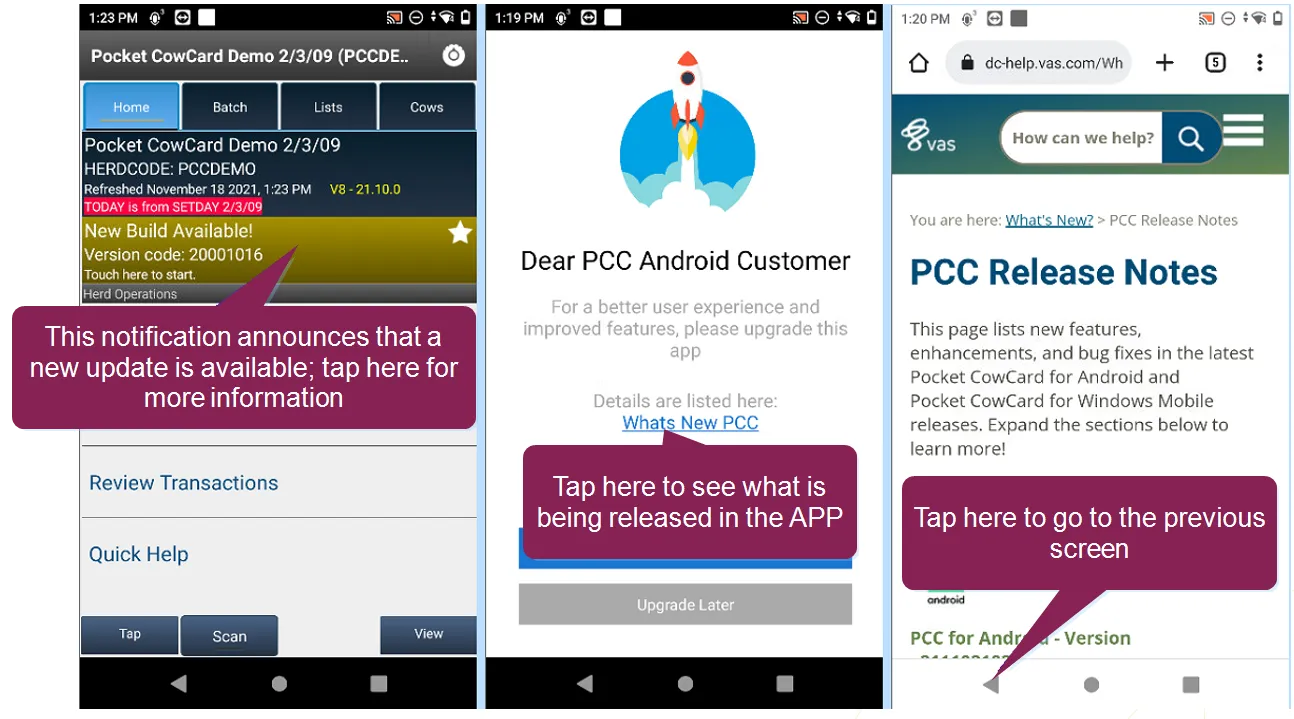
Pocket CowCard for Android - Version v2112070820
Build Date: 12/07/21 Release Date: 12/07/21
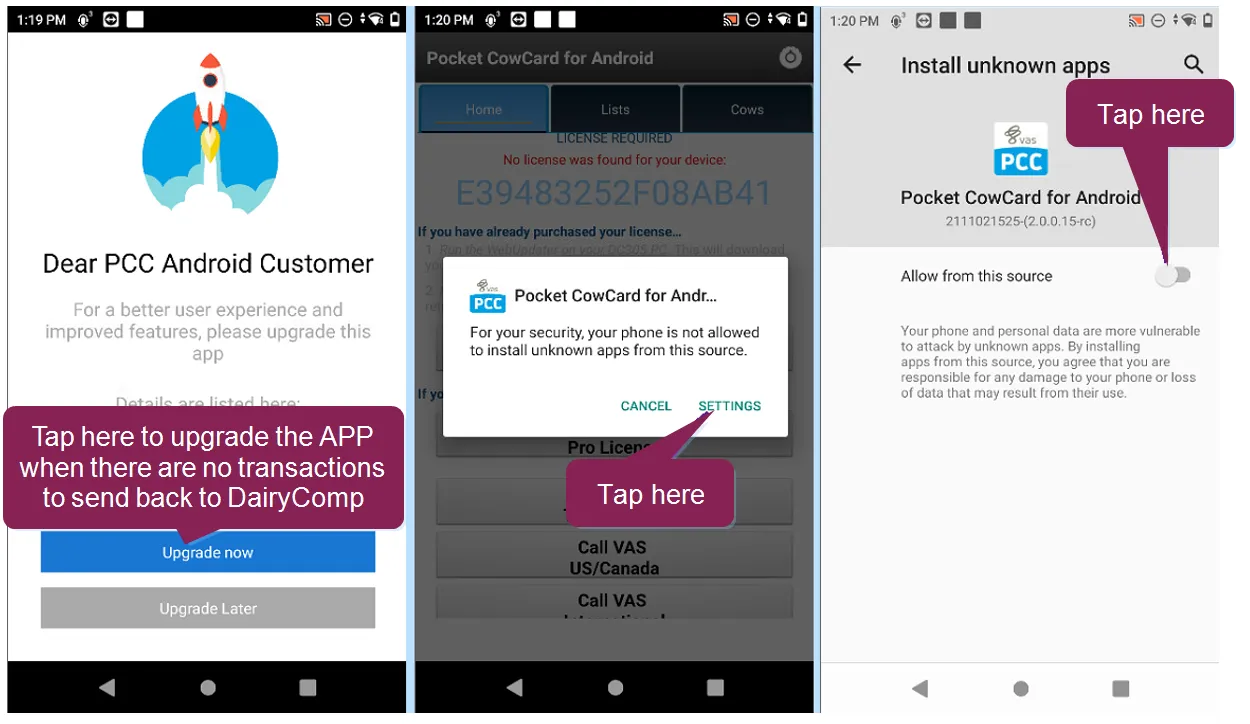
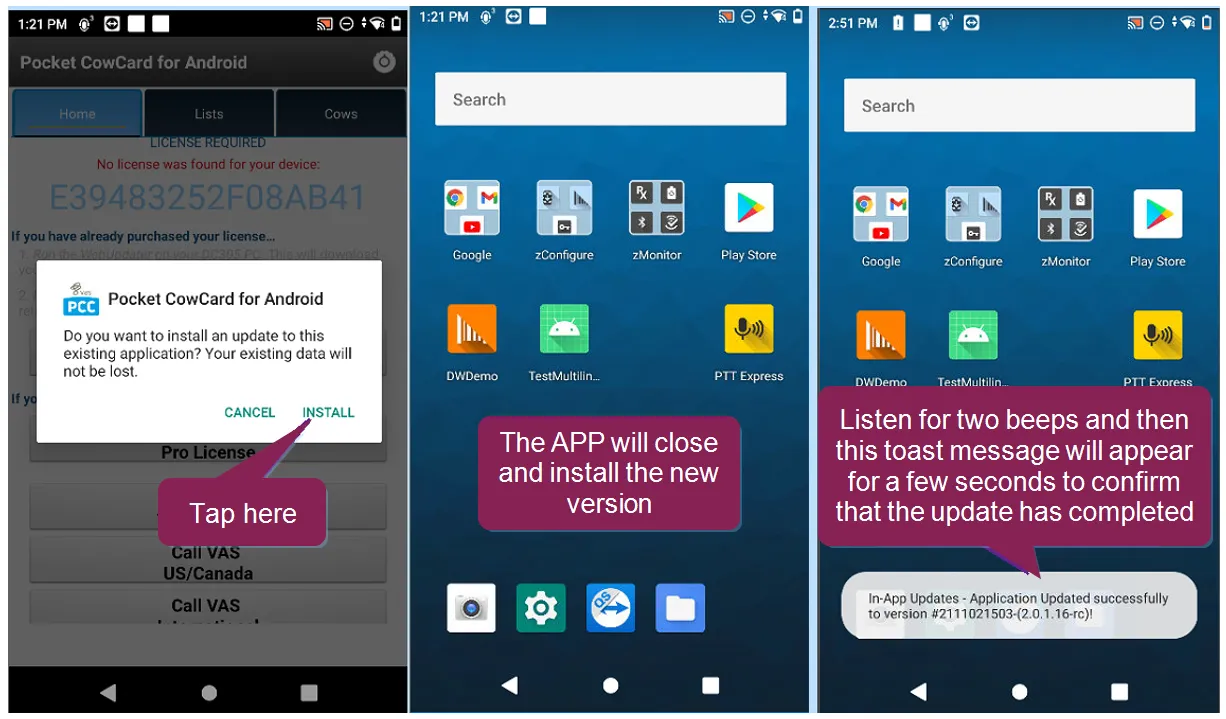
- New in-app update feature to replace current, non-working process – Pocket CowCard‑978, Pocket CowCard‑932: We've created a new method for being notified about and downloading the latest Pocket CowCard releases, along with a link to the associated release notes. Other download pathways will be deprecated in the future.
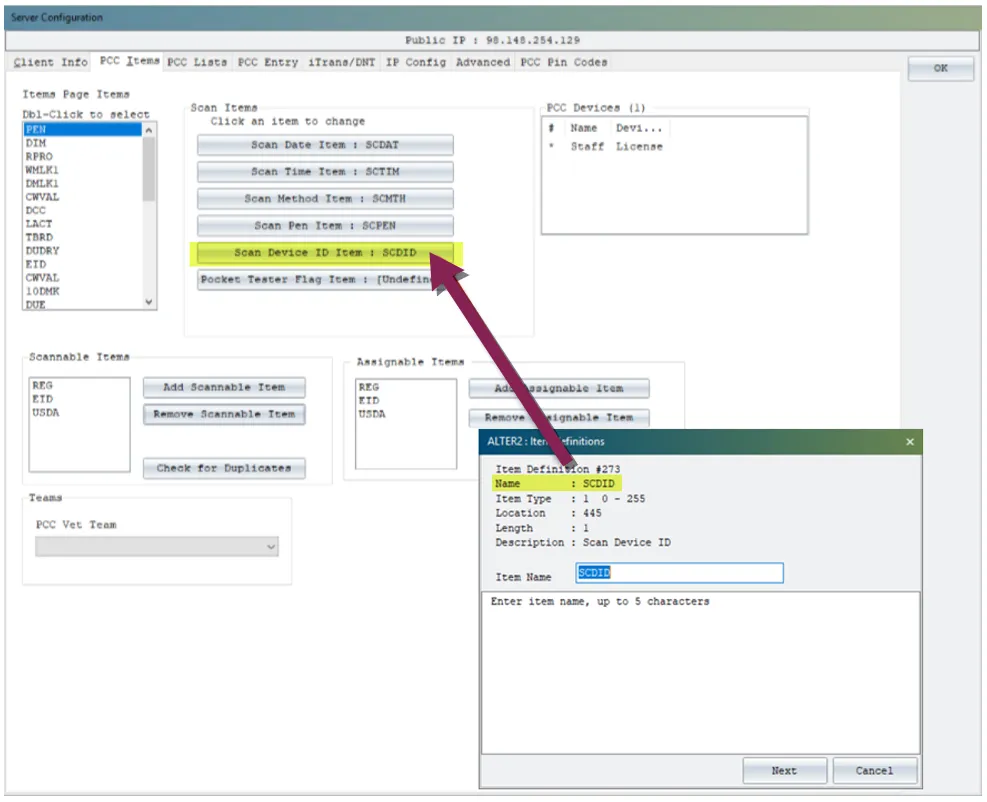
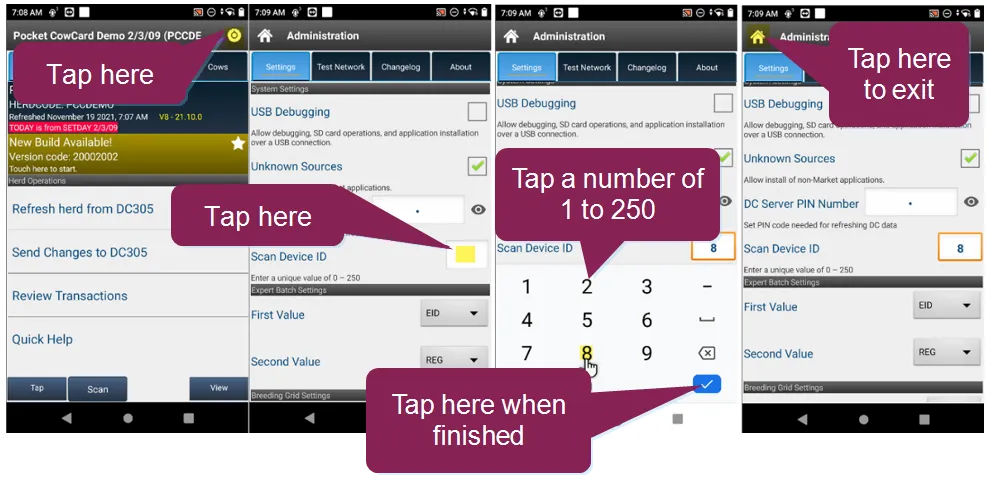
- Parity support for Scan Device ID now available – Pocket CowCard‑978, Pocket CowCard‑686: You can now identify your Android device with a number from 0 to 250 in order to mark tasks for animals by the device used. This new feature allows you to define the Scan Device ID (SCDID) "item name" under the ALTER\2 and SERVER\3 areas of DairyComp. Then, on your Pocket CowCard Android app, set a number of 1 to 250 (zero being the default) under the settings screen, as shown below.
IMPORTANT:
The ability to use this parity feature requires the upcoming December release of DairyComp, version 21.12.
- Entering a BRED event from the CowCard within a vet form caused "wrong" data line in journal file – Pocket CowCard‑978, Pocket CowCard‑847: This issue has been fixed so that herds without defined breeding codes can enter breedings anywhere within the app where breeding entries can take place. The previous release did not allow breeding to occur without a breeding code.
- Tap feature of bottom status bar unavailable on pen tab when four animals shown – Pocket CowCard‑978, Pocket CowCard‑920: This issue has been fixed so that the bottom navigation bar allows you to tap in an animal ID when the list gets down to four animals.
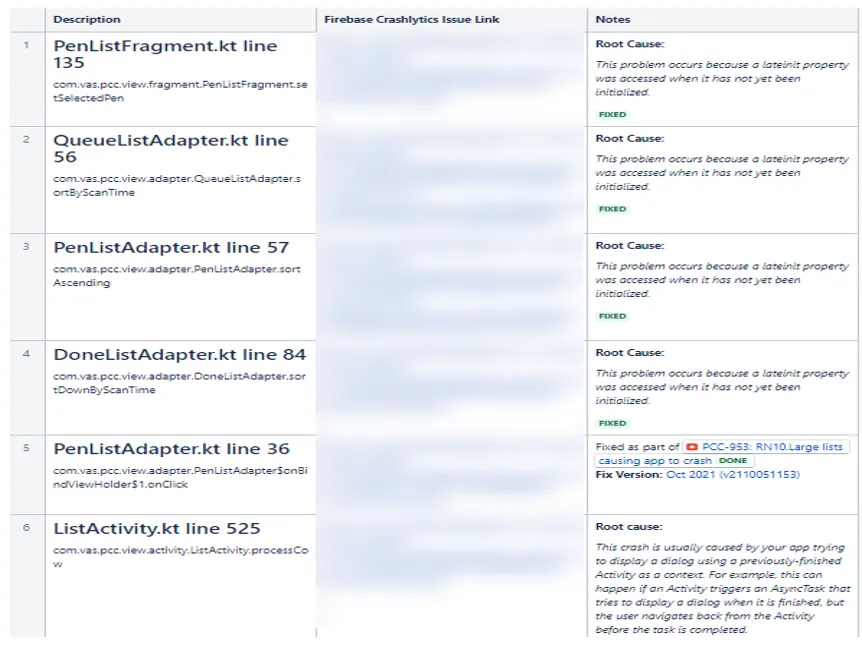
- App crashed when using vet lists – Pocket CowCard‑978, Pocket CowCard‑969: We fixed several lines of code related to the crash details reported in Firebase. Please note that we have no easy way to test or replicate these changes. We need to wait and see if the crash details stop reporting with the changes that have been made.
Pocket CowCard for Android - Version v2111021024
Build Date: 11/02/21 Release Date: 11/02/21
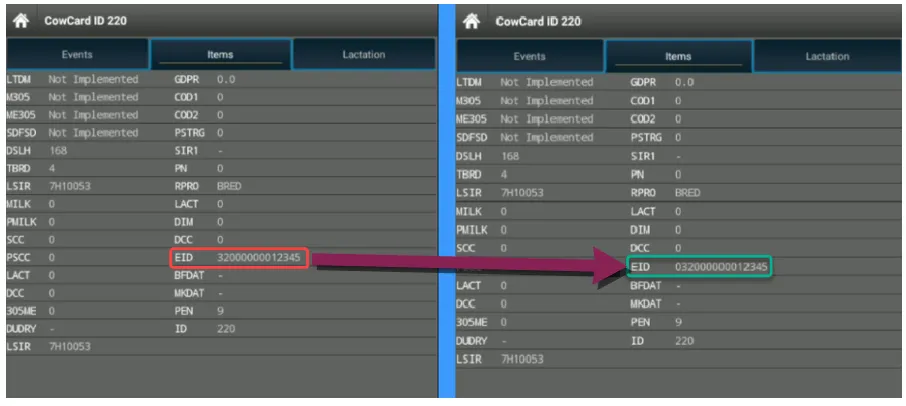
- Improved identification process for 15-digit ISOs – Pocket CowCard‑967, Pocket CowCard‑966: The user experience for identifying ISOs that start with 0 (zero) has been enhanced.
- Improved process for marking animals as DIED – Pocket CowCard‑967, Pocket CowCard‑797: The process for marking an animals as DIED when refreshing the herd with a non-current setday has been improved. Now, users can bypass the acknowledge prompt by clicking outside of it or by using the Android back button.
- Entering a Bred event from the CowCard inside of the VETFORM caused a "wrong" data line in the journal file – Pocket CowCard‑967, Pocket CowCard‑847: This issue has been fixed so that herds without defined breeding codes can enter breedings anywhere within the app where breeding entries can take place.
- Russian localization issue on Pen Validation button – Pocket CowCard‑967, Pocket CowCard‑949: A display issue has been fixed that impacted the settings screen for Russian localizations.
- Small YES/NO button for some Android versions – Pocket CowCard‑967, Pocket CowCard‑944: A modal screen issue has been fixed that resulted in small YES/NO buttons on Pocket CowCard APK for Android 11 and some Android 10 units.
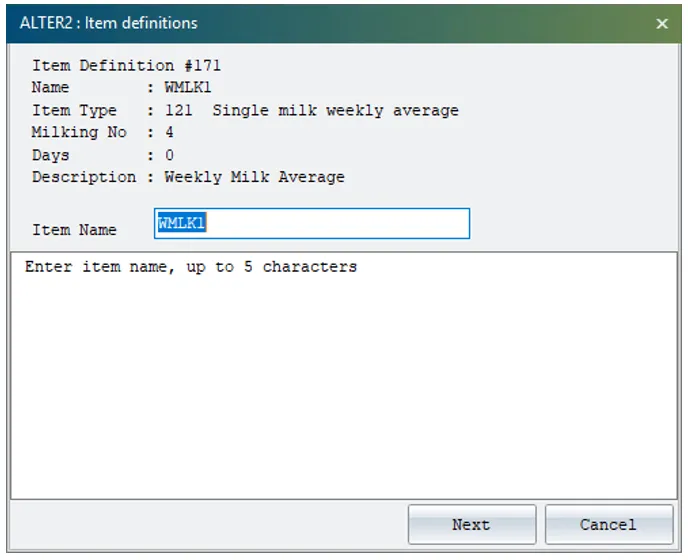
- Added support for ITEM TYPE 121 – Pocket CowCard‑967, Pocket CowCard‑944: We fixed the app implementation for showing weekly milk totals (WMLK1) for 4X milking schedules.
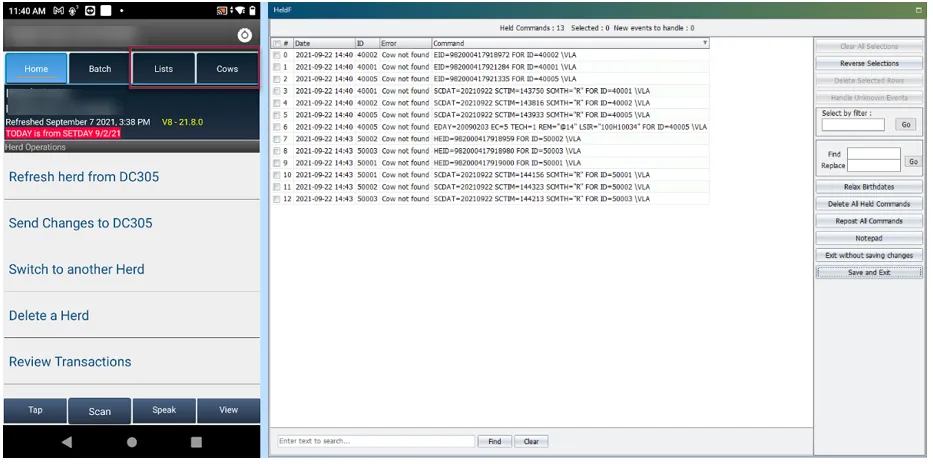
- Worklist Column ID view crash issue – Pocket CowCard‑967, Pocket CowCard‑972: An issue caused the app to crash when viewing worklists in the Column ID view. This problem was introduced in version 2110051153 on October 5, 2021 but has now been corrected.
Pocket CowCard for Android - Version v2110051153
Build Date: 10/05/21 Release Date: 10/05/21
- Improvement to new animal records creation procedure – Pocket CowCard‑959, Pocket CowCard‑956: The app has been improved to no longer create records of new animals found while RFID scanning in the LISTS and COWS tabs. These transactions will now be held in the SERVER cache of DairyComp for review, as is done in the BREEDING GRID area. These changes now match more closely how Pocket CowCard Windows Mobile handled these types of entries. We are allowing EXPERT batch to add them to the herd, because many users have not yet migrated to ADD\Z since that parity was added about two years ago.
- Pocket CowCard scan failed to recognize item #5 when posting data – Pocket CowCard‑959, Pocket CowCard‑955: An issue has been fixed in which the term "EID" was transmitted instead of the RFID item selected (such as "CREG" or REG1") during an ADD/EXPERT batch routine to add new records.
- App crash when selecting "No" button in the "No Read Permission" window – Pocket CowCard‑959, Pocket CowCard‑961: An issue has been fixed related to app startup and the PIN code feature introduced a few months ago that caused the app to crash in some instances.
- App crash in Firebase Pocket CowCardService.java line 119 – Pocket CowCard‑959, Pocket CowCard‑958: An area of the app related to some crash recently reported by users has been fixed. This area is difficult to test and our hope is that these changes have solved the problem.
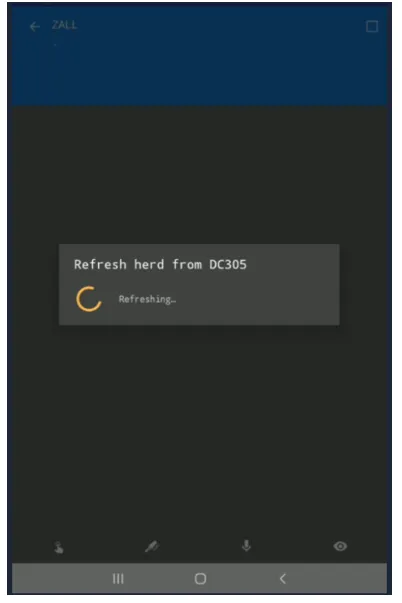
- App crash related to large worklists on certain devices running Android 11– Pocket CowCard‑959, Pocket CowCard‑953: The part of this issue that caused the app to crash while waiting for large worklists to synchronize has been fixed. Previously, the delay might have led users to think that the app was not working. A spinner notification now informs users that the app is working while data is being surfaced the first time after a refresh. The speed issue will be addressed in a future release. For now, the app should no longer crash while data is being surfaced.
Pocket CowCard for Android - Version v2108241329
Build Date: 08/24/21 Release Date: 08/24/21
- Changed "PING" sound to "HORN" sound for found animals – Pocket CowCard‑950, Pocket CowCard‑947: The "PING" sound used to announce found animals under the Cows tab or when using Expert Batch has been changed to a "HORN" sound. This was done to make the sound easier to distinguish from sounds made by BT Scanner. The long-term goal is to allow users to place their own sound file preference into the workflow.
- ISO tags beginning with 0 (zero) failed to record properly in DairyComp – Pocket CowCard‑950, Pocket CowCard‑925: Fixed the ISO values that look like an integer of 14 digits to include a 0 at the beginning. For example: 032123456789012 would store as 32123456789012 and DairyComp would sometimes show it as 320123456789012.
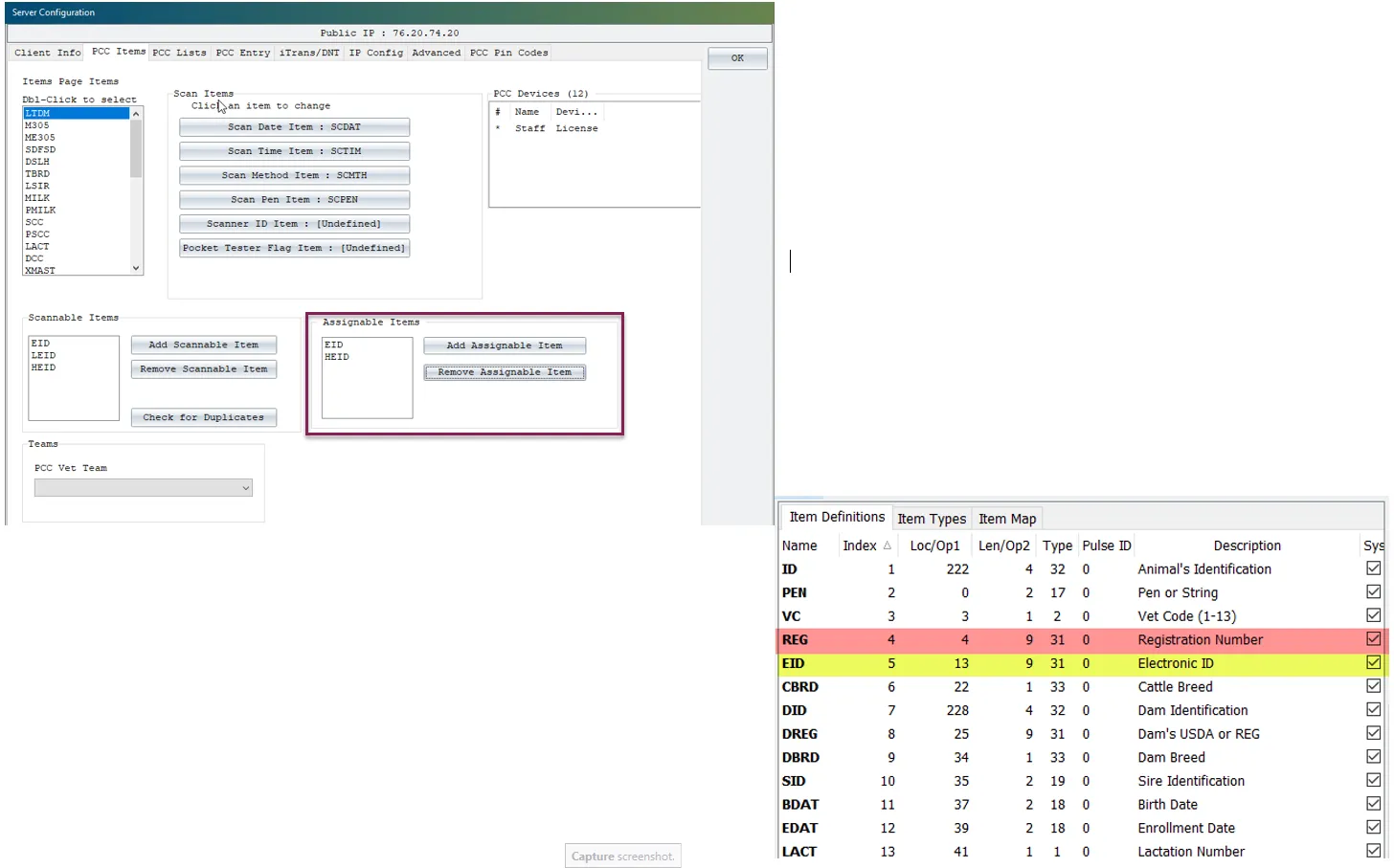
- Scannable RFID items display choices were changed to RFID assignable item choices – Pocket CowCard‑950, Pocket CowCard‑924: Fixed an issue where SCANNABLE ITEMS choice were displayed instead of the ASSIGNABLE ITEMS choice when scanning in the app.
IMPORTANT:
Users CANNOT exclude ITEM #5 from being scanned, and it is recommended that users DO NOT select ITEM #4 (when it is a TYPE #31) as an ASSIGNABLE or SCANNABLE item in order to maintain genomic import routine mappings and milk meter interfaces. Best practice is to maintain a match of each item on each side for RFID assignments.
Pocket CowCard for Android - Version v2107201313
Build Date: 07/20/2021 Release Date: 07/20/2021
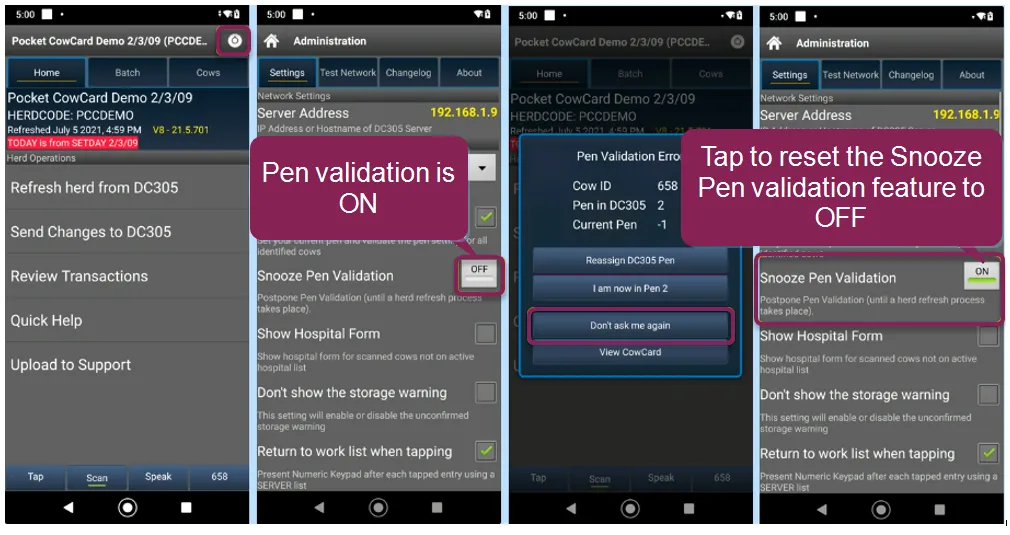
- Added support for turning back on Pen Validation from the Settings menu – Pocket CowCard‑930, Pocket CowCard‑846: The "Don't ask me again" selection for Pen Validation routines has been changed so that the Pen Validation feature can now be reset from the Settings menu.
- Fixed several issues regarding scan dates, scan times, scan methods, and pen validations when using the EXPERT BATCH feature and filtering it with lists – Pocket CowCard‑930, Pocket CowCard‑916, Pocket CowCard‑664, Pocket CowCard‑765: All animals now receive pen validation prompts and scan item data inputs while scanning or tapping their IDs, whether or not they are on the filtered list.
- Fixed disappearing "Scan" button when DairyComp PIN codes module disabled – Pocket CowCard‑930, Pocket CowCard‑526: An issue has been fixed in which a SCAN license was unable to scan when PIN codes were disabled for the new PIN codes feature in DairyComp.
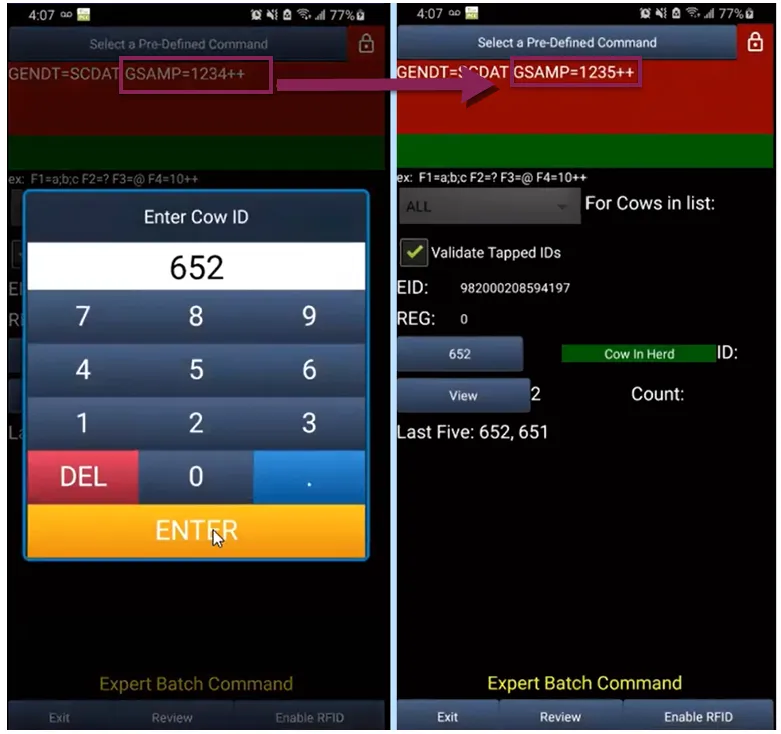
- Fixed display of next values for EXPERT BATCH command – Pocket CowCard‑930, Pocket CowCard‑549: An issue prevented the next value to display when using ITEM=nnnn++ or ITEM=nnnn-- on the EXPERT BATCH command. This issue has been fixed so that the next value now shows properly.
Pocket CowCard for Android - Version v2106081933
Build Date: 06/08/2021 Release Date: 06/09/2021
- Support added for PAC-5000 at higher API levels – Pocket CowCard‑915, Pocket CowCard‑912: With assistance from Allflex, support has been added for their PAC-5000 model at higher API levels. Please note that support for this device and its integrated reader will be deprecated in the next 12 months or so, due to the QA and development time required.
- Show EULA/PP/T&C (aka "DOCS") when updated – Pocket CowCard‑915, Pocket CowCard‑908: Updated versions of the End User License Agreement, Privacy Policy, and Terms and Conditions documents (also known as "DOCS") now display automatically without neededing to reinstall the app when future changes to these documents occur.
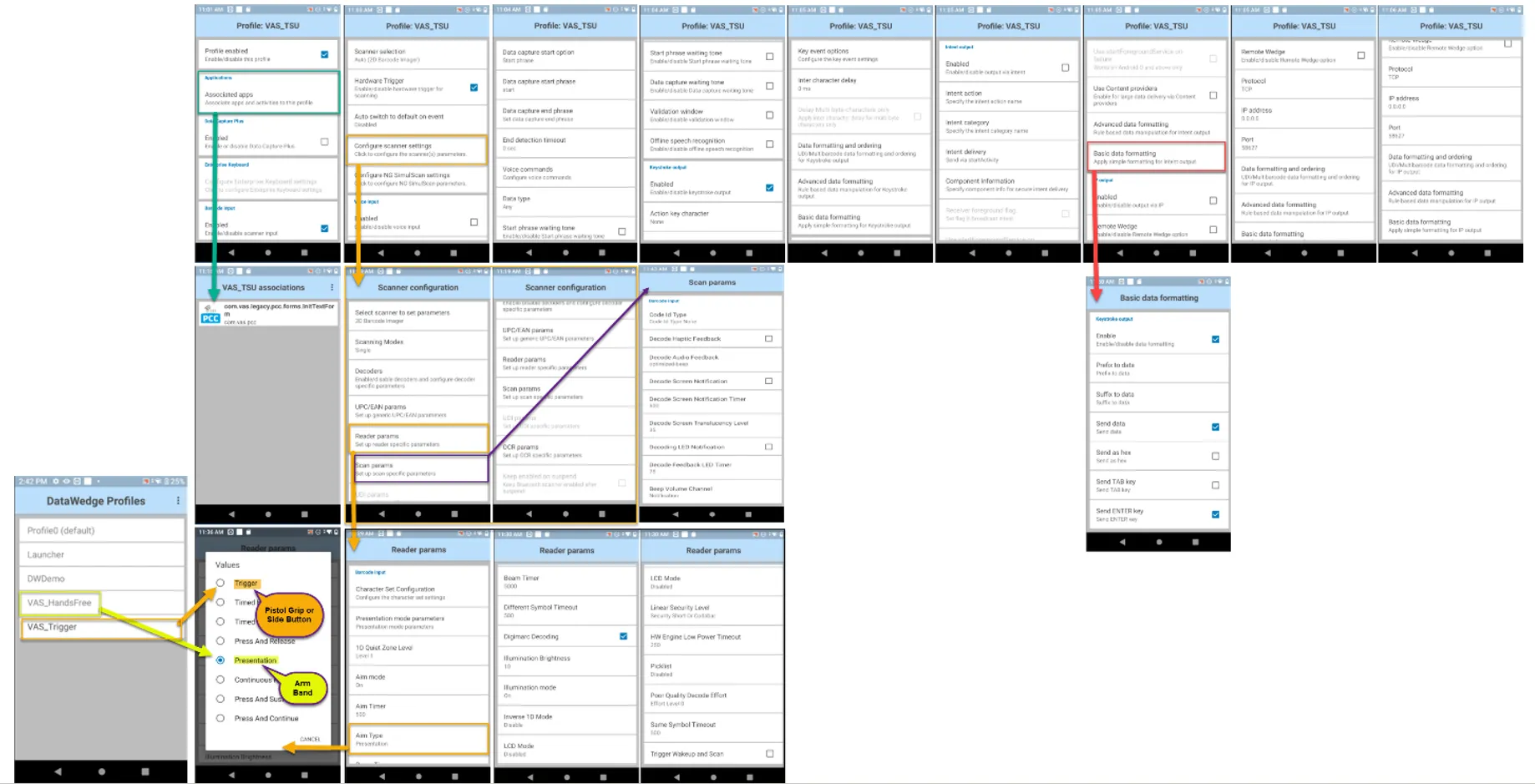
- Set up automatic Enter key selection for imager scans – Pocket CowCard‑915, Pocket CowCard‑763: When using devices equipped with a data wedge feature (such as the Zebra TC-52), an improvement has been made to automatically select the Enter key for Export/Add Batch commands after receiving an imager scan into the batch field. For details on how to configure a Zebra device to send an Enter key, contact EQ support. The flowchart below shows how this feature is set up on a Zebra TC-52.
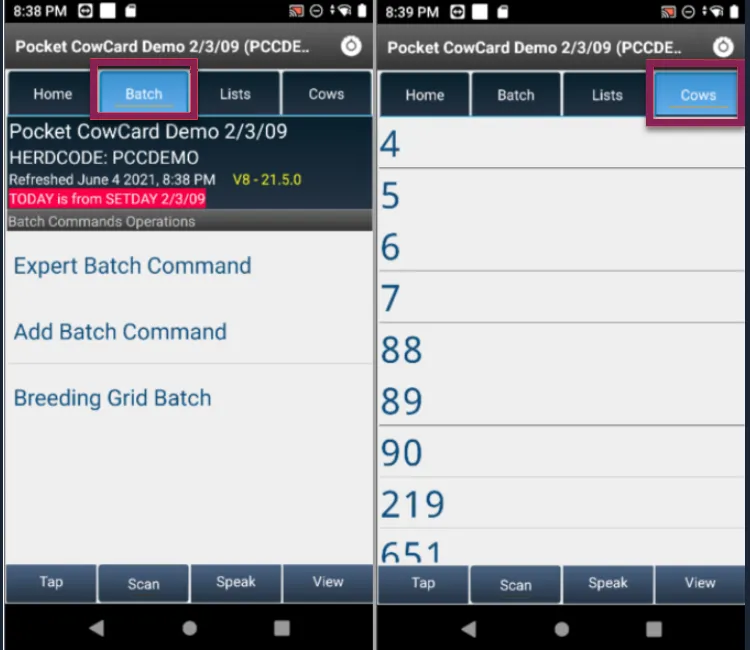
- Sound added to Expert Batch/Add Batch commands – Pocket CowCard‑915, Pocket CowCard‑913: An improvement has been made so that a "PING" sound is now emitted when a batch field is ready for input upon executing Expert/Add Batch commands. This now matches the Pocket CowCard Windows Mobile experience. This "PING" sound also replaces the "FOUND HER" sound played under the Batch and Cows tabs.
- Support added for DairyComp PIN codes – Pocket CowCard‑915, Pocket CowCard‑907, Pocket CowCard‑906: With the move to support higher versions of Android API levels, the device IDs of Android devices may change. This can cause issues for users that want to control who can refresh their DairyComp at will. If you are using “Goodwill Certificates” with DairyComp, you do not have to do anything more. With the May 2021 release of DairyComp (version 21.5), Pocket CowCard Android can now be set to use PIN code permissions set in DairyComp. PIN codes will not affect Windows Mobile users; those users still need to be managed as usual. To locate this feature in DairyComp, enter SERVER\3 in the command line and select the Pocket CowCard Pin Codes tab. You can set up various users with a numerical PIN code of 1 to 999999. You can be granular to each device or not. DairyComp PRO users that visit your site should be given a PIN code to use across several sites, as PIN codes are saved per device.
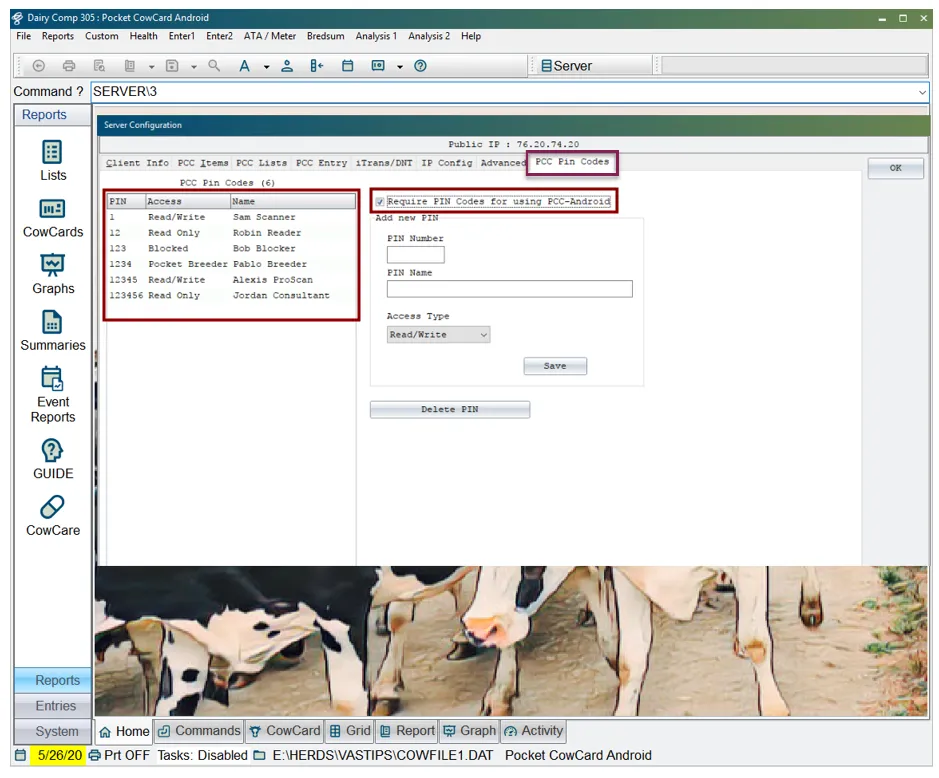
- Be sure to select the option to Require PIN Codes for using Pocket CowCard-Android if you want to control which users of Pocket CowCard Android can refresh. More information on setting up PIN codes for Pocket CowCard Android devices is included below in the release notes. There are three levels of access for Pocket CowCard users (assuming they are on the current releases for both DairyComp and Pocket CowCard Android), as well as a level for blocking access:
- Read/Write: User has full features, can scan with RFID, and enter data.
- Read Only: User can see animal data but cannot enter or send data.
- Pocket Breeder: User is limited to the Breeding Grid under the Batch tab, has no access to lists, and can enter a subset of events.
- Blocked: A way to stop access by a user without deleting their credentials. User will be unable to refresh, and users without a matching PIN code will also be unable to refresh.
- For more information on setting PIN codes, see this video.
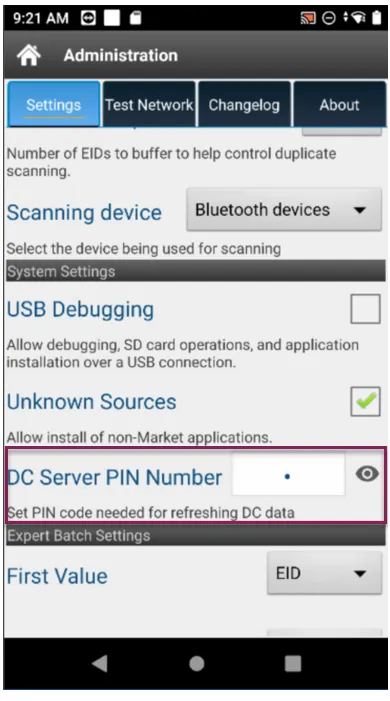
- Input and store PIN codes on refresh (for DairyComp Unlimited users) – Pocket CowCard‑915, Pocket CowCard‑906,Pocket CowCard‑907 : DairyComp Unlimited users can now control who refreshes from the DairyComp Server, using a PIN code in the Pocket CowCard app that's set up under the Settings menu.
- Additional Notes:
- Pocket CowCard PRO Android users that update will need to get permission from a customer that chooses to use this feature.
- Only one PIN code is stored, so users of multiple sites need to coordinate a unique 6-digit PIN code that can be used at each location they visit.
- PIN code activation does not affect users of Pocket CowCard Windows Mobile or older versions of Pocket CowCard Android. Those APK versions will eventually expire.
- By default, the PIN code is set to zero (0). One cannot refresh with a DairyComp Server that has a PIN code activated if the device PIN code is set to zero (0).
- Fixed issue with displaying newly added breeding techs – Pocket CowCard‑915, Pocket CowCard‑910: An issue has been fixed in which newly added breeding technicians failed to display within the Breeding Grid unless the app was deleted and then reinstalled.
- Fixed issue with movement of animals between TODO and DONE tabs – Pocket CowCard‑915, Pocket CowCard‑899: An issue has been fixed in which tapping an animal ID within a worklist failed to move the animal from the TODO tab to the DONE tab.
Pocket CowCard for Android - Version v2105031251
Build Date: 05/03/21 Release Date: 05/03/21
- Warning for Android 5.x users – Pocket CowCard‑905, Pocket CowCard‑874: Users who install the Pocket CowCard app from an unofficial source (i.e., "sideload") onto an Android version 5.x device will receive a "Parse Error" warning message that their device is no longer supported.
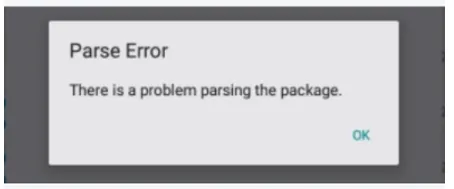
- Updated End User License Agreement, Terms and Conditions, and Privacy Policy – Pocket CowCard‑905, Pocket CowCard‑889: When installing the app, please review the latest updates to the legal documentation related to its use.
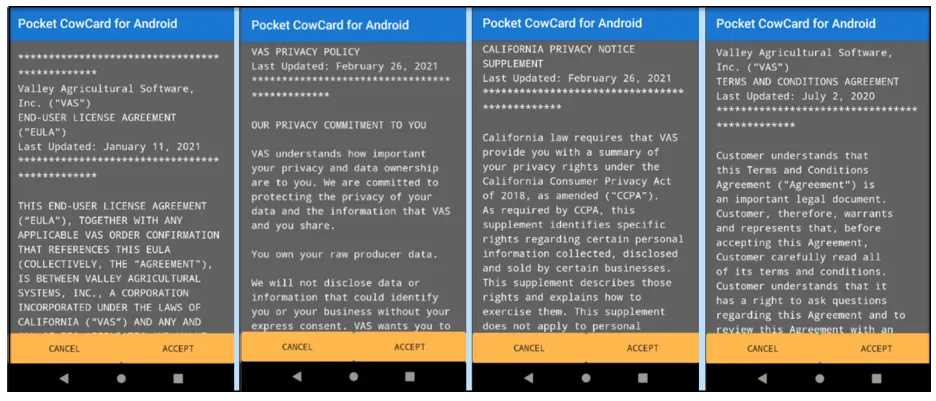
- New PIN code feature coming (for DC Unlimited) – Pocket CowCard‑905, Pocket CowCard‑880, Pocket CowCard‑885: A new PIN code feature is being developed to allow users to control refreshes from their DairyComp server. Additional information about this feature will be provided in the near future. For now, you can view this upcoming feature in the Pocket CowCard Settings menu.
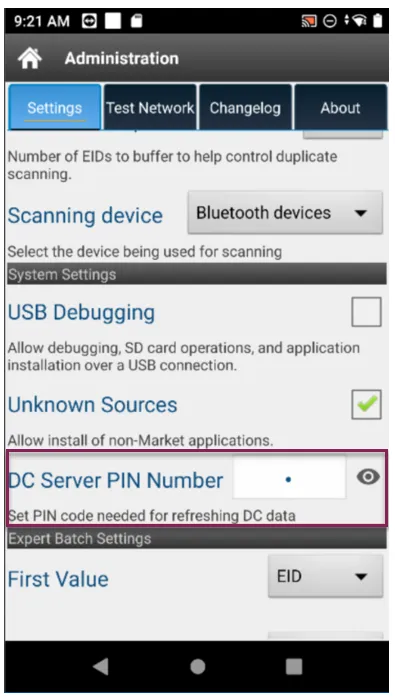
- To use this feature with the current version of Pocket CowCard, users must have a goodwill certificate established on the VAS Licensing Server (CURTIS) for their DairyComp Unlimited license. Additional notes:
- This feature works with the current and future version of Pocket CowCard for Android, but will not function until the upcoming version of DairyComp is released (in approximately 4-6 weeks).
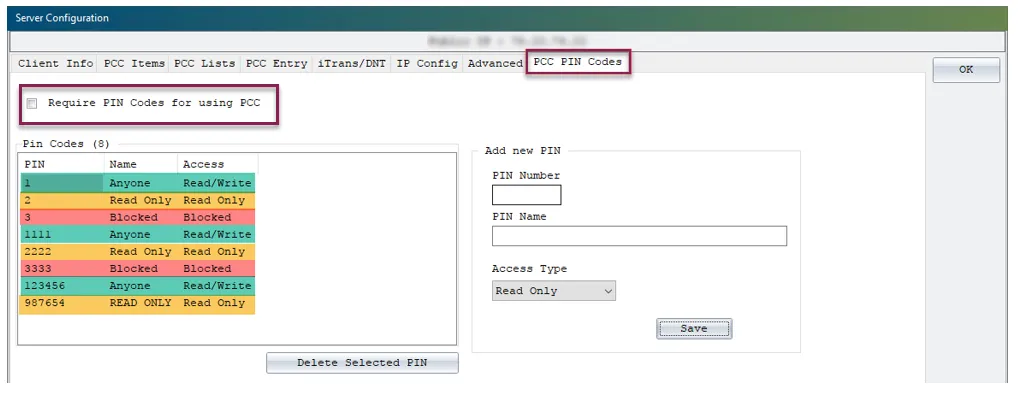
- Windows mobile devices are still supported via the DEMO certificate.
- Pocket CowCard PRO Android users that update will need to get permission from a customer that chooses to use this feature. PIN codes trump Pocket CowCard PRO Android users.
- Only one PIN code is stored, so users of multiple sites need to coordinate a unique 6-digit PIN code that can be used at each location they visit.
- Updated target API level for Android – Pocket CowCard‑905, Pocket CowCard‑873, Pocket CowCard‑898, Pocket CowCard‑881: The API level of the app is being upgraded to support the release of the app in the Google Play Store. In the near future, this method will be used to install and support the app. The previous method will be deprecated due to inefficient notifications and server instability during downloads. This version of the app must be allowed access to the areas shown in the example below.
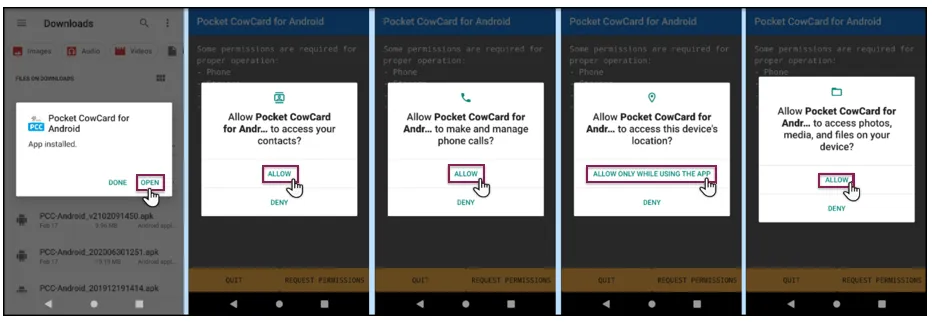
- Note that the following screen may be presented after updating the app, showing the permission allowances. In this case, select Continue to proceed.
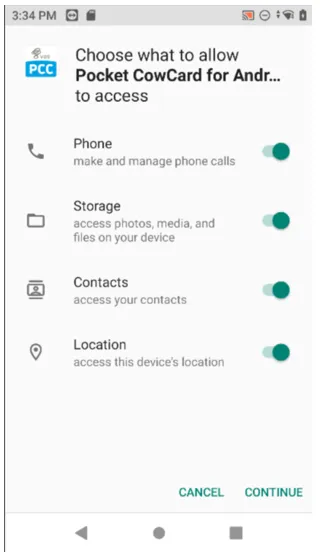
- You can review these permissions under the Settings menu of your device.
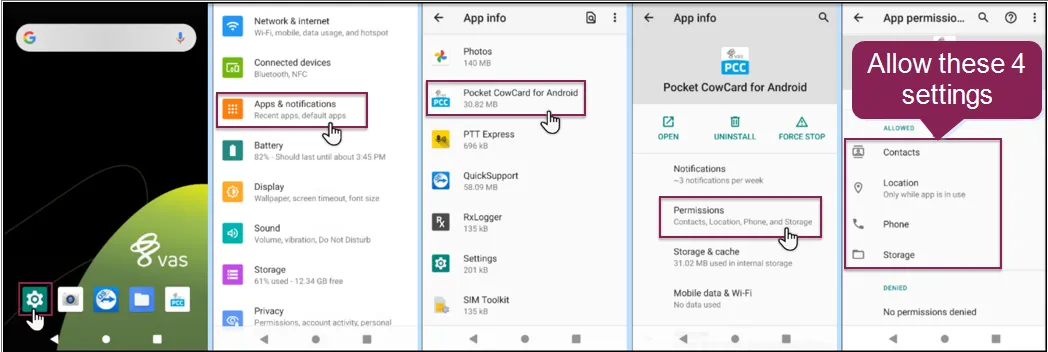
- As shown in the example below, these settings can be enabled post-install.
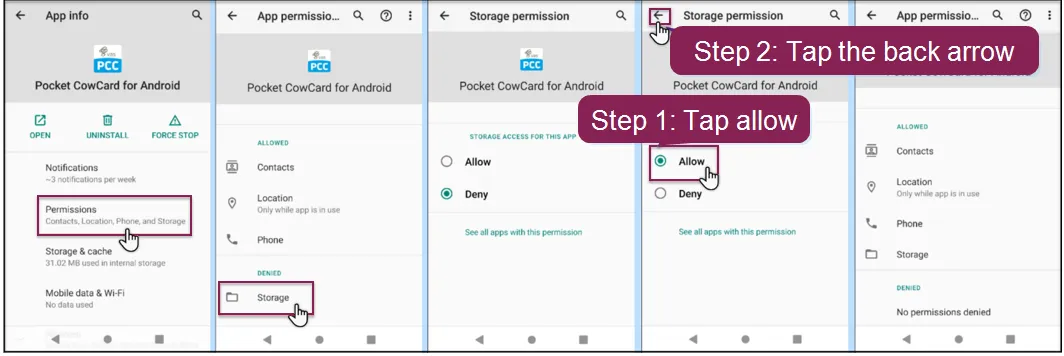
NOTE: During testing, no changes were observed to the device's ID on Android 9 or 10 systems. This may not be the case depending on the model of your device or once the app is live on the Google Play store.
- Repaired crashing issue on Administration screen – Pocket CowCard‑905, Pocket CowCard‑898: An issue caused the app to crash when tapping the About tab on the Administration screen. This issue was traced back to the use of PIN codes in the Pocket CowCard settings and has been resolved.
Pocket CowCard for Android - Version v2103191053
Build Date: 03/19/21 Release Date: 03/24/21
- Improved display of protocols on event entry – Pocket CowCard‑887, Pocket CowCard‑541: During event entry, protocols are now shown by display order instead of protocol number order.
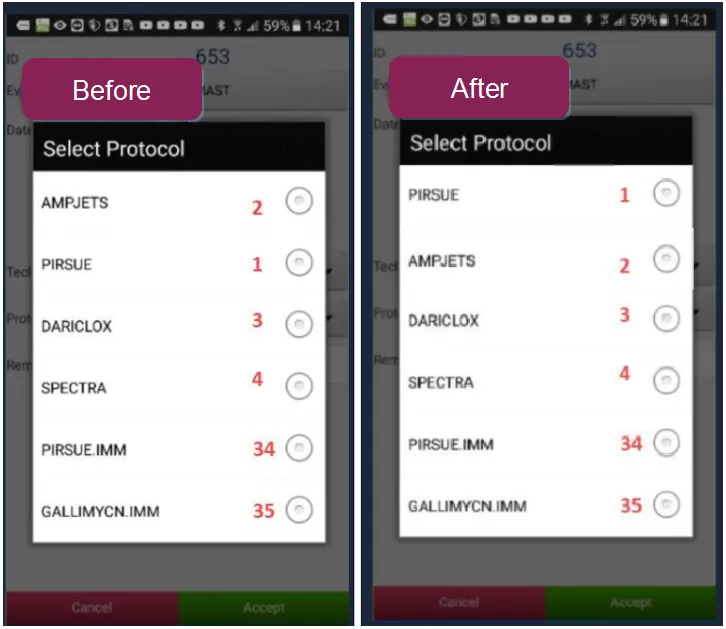
- Added support for longer protocol remarks – Pocket CowCard‑887, Pocket CowCard‑873: You can now enter protocol remarks as long as 16 characters. The previous limit was 8 characters.
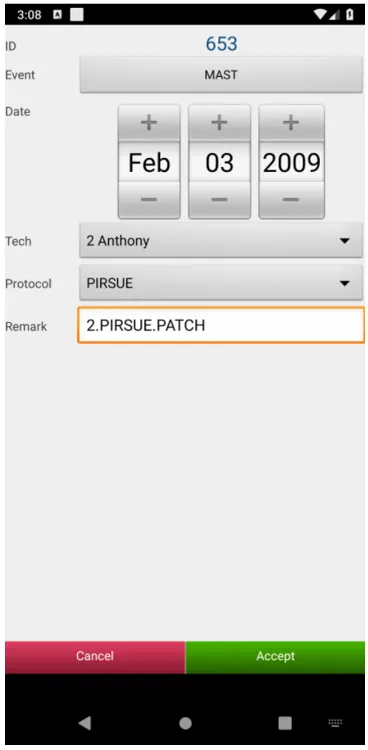
- Repaired use of multiple worklists – Pocket CowCard‑887, Pocket CowCard‑541: Users can scan animals across multiple open worklists while not focused on the Cow tab. This provides a "short term" way to combine worklist actions into a single worklist for the long term. Note that this method is considered experimental and may not be sustainable for future versions of the app or for DairyComp mobile.
- Corrected error when scanning with an open prompt – Pocket CowCard‑887, Pocket CowCard‑861: An error occurred within the breeding grid when RFID scanning while a system prompt was open. This issue has been resolved. However, it is still best practice to not scan while a system prompt is open or when inputting data.
Pocket CowCard for Android - Version v2102091450
Build Date: 02/09/21 Release Date: 02/09/21
- Improved animal scanning speed with worklists – Pocket CowCard-878, Pocket CowCard-868: The time it takes to process an animal in a worklist has once again been improved (down from 100 to 35 milliseconds), allowing you to scan more animals in less time with fewer app crashes.
- Updated version of Firebase in the app – Pocket CowCard‑878, Pocket CowCard‑859: The version of Firebase used by the app has been updated from a version previously deprecated by Google.
- Updated End-User License Agreement (EULA) for the app – Pocket CowCard‑878, Pocket CowCard‑866: A revision has been made to the EULA as of January 11th, 2021.
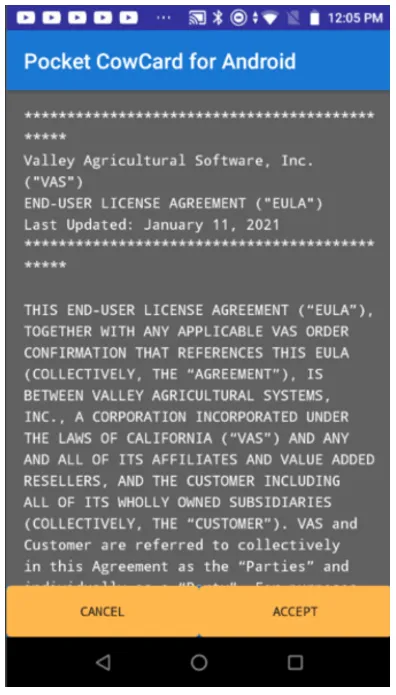
- Show all "day details" on the hospital form – Pocket CowCard‑878, Pocket CowCard‑464: The "Day" field on the hospital form now shows details on event protocols that have designated day details defined after the treatment days of a protocol are complete.
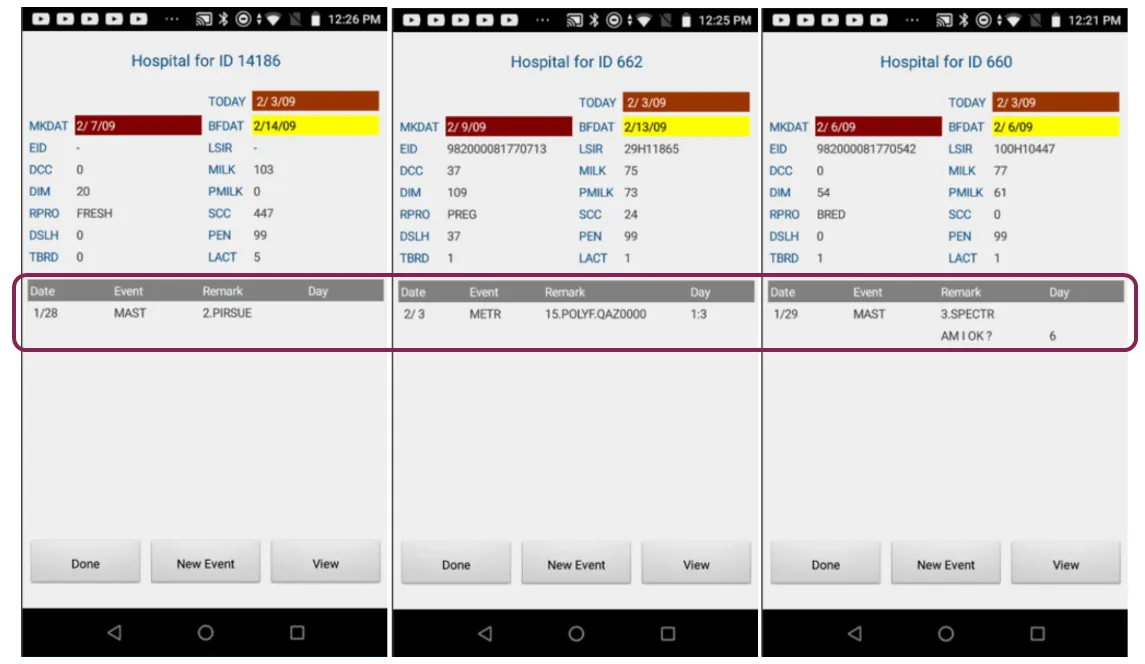
- Pocket CowCard app file available through DairyComp Web Updater – Pocket CowCard‑871: Users who are downloading/installing the Pocket CowCard app from an unofficial source (i.e., "sideloading") can find the latest version of the app after performing an update to DairyComp from the Web Updater. The file name is Pocket CowCard-ANDROID.APK and is located in the DairyComp\AXIM or DC\AXIM folder.
- See Update DC305 to the Latest ReleaseUpdate DairyComp to the Latest Release to learn more.
Pocket CowCard for Android - Version 2012231001
Build Date: 12/23/20 Release Date: 01/05/21
- End of Life for Android 5.x devices coming in March! – Pocket CowCard-862, Pocket CowCard-848: Support for Pocket CowCard Android 5.x devices will end on March 19th, 2021, and this release includes a notification that your devices should be running Android operating system 7.x to 11.x before that date. Be sure to upgrade or replace your devices before March 19th!

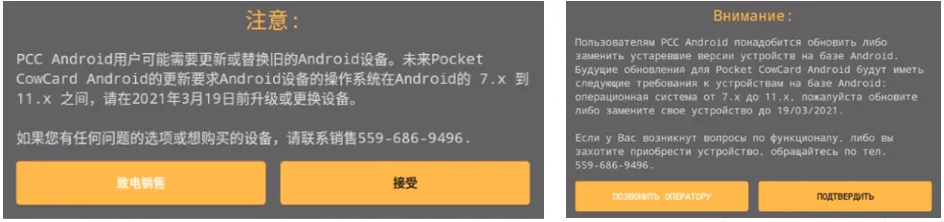
- Improved scanning speed with worklists – Pocket CowCard‑862, Pocket CowCard‑856: The app now processes scans more quickly (down to 100ms from 300ms), allowing you scan more animals in less time and with fewer app crashes.
- Increased battery life with worklists – Pocket CowCard‑862, Pocket CowCard‑860: The app now requires less battery power while processing worklists. As part of our effort to improve scanning speeds, we also made code enhancements that increase battery life and boost app stability.
- Scanning issues with unanswered PEN validation prompt – Pocket CowCard‑862, Pocket CowCard‑853: Repaired unexpected crashes that occurred when continuing to scan animals while the “Wrong Pen” prompt remained unanswered. VAS recommends responding to any screen prompts before proceeding to the next RFID scan.
Pocket CowCard for Android - Version 2011161600
Build Date: 11/16/20 Release Date: 11/17/20
- Android 11 Support – Pocket CowCard‑845, Pocket CowCard‑852: Pocket CowCard Android now supports devices running the Android 11 operating system.
- Scanning Issues in Latest Version – Pocket CowCard‑840, Pocket CowCard‑852: Repaired unexpected crashes that occurred while scanning animals in the previous Pocket CowCard Android app version released on October 6th, 2020 (V2010021354).
For release notes prior to August 2020, please see the Pocket CowCard Release Notes Archive on the VAS website.