Assign NFC Tags Without a Wand
3 min
Question: Can I scan and assign NFC tags without using a wand?
Answer: If you don't have a wand, you can now use the NFC reader on your phone to assign compatible monitoring tags. To do so, you must first create an Expert Batch command, then use the command to start scanning NFC tags:
Create a Command to Assign Tags
- Enter ALTER\3 in the command line.
- Click Add [Ins] in the Commands menu on the left side.
- Enter the command details for your monitoring tag's brand:
Product | Abbreviation | Content | Item Type |
|---|---|---|---|
Nedap | NFCNDAP | ENTER\Z HTTAG=@DEVICE VATAG=HTTAG | 31 |
Afikim | NFCAFI | ENTER\Z HTTAG=@DEVICE TRANS=HTTAG | 32 |
Merck | NFCSCR | ENTER\Z HTTAG=@DEVICE | 32 |
- Save your changes.
Update Nedap Items
If you are use a Nedap SmartTag (ear tag), you need to remove the Nedap item from the Assignable and Scannable lists in DairyComp. If you do not, you may scan and assign the wrong items.
- Open DairyComp and enter SERVER\C in the command line:
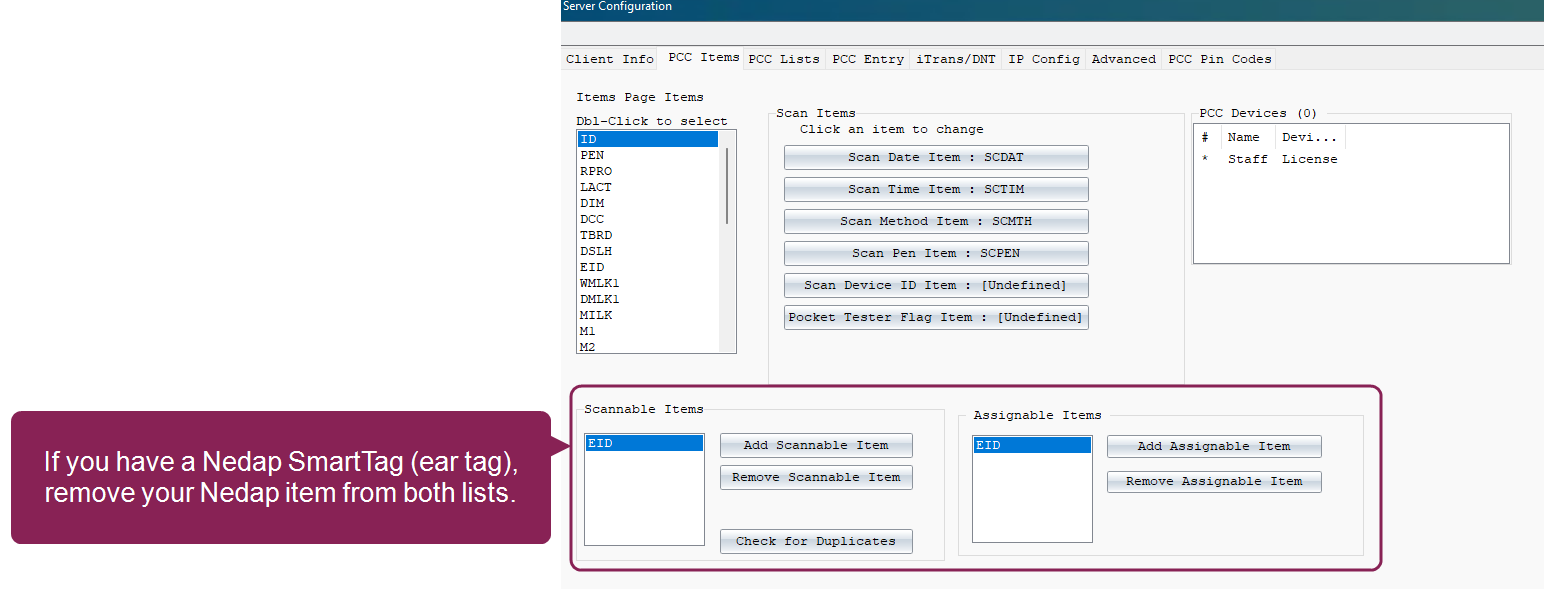
- Highlight the Nedap item in the Scannable Items list.
- Click Remove Scannable Item.
- Highlight the Nedap item in the Assignable Items list.
- Click Remove Assignable Item.
- Click OK in the upper right corner to save your changes.
Use an Android NFC Reader to Assign Tags
- Refresh your Pocket CowCard device and enable the batch command you created.
- Scan the animal's existing EID or manually enter the animal VISID.
- Scan the NFC monitoring tag with your Android device's NFC reader.