Pocket CowCard Update - November 2025
Android - Version v2511172141-(2.0.34.15-rc)
Build Date: November 17, 2025 Release Date: November 18, 2025
Pocket CowCard for Android version v2511172141-(2.0.34.15-rc) includes a variety of enhancements and bug fixes. Expand the sections below to learn more:
- Scan NFC tags from your Pocket CowCard device: If you don't have a wand, you can now use the NFC reader on your phone to assign compatible monitoring tags. If you want to use your Android device for tag assignments, you must first create an Expert Batch command, then use the command to start scanning NFC tags:
- Enter ALTER\3 in the command line.
- Click Add [Ins] in the Commands menu on the left side.
- Enter the command details for your monitoring tag's brand:
Product | Abbreviation | Content | Item Type |
|---|---|---|---|
Nedap | NFCNDAP | ENTER\Z HTTAG=@DEVICE VATAG=HTTAG | 31 |
Afikim | NFCAFI | ENTER\Z HTTAG=@DEVICE TRANS=HTTAG | 32 |
Merck | NFCSCR | ENTER\Z HTTAG=@DEVICE | 32 |
| |||
NOTE: If you are using a Nedap SmartTag (ear tag), you need to remove the Nedap item from the Assignable and Scannable lists in DairyComp. If you do not, you may scan and assign the wrong items. Expand the steps to learn how:
- Open DairyComp and enter SERVER\C in the command line:
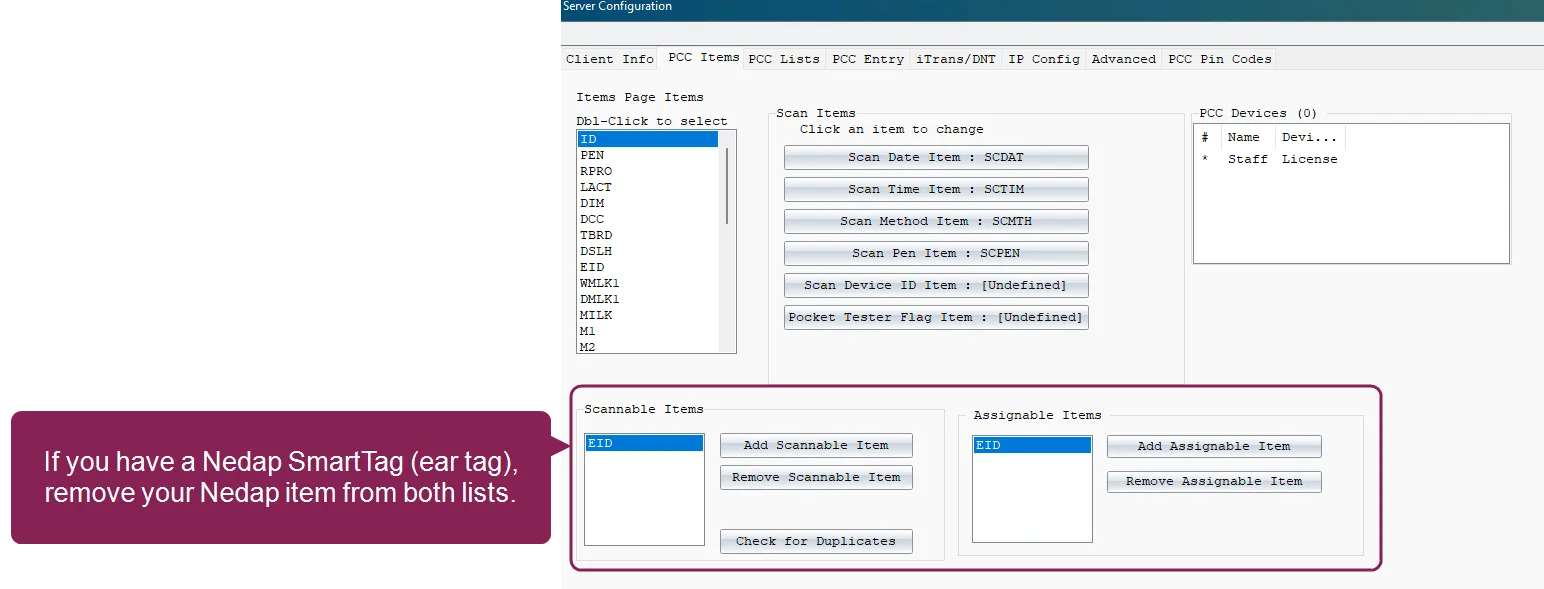
- Highlight the Nedap item in the Scannable Items list.
- Click Remove Scannable Item.
- Highlight the Nedap item in the Assignable Items list.
- Click Remove Assignable Item.
- Click OK in the upper right corner to save your changes. Save your changes and proceed to Use an Android NFC Reader to Assign Tags.
- Refresh your Pocket CowCard device and enable the batch command you created in Create a Command to Assign Tags.
- Scan the animal's existing EID or manually enter the animal VISID.
- Scan the NFC monitoring tag with your Android device's NFC reader.
(Pocket CowCard-1646, Pocket CowCard-1526, Pocket CowCard-1647, Pocket CowCard-1648, Pocket CowCard-1649, Pocket CowCard-1651, Pocket CowCard-1652, Pocket CowCard-1657, Pocket CowCard-1707, Pocket CowCard-1716)
- Item validation improvements for FRESH events: When you add animal data for FRESH events, Pocket CowCard now validates your item entries with special screen features for Date and Time items. (Pocket CowCard-1525, Pocket CowCard-1716)
- Calculated item support: Pocket CowCard can now support calculated items (Item Type #94), like Previous Dry Date (PDDAT). (Pocket CowCard-1379, Pocket CowCard-1716)
- EULA update: We updated the EULA (End User License Agreement) for Pocket CowCard. (Pocket CowCard-1718, Pocket CowCard-1716)
- Dark Mode readability improvement: When you choose Dark Mode, the text is now more visible. (Pocket CowCard-1543, Pocket CowCard-1716)
- Pocket CowCard filters out nonexistent pens: When you enter items using the Simple Batch command, Pocket CowCard only allows you to select existing pens. (Pocket CowCard-1539, Pocket CowCard-1716)
- Blank values supported in Simple Batch commands: Pocket CowCard now registers a blank value when you enter a Simple Batch command. Previously, you had to enter a question mark to leave the value blank. (Pocket CowCard-1629, Pocket CowCard-1716)
- Improved licensing process: We have improved the yearly licensing process for non-ProScan Pocket CowCard users, so now Pocket CowCard only expires when your DairyComp license expires. (Pocket CowCard-1712, Pocket CowCard-1716)
- Edit animal items from a worklist: You can now edit animal items when you're working in a worklist. Just tap on the animal ID, open its CowCard, edit the items, save your changes, and return to the worklist. (Pocket CowCard-1492, Pocket CowCard-1716)
- Additional Lactation History data: We added two new items to the Lactation History page: Age at Fresh Date (AGE) and Conception Date (CDAT). (Pocket CowCard-1661, Pocket CowCard-1716)
- Use merged worklists as a Batch Command filter: When you enter Expert Batch or Simple Batch commands, you can now select a merged worklist as a filter, so the command only affects animals in the merged worklist. To learn how to merge worklists, see Merge Worklists in Pocket CowCard. (Pocket CowCard-1703, Pocket CowCard-1716)
- Scan DONE animals to edit its details: If an animal is set as DONE using the AUTO SKIP or AUTO PREG feature in a vet list, you can now scan an animal to edit its details. (Pocket CowCard-1685, Pocket CowCard-1716)
- Cow items can now transfer to its calf: Now, items assigned to a cow can be transferred to its calf whenever FRESH events are created in Pocket CowCard. However, if an item that is assigned to move during a Cow to Calf transfer is also assigned to move to Previous, the Cow to Calf value will override the Previous value. To disable this default setting, open Administration > Settings and uncheck the box next to Reverse CowItems Order. (Pocket CowCard-1729, Pocket CowCard-1716)
- Hospital grid display improvement: The hospital worklist grid display has been updated to support an upcoming queuing feature. To support the future update, the Done button is now green and is displayed on the right side of the screen. (Pocket CowCard-1586, Pocket CowCard-1581, Pocket CowCard-1582 , Pocket CowCard-1583 , Pocket CowCard-1584 , Pocket CowCard-1585 , Pocket CowCard-1587 , Pocket CowCard-1589 , Pocket CowCard-1710 , Pocket CowCard-1716 , Pocket CowCard-1719)
- Multiple crash fixes: Using our analytics tool, we improved several instances of reported crashes. (Pocket CowCard-1476, Pocket CowCard-1477, Pocket CowCard-1495, Pocket CowCard-1496, Pocket CowCard-1679, Pocket CowCard-1680, Pocket CowCard-1681, Pocket CowCard-1682, Pocket CowCard-1683, Pocket CowCard-1684, Pocket CowCard-1688, Pocket CowCard-1691, Pocket CowCard-1692, Pocket CowCard-1697, Pocket CowCard-1701, Pocket CowCard-1709, Pocket CowCard-1715, Pocket CowCard-1716)
- Quotation mark support fix: Pocket CowCard now correctly recognizes remark entries that use quotation marks. (Pocket CowCard-1321, Pocket CowCard-1716)
- Protocol display additions: Pocket CowCard now displays protocol details above 250 for v10 herds. (Pocket CowCard-1704, Pocket CowCard-1705, Pocket CowCard-1716)
- Herd switching display fix: When you switch herds, the keypad now closes correctly. (Pocket CowCard-1417, Pocket CowCard-1716)
- Russian and Chinese characters fix: Pocket CowCard and DairyComp now correctly display Russian and Chinese characters. (Pocket CowCard-1531, Pocket CowCard-1716)
- EID/REG display fix: When you use Expert and Simple Batch commands, the EID or REG values now display correctly. (Pocket CowCard-1530, Pocket CowCard-1716)
- Hospital worklist data fix: The hospital form now loads correctly when you navigate from hospital worklist to a CowCard. Previously, the hospital form would look empty. We recommend using the Merge Worklists in Pocket CowCard function to combine worklists. (Pocket CowCard-1734)