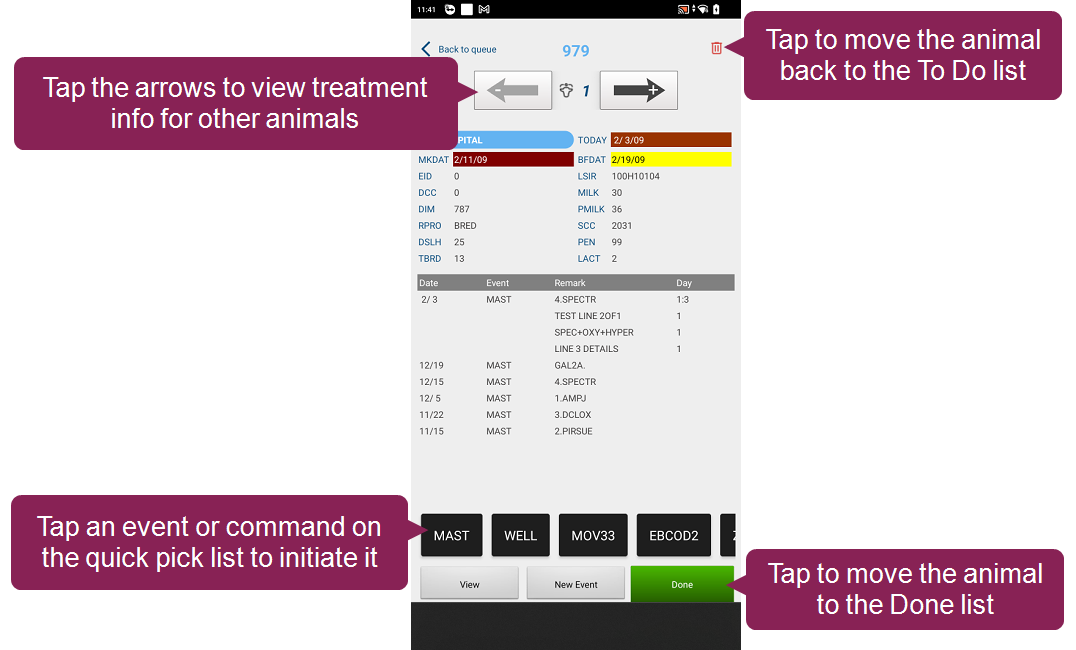
Pocket CowCard Update - February 2026
2 min
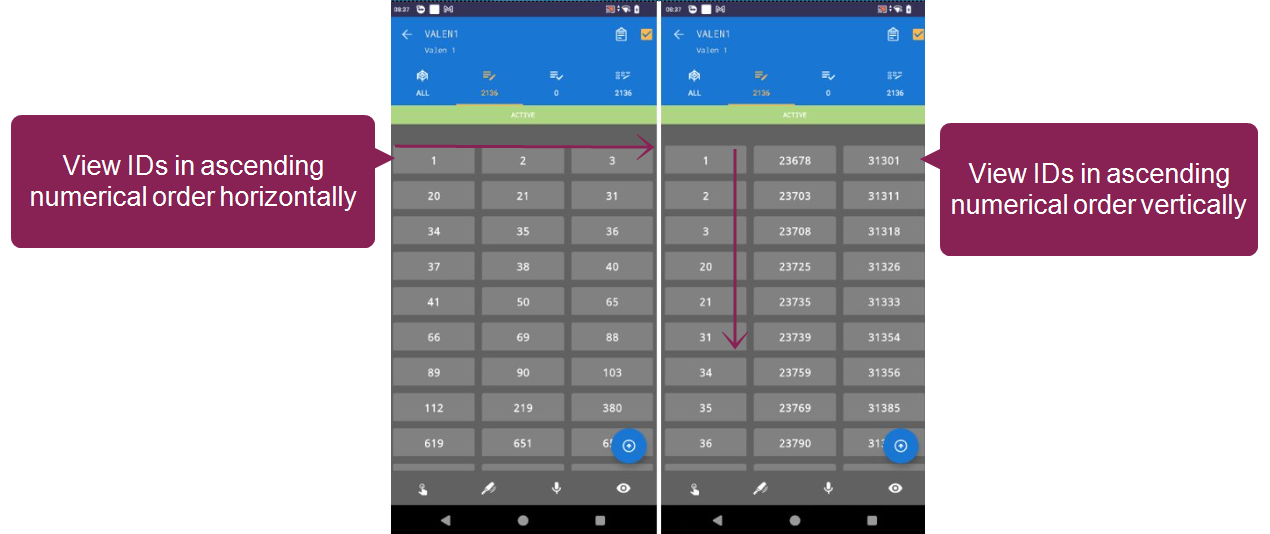
android version v2602162155 (2 0 35 25 rc) build date february 16, 2026 release date february 18, 2026 for android hot fix version v2602162155 (2 0 35 25 rc) resolves the following issues fixed an issue where the events list displayed comments or protocols that did not match the associated event resolved an issue where would crash if a v10 cowfile had too many active records, depending on the android device android version v2602051550 (2 0 35 23 rc) build date february 5, 2026 release date february 9, 2026 for android version v2602051550 (2 0 35 23 rc) includes a variety of enhancements and bug fixes expand the sections below to learn more enhancements hospital list upgrades we made several improvements to optimize how you view, queue, and manage animals in a hospital list learn more about the new features in manage hospital list queues in pocket cowcard docid\ qo73eyqfzb0qn kd7cxnj position view when you're checking an animal on the hospital list, use the new position view to manage the cow in front of you you can review its treatment information, add an event from the quick pick list, or move it to the done list position view mirrors what you see in real life — use the arrows at the top as you walk to the next animal in the queue if you move to the animal to the left, tap the left arrow, and displays the treatment information for that animal queue animals automatically when you queue animals on a hospital list, can now assign the animal's position for you, so you don't have to manually assign a position to each animal to do so, manually assign an animal to the first position in your hospital queue the animal should also be located in the first stall or hutch in your hospital area then, simply tap the subsequent animals and automatically queues them in order (i e the second tapped animal is assigned to the second position, the third tapped animal is assigned to the third position, etc ) customize more quick pick lists you can now add quick pick lists for up to 8 hospital lists additionally, you can add up to 16 events or expert batch commands on your quick pick list using quick pick lists saves you a few extra clicks, so you can quickly add events or commands to an animal without ever leaving the hospital list see customize quick pick lists docid 6uwno1bobfyk1mm4ii8zv to learn how ( 1600, 1773, 1795) fresh event updates we made several improvements to fresh events, including the ability to add and customize quick pick lists so you can easily initiate expert batch commands when you enter new fresh events see add quick pick options for fresh events docid 6uwno1bobfyk1mm4ii8zv to learn more view animal order vertically or horizontally when you view a worklist in grid view, you can now choose to view your animals listed in ascending numeric order vertically or horizontally open settings and select your orientation preference next to worklist ids in columns no grid view a list of animal ids horizontal view animal ids in a grid that ascends horizontally vertical view animal ids in a grid that ascends vertically ( 1396, 1795) review merged lists without unmerging them on the lists tab, you can now tap the review merge list button to see which lists are merged and check list progress without affecting the merged list ( 1674, 1795) added support for additional item types now supports two additional item types item type #79 (event protocol number) and item type #130 (date format mmmyy) ( 1543, 1716) improved messaging when entering abort events we improved the messaging for abort events entered for animals that aren't on the vet list (vc=0) and have a conception date (cdat>0) if the animal's last event was a heat only event note that most abort dates are an estimate, so using today is not the best practice ( 1732, 1716) several small enhancements to the code base made small refactor improvements to the code base ( 18514, 1765, 1774, 1795) new online help link to server ip message when a refresh fails or prompts you for the server ip address, now displays a message that includes an online help link to find your dairycomp ip address docid\ ktmm r8dtp5lb7hepxedp ( 1712, 1716) nonexistent source farm warning during add batch entry, now displays a warning if you enter a source farm number that isn't defined in dairycomp ( 1744, 1795) added support for five more languages now supports translations for brazilian portuguese, italian, french canadian, polish, and japanese ( 1533, 1763, 1766, 1795) bugs improved app stability fixed several reported issues from our analytic tools, making the app more stable ( 1269, 1687, 1689, 1690, 1693, 1695 to 1702, 1796) keyboard display fix for tablets fixed an issue where two keyboards would be shown at the same time if you used on a tablet ( 1269, 1796) id display fix in grid view ids are no longer cut off when you use grid view ( 1711, 1850, 1795) transactiontoolargeexception error fix can now handle larger batch transactions for large workflows, so you will no longer receive a transactiontoolargeexception error ( 1748, 1795) quotation mark fix fixed an issue where wouldn't send data split correctly if the data was split by quotation marks ( 1811)