Common Vet List Questions
Expand the topics below when working with vet lists for help with some common questions:
There are several possible reasons for having too many animals on your vet list:
- The FOR criteria in your vet list command is faulty.
- The criteria for your vet codes is wrong.
- The reproductive status of the animals is out of date.
Start by reviewing a few specific animals from the list one at a time to determine if the FOR criteria is wrong in the vet list command or if the animal's reproductive status is incorrect.
If the animal's status is correct but it should NOT be on the list, clear the vet codesvet codes by running the following command (to reset all the vet codes to new parameters as defined in the system's vet list table):
VC=0 FOR VC>1 VC<>6 <enter>
Once you've entered the above command, generate the vet list again.
If the steps above fail to solve the problem, try running the CHKFILE command with the Repair access table option and then rerun the vet list.
If there are not enough animals on the vet list, the cause(s) may be the same as those for having too many animals on the list (above). Another possibility is that the cowfile is damaged. In this case, contact VAS Support.
Normally, vet entry information is entered for animals in the same order that the animals appear on the vet list. If the vet entry order is out of synch, consider the following:
- FOR and BY statements must be the same in the VENTER command as they are in the VETLIST command. If they are not, make the necessary changes to the commands to ensure that they match.
- Vet exam results should be entered soon after the vet list is generated. Delaying the entry of exam results can cause animals to be brought up in a different order. Re-running the vet list can bring the process back close to the same order, but usually with some differences. The best precaution is to enter the results quickly following the next vet check.
For information about the exam results entry process, see Enter Vet Exam ResultsEnter Vet Exam Results.
There are various reasons you might want certain animals kept off vet lists. For example, you might want to delay rechecking animals for pregnancy that have been checked very recently. See Hold Animals from Vet ListsHold Animals from Vet Lists for more information.
Follow the steps below to prevent FRESH animals from being included in vet lists:
- Disable the FRESH vet code. Vet codes can be enabled/disabled through the ALTER command. See Vet CodesVet Codes to learn more.
- Change the FRESH command to set fresh animals to OPEN when they calve. To do this, use the ALTER\3 command to add RC=3 to the end of the FRESH command.
- In the command line, enter RC=3 FOR RC=2. This will set all of the currently FRESH animals to OPEN.
See Hold Animals from Vet ListsHold Animals from Vet Lists for more information.
Many dairies prefer a separate vet list for heifers (i.e., animals with lactation=0). This can be done by creating a new command/menu abbreviation that creates a vet list just for heifers, as in:
HVLIST=VETLIST ID VITEMS ID FOR VC>0 LACT=0 BY PEN
If you want to create an items grouping specifically for use in your heifers vet list command, you can do that as well. For example:
HVITEMS=RPRO DIM TBRD DSLH AGE EDAY EVT REM VETC
In this case, you would replace the VITEMS in your new command string with HVITEMS:
HVLIST=VETLIST ID HVITEMS ID FOR VC>0 LACT=0 BY PEN
See Group Vet List ItemsGroup Vet List Items for more information.
Finally, you'll want to create a new command for your vet entry routine, such as:
HVENTER=VETENT FOR LACT=0 VC>0 BY PEN
It is recommended that you set your DairyComp printing font to Courier New or Lucida Console when printing vet lists to avoid any alignment problems when printing. See Change Font in Printed ReportsChange Font in Printed Reports to learn how. For additional information about printing, see Print Reports and Change LayoutPrint Reports and Change Layout.
NOTE: Most vet lists are set up for compressed printing in order to supply more information (e.g., pen number, milk production, etc.).
See Adjust the Hold Date (HLDAT)Adjust the Hold Date (HLDAT) for instructions.
When a DNB cow shows up on a vet list for a PREG check, the cow was likely not declared OPEN after she was bred. As a result, DairyComp adds the cow to the vet list to confirm if the cow is OPEN or PREG.
NOTE: Sometimes a DNB event is added for a cow and then removed later to make her eligible again for breeding.
See Hold Animals from Vet ListsHold Animals from Vet Lists for more information.
To change or alter your VETLIST or vet codes, please contact VAS Support because some vet codes might be tied to ovsynch.
You can also adjust the pens or vet codes you are checking by using a FOR statement for a VETLIST. See VLCONVLCON to learn more about a custom item that can be used to define additional parameters in a command.
In the command line, enter a SHOW command to review results from a vet check. DairyComp uses a vet check combination event to generate the report.
NOTE: If your dairy does not already have a vet check combination event, see Create a Combo EventCreate a Combo Event.
The following command generates a report that shows you the results of your vet check with VREM remarks:
SHOW ID PEN DIM LACT RPRO VDAT VREM FOR VDAT=%WHAT_DATE_CHECKED
NOTE: If your dairy does not already have a VREM item definition, see
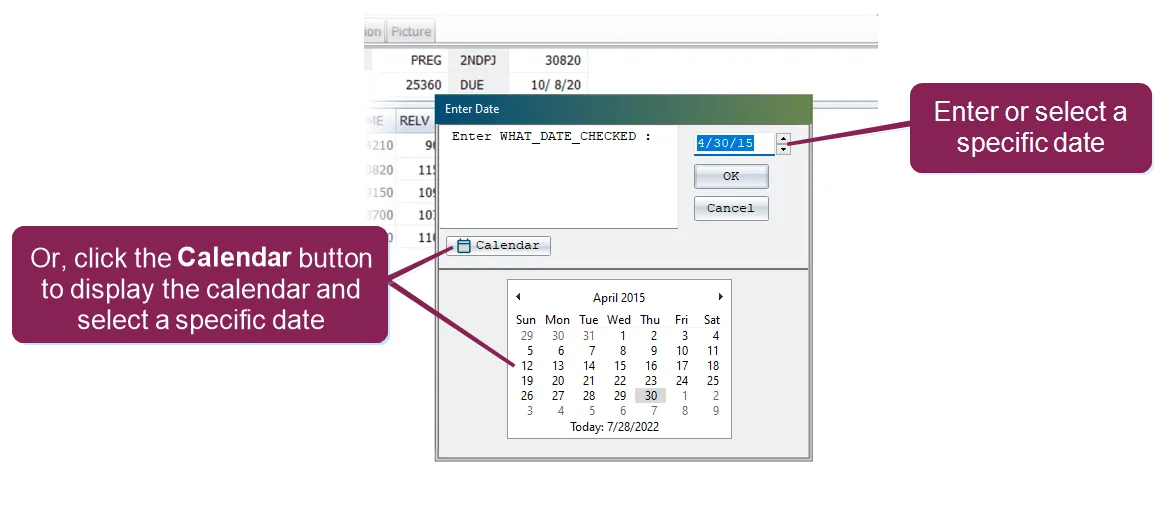
How do I create a list based on a vet remark? for more information. When th%WHAT_DATE_CHECKEDswitch is entered in the command line, DairyComp opens the Enter Date window and allows you to select a specific date for the report.
You can also edit the events to include in a combo event for a vet list if necessary. See Edit a Combo Event for a Vet ListEdit a Combo Event for a Vet List for instructions.
Follow the steps below to create a vet list based on a vet remark:
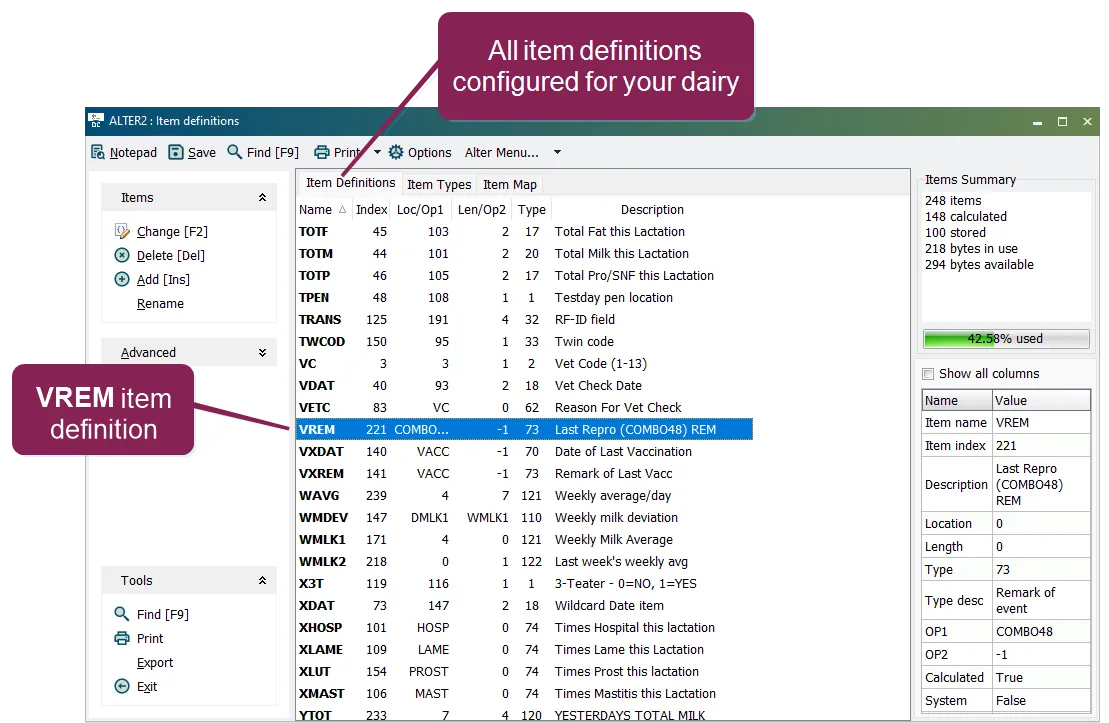
- Confirm that DairyComp includes a VREM item definition by entering ALTER\2 In the command line and locating the VREM item definition in the ALTER2 : Item Definitions window.
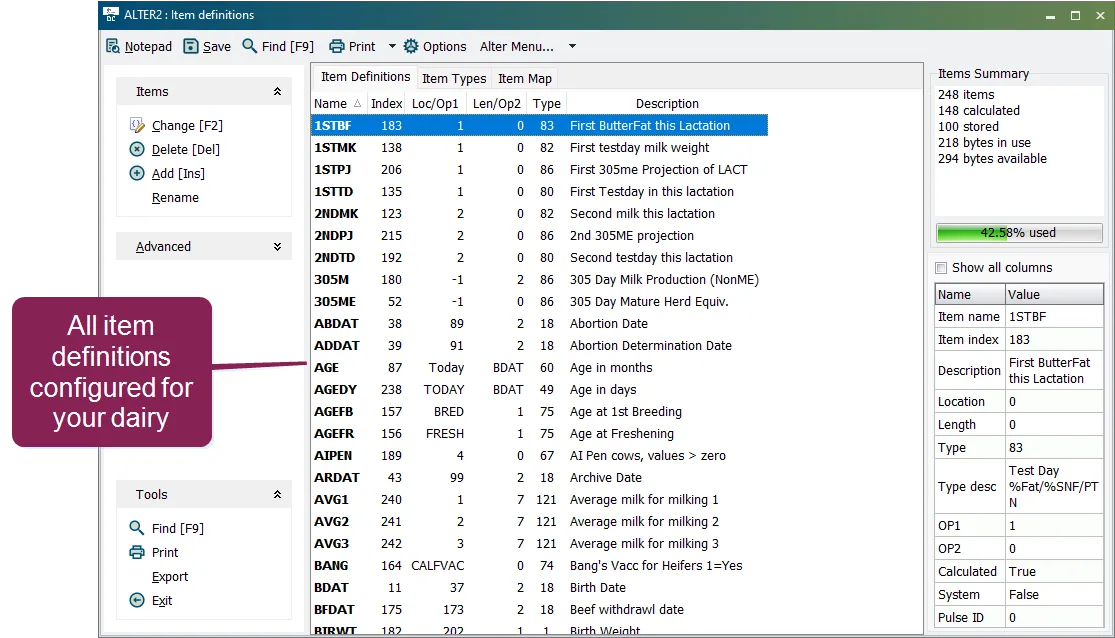
- In the command line, enter ALTER\2 to view your item definitions. The ALTER2 : Item Definitions window opens, showing all item definitions configured for DairyComp.
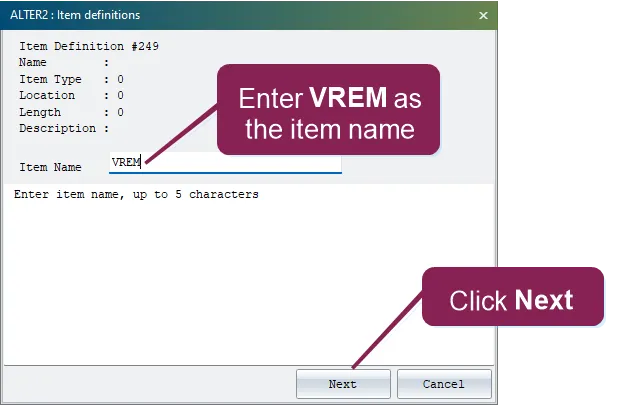
- Click Add [Ins] and enter VREM in the Item Name field in the pop-up window.
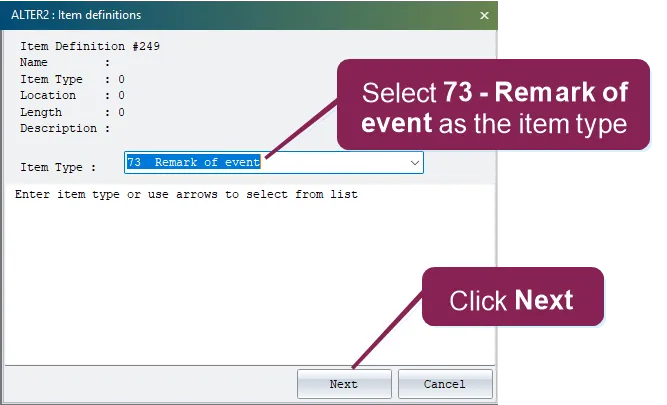
- Click the Next button and select 73 - Remark of event in the Item Type drop-down list.
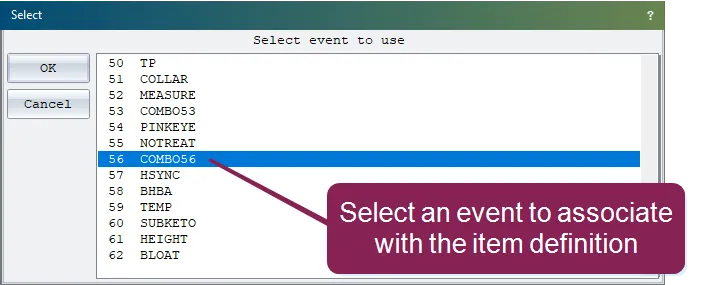
- Click the Next button and select the vet check combination event that you want to associate with the VREM item definition.
NOTE: If your dairy does not already have a vet check combination event, see Create a Combo EventCreate a Combo Event.
- Click OK to save the new item definition and event association.
- In the command line, enter ALTER\2 to view your item definitions. The Item Definitions window opens, showing all items configured for DairyComp.
- Verify that a VREM item definition already exists for your dairy. The example below shows an existing VREM event definition.
- Run a report in the command lineRun a report in the command line that includes VREM remarks.
NOTE: Any event that has a VREM remark is included in the vet list.
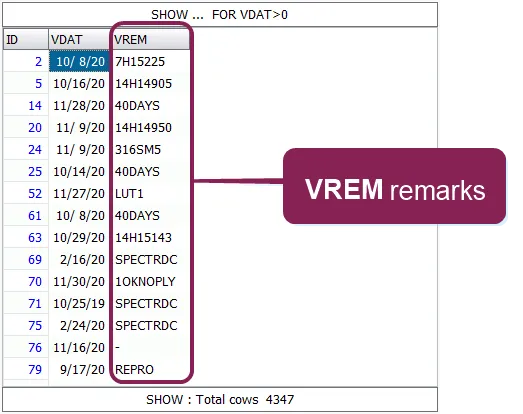
For example, the command below generates a report that includes VREM remarks: SHOW ID VDAT VREM FOR VDAT>0 Running this command generates a list of animals that have events associated with the VREM remark for a vet date greater than 0.