ALTER9: Events
The ALTER9 : Events option allows you to manage your DairyComp events configuration. The changes you make here will impact the events that you can enter for your animals.
To manage your events configuration, simply enter ALTER\9 in the command line, or enter ALTER in the command line and then choose option 9 for User‑defined events. Either of these actions opens the ALTER9 : Events configuration window.
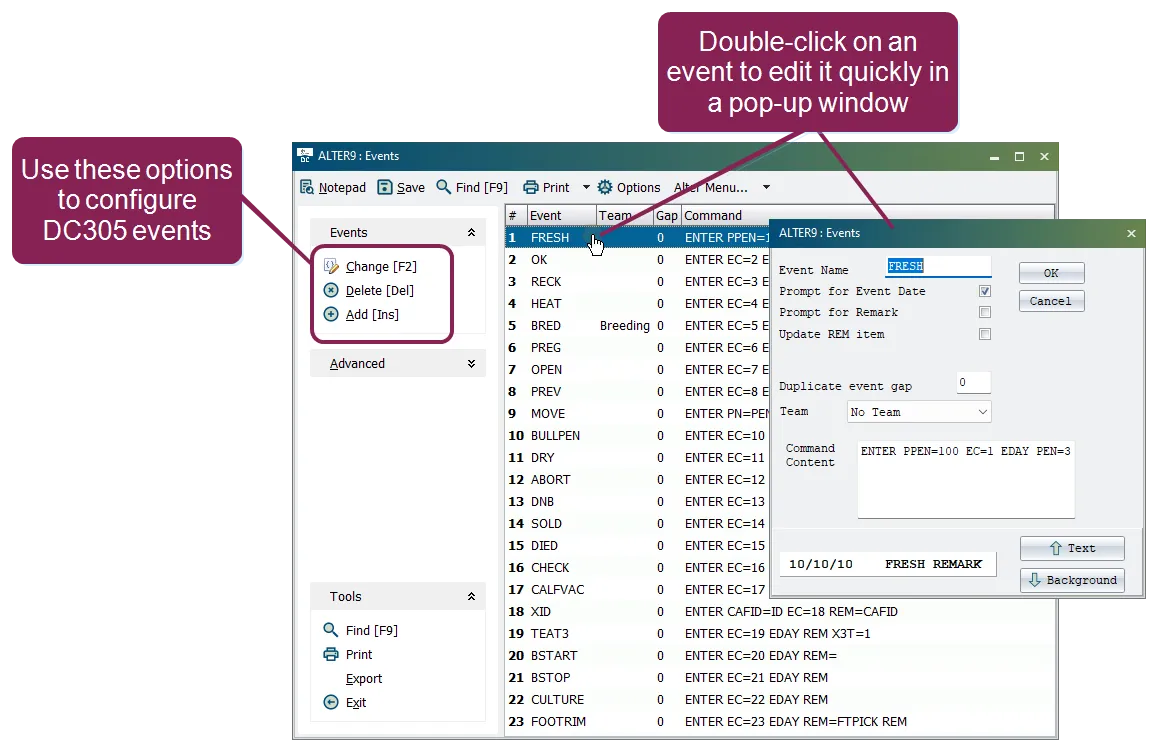
You can add new events or edit user‑defined events in this list, but you cannot change any of the system events that come with the original program (events 1–18), except for their event name. Beyond the 18 system events, you can create up to 63 additional events.
See the topics below when configuring your events in DairyComp:
Follow the guidelines below when creating or editing an event:
- Enter ALTER\9 in the command line to open the Events configuration window.
- To create a new event, select the Add option, or press the Insert key. To edit an event, click on an event in the list and select the Change option, or press the F2 key.
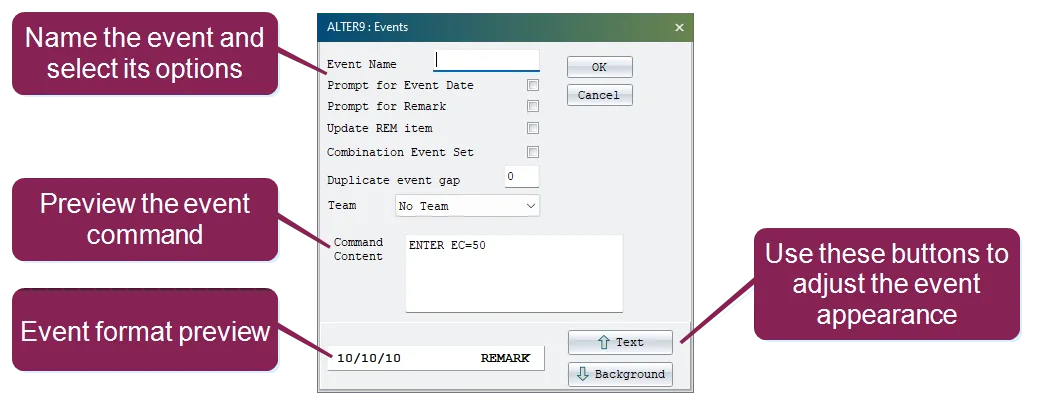
- Enter an event name up to 7 characters.
- Use the checkboxes below the event name to select which options the event should prompt for when it is entered (event day, remark, etc.). Note that the Command Content field is updated as you select different options.
- If you want to make this a Combination Event, you can check that box now and click OK. See Create a Combo Event for additional instructions.
- To define a gap for this event, enter the number of gap days in the Duplicate event gap field. See Define a Gap for an Event for details on what a gap is and how it works.
- To associate a team with this event, select it from the Team drop‑down list.
- At the bottom of the window, you can use the Text and Background buttons to adjust the event's appearance. These options adjust the text color and background color so that events of this type stand out differently from other events on the Events TabEvents Tab in your CowCard.
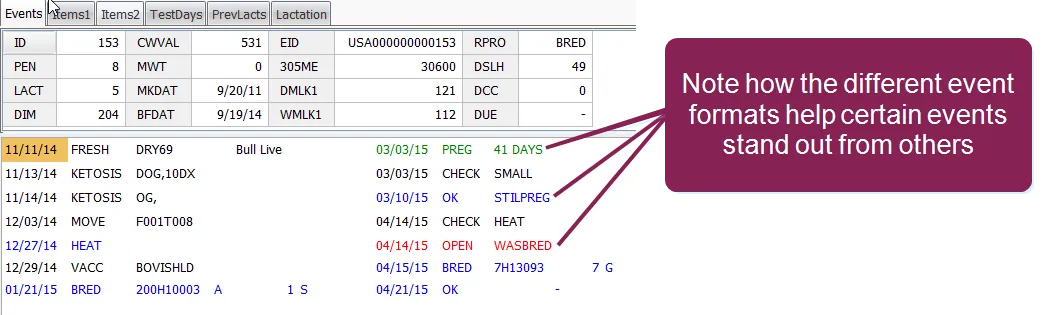
You can see a preview of your event format in the field to the left of those buttons.
- When you finish defining your event settings, click the OK button at the top right of the window to save the new/updated event and add it to the system. If you chose the option to make this a combination event, the system displays another pop-up where you can select the events to add to the combo. See Create a Combo Event for additional instructions.
Enter ALTER\9 in the command line to open the Events configuration window, and then click on the last event in the table. Select the Delete option or press the Delete key.
IMPORTANT: You can only delete the last event that was added to the list. You cannot remove any of the other events from the event table; you can only rename them. There are options in the EVENTS command to remove an event from the animal records, if desired, as well as to map one event name to another. See Create New Event or Edit Settings for an Existing One for help renaming events.
A combination (or "combo") event exists in DairyComp solely to allow you to create event items that reference a set of events (as opposed to a single event). You cannot actually enter a combo event, and a combo event would never appear on a CowCard. Instead, it exists as an event for which you can make items.
The goal is to make event items that reference a set of events (as opposed to a single event). For example, lets say you have interest in three specific repro events: PREG, OPEN, and OK — we'll call them "vet events" — and as an item for reporting, you want to see the date of either the latest PREG, OPEN, or OK .
You could create 3 unique items to represent the "latest date" for each of these events, something like L OK , LPREG, and LOPEN , and make these dates specific to those events. However, that's not really what you want; you want a single date item that represents the latest of an OPEN, PREG, or OK.
This is where combo events come in. A combo event is sort of a "virtual" event. As mentioned above: You cannot actually enter a combo event, and a combo event would never appear on a CowCard. Instead, it exists as an event for which you can make items.
Continuing with our "vet events" example, if you create a combo event that contains all three of the OPEN, PREG, and OK events, you can then create a single item for that date — we'll call it LVET — and use it on reports. To create the new event item, you'll need to use ALTER\2.
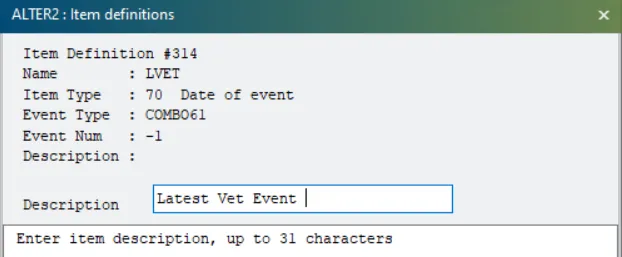
Proceed with the instructions below to create a combo event.
Follow the steps below to create a combination event.
- Follow the steps in Create New Event or Edit Settings for an Existing One and be sure to check the Combination Event Set box. When you check that box, the system displays a window to confirm that you want to create a combo event. Click Yes in that window.
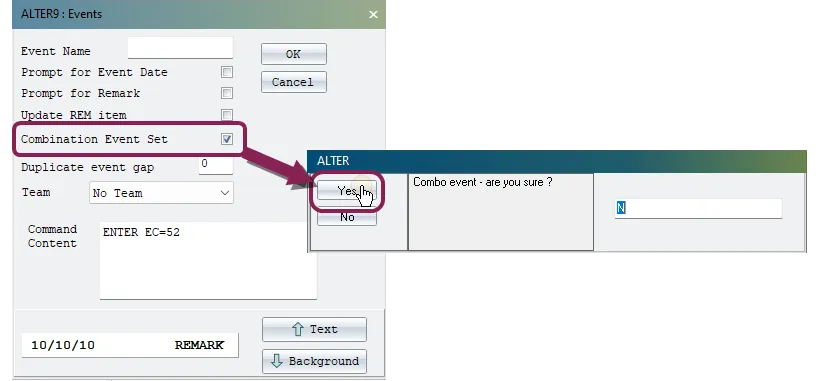
- The system assigns an event name with the next available number in the system, such as COMBO52. This name cannot be edited.
- When you are done selecting the settings for the event, click OK. This closes the "new event" window and opens another window where you can choose the events to include in the combo.
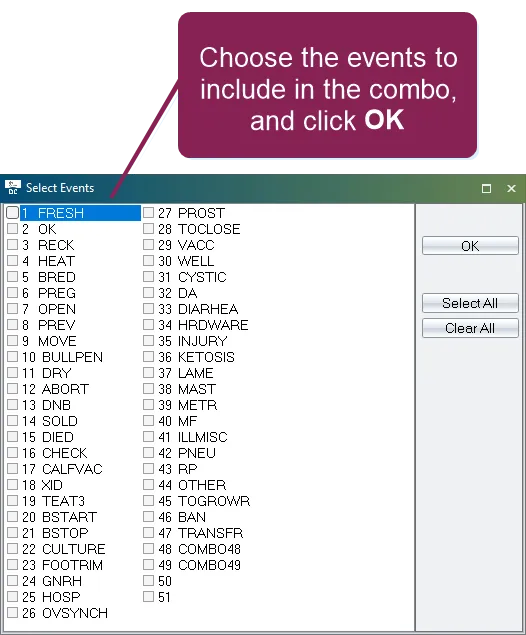
- Check the events you want to add, and click OK to save the combo event and add it to the system.
In DairyComp, you can use the "gap" option to set the number of days that multiple treatment events will be considered part of the same occurrence.
Setting a gap value is helpful when conducting analysis on the farm because the number of events can be greatly inflated if a gap value is not set and employees re-enter the event multiple times to track daily treatments.
To understand the gap value better, let's review an animal that has been treated for ketosis. When checking the animal's CowCard, consider how many times she has had ketosis.
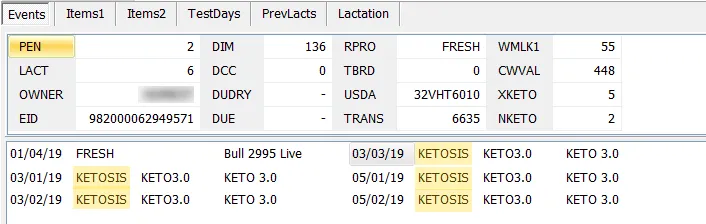
You might at first say 5 times. But that is just the number of KETOSIS events, or treatments; it's not necessarily the number of times the animal has had ketosis.
She was treated three times in early March, and again in early May:
- If the question is How many times was this animal treated for ketosis?, then 5 times would be correct.
- If the question is How many times did this animal have ketosis?, then it's more accurate to say she had ketosis 2 times.
The outcome of using a gap in events is that the type 74 item definition (“Count of Events”) will be reflected in the gap-affected values. In the example provided above, you could set a gap value of 5 on your KETOSIS event to ensure that all ketosis treatments that are entered within a 5‑day timeframe will all be included under one ketosis occurence in the “Count of ketosis events” item. You could then create 2 type 74 items for the number of ketosis treatments and the number of ketosis occurrences:
Item | Type | ALTER2 asks: Use Gap? | Result |
|---|---|---|---|
XKETO | 74 | No | 5 |
NKETO | 74 | Yes | 2 |
Then the ketosis count in this instance would be 2, not 5 (the first occurrence being in early March and the second being in early May).
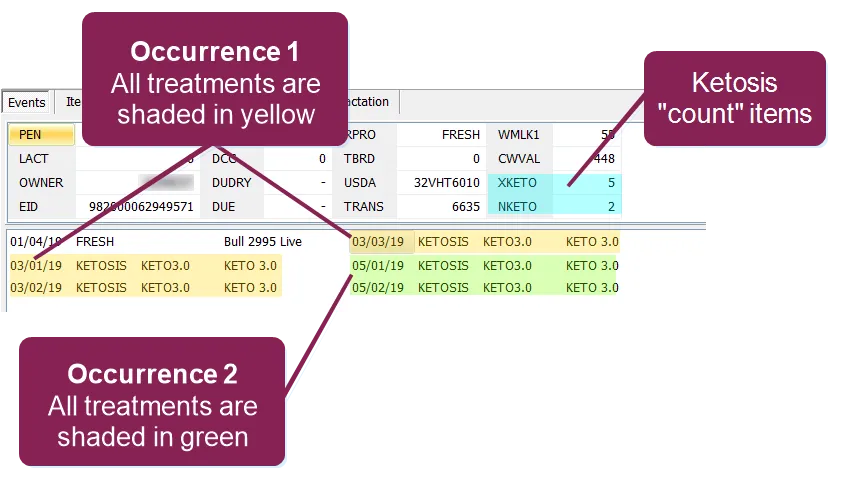
The gap value is helpful in a situation like this because the dairy owner or veterinarian might want to look at trends in ketosis across the herd. In this case, whether the cows were treated 3 times or 1 time per occurrence is less important. It's more important to know if ketosis has become more of a problem recently, so maybe the time of year or stage of lactation is more relevant than number of treatments.
For this example, we will focus on the mastitis event (MAST) with a gap of 14 days, assuming that an animal will receive multiple MAST treatments for one occurrence of mastitis within those 14 days.
If the first MAST event is entered into DairyComp today and again in 5 days, the system will still track both treatment events, but it will consider them as part of a singular occurrence. In this case, here's what you can expect to see on the CowCard:
- The Events tab on the CowCard will show each individual MAST event entry, along with its treatment details (date, protocol, and treatment area).
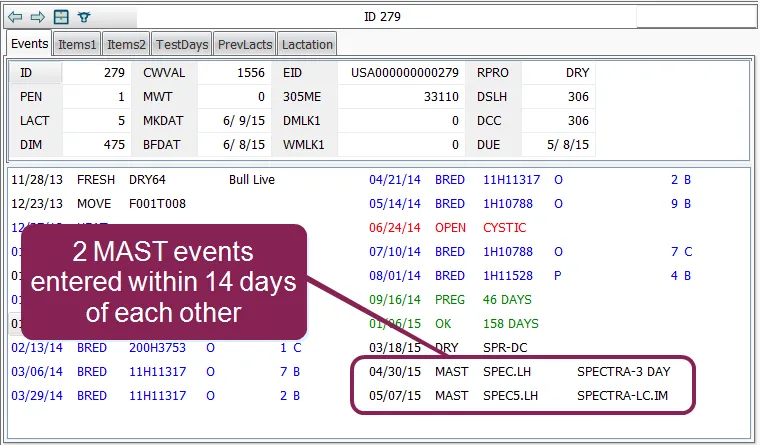
- The Items tab on the CowCard will only show a value of 1 for the XMAST item, even though the MAST event has been entered twice. Even if a MAST event is entered within the gap period yet is treated in a different area (different hoof or teat), XMAST will still consider this as part of the initial event.
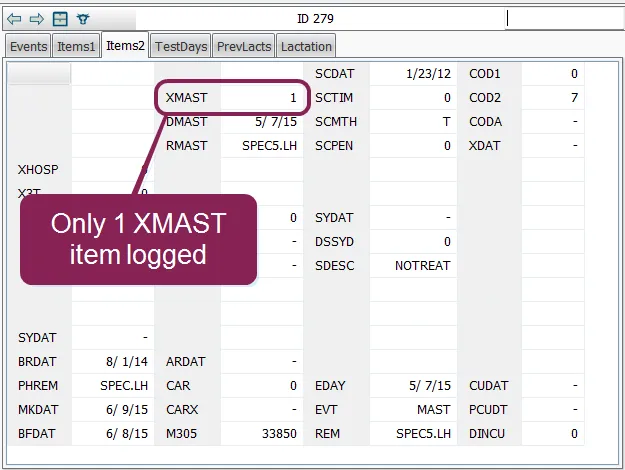
Continuing forward during the 14 days of this gap period, if the MAST event is entered several more times, the gap value will calculate off of the last entry, and the system will still count it as one XMAST event as long as it is entered within 14 days from that first MAST entry.
If the same animal is given a second MAST event entry 15 days from the initial entry, the system will consider this a new event because the initial gap value was set to 14 days. If this occurs, the XMAST item will now be updated to 2, indicating that the animal has been treated for mastitis twice during this lactation cycle.
To set a gap value:
- Enter ALTER\9 in the command line.
- Open the event that requires the gap.
- Enter a value (number of days) for Duplicate event gap.
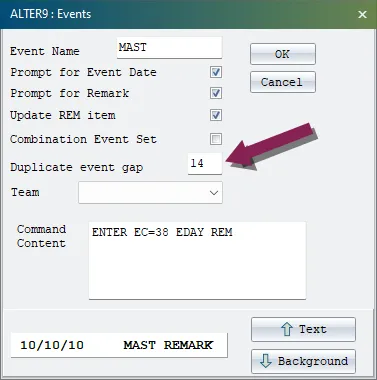
- Click the OK button at the top right of the window to save your changes.
Note that the instructions in this topic are for configuring the events that are available in DairyComp. For information on events that have been added to an animal, see Events TabEvents Tab.