Set Up Function Keys
Oftentimes you'll need to enter the same vet exam results for multiple animals. Having a function key defined to automatically enter these results can be helpful.
On the right side of the Enter Vet Results window, you'll see the function keys currently configured for your DairyComp installation.
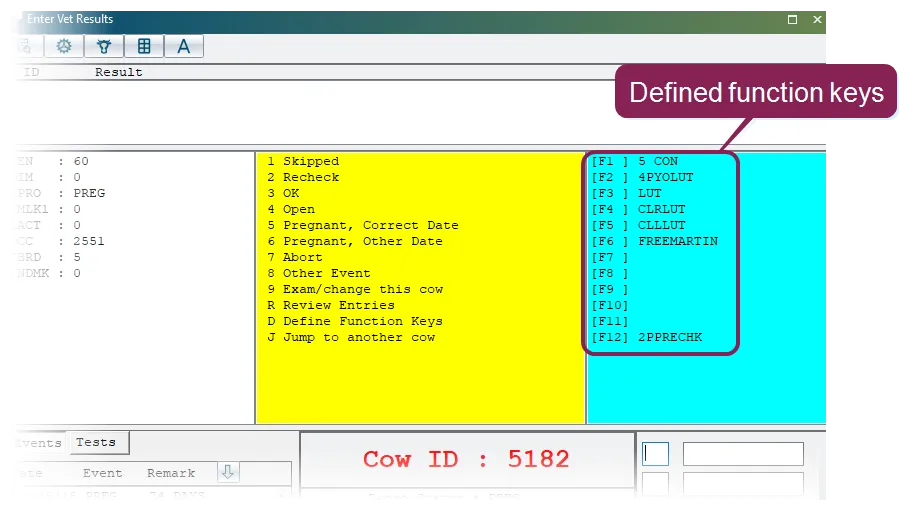
Function keys can be defined to enter exam result codes, remarks, or both. To use a function key, click inside either the results code field or the remark field (depending on the function's definition), then press the applicable function key. Alternatively, you can just double-click the function key definition on-screen.
To create or change a function key definition, enter D in the results code field. You'll then be asked which function key to define (1-7).
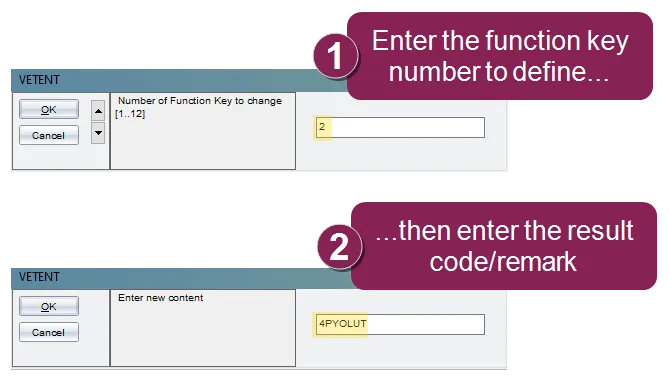
You can define function keys to enter up to three result code/remark combinations, including definitions for adding other events as exam results. See Enter Other EventsEnter Other Events to learn more.