Change Font in Printed Reports
Question: How do I change the font size on my printed reports?
Answer: You can customize your font settings in the Printer tab of your SETUP window:
In the command line, enter SETUP to open the SETUP window, then select the Printer tab. Click on your current font to change your settings, then click OK to save your changes.
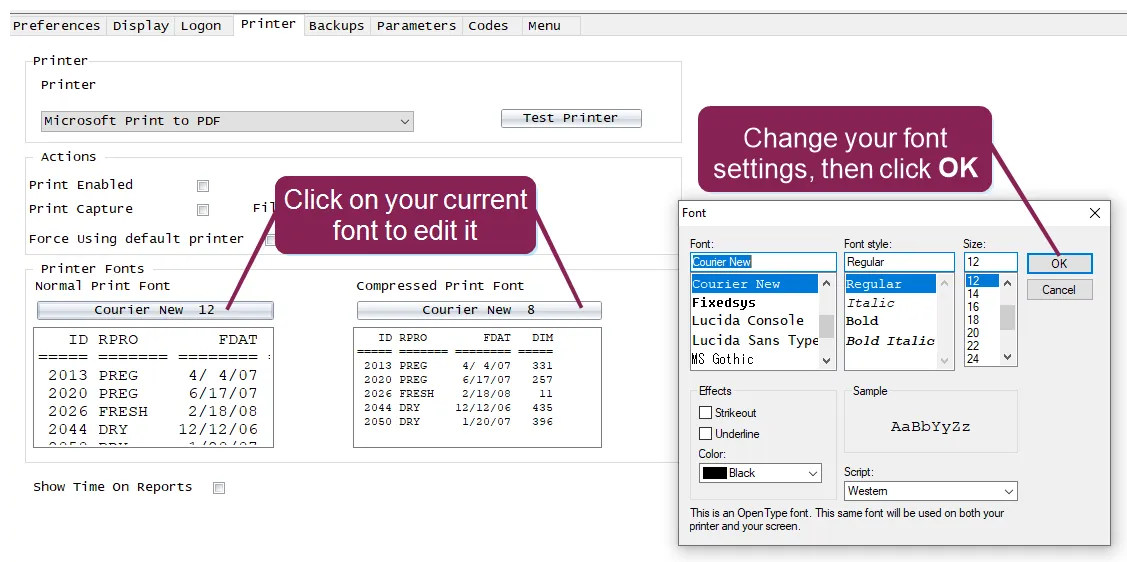
You can customize your font, font size, and font style. You can even set a different font for normal reports (which fits about 80 characters across a page) and compressed reports (which fits about 120 characters across a page).
TIP: Before you print a full report with your new settings, we recommend that you view Print Preview or print a test page to ensure that your reports aren't cut off or your font is too small to read.