SETUP Options
🎓In This Guide, You Will Learn:
- SETUP options available for adjustment and which options should not be adjusted
- Customization options under the Preferences and Parameters tabs
- Printer settings
- Disposal and repro codes, plus quarter remark prompts
- Customizing Drop-Down menus
🗒️ NOTE: Most SETUP functions will be completed by the install technician.
SETUP is a command verb used for adjusting display and print preferences, setting automatic backup preferences, customizing dropdown menus and user preferences with various parameters and codes.
 Type SETUP on the command line to see the SETUP options shown below.
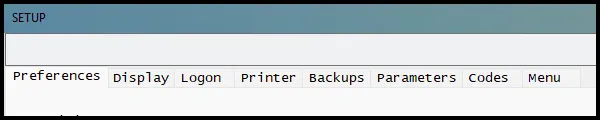
Preferences Tab
The Preferences tab has several important settings:
- Activity Logs: Adjust the number of days DairyComp will save activity logs for. The default is 365 days. You can lower this, but if you do, you may lose the ability to troubleshoot issues or track who changed what — so we recommend keeping it at 365 or higher.
- International ID Format: This allows you to choose how to display the international IDs items (EID, RFID, REG).
- 2 Character: US003251234567
- 3 Character: USA003251234567
- Numeric: 840003251234567
- CowCard Sire Click: When a sire item, such as SID, is displayed on a CowCard users have two options to choose from:
- Show Sire Info: When clicking on a sire item displayed on a CowCard, DairyComp will display the sire information.
- Edit Sire Item: When clicking on a sire item displayed on a CowCard, DairyComp will prompt you to change the item value.
- Create Move Event if Pen Changes. Located under the Misc. box, any time a pen number is changed, DairyComp will automatically create a MOVE event when this setting is checked.
Printer Tab
Under the Printer tab you can change:
- The default printer
- Normal Printer Fonts: The font style and size set here are for all standard lists (SHOW and LIST commands) in DairyComp.
- Compressed Print Font: Any lists (SHOW and LIST commands) using the \C switch will use the font style and size set under the Compressed Print Font.
💡TIPS:
- Use the Preview option located under the File dropdown menu to preview a list after changing the font style and size.
- Check other commonly used lists to confirm the changes did not cause columns to print incorrectly.
Parameters Tab
The Key box allows users to customize data entry "warnings" in DairyComp. For example, a warning if a FRESH event is being entered on a cow that has been dry for less than 30 days. These warnings can help prevent accidental data entry errors. Click on the current value to change it.
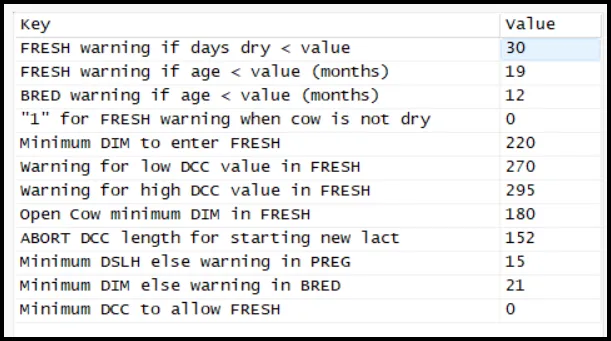
⚠️ IMPORTANT: Under the Parameters tab, the DCSETUP.TXT section is for Support use only.
Codes Tab
The Codes tab serves as a nice reference for the following codes:
- Disposal Codes are the reason an animal left the herd. This is helpful for analyzing why animals were sold. Do not alter codes 1-9, but you can add additional codes (reasons) if needed.
Found under the DairyComp FAQs, use these two links to learn more about disposal codes:
- Repro Codes displays the reproduction descriptions (RPRO) that are assigned based on an animal's current reproductive code (RC). For example, RC=5 is for PREG animals (RC=5, RPRO=PREG). This serves as a reference if needing to remember how the codes are assigned as RC codes are often used in commands. For example: SHOW ID FOR RC=5 will only show pregnant animals.
Found under the DairyComp Reference Guide, use this link to learn more about Reproductive Codes
⚠️ IMPORTANT: Do not change the code descriptions on the Codes page. Doing so may create unintended errors and make them difficult to troubleshoot.
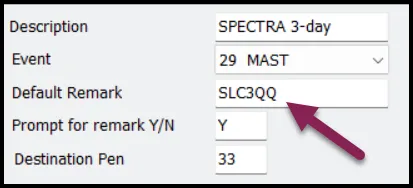
- Quarter Remark Prompts can be adjusted to your personal preference as some farms may use different letters to identify a quarter. For example, LH (left hind) may be used by one farm, whereas LR (left rear) may be used by another. It's important to keep the quarters listed in this order though: LH;LF;RH;RF
💡TIP: Add QQ to a protocol to prompt for the quarter entry. Also use QQ with a LAME event entry to record which foot was treated.
Menu Tab
This tab may be the most useful SETUP feature as it allows you to fully customize your drop-down menus. Add commonly used worklists, reports, entry options, etc. here to make tasks easier and well organized.
Found under the DairyComp Reference Guide, follow this link to review the Menu Customization Guide: Menu Customization
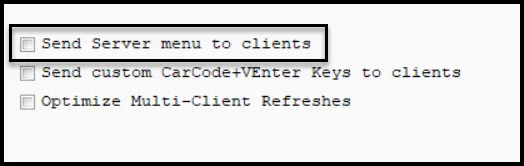
⚠️ IMPORTANT: DairyComp Client computers may use their own customized menus that differ from the DairyComp Server. Enter SERVER\3 on the DairyComp Server command line to check the setting shown below. If the box is currently unchecked, the DairyComp Server will override any customization of DairyComp Client menu if it becomes checked.