Manage Disposal Codes
2 min
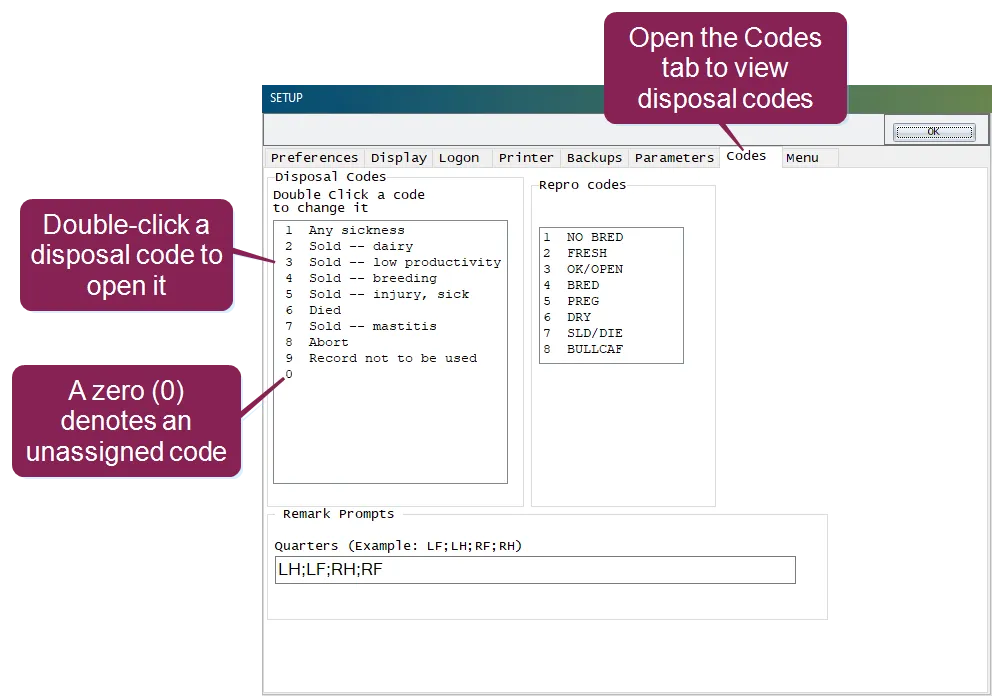
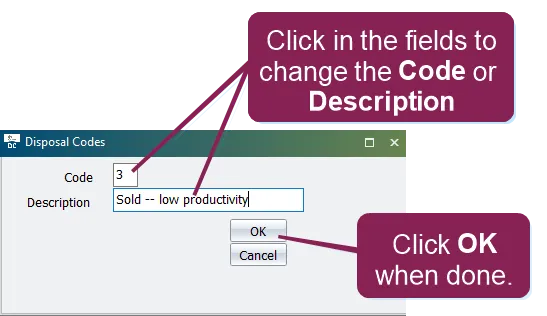
\<font color="#67854e"> question \</font> how can i add a new disposal code to dairycomp or change an existing disposal code? \<font color="#67854e"> answer \</font> dairycomp disposal codes can easily be added or changed from the window follow the instructions below to learn how whenever a event is entered for an animal, a disposal code is entered along with that event put simply, a disposal code tells the system why the animal was sold (i e , culled from the herd) these disposal codes can then be used for later analysis note users can only assign disposal codes to events users cannot assign a disposal code for a event, since events are automatically assigned disposal code #6 to view and manage your disposal codes, enter in the command line to open the window, and then click the codes tab all of the disposal codes currently configured for your dairycomp system are shown on the left side of the codes tab each disposal code has a unique number note that entries numbered 0 (zero) are unassigned; these can be used to create additional disposal codes expand the topics below to learn more change a disposal code to change a disposal code, double click on it from the list to open the disposal codes window, where you can edit its code number and description when you're done making changes, click ok \<font color="#f97316"> important \</font> do not change disposal code #6 as stated previously, all events are automatically coded as disposal code #6 remember the following additional guidelines when changing disposal codes each disposal code must have a unique number so, you can't change code #3 to #4 if #4 is already assigned to a different disposal code if you change the description of a disposal code, all past records that use that disposal code will adopt the new description if you then change the code number on that changed description, then all past records that previously used the old number will not have a description when you go to run reports on disposal codes add a disposal code to add a new disposal code, double click on a code that has a number of 0 (zero) then, in the disposal codes window, enter a previously unassigned code number and description and click ok