Held Scheduled Tasks
🎓In This Guide, You Will Learn:
- What held scheduled tasks are and how they affect operations
- How to identify when a task is held
- How to fix a held task
What are Held Scheduled Tasks?
Held tasks are scheduled processes in DairyComp that did not run at their planned time.
- DairyComp performs many automated functions throughout the day—such as loading milk weights, transferring data, creating backups, and other essential operations.
- If DairyComp is busy when a task is scheduled to run, that task may be placed on hold. When this happens, it needs to be reviewed and run manually to keep data and workflows current.
⚠️ IMPORTANT: Ensure employees check for held tasks before starting their day.
Identify Held Scheduled Tasks
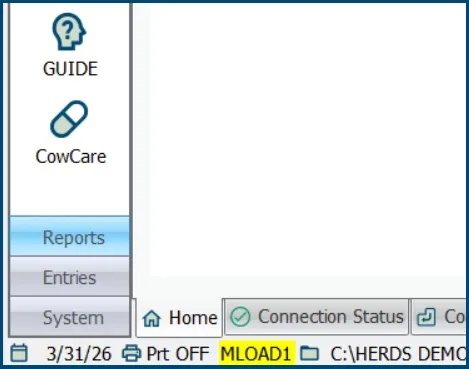
Look for a yellow‑highlighted task name displayed in the bottom-left corner of DairyComp.
In the picture below, MLOAD1 is held and DairyComp has not loaded milk weights for milking one.
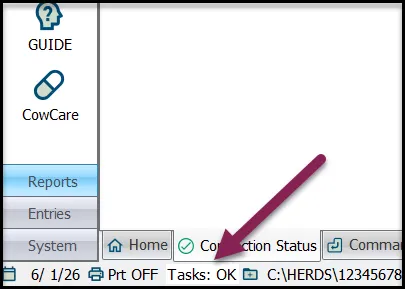
DairyComp will display "Tasks: OK" when there are no held tasks and all tasks are on schedule.
 Click here to learn how to add scheduled tasks in DairyComp:Add Tasks to the Task Scheduler
How to Fix Held Tasks
Double-Click on the yellow task name to run it. Repeat for each held task until DairyComp displays Tasks: OK.
⚠️ IMPORTANT: Call Support if scheduled tasks have been held for more than a day. Use the steps below to determine when a task was scheduled to run:
- Type ALTER\6 on the Command Line to open the Scheduled Tasks menu.
- Search for the task name that is held.
- Look at the Next Date column to see when the task is scheduled to run next.
- If the Next Date is a previous date, call DairyComp Support for assistance as some tasks are built for a specific day-of-week.
For example, a sync enrollment task scheduled to run on Mondays, will enroll zero cows if it runs on Tuesday.
Video Reference for Held Scheduled Tasks:
This video provides a visual reference for handling two held scheduled tasks.
Video Reference for Determining the Scheduled Date:
This video provides a visual reference for determining the date a held scheduled task was scheduled to run on using ALTER\6.
U.S. Customers
Need more help? Use one of the methods below to contact VAS Support! | |
|---|---|
Live Chat | Chat directly with a product support team member directly in PULSE. At the bottom right corner of any PULSE page, click the Chat button |
Text Message | Text 559-686-9496. Standard text messaging rates apply. |
Phone | Call 559-686-9496 or the toll-free phone number 888-225-6753. |
Email [email protected]. | |
Web | For the most up-to-date VAS Support contact information, visit the VAS Support page. |
