ALTER Options
🎓In this Guide, You Will Learn:
- What ALTER is and what it's used for
- Five commonly used ALTER options
- Where to learn more about each option
ALTER Overview
ALTER is a command verb used to display the menu shown below for accessing multiple options allowing you to customize DairyComp.
 Type ALTER on the DairyComp Server computer's Command Line to bring up the menu shown below.
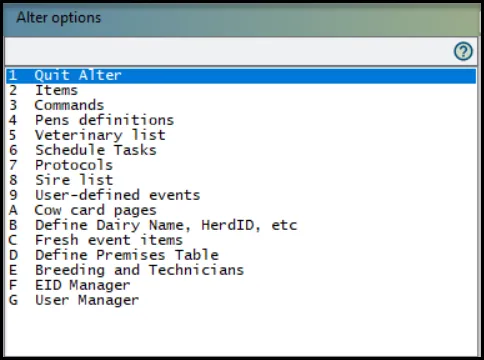
Found under the DairyComp Reference Guide, ALTER Overview is the perfect place to get started learning about ALTER before reviewing the five commonly used ALTER options. Follow this link to get started: ALTER Overview
Commonly Used ALTER Options
Found under the DairyComp Reference Guide, the links below were selected to help guide you through some of the most commonly used ALTER options.
ALTER | Description |
|---|---|
Learn how to view all items currently configured in DairyComp and perform essential item management tasks, including creating, modifying, deleting, and renaming items. | |
Learn what command abbreviations are and how to create, modify, or delete them within DairyComp. | |
Learn how to manage DairyComp pens, view historical pen inventory, and perform key pen management tasks such as creating, deleting, renaming, and modifying pen settings. | |
Learn about treatment protocol management, providing guidance on how to create, update, and maintain protocols within DairyComp. | |
Learn about managing DairyComp events, including how to create, update, and delete events to support your herd management workflows. |
💡TIP: Want to learn more about other ALTER options? Navigate to the DairyComp Reference Guide or type ALTER in the Help-Doc search bar.