DairyComp Update - December 2025
DairyComp - Version 25.11
Release Date: December 2, 2025
DairyComp version 25.11 contains various bug fixes, customer-requested enhancements, and integration improvements for our integration partners, as well as many other improvements.
Expand the topics below to learn more about the updates in this release:
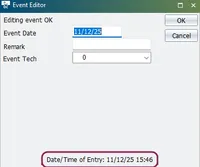
- DairyComp can now capture event entry dates and times. Use the following new items to track event entry (version 10 cowfiles only):
- Item type 175: A calculated item that extracts the date the event was entered into DairyComp. This differs from the actual event date, because events are often recorded on a date that is not the same as when they occurred for the animal.
- Item type 176: A calculated item that extracts the time the event was entered into DairyComp. This is the time the event was entered into DairyComp, not the time the event occurred for the animal.
- Event entry date and time can be see in the event editor for each event on the CowCard. This field is read only. Events that existed prior to this release show the event date and 00:00 for the time.
- DairyComp now supports additional item details:
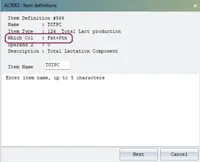
- Item type 124 now has a new column that can be used to show total lactation production components (i.e., the sum of fat and protein). Choose Fat+Ptn for the column to see total lactation production components:
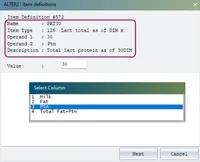
- Item type 125 now has additional Operand 2 options that can be used to show total lactation as a days in milk (DIM) value for fat, protein, and the sum of fat and protein.
For example, PRT30 with Operand 1:30 is the total lactation protein as of DIM 30:
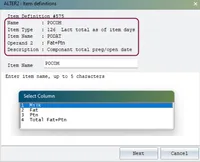
- Item type 126 now has additional Operand 2 options that can be used to show total lactation at the time of a specific date item for fat, protein, and the sum of fat and protein.
For example, POCOM with Item Name: PODAT and Operand 2: Fat+Ptn returns the sum of fat and protein at the time of the PODAT (preg/open date):
- Resolved an issue that caused the DC Client task table to be overwritten by the DC Server.
- Updated the 646 stud code to show as sexed semen.
- Russian language vet codes are now supported in the ALTER\5ALTER\5 function.
- Integrated helpIntegrated help has been added to the SERVER button when there are HELD commandsHELD commands.
- The SAVE\2 option in SETUPSETUP now allows you to set the number of backups to keep.
- When the \GG switch is used, item type 54 in the EVENTSEVENTS function now displays the item data for the corresponding event.
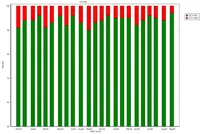
- The PLOT function now sets the minimum y-axis value for Somatic Cell Count (SCC) charts to 50 (was 0). This improves the visual contrast and readability of stacked multi-bar charts involving SCC.
- Item type 130 in the EVENTSEVENTS function now displays correctly.
- When the \GG switch is used, item type 54 in the EVENTSEVENTS function now displays the item data for the corresponding event.
- A default printer is no longer required. The following message now displays: Printing is disabled because no default printer has been found. To stop seeing this message, add a default printer or disable printing: ADD A PRINTER: In Windows Settings, add or select a default printer. Restart DairyComp and clear the message. Enter SETUP in the command line. In the Printer tab, check the box next to Print Enabled. Click OK to save your changes. DISABLE PRINTING: Enter SETUP in the command line. In the Printer tab, check the box next to Disable All Printing. Click OK to save your changes.
- Resolved an issue with the event translation file when it was automatically created.
- Resolved an issue with a corrupted DCGUIDE file.
- Resolved an issue causing license errors for Russian customers.
- Jantec: Updated handling of Jantec milkings when a milk shift crosses midnight. Contact supportContact support for assistance if your setup has a milk shift that crosses midnight.
Pocket CowCard Android - Version v2509081615-(2.0.33.7-rc): When you send or receive data from DairyComp, Pocket CowCard automatically sends the device name, Pocket CowCard version, and Android OS version so you can better log updates and troubleshoot any device issues. Example log issues:
- S 01:19 Pocket CowCard 9ca667a077cd2971 - Gary's S21+ - v2507011612-(2.0.30.237-rc) A15 - V10 refresh started
- S 01:19 Pocket CowCard 9ca667a077cd2971 - Gary's S21+ - v2507011612-(2.0.30.237-rc) A15 - V10 refresh completed
We added a new help topic, ALTER\3: Command AbbreviationsALTER\3: Command Abbreviations, that describes how to manage command abbreviations in DairyComp. The topic covers how to create, edit, delete, and test command abbreviations, as well as options such as printing or exporting your abbreviation list and saving or reading commands from a file.
We added a new help topic, Visualize Item Distribution with GRAPHVisualize Item Distribution with GRAPH, that shows you how to analyze numeric animal items in DairyComp using graphical tools. The topic explains how to create bar graphs for frequency distributions and scatter plots for correlations between items. This helps you quickly visualize herd data and identify trends or relationships.
We added a new help topic, Visualize Event Distribution with EGRAPHVisualize Event Distribution with EGRAPH, that provides guidance on graphing herd events in DairyComp. The topic covers creating bar graphs and scatter plots, customizing parameters, and drilling down into event details to help monitor trends and validate protocols.
We added a new help topic, Visualize Historical Measurements with EPLOTVisualize Historical Measurements with EPLOT, which explains how to graph trends for body condition score, weight, and height in DairyComp. The topic covers plotting individual or group measurements over time and customizing settings for accurate analysis.