BRED Event
The BRED event records when an animal is bred using artificial insemination or mates with a bull. Expand the sections below to learn more:
Use the mobile app or the web version of PULSE to enter events! Tap Events in the mobile appmobile app to get started, or see Add EventsAdd Events to learn more about adding events from web. PULSE supports adding events that have occurred within the last year.
Expand the topics below to learn more about BRED event details:
The service sire that was chosen to inseminate the selected female. Tap this field to search for a sire or choose from the predefined choices.
When you search for a sire, the app only locates matches within your herd. Once you choose a sire, the Sire field displays the sire ID (SID).
If you do not find the sire you need to choose, you can enter it manually (see instructions below).
If the sire you need to use is not shown in the search results, you can enter its ID manually. Type the service sire ID in the search bar, and the app displays an option to add that animal. The app allows you to enter numbers, letters, and symbols, and it will display the exact ID you enter for the sire.
You can also type a description such as Pool to indicate that the animal was bred from a sire pool.
The breeding code for the selected female. Tap this field to select from a list of available breeding codes.
If you have the required permissions, you can view or edit the Breeding CodesBreeding Codes in PULSE or the Breeding Code Table in DC305 for DC Unlimited dairies. These breeding codes are used mainly for extra information regarding the breeding, such as a standing heat, prostaglandin usage, embryo transfer, etc., with a specific veterinary application.
The animal's height (in the units set in your PULSE User AccountPULSE User Account). To enable Height for this event, select the event from Event DefinitionsEvent Definitions and expand Optional DetailsOptional Details.
The animal's weight (in the units set in your PULSE User AccountPULSE User Account). To enable Weight for this event, select the event from Event DefinitionsEvent Definitions and expand Optional DetailsOptional Details.
Body condition score, which is used to evaluate an animal's energy balance based on being extremely thin (1.00) or having excessive fat deposits (5.00). The value can be a whole number or decimal, and you can include additional notes using the REM field for the event (up to 16 alpha-numeric characters). To enable BCS value for this event, select the event from Event DefinitionsEvent Definitions and expand Optional DetailsOptional Details.
When you add events from web or the mobile app, your updates are sent to PULSE and then on to DairyComp for DCU dairies (WiFi or data connection required).
When DairyComp receives a completed BRED event from PULSE, it processes the following changes:
- Records a BRED event and updates the RPRO status for all completed animals in the event.
- If the Embryo Age is defined in the TRANSFER event, then the BRED event is back-dated based on the Age entered. For example, if the embryo is 7 days old and today is 8/21/19, then PULSE TRANSFER event is recorded as 8/21/19, and DairyComp will receive a BRED event dated 8/14/19.

- If the Embryo Age is not defined in the TRANSFER event, then the date of the transfer is used for the BRED date.
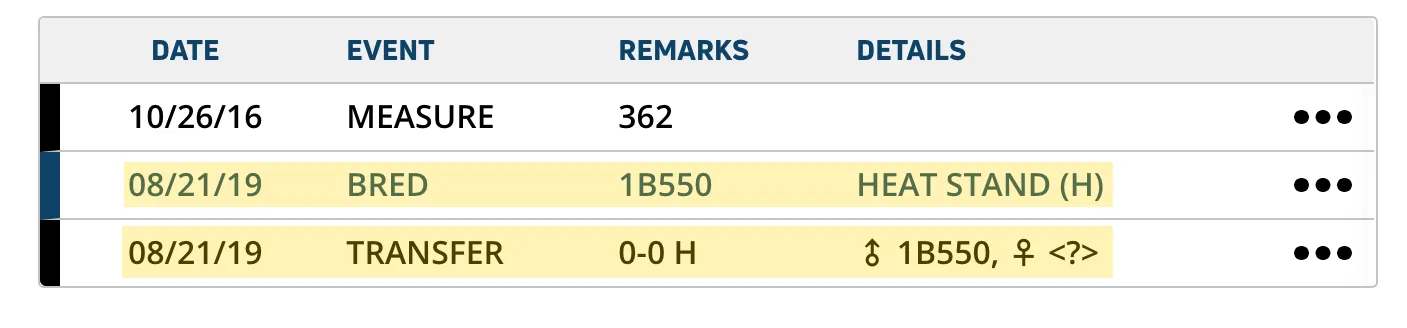
- Records the EDAY as the date the BRED event was completed in the mobile app.
- If DairyComp receives a breeding event for a pregnant animal, it updates the animal's record to show a status of Vet Code 6 = ABT?.
- If you have not selected the Sire and/or Breeding Code for an animal in this event, the app will not include that animal when it sends the batch BRED event update to PULSE.
- Any incomplete animals will remain visible in the mobile app BRED event until you either remove them from the list or finish defining their details and process the changes again.