Enable Automatic Skip for Some Vet Codes
1 min
Question: Can Pocket CowCard automatically skip some vet codes on a VETFORM worklist?
Answer: You can automatically Skip (Mark as Done) selected vet codes on a VETFORM worklist in Pocket CowCard. To use this feature, you need to edit the vet code in DairyComp 305 and edit your settings in Pocket CowCard.
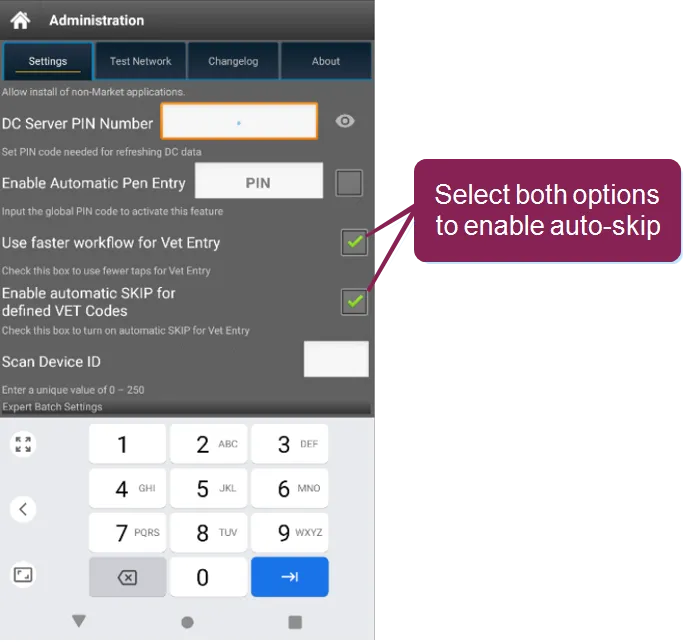
- In Pocket CowCard, go to Administration > Settings and check the boxes for Use faster workflow for Vet EntryUse faster workflow for Vet Entry and Enable Automatic SKIP for defined VET Codes.
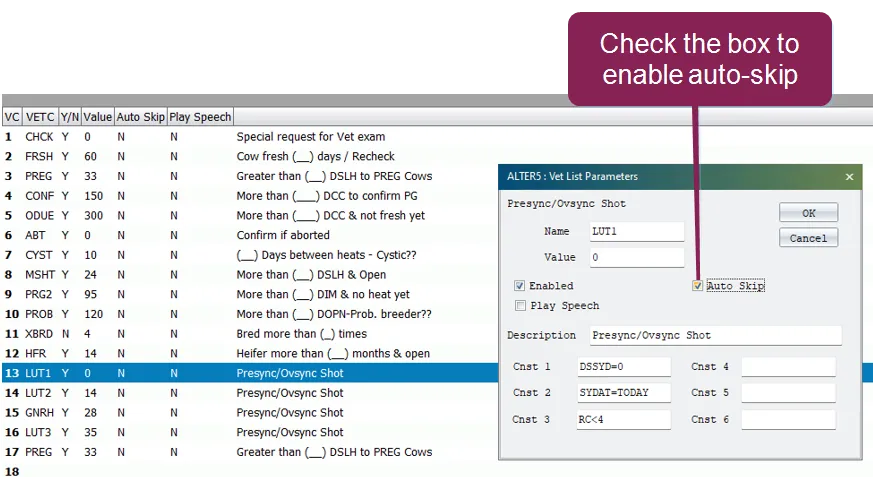
- In DairyComp, enter ALTER\5S to open the list of vet codes.
- Double-click the vet code that you want the system to automatically skip and mark as done.
- In the Vet List Parameters window, check the Auto Skip box.
For more information, Contact Us. This feature can also be enhanced by using a OnDone or PostProcess command.