Enable Auto PREG Event in Pocket CowCard
NOTE: This Pocket CowCard feature requires DairyComp version 25.1 or later.
Question: Can Pocket CowCard automatically process some events on a VETFORM worklist?
Answer: Yes, for some vet codes, you can automatically move an event to the Done tab in one tap! When you enable and configure the Auto PREG Event feature, you can easily move events with a PREG or CONF vet code to the Done tab just by scanning and tapping on the animal in the To Do tab. Use the instructions below to set up the feature in DairyComp and enable it in Pocket CowCard:
In DairyComp, enter ALTER in the command line and open Veterinary list.
Double-click the vet code you want to update.
Check the Pocket CowCard: Auto PREG Event box.
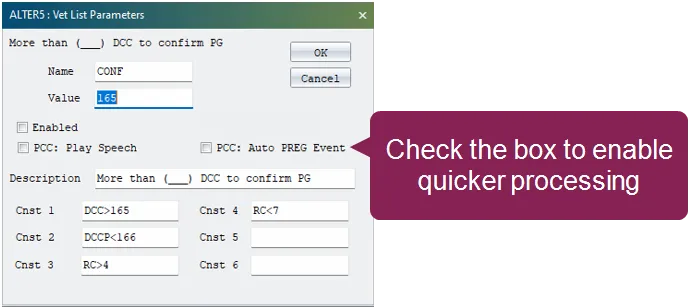
Save your changes.
Open Pocket CowCard and refresh your herd from DairyComp.
Tap the Settings button in the top right corner.
Check the Use faster workflow for Vet Entry box if it is unchecked.
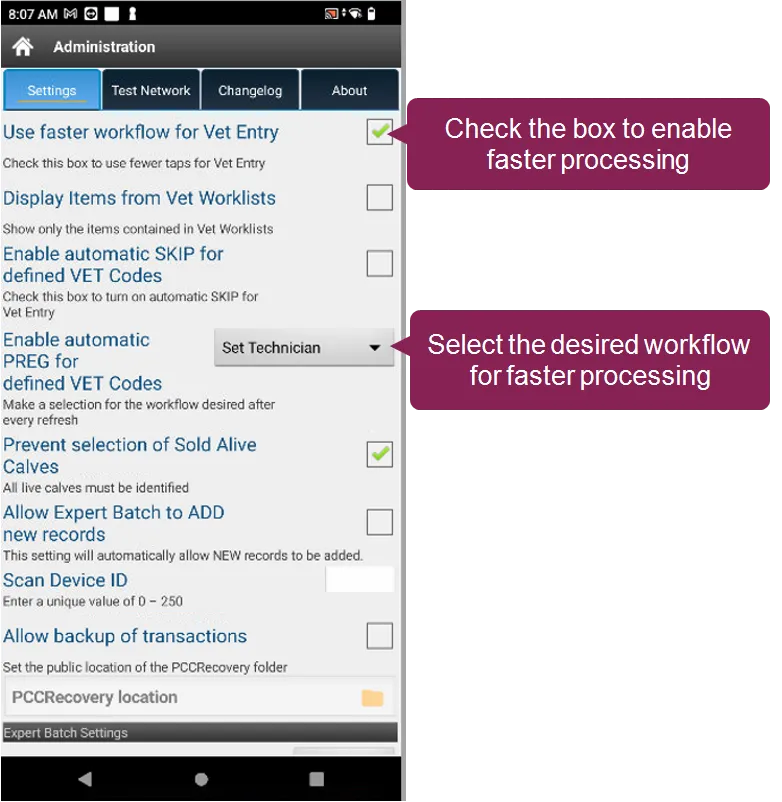
Scroll down to the Enable automatic PREG for defined VET codes field and select what happens when you tap on an animal in your VETFORM worklist:
- Not used: Does not automatically move events from the To Do tab to the Done tab.
- Set Technician: Automatically move events from the To Do tab to the Done tab, and select the technician when you tap the first animal. The same technician is automatically added to all subsequent animals.
- Prompt Technician: Automatically move events from the To Do tab to the Done tab, and select the technician every time you tap an animal. You can either tap the technician's name to add more event details or you can press and hold the technician's name to move the animal to the Done tab.
- No Technician: Automatically move events from the To Do tab to the Done tab, but no technician is selected.
Now, when you open a VETFORM worklist with Auto Preg Event enabled, you can simply scan an animal, then tap it in the To Do tab to automatically move the event to the Done tab.
If you do need to edit event details for an animal that is automatically moved to the Done tab, open the Done tab, tap All in the upper right corner to see all animals, and tap the animal you need to edit. Edit the event details, then save your changes.