Customize Table Columns
2 min
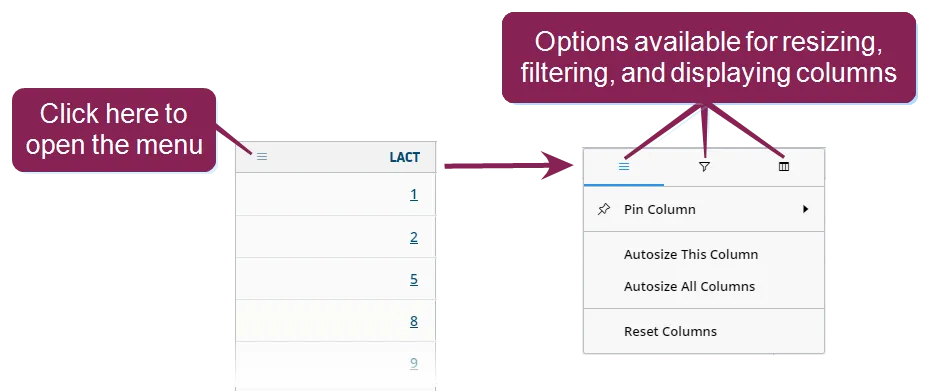
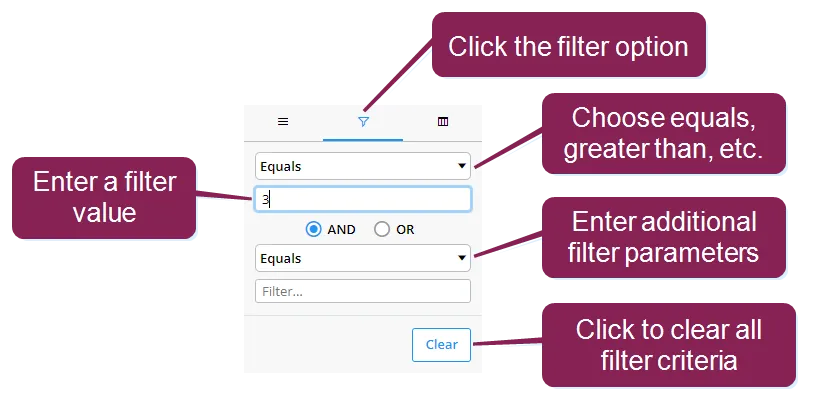
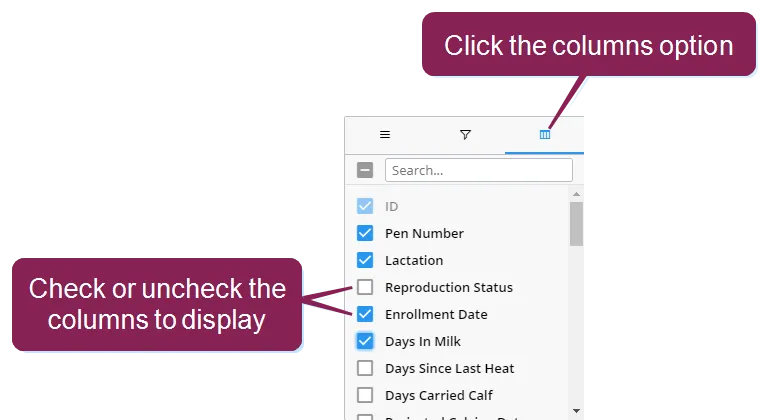
interactive column headers allow you to arrange the data into a way that's most useful to you depending on the features available for each column, you can add new columns of data, rearrange and reorder them, and filter some columns to access these features, click on the column menu in the column you want to change the top menu can contain three different options—one for resizing the column, one for filtering the data displayed in the column, and one for controlling which columns are displayed each menu contains various ways for manipulating what's shown on the page expand the sections below to learn more filter columns some columns that contain numeric values can be filtered to show only certain data for example, to filter the lactation column so that only animals with a lactation value of 3 display, click the filter option, and then use the fields to create your filter reorder columns you can reorder the way columns display by clicking in the header of the column you want to move and dragging it to its new location change which columns to display to add or remove columns from the page, click the columns option and then check or uncheck the boxes to select which columns to display you can also remove columns by clicking on the header of the column you want to remove, holding down the mouse key, and dragging the column up and out of the table