Pen Time Report
1 min
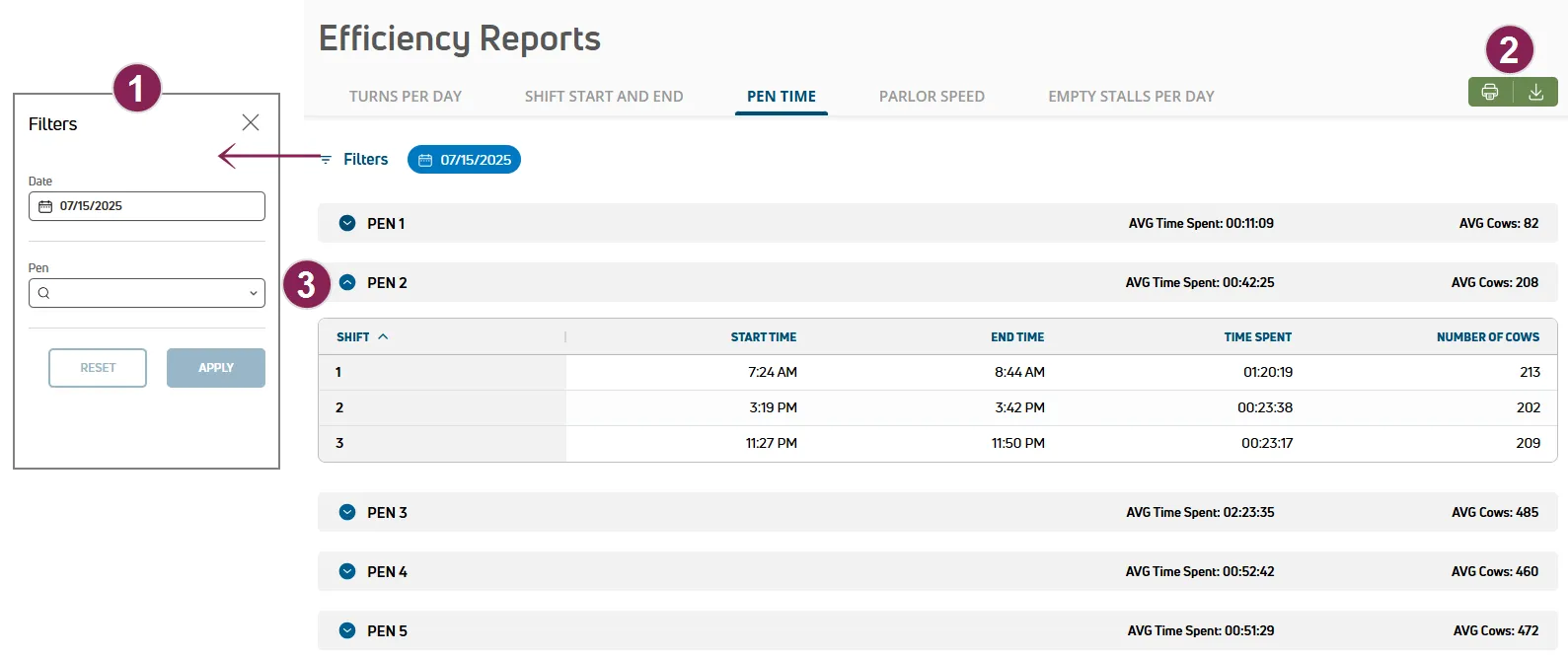
use the pen time report to to review and analyze time spent during milking shifts by date and this information can help you review your management strategies to improve efficiencies for specific pens expand the sections below to learn more search and filter the pen time report options to search and filter the pen time report are available at the top of the page follow the guidelines below when working with the pen time report click filters at the top left of the page to limit the data that is displayed the filters side panel opens use the date filter to choose a date for the report select a pen to limit the report to a specific pen click the clear filters option to clear all of the filters currently applied print or export the report click the green export as csv button at the top right of the page to save the data as a csv file or, click print to send your parlor data to the printer if you applied filter(s), the data will print or export with the current filter(s) applied view report details if your dairy has multiple parlors, click the down arrow to expand a row and view details for a specific parlor follow the guidelines below when viewing report details \<font color="#2166ae">average time spent/average cows milked \</font> an average time and number of cows milked for all shifts displays in the gray bar for each pen click the down arrow to expand a row and view details for a specific pen \<font color="#2166ae">shift\</font> milking shift number click the column header to sort the data in descending or ascending order by shift \<font color="#2166ae">start time \</font> time the shift started \<font color="#2166ae">end time \</font> time the shift ended \<font color="#2166ae">time spent\</font> total time spent on the milking shift \<font color="#2166ae">number of cows \</font> total number of cows milked during the shift