What's New in ParlorBoss?
Learn about the latest ParlorBoss enhancements and bug fixes below!
ParlorBoss - Version 2.8.91
Release Date: June 18, 2026
This hot fix resolves an issue where ParlorBoss and Agrident readers might not connect correctly. In some cases, this caused inconsistent or failed communication and required multiple restarts before the connection was established.
ParlorBoss - Version 2.8.11
Release Date: June 3, 2026
This release includes enhancements and minor bug fixes:
- Set a delay for stall readings: You can now add a short pause before each stall reading is saved. This helps make sure readings are more accurate. The setting remains saved even after a restart.
- Better parlor reversal recovery: When your rotary backs up, ParlorBoss can now automatically recover from reversals up to 7 stalls. Once the platform moves forward again, everything lines back up on its own.
- Fewer missed reads on Nedap stall readers: If a stall tag is missed on Nedap rotaries, ParlorBoss will still send the cow’s scan data, preventing skipped cows and keeping your data complete.
- Improved performance for large herds: Resolved an issue where dairies with 75,000+ cows could freeze when loading data. Large herds now run smoothly.
- Auto-update reliability restored: Fixed an issue where automatic updates were not triggering as expected. Updates now install automatically when available.
- GEA parlor fix: Resolved an issue that could cause mixed or “NO ID” readings.
ParlorBoss - Version 2.8.10
Release Date: April 9, 2026
ParlorBoss version 2.8.10 includes enhancements and minor bug fixes:
- Reporting fix for some regions: Fixed an issue where ParlorBoss was not sending reports to PULSE if the region was located in a UTC+ time zone.
- Nedap improvement: ParlorBoss now better handles Nedap parlor records with missing stall numbers. Animal EIDs still display even when stall numbers are missing, improving visibility and record accuracy.
- GEA improvement: ParlorBoss now reliably maintains the display lag setting for GEA parlors.
- Shift deletion sync fix: ParlorBoss now correctly removes shifts that are deleted in PULSE.
- Improved app performance: Resolved minor bugs and addressed technical debt to improve overall app performance and app stability.
ParlorBoss - Version 2.8.9
Release Date: October 8, 2025
ParlorBoss version 2.8.9 includes enhancements and minor bug fixes:
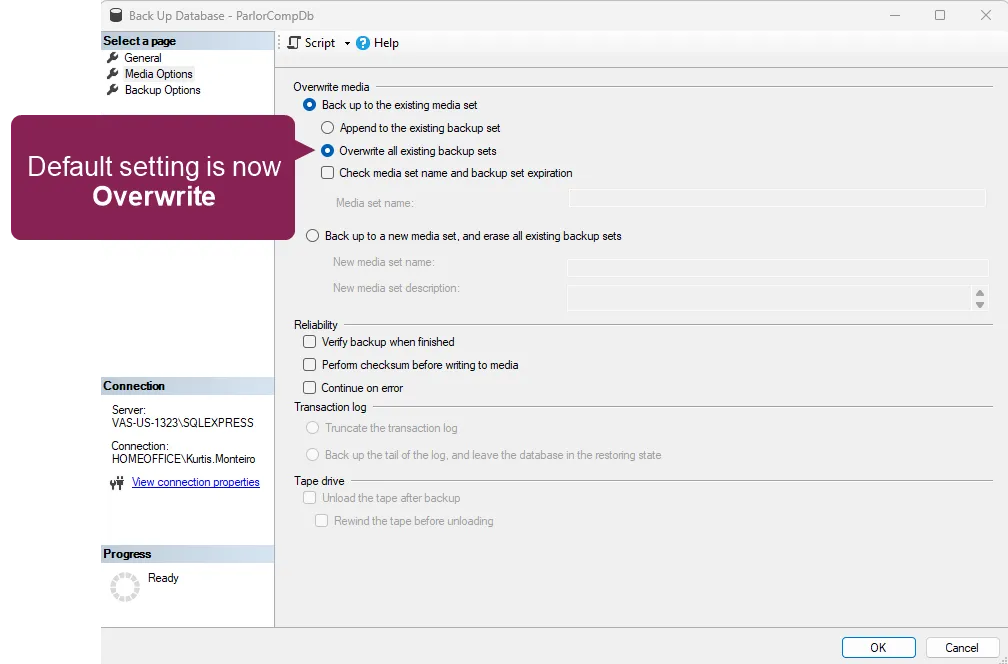
- Backup settings update: By default, ParlorBoss is set to Overwrite backups and only keeps three days' worth of backups. This setting was previously set to Append by default:
- Cow tasks improvements: ParlorBoss cow tasks are created after each update from DairyComp is received.
ParlorBoss - Version 2.8.8
Release Date: June 9, 2025
ParlorBoss version 2.8.8 contains various bug fixes and integration improvements for our partners:
Bug Fixes
- GEA improvements: Completed numerous updates and bug fixes to improve ParlorBoss's integration with GEA rotary parlors.
- Empty stall assignment fix: Resolved an issue where animal IDs were assigned to more than one stall. Now, ParlorBoss correctly identifies empty stalls.
- Installer fix: Fixed an issue where the installer would get stuck after token validation.
ParlorBoss - Version 2.8.7
Release Date: May 6, 2025
Improvements
With this release, ParlorBoss is now compatible with GEA rotary parlors. We added a new type of communication that now works with GEA, so ParlorBoss can now receive and show the required animal information.
ParlorBoss - Version 2.8.6
Release Date: September 17, 2024
Bug Fixes
In this release, we fixed an issue where the auto-updater did not automatically update ParlorBoss to the latest version. We also added improvements to the auto-update process.
ParlorBoss - Version 2.8.5
Release Date: August 20, 2024
Expand the sections below to learn more:
- SQL Server now automatically installs when you install ParlorBoss: When you install ParlorBoss, you no longer have to manually install SQL Server. The system now automatically installs SQL Server when you install a new version of ParlorBoss.
- You can now back up and restore your ParlorBoss settings: You can now back up and save the settings for your Tag List, Manage Tasks, Manage Items, and Options screens. Go to File > Settings to save you backup file, then restore your settings at any time.
- You can now enter another SQL instance for ParlorBoss: If you open ParlorBoss and there is no connection to an SQL server, you can now enter an SQL instance and create a new database directly on the machine.
- Resolved an issue that occurred if you started running ParlorBoss while DairyComp was closed. Previously, if you opened DairyComp after ParlorBoss already collected some data, the system would display all the collected data in a delayed and unreadable way.
- Corrected the ParlorBoss version number displayed in the About ParlorBoss screen.
- Resolved an issue where you could not scroll to the bottom of the ParlorBoss Log screen if the log was not expanded.
- Several bugs were squashed in this update. For a detailed list, please contact VAS Support.
ParlorBoss - Version 2.8.4
Release Date: April 1, 2024
Expand the information below to learn more about the updates in this release:
- Improved the ParlorBoss auto-update process:
- ParlorBoss now displays a warning message if the system tries to download the latest version of ParlorBoss when there isn't enough space on your device (less than 1 GB).
- When ParlorBoss auto-updates, the system now checks if the update was successful. If the update was not successful, the system reverts back to an older version of ParlorBoss to ensure that service is uninterrupted.
- Reduced the amount of disk space used by ParlorBoss backups: Now, ParlorBoss backups only store data from the last 180 days to save disk space and better optimize ParlorBoss's performance.
Several bugs were squashed in this update. For a detailed list, please contact VAS Support.
ParlorBoss - Version 2.8.3
Release Date: October 23, 2023
Expand the information below to learn more about the updates in this release:
Several bugs were squashed in this update, including:
- Fixed ParlorBoss scan times sent to DC305: ParlorBoss now sends the correct scan times to DairyComp 305. Previously, the scan times in ParlorBoss did not match the scan times in DairyComp 305.
- ParlorBoss saves your user settings: When you upgrade or reinstall ParlorBoss, the system now retains your settings, like Stall Tag, List Color, etc.
- Improved the Stall List screen: We fixed the Stall List screen so that the Save and Cancel buttons are always visible.
For a detailed list, please contact VAS Support.
ParlorBoss - Version 2.8.2.3
Release Date: June 1, 2023
Expand the topics below to learn more about the updates in this release:
ParlorBoss can now be updated with the Auto Update feature: In version 2.8.2.3, ParlorBoss can be configured to automatically check for updates or check for updates during a designated time frame.
Follow the steps below to configure when ParlorBoss checks for updates.
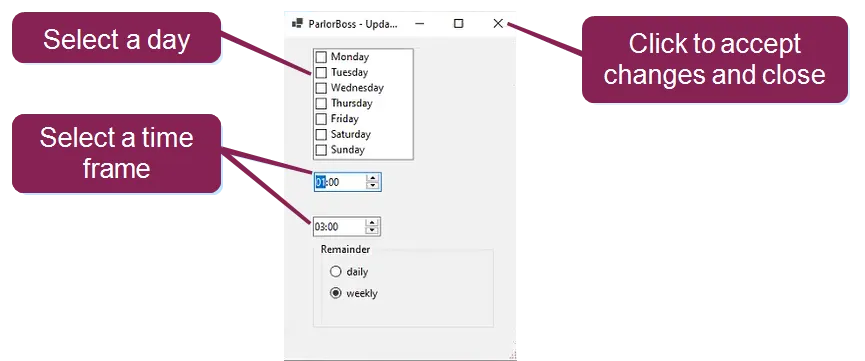
- From ParlorBoss, select Help > Autoupdate.
- Select weekly or daily from the auto update window.
- When you select weekly, you must choose a day and then select a time frame. If you select daily, only the time frame options are available. Click the X to accept changes and close the window.
NOTE: If the time frame options are not set here, ParlorBoss checks for updates every 10 minutes.
- Freezing issue: We have updated the ParlorBoss software to prevent it from freezing when scanning animals.
- Editing specific items: You can now edit specific stall items including stall and tag IDs. Previously, when selecting Stall Edit you could only edit all of the options and not specific items.
- Changes during Reinit Process: ParlorBoss no longer allows changes while the Reinit process is running. This addresses an issue where multiple instances of the process would start running, slowing down app performance.
- Refresh Cow confirmation: ParlorBoss now displays an alert when automatically refreshing, and it asks whether you want to continue the automatic refresh or start a manual refresh.
- "Get Support" error repaired: ParlorBoss no longer shows an error when you click on Help > Get Support.
- Repaired error when updating company details: ParlorBoss now saves new reader settings without sending an unexpected error.
- Added a maximize window option: We applied a fix to make secondary ParlorBoss windows larger. In some cases, secondary windows were hidden behind the main ParlorBoss window.
- Automatic refresh with Nedap settings: We resolved an issue when using a Nedap stall reader. Previously, ParlorBoss would not automatically update DairyComp with PBTIM, PBDAT, and autopen data.
Expand the topic below to learn more about our updated online help content!
Do you know how to identify bad EID stall tags and change them in ParlorBoss? See Change Stall EID Tags in ParlorBossChange Stall EID Tags in ParlorBoss to learn more!
ParlorBoss - Version 2.0.6.55
Build Date: April 27, 2022
Release Date: May 2, 2022
Expand the topics below to learn more about the updates in this release:
- Refresh Cow Command message: If ParlorBoss is processing a refresh while one is manually requested, the app displays a message to offer you the option to complete the refresh in progress or to stop and restart the refresh.
- ParlorBoss already running message: ParlorBoss displays an alert in the task bar when the app is already running.
- Changes during Reinit Process: ParlorBoss no longer allows changes while the Reinit process is running. This addresses an issue where multiple instances of the process would start running, slowing down app performance.
- Switching scanner COM ports: ParlorBoss now supports switching scanners between COM ports.
- EID fix for country codes: ParlorBoss no longer requires DairyComp 305 to have EIDs in a numeric-only format.
- Scanner options change error: Updating scanner options no longer causes ParlorBoss to show an error message about company settings.
- Get Support error: ParlorBoss no longer shows an error when you click on Help > Get Support.