WeighComp App
At this time, the WeighComp app can only be used on the RuggON-PA-501 Android-based tablet. Once you have your tablet, follow the instructions below to download and set up the app:
NOTE: A Wi-Fi, Ethernet, or cellular connection for the tablet is required in order to complete the steps below.
- Add your Google Account in the tablet's Settings.
- Download the WeighComp app from the Google Play Store.
- Once the app has downloaded, enter your PULSE login credentials into the app. You only need to login once. After the login has completed successfully, the app will sync with PULSE and be authenticated for use.
NOTE: In order for the app to sync and authenticate with PULSE, a WeighComp zone integration must be set up. This should have occurred shortly after your purchase of WeighComp, but if you have trouble with step 3 (above) please check if this zone integration has been set up or contact customer support.
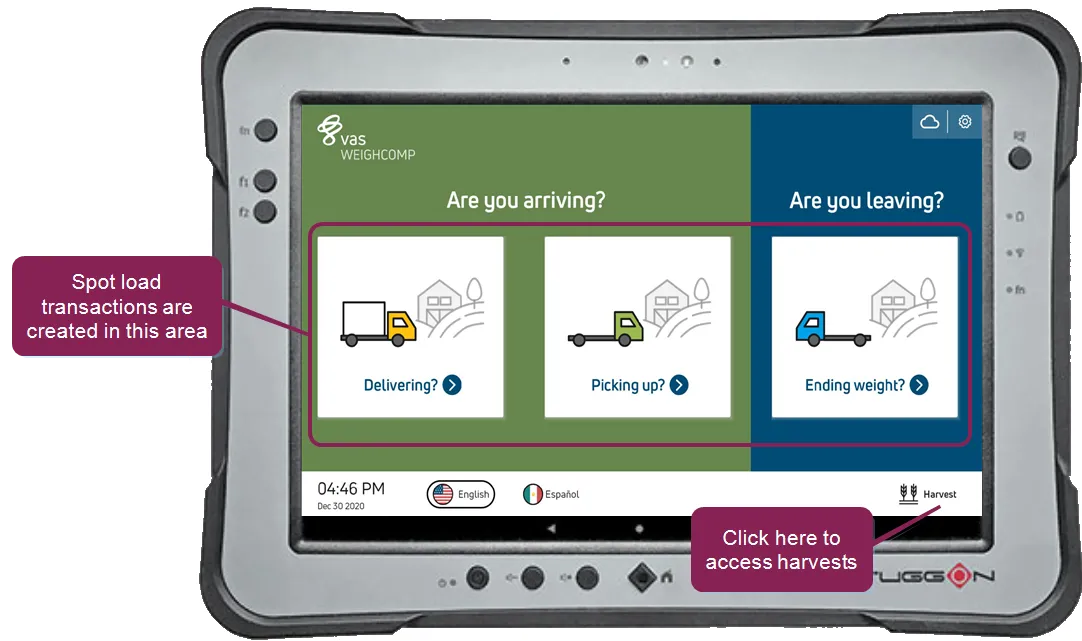
Once you have downloaded the app, you can start using it to capture WeighComp data for spot load transactions or harvests. Proceed to one of the following sections to learn how:
- Transaction ManagementTransaction Management
- Harvest ManagementHarvest Management