Add Animals
Only users who are assigned to a Role with Herd Write permissions can use this feature. See Edit Dairy User PermissionsEdit Dairy User Permissions and Manage Dairy RolesManage Dairy Roles for more information.
PULSE allows you to add a single animal using the Add Animal wizard or multiple animals using the Import Animals in Batch option. You can find this feature under the DairyComp/MyDCDairyComp/MyDC > AnimalsAnimals menu.
Expand the sections below to learn more:
Click the Add Animal button  at the top right of the Animals page to launch the Add Animal wizard.
Start by choosing the Animal Type in Step 1 of the wizard.
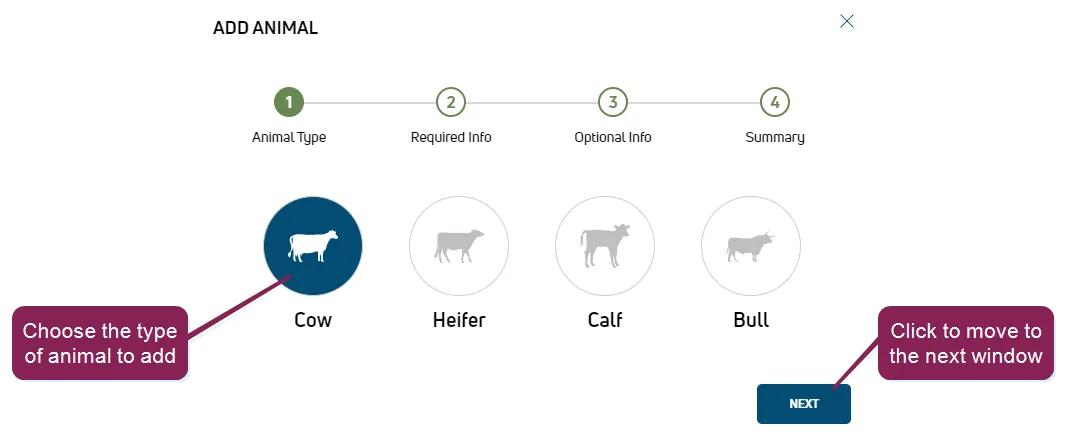
Note the following guidelines as you step through the remaining wizard pages:
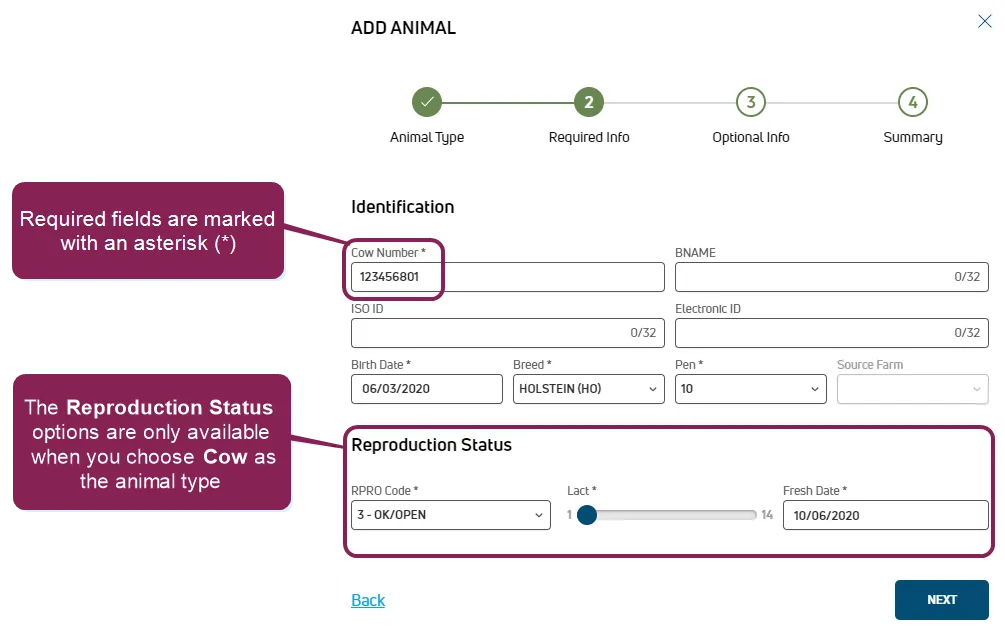
- In Step 2: Required info, the required fields are marked with an asterisk (*). The Reproduction Status options are only available when you choose Cow as the Animal Type in Step 1 of the wizard.
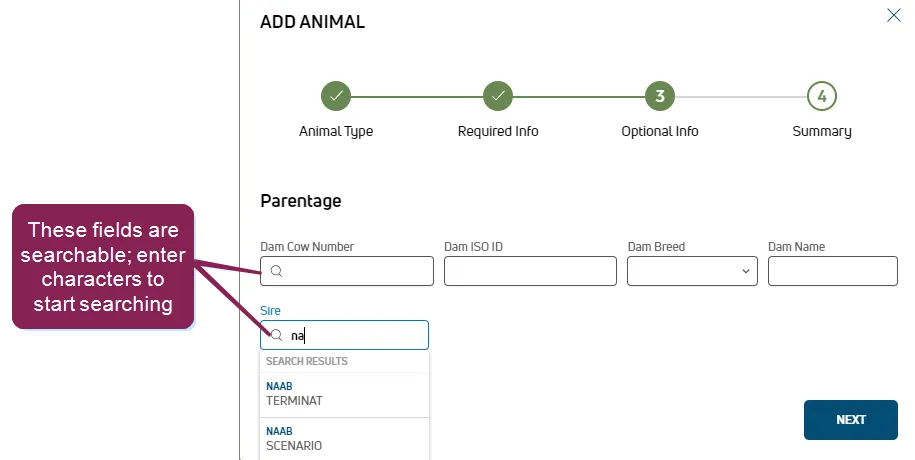
- In Step 3: Optional info, all fields are optional. The fields under Pedigree describe the dam and sire for the animal. The Dam Cow Number and Sire fields are searchable; start typing in these fields to search for matches.
- On Step 4: Summary, review the information for the animal and click Save to add the animal. To change any of the information you've entered, click the Back button to return to the previous steps.
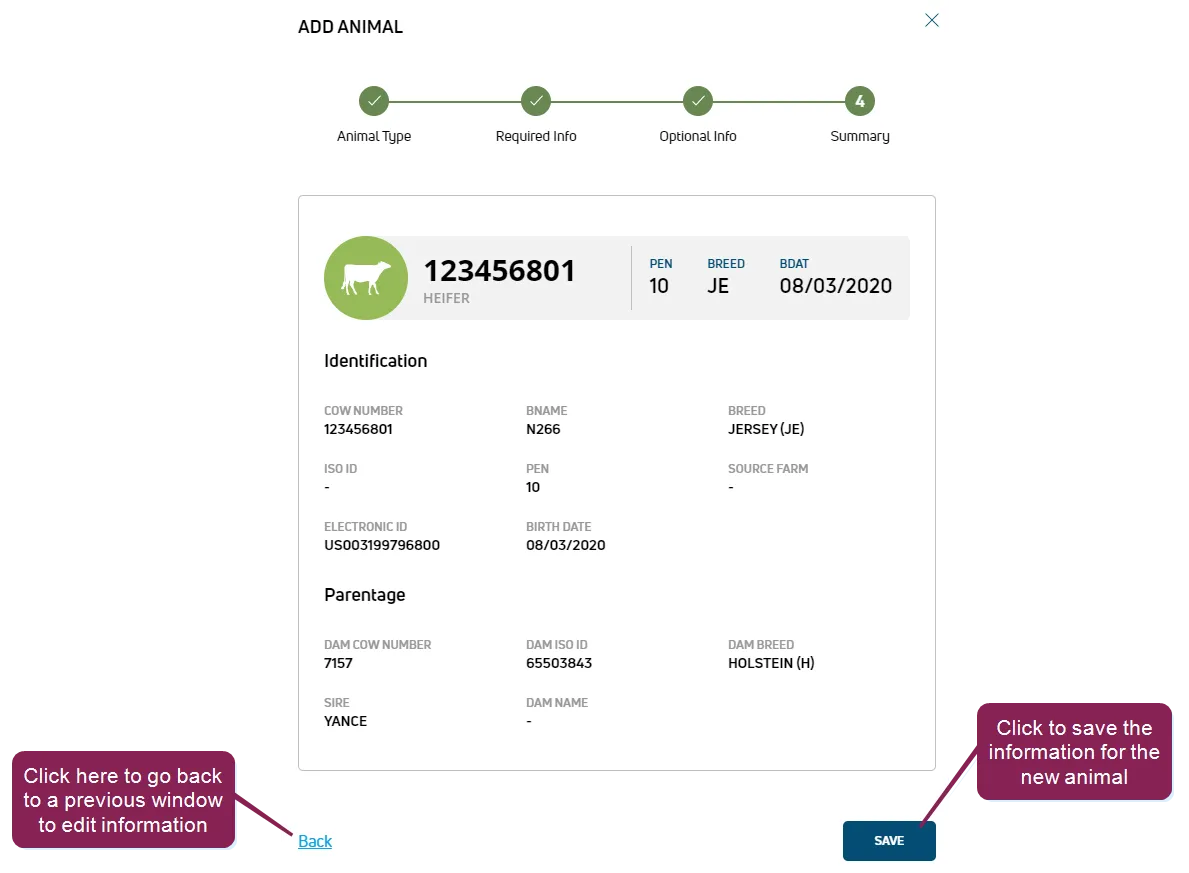
- After saving the animal, you can then view it in the AnimalsAnimals list.
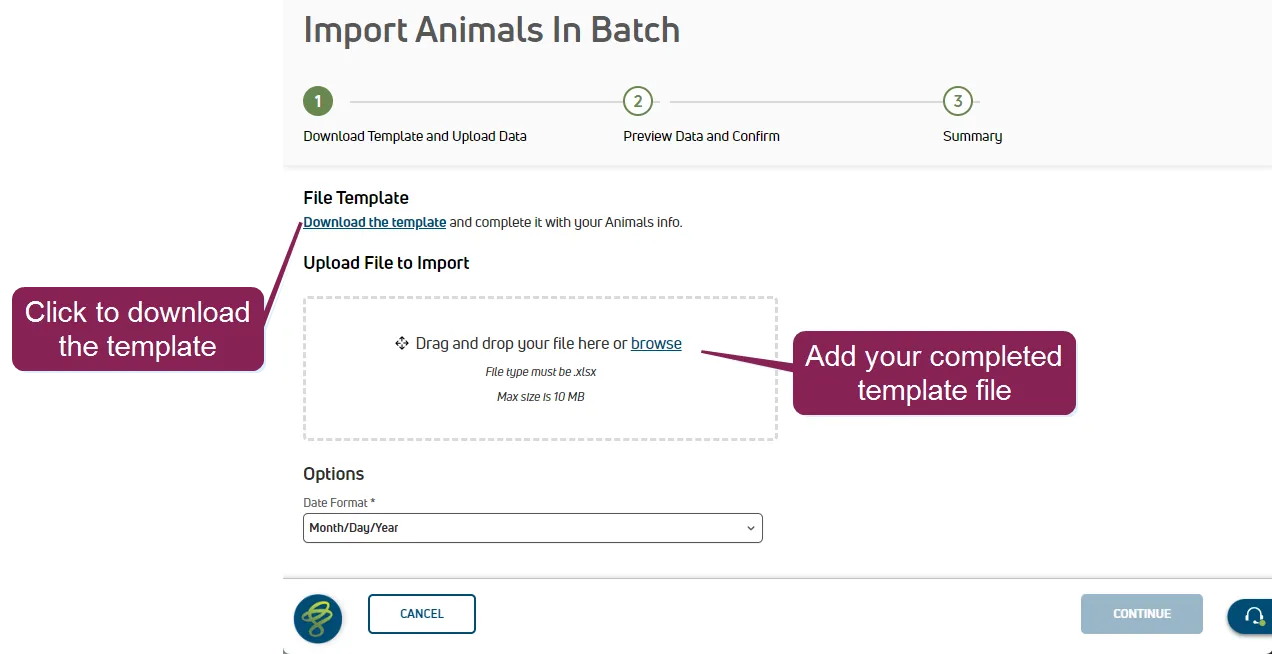
Click the Import Animals in Batch button  or select the option from the menu.
Click Download the template to save the template file.
Add animal details to the template file and save it.
TIP: The template file includes tips to help you add your animal data. Click the cell to see the tip.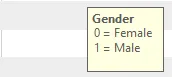
Add required data for all animals. Required fields are bolded in the template:
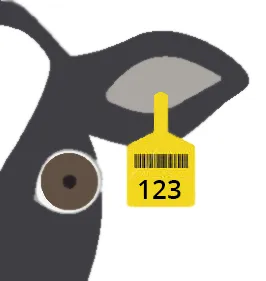
- CowNumber: Number assigned to the animal, usually visible on the eartag.
- Breed: Two-letter abbreviation for the animal's breed. Common breeds include the following: HO = Holstein; JE = Jersey; AY = Ayrshire; BS = Brown Swiss; GS = Guernsey; MS = Milking Shorthorn; XB = Beef crossbreed; XD = Dairy crossbreed.
- BirthDate: Animal's date of birth (any format)
- Gender: 0 = female; 1 = male
- Lactation: Current lactation number. Enter 0 for heifers and bull calves.
- PenNumber: Animal's pen number
Enter additional required details for cows:
- FreshDate: Date of FRESH event (calving) for the current lactation
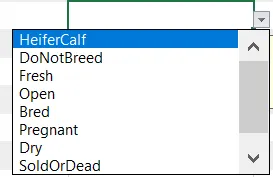
- ReproductionCode: Select the cow's reproduction status from the drop-down list. The selected status automatically translates to a code.
Enter the additional required detail for BRED, PREG, or DRY animals:
- DateofLastBreeding: Date of last BRED event. This date cannot be before the FreshDate (FDAT).
NOTE: The required details automatically generate events for each animal's current lactation in PULSE, populating as much data about each animal as possible. For instance, adding a DateofLastBreeding for an animal automatically adds a BRED event to the animal's CowCard for the current lactation.
Add optional data.
- CowName: Common name for the animal
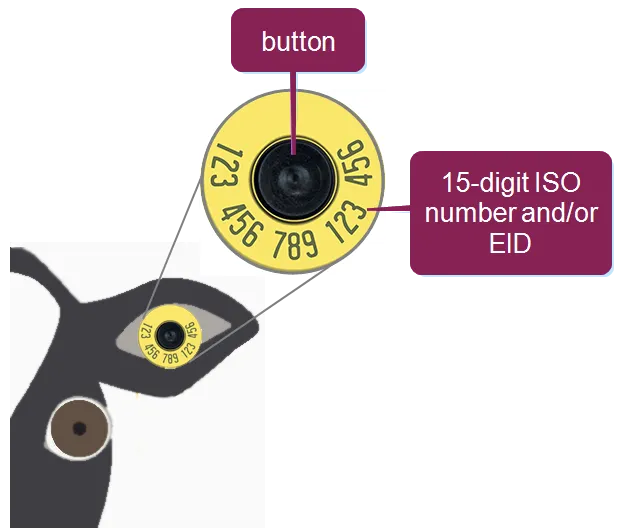
- IsoId: 15-digit ISO number associated with the animal eartag, often the same as the electronic ID. If the electronic ID changes, the isoId does not.
- ElectronicId: 15-digit electronic ID (EID) number associated with the electronic animal eartag, often the same as the IsoId. The EID of an animal changes whenever the button in the electronic tag is replaced.
- EnrollmentDate: Date the animal was added to the dairy
- SireIdofLastBreeding: Sire ID from the animal's last BRED event
- SireNameofLastBreeding: Common name of the sire from the animal's last BRED event
- SireIsoIdofLastBreeding: 15-digit ISO ID of the sire from the animal's last BRED event
- SireBreedofLastBreeding: Two-letter abbreviation for the breed of the sire from the animal's last BRED event. Common breeds include the following: HO = Holstein; JE = Jersey; AY = Ayrshire; BS = Brown Swiss; GS = Guernsey; MS = Milking Shorthorn; XB = Beef crossbreed; XD = Dairy crossbreed.
- SireStudCodeOfLastBreeding: Semen company identification of the sire from the animal's last BRED event. For a listing of standard identifiers for the US, see NAAB Stud Codes.
- BreedingTech: Technician name for the BRED event
- DryDate: Date the cow was removed from milk production in the current lactation. Must be after the animal's birth date (BDAT), FRESH date (FDAT), and conception date (CDAT).
- SireIDofAnimal: Animal's sire ID
- SireNameofAnimal: Common name of the animal's sire
- SireISOId: 15-digit ISO ID of the animal's sire
- SireBreed: Two-letter abbreviation for the breed of the animal's sire. Common breeds include the following: HO = Holstein; JE = Jersey; AY = Ayrshire; BS = Brown Swiss; GS = Guernsey; MS = Milking Shorthorn; XB = Beef crossbreed; XD = Dairy crossbreed.
- SireStudCode: Semen company identification. For a listing of standard identifiers for the US, see NAAB Stud Codes.
- DamNumber: CowNumber assigned to the animal's dam
- DamName: Common name of the animal's dam
- DamIsoId: 15-digit ISO ID of the animal's dam
- DamBreed: Two-letter abbreviation for the breed of the animal's dam. Common breeds include the following: HO = Holstein; JE = Jersey; AY = Ayrshire; BS = Brown Swiss; GS = Guernsey; MS = Milking Shorthorn; XB = Beef crossbreed; XD = Dairy crossbreed.
- BloodComposition: A crossbred animal's primary breeds, provided as a fraction. For example, "3/4 HO, GL" identifies the animal as 3/4 Holstein and 1/4 Guzolando.
- SpeciesType: This value defaults to Cattle.
IMPORTANT: If you are not adding data for optional fields, leave them empty. Make sure the file extension remains XLSX. If you change the extension, the file upload will fail, resulting in an "Invalid File Type" error:  .
.
Drag and drop the completed template file into the upload box, or click browse to navigate to your file.
Platform previews the animal data being imported with errors and warnings that can be addressed before completing the import. Hover over the error icon for more details.
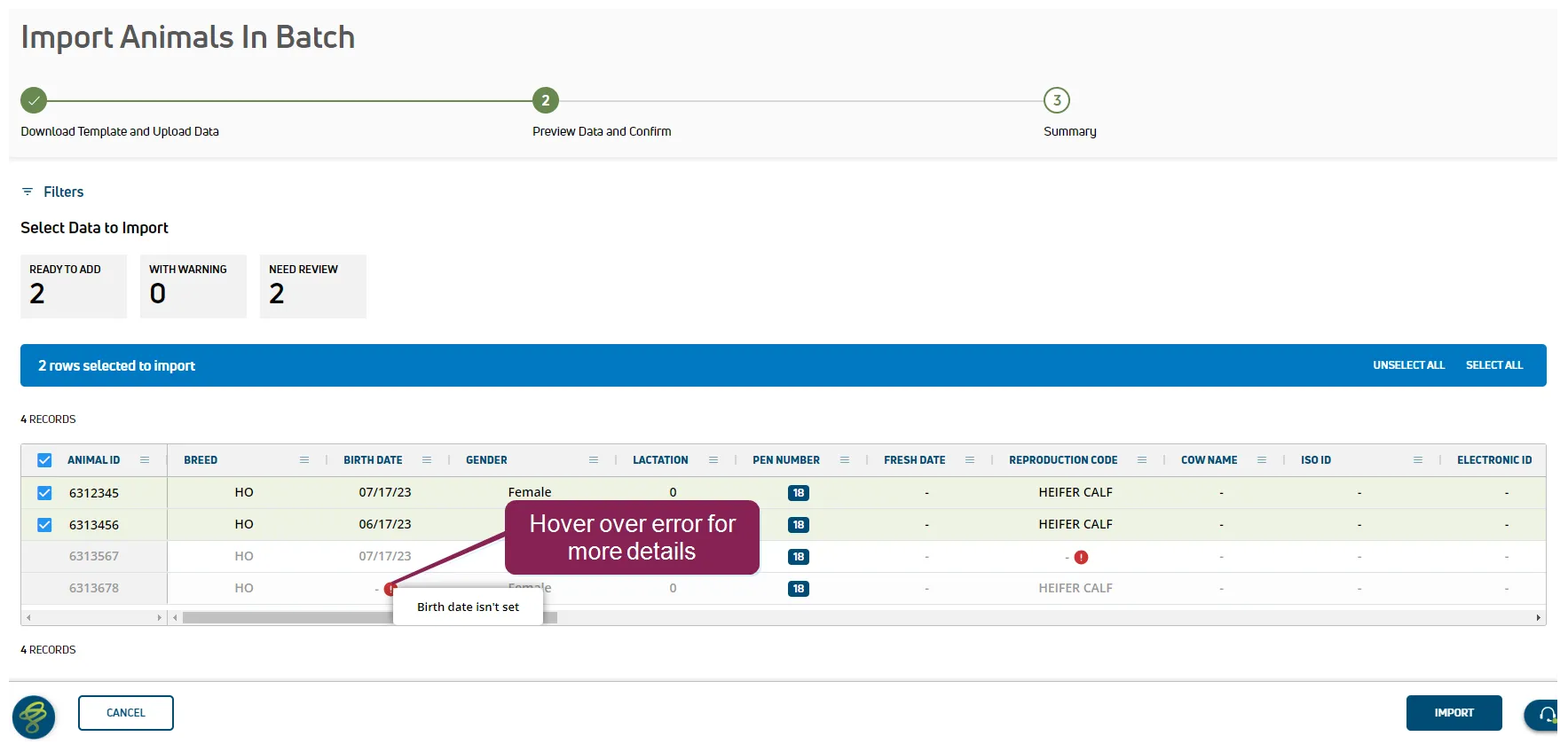
You can then return to your template file, resolve any errors, and upload the file again.
When ready, click Import to import your animals and add them to your dairy. See View Animals ListView Animals List to learn more about viewing your animals.