Enable Text-to-Speech for Vetcode Restraints
Question: How do I enable text-to-speech for vetcode restraints in Pocket CowCard?
Answer: In Pocket CowCard, you can now enable a text-to-speech (TTS) feature to hear the number of days for some vetcode constraints. For example, you can set up a vetcode (PREG) and enter its primary time constraint (Days Since Last Heat) in DairyComp. Then, in Pocket CowCard, you can tap on an animal with a PREG vetcode to hear the number of days that have passed since its last heat. Enable this feature in your Pocket CowCard settings in DairyComp, then use the feature in Pocket CowCard:
NOTE: This feature works best with time constraints that are measured in days. When you enable this feature, Pocket CowCard will say the primary time constraint value, then "days." Pocket CowCard will say "days" in the supported language you have selected.
- In DairyComp, enter ALTER\5S to open the VetList Options window.
- Open the vet code you want to edit.
- In the vet code's Vet List Parameters window, check the Play Speech box and enter the primary time constraint in the Cnst 1 field to indicate when the system should play the sound. For example, you can enter DSLH>33 so Pocket CowCard plays a sound to let you know how many days have passed since an animal's last heat.
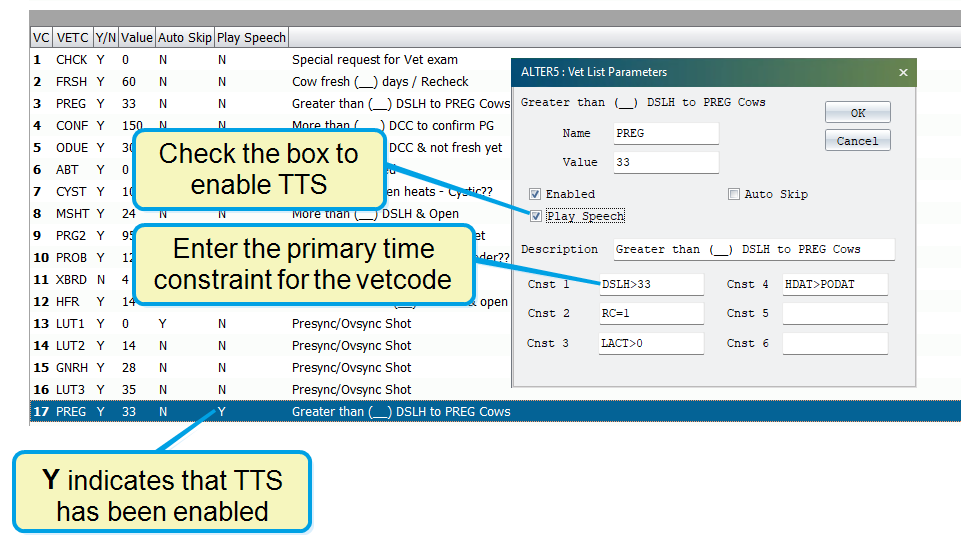
- Save your changes. In the VetList Options window, the system displays a Y in the Play Speech column to indicate that the system will play a TTS sound for the vetcode.
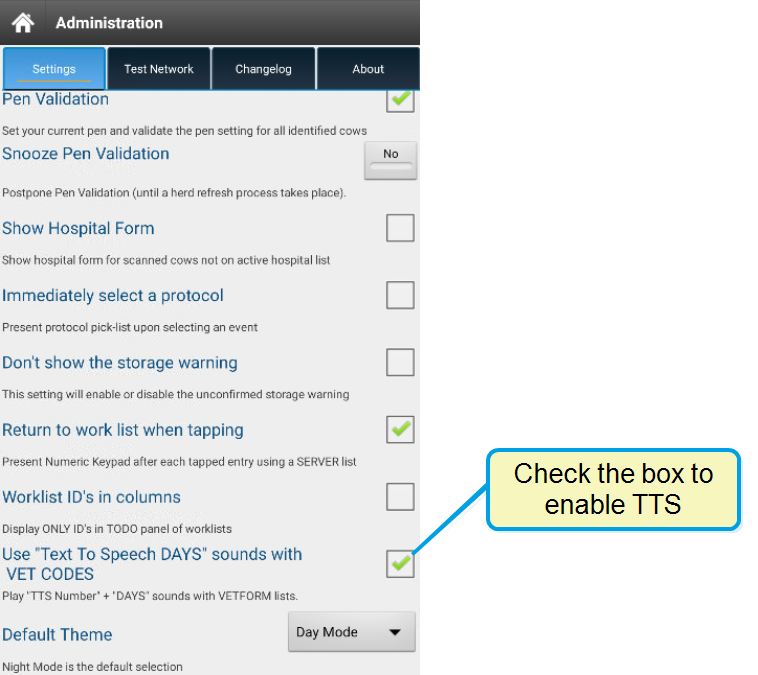
- In Pocket CowCard, go to the Administration > Settings tab and check the Use "Text to Speech DAYS" sounds with VET CODES box to enable TTS.